
WOLFANG WDV01
WOLFANG WDV01 Portable DVD Player User Manual
Model: WDV01
1. Уводзіны
Thank you for choosing the WOLFANG WDV01 Portable DVD Player. This manual provides essential information for setting up, operating, and maintaining your device. Please read it carefully before use to ensure optimal performance and longevity of your product.
The WOLFANG WDV01 is designed for portable entertainment, featuring a 9.5-inch unit with a 7.5-inch HD swivel screen, stereo speakers, and a long-lasting battery. It supports various disc and file formats, making it versatile for different media content.
2. Змесціва ўпакоўкі
Праверце наяўнасць усіх прадметаў у камплекце:
- WOLFANG WDV01 Portable DVD Player
- Пульт дыстанцыйнага кіравання
- Кіраўніцтва карыстальніка
- Зарадная прылада пераменнага току
- Аўтамабільная зарадная прылада
- AV-кабель 3-у-1

Image: Contents of the WOLFANG WDV01 package, showing the DVD player, remote control, user manual, AC charger, car charger, and AV cable.
3. Прадукт скончыўсяview
3.1 Асноўныя магчымасці
- Дысплей: 9.5-inch unit with 7.5-inch HD eye-protection screen.
- Паварот экрана: 270° horizontal rotation and 180° vertical flip for flexible viewныя вуглы.
- Аўдыё: Інтэграваныя стэрэадынамікі.
- Тэрмін службы батарэі: Up to 6 hours of playback on a full charge.
- Параметры харчавання: AC power adapter and car charger included.
- Функцыя памяці: Breakpoint memory resumes playback from the last stopped point.
- Сумяшчальнасць СМІ: Supports DVD, SVCD, VCD, CD-R/RW discs.
- File Падтрымка фарматаў: JPEG, WMA, MPG, MP3, DIVX, VOB, AVI.
- Знешняе падключэнне: USB port, SD card slot (max 32GB), AV input, AV output, 3.5mm headphone jack.
3.2 Макет прылады
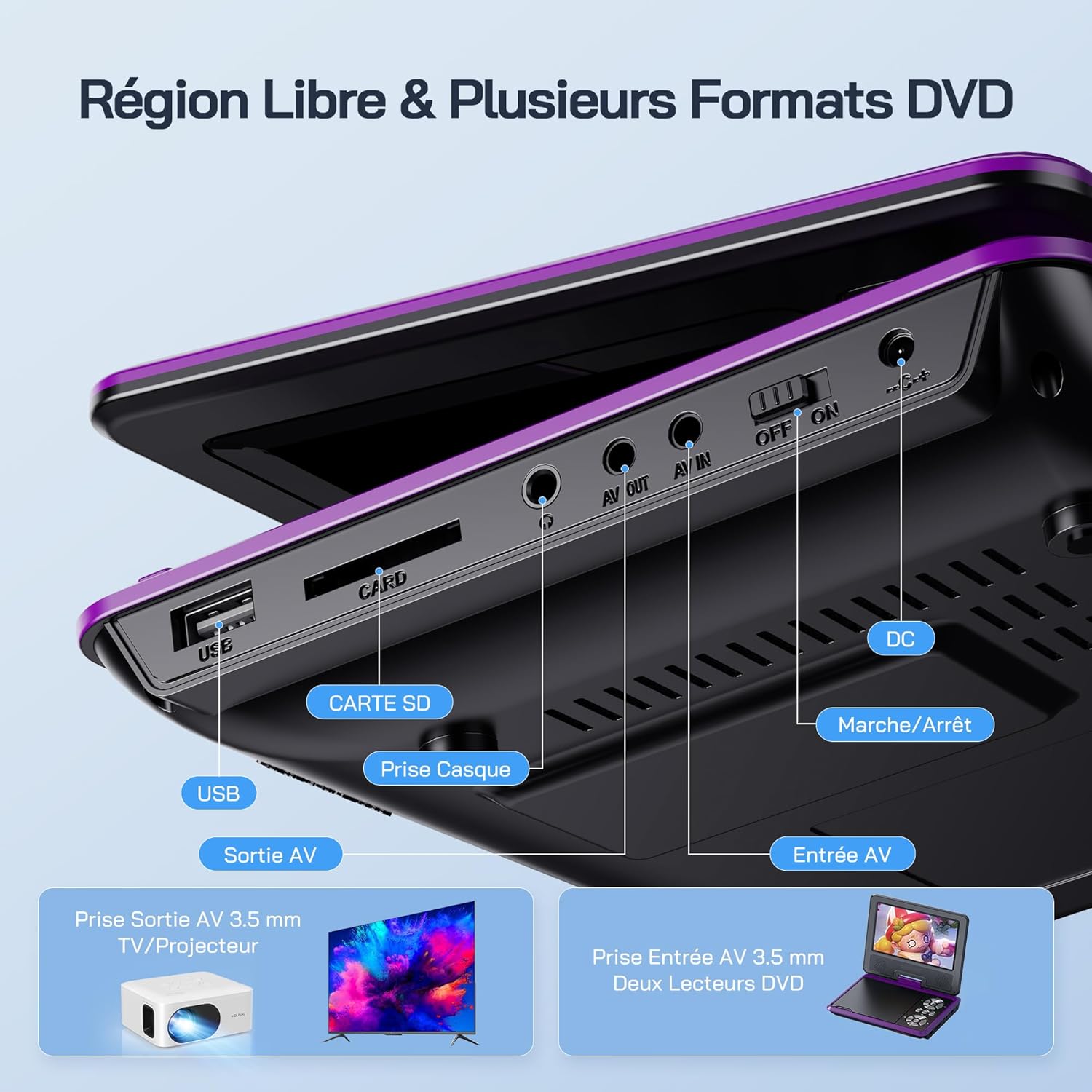
Выява: Падрабязная view of the side panel of the WOLFANG WDV01, highlighting the USB port, SD card slot, headphone jack, AV OUT, AV IN, DC power input, and ON/OFF switch.
- Порт USB: Для падлучэння USB-флэш-назапашвальнікаў.
- Слот для SD-карты: For inserting SD/MMC cards.
- Раз'ём для навушнікаў: 3.5-мм аўдыёвыхад для навушнікаў.
- AV-выхад: Audio/Video output for connecting to a TV or projector.
- AV IN: Audio/Video input for connecting external devices or another DVD player.
- DC IN: Уваход для падключэння адаптара пераменнага току або аўтамабільнай зараднай прылады.
- Пераключальнік уключэння/выключэння: Кантроль магутнасці прылады.
4. Настройка
4.1 Першапачатковая зарадка
Before first use, fully charge the device. Connect the AC charger to the DC IN port on the player and plug it into a wall outlet. The charging indicator light will illuminate. Once fully charged, the light may change color or turn off, depending on the model.
4.2 Уключэнне/выключэнне
To power on the device, slide the ON/OFF switch to the "ON" position. To power off, slide it to the "OFF" position.
4.3 Рэгуляванне экрана
The screen can be rotated 270 degrees horizontally and flipped 180 degrees vertically. Adjust the screen to your preferred viewing angle. This feature is particularly useful for mounting in a car or for shared viewінж.

Image: Illustration demonstrating the 270-degree rotation and 180-degree flip capabilities of the WOLFANG WDV01 screen.
5. Інструкцыя па эксплуатацыі
5.1 Playing a DVD/CD
- Open the disc cover gently.
- Place a compatible DVD or CD onto the spindle, label side up.
- Зачыніце вечка дыска.
- The player will automatically detect and begin playback. If not, select "Disc" from the main menu.
Заўвага: This device supports DVD, SVCD, VCD, CD-R/RW discs. It is not compatible with 1080p, 4K, or Blu-ray discs.
5.2 Playing from USB/SD Card
- Устаўце флэш-назапашвальнік USB у порт USB або SD-карту ў слот для SD-карты.
- From the main menu, select "USB" or "SD" depending on your media source.
- Перамяшчайцеся па папках і files using the control buttons or remote control.
- Выберыце жаданае file (JPEG, WMA, MPG, MP3, DIVX, VOB, AVI) to begin playback.
Заўвага: Maximum supported Micro SD card capacity is 32GB. Video files should have a resolution up to 720x480. Image files should have a resolution up to 2650x1440.
5.3 Breakpoint Memory Function
The player automatically remembers the last playback position. When you power on the device again or re-insert the same disc/media, it will prompt you to resume playback from where you left off. This function may need to be activated in the system settings.

Image: Visual representation of the breakpoint memory feature, illustrating how the player can pause and resume video playback from the exact point of interruption.
5.4 Connecting to an External Display (TV/Projector)
Use the provided 3-in-1 AV cable to connect the player to a TV or projector.
- Падключыце адзін канец AV-кабеля да порта AV OUT на DVD-плэеры.
- Connect the other end of the AV cable to the corresponding AV input ports (Yellow for Video, Red for Right Audio, White for Left Audio) on your TV or projector.
- Select the correct AV input source on your TV or projector.
- The player's screen content will now be displayed on the external screen.

Image: A WOLFANG WDV01 Portable DVD Player connected to a large television screen, displaying content for a family watching together, demonstrating the TV sync feature.
5.5 Connecting to Another DVD Player (AV IN)
The AV IN port allows you to connect another compatible device, such as a second DVD player, to display its content on the WOLFANG WDV01 screen.
- Connect one end of an AV cable to the AV OUT port of the external device.
- Connect the other end of the AV cable to the AV IN port on the WOLFANG WDV01.
- Switch the WOLFANG WDV01 to AV input mode (refer to the on-screen menu or remote control for this option).
6. Тэхнічнае абслугоўванне
6.1 Ачыстка прылады
- Перад чысткай пераканайцеся, што прылада выключана і адключана ад сеткі.
- Выкарыстоўвайце мяккую, сухую тканіну для працірання вонкавых паверхняў прайгравальніка.
- For the screen, use a soft, lint-free cloth specifically designed for electronics screens. Do not use abrasive cleaners or solvents.
- To clean the disc lens, use a specialized DVD lens cleaning disc. Do not attempt to clean the lens manually.
6.2 Сыход за акумулятарам
- Пазбягайце ўздзеяння экстрэмальных тэмператур (высокіх або нізкіх).
- If storing the device for an extended period, charge the battery to approximately 50% to prolong its lifespan.
- Do not attempt to replace the internal battery yourself. Contact customer support if battery issues arise.
6.3 Захоўванне
Store the player in a cool, dry place away from direct sunlight and moisture. Keep it in its original packaging or a protective case when not in use to prevent damage.
7. Выпраўленне непаладак
| праблема | Магчымая прычына | Рашэнне |
|---|---|---|
| Няма ўлады | Battery drained, power adapter not connected, power switch off. | Charge the battery, ensure power adapter is securely connected, slide power switch to ON. |
| Дыск не прайграваецца | Incompatible disc format, disc dirty/scratched, disc inserted incorrectly. | Check disc compatibility (no Blu-ray/4K), clean disc, insert disc label side up. |
| Няма гуку | Volume too low, headphones connected, audio settings incorrect. | Increase volume, disconnect headphones, check audio output settings. |
| Няма выявы на тэлевізары | AV cable loose, incorrect TV input selected. | Ensure AV cable is securely connected, select correct AV input on TV. |
| USB/SD-карта не распазнаецца | Incompatible format, card/drive damaged, incorrect file сістэма. | Ensure media is formatted to FAT32, check for damage, try another USB/SD card. Max 32GB SD card. |
If the problem persists after trying these solutions, please contact WOLFANG customer support.
8. Тэхнічныя характарыстыкі
| Асаблівасць | Дэталь |
|---|---|
| Марка | ВОЛЬФАНГ |
| мадэль | WDV01 |
| Памер экрана | 7.5 цаляў |
| Памер блока | 9.5 цаляў (дыяганаль) |
| Дазвол экрана | Да 800 х 480 пікселяў |
| Сумяшчальнасць дыскаў | DVD, SVCD, VCD, CD-R/RW |
| File Падтрымка фарматаў | Video: AVI, MPG, MP3, DIVX, VOB; Audio: WMA, MP3; Image: JPEG |
| USB/SD Card Support | Max 32GB (Micro SD) |
| Video Resolution (USB/SD) | Да 720 х 480 пікселяў |
| Image Resolution (USB/SD) | Да 2650 х 1440 пікселяў |
| Тэрмін службы батарэі | 4-6 гадзін |
| Вага прадмета | 1100 грам |
| UPC | 850067892205 |
9. Гарантыя і падтрымка
9.1 Гарантыя вытворцы
The WOLFANG WDV01 Portable DVD Player comes with a 24-месячная гарантыя вытворцы з даты пакупкі. Гэтая гарантыя распаўсюджваецца на дэфекты матэрыялаў і вырабу пры нармальным выкарыстанні. Яна не распаўсюджваецца на пашкоджанні, выкліканыя няправільным выкарыстаннем, аварыямі, несанкцыянаванымі мадыфікацыямі або звычайным зносам.
Калі ласка, захавайце доказы пакупкі для прэтэнзій па гарантыі.
9.2 Падтрымка кліентаў
For any questions, technical assistance, or warranty claims, please contact WOLFANG customer support. Our team is available to assist you and aims to respond within 24 hours.
Contact information can typically be found on the official WOLFANG webсайт або праз вашу платформу для пакупак.