
1. Уводзіны
This manual provides detailed instructions for setting up, operating, maintaining, and troubleshooting your AWOW AK10 Pro Mini PC. Please read this manual thoroughly before using the device to ensure proper functionality and to maximize your user experience.
2. Што ў скрынцы
Пасля адкрыцця ўпакоўкі пераканайцеся, што ўсе пералічаныя ніжэй прадметы наяўныя і знаходзяцца ў добрым стане:
- Міні-ПК AWOW AK10 Pro
- Адаптар сілкавання
- Кабель HDMI
- Screws for internal drive installation
- Кіраўніцтва карыстальніка (гэты дакумент)
3. Прадукт скончыўсяview
The AWOW AK10 Pro is a compact and efficient mini PC designed for various applications, including home, office, and educational use. It features an Intel N100 processor, 8GB RAM, and a 256GB PCIe 3.0 SSD, supporting 4K display output and multiple connectivity options.
3.1 Асноўныя магчымасці
- Працэсар: Intel N100 Quad-Core (up to 3.4GHz)
- Памяць: 8GB DDR4 RAM (3200MHz)
- захоўванне: 256GB PCIe 3.0 SSD (expandable up to 4TB with M.2 SSD + 2.5" SATA drive)
- Графіка: Intel UHD Graphics with 4K@60Hz dual display support (HDMI 2.0, DisplayPort 1.4)
- Падключэнне: Dual-band 802.11ac WiFi (2.4GHz/5GHz), Bluetooth 5.2, Gigabit Ethernet
- парты: USB 3.2 x2, USB 2.0 x2, HDMI, DisplayPort, RJ45 Gigabit Ethernet, 2-in-1 Audio Jack, DC 12V Power Input, CMOS CLR button
3.2 Ідэнтыфікацыя кампанентаў
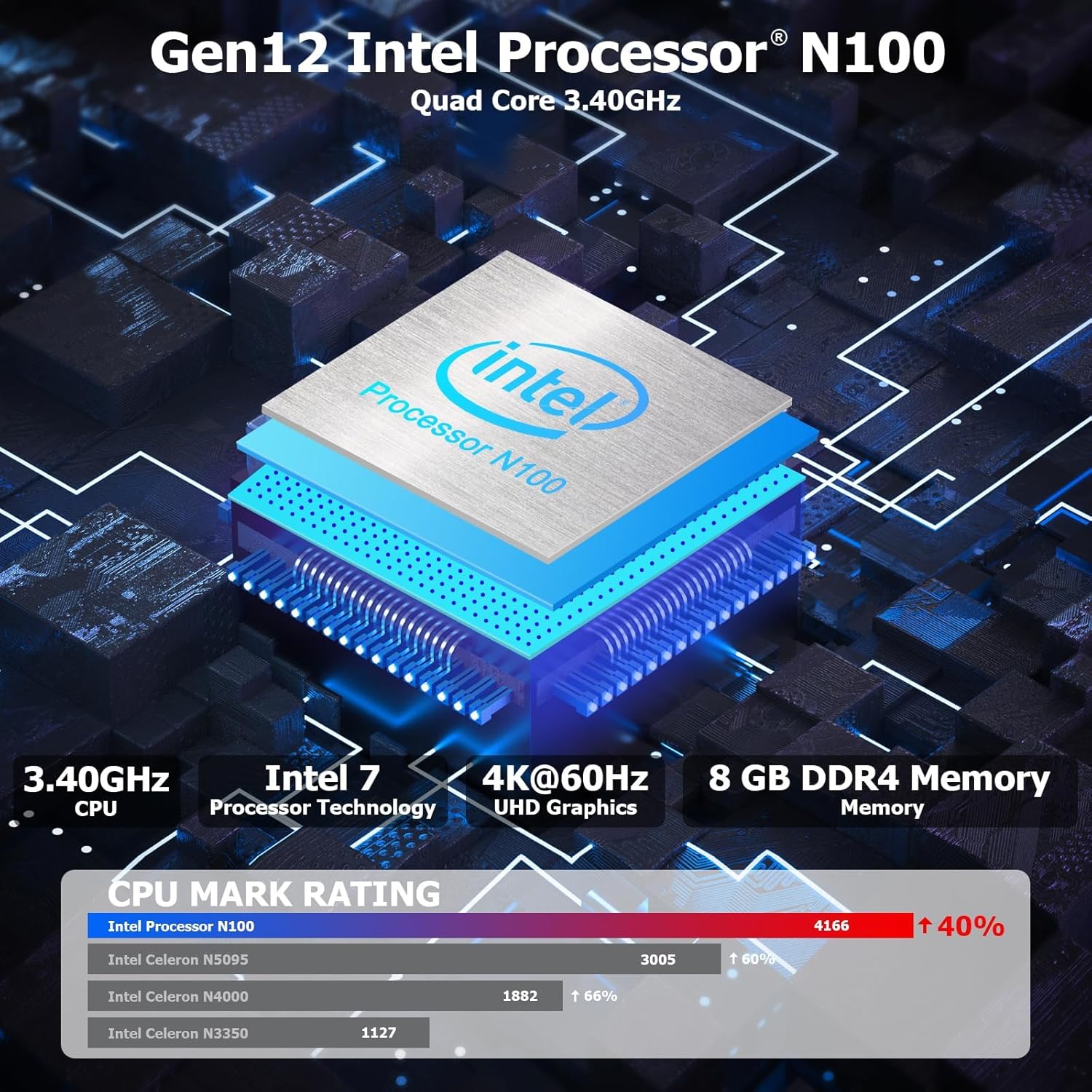
Малюнак 3.1: Унутраны view highlighting the Intel N100 processor, 4K@60Hz capability, and 8GB DDR4 memory, along with a CPU Mark Rating comparison.
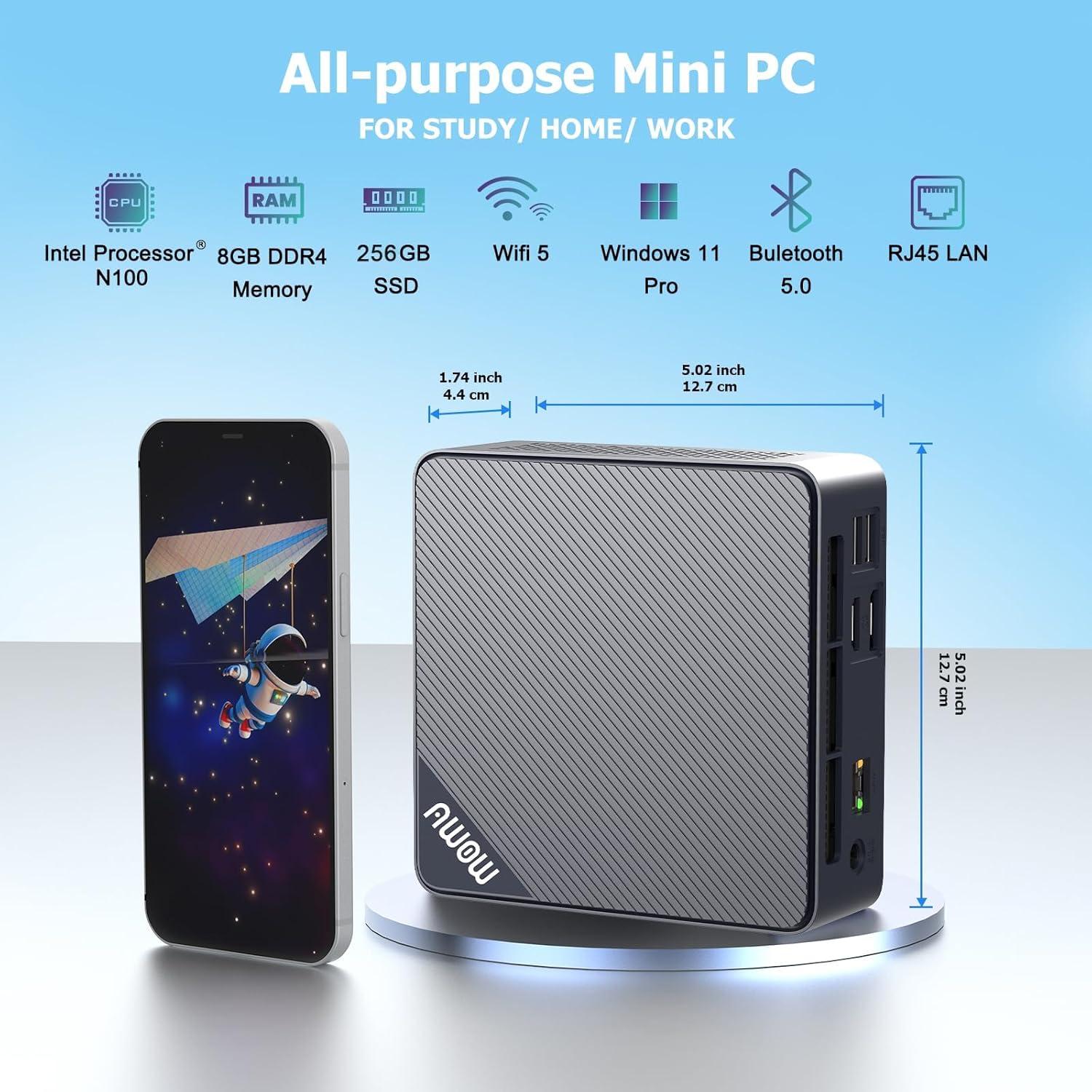
Малюнак 3.2: Спераду і збоку view of the AWOW Mini PC, illustrating its compact dimensions (4.9 x 4.9 x 1.7 inches) and key features like Intel N100 CPU, 8GB DDR4, 256GB SSD, WiFi 5, and Bluetooth 5.0.

Малюнак 3.3: Detailed diagram of the AWOW Mini PC's ports, including USB 3.2 x2, 2-in-1 Audio, Power Button, CMOS CLR, DC 12V, RJ45, HDMI, DisplayPort, and USB 2.0 x2.
4. Інструкцыі па ўсталёўцы
Follow these steps to set up your AWOW AK10 Pro Mini PC:
- Падключэнне да сілкавання: Insert the DC 12V power adapter into the power input port on the mini PC, then plug the adapter into a power outlet.
- Падключэнне да дысплея: Connect your monitor(s) to the mini PC using either the HDMI 2.0 port or the DisplayPort 1.4. For dual display setup, use both ports.
- Падключэнне перыферыйных прылад: Plug in your USB keyboard and mouse into the available USB 2.0 or USB 3.2 ports.
- Падключэнне да сеткі (неабавязкова): For a wired internet connection, connect an Ethernet cable from your router or modem to the RJ45 Gigabit Ethernet port. For wireless, ensure your WiFi network is available.
- Уключэнне: Націсніце кнопку харчавання, размешчаную на пярэдняй панэлі міні-ПК. Індыкатар харчавання загарыцца.
- Першапачатковая ўстаноўка: Follow the on-screen instructions to complete the operating system setup (e.g., Windows 11 initial configuration).
5. Інструкцыя па эксплуатацыі
5.1 Асноўныя аперацыі
- Уключэнне/выключэнне харчавання: Press the power button to turn on the device. To shut down, use the operating system's shutdown function. A short press on the power button can also put the PC to sleep.
- Перазапуск: Скарыстайцеся функцыяй перазагрузкі аперацыйнай сістэмы.
- Доступ да BIOS: To enter the BIOS settings, press the DEL key repeatedly during startup. To select a boot device, press F7 падчас запуску.
5.2 Dual Display Setup
The AWOW AK10 Pro supports dual 4K@60Hz displays via its HDMI 2.0 and DisplayPort 1.4 outputs. After connecting both monitors, you can configure display settings within your operating system (e.g., Windows Display Settings) to extend or duplicate your desktop.

Малюнак 5.1: Example of a dual monitor setup, demonstrating extended desktop functionality for increased productivity.
5.3 Пашырэнне сховішча
The mini PC's storage can be expanded. It supports an additional 2.5-inch SATA SSD/HDD (up to 2TB) and an M.2 SSD (up to 2TB). To install an additional drive:
- Ensure the mini PC is powered off and disconnected from the power source.
- Carefully open the chassis. Refer to the product's official support resources or contact AWOW service for detailed instructions on opening the case to avoid damage.
- Install the 2.5-inch SATA drive or M.2 SSD into the designated slot. Use the provided screws for secure installation.
- Close the chassis and reconnect power. The new drive may need to be initialized and formatted within the operating system's Disk Management utility before use.
6. Тэхнічнае абслугоўванне
- Уборка: Regularly clean the exterior of the mini PC with a soft, dry cloth. Use compressed air to clear dust from ventilation grilles to ensure proper airflow and prevent overheating. Do not use liquid cleaners directly on the device.
- Абнаўленні праграмнага забеспячэння: Абнаўляйце аперацыйную сістэму і драйверы, каб забяспечыць аптымальную прадукцыйнасць і бяспеку.
- Кіраванне сховішчам: Periodically check your storage usage and remove unnecessary fileдля падтрымання хуткасці сістэмы.
- Умовы навакольнага асяроддзя: Operate the mini PC in a well-ventilated area, away from direct sunlight, heat sources, and excessive moisture.
7. Выпраўленне непаладак
If you encounter issues with your AWOW AK10 Pro Mini PC, refer to the following common problems and solutions:
- Няма харчавання / сістэма не загружаецца:
- Пераканайцеся, што адаптар сілкавання надзейна падключаны як да міні-ПК, так і да спраўнай разеткі.
- Праверце працаздольнасць разеткі, падключыўшы да яе іншую прыладу.
- If the issue persists, try pressing the CMOS CLR button (if available and accessible) to reset BIOS settings.
- Няма адлюстравання на маніторы:
- Check that the HDMI or DisplayPort cable is securely connected to both the mini PC and the monitor.
- Пераканайцеся, што манітор уключаны і настроены на правільную крыніцу ўваходнага сігналу (HDMI/DP).
- Test with a different cable or monitor if possible.
- Noisy Fan:
- Ensure the mini PC is placed in a well-ventilated area and that the air vents are not obstructed.
- Clean any dust accumulation from the vents using compressed air.
- If the fan noise is excessive or constant, it may indicate a hardware issue. Contact AWOW support.
- External Drives Not Recognized:
- Ensure the external drive is properly connected and powered (if required).
- Check Disk Management in your operating system to see if the drive is detected but needs initialization or formatting.
- Try connecting the drive to a different USB port or another computer to rule out drive issues.
8. Тэхнічныя характарыстыкі
| Асаблівасць | Дэталь |
|---|---|
| мадэль | AK10 Pro |
| Працэсар | Intel N100 (Quad-Core, up to 3.4 GHz) |
| Графічны супрацэсар | Графіка Intel UHD |
| АЗП | 8 GB LPDDR4 (3200MHz) |
| Захоўванне | Цвёрдацельны назапашвальнік 256 ГБ PCIe 3.0 |
| Сховішча з магчымасцю пашырэння | Up to 2TB M.2 SSD + Up to 2TB 2.5" SATA Drive |
| Максімальны дазвол экрана | 4K (3840 x 2160) |
| Відэавыхад | HDMI 2.0, DisplayPort 1.4 (Dual Display Support) |
| Бесправоднае падключэнне | 802.11ac WiFi (2.4GHz/5GHz), Bluetooth 5.2 |
| Правадное падключэнне | Гігабітны Ethernet (RJ45) |
| Парты USB | 2x USB 3.2, 2x USB 2.0 |
| Аўдыёпарты | Аўдыёраздым 2-у-1 |
| Аперацыйная сістэма | OS (Typically Windows 11 Pro pre-installed) |
| Памеры (ДхШхВ) | 4.9 х 4.9 х 1.7 цалі (12.5 х 12.5 х 4.3 см) |
| Вага прадмета | 1.74 фунта (0.79 кг) |
9. Гарантыя і падтрымка
AWOW is committed to providing excellent customer service and technical support for your product.
- Пасляпродажнае абслугоўванне: AWOW прапануе комплекснае пасляпродажнае абслугоўванне.
- Тэхнічная падтрымка: Тэхнічная падтрымка даступная кругласутачна, і яе могуць дапамагчы вопытныя камп'ютэрныя эксперты ў вырашэнні любых тэхнічных праблем.
- Мясцовая служба падтрымкі кліентаў: Мясцовая служба падтрымкі кліентаў даступная ў працоўны час (з 9:00 да 5:00 па ўсходнім стандартным часе).
- Налада OEM: Таксама даступныя паслугі перадпродажнай падрыхтоўкі для налады OEM.
- Каб атрымаць падтрымку, звярніцеся да кантактнай інфармацыі, прадастаўленай пры куплі, або наведайце афіцыйны сайт AWOW. webсайт.