
1. Прадукт скончыўсяview
The PECSU S2 is a versatile 64GB MP3 player designed for portable audio and multimedia enjoyment. It features Bluetooth 5.3 for seamless wireless connectivity, a built-in HD speaker, voice recorder, FM radio, and e-book reader. The device comes with a pre-installed 64GB TF card, expandable up to 256GB, and offers up to 30 hours of music playtime on a 2-hour charge.
Асноўныя характарыстыкі:
- 64GB internal storage, expandable up to 256GB via TF card.
- Bluetooth 5.3 for stable and fast wireless connections.
- Да 30 гадзін прайгравання музыкі на адной зарадцы.
- Supports multiple audio formats: MP3, FLAC, WAV, APE, OGG, AAC-LC.
- Built-in HD speaker for headphone-free listening.
- Integrated voice recorder with noise reduction.
- FM Radio (requires wired headphones as antenna).
- E-book reader, video, and photo browsing capabilities.
- Timer-off function for controlled listening.

Image: The PECSU S2 MP3 Player in white, shown with a 64GB memory card and wired earbuds.
2. Настройка
2.1. Распакаванне і першапачатковы агляд
Upon receiving your PECSU S2 MP3 player, carefully unbox all components. The package should include:
- PECSU S2 MP3 Player (with pre-inserted 64GB memory card)
- Правадныя навушнікі
- USB-кабель для перадачы дадзеных (тыпу C)
- Кіраўніцтва карыстальніка

Image: A visual representation of the items included in the PECSU S2 MP3 Player package: the player, 64GB memory card, user manual, USB data cable, and wired earphones.
2.2. Зарадка прылады
Before first use, fully charge your MP3 player. Connect the provided USB data cable to the Type-C charging port on the device and to a USB power adapter (not included) or a computer's USB port. A full charge typically takes approximately 2 hours and provides up to 30 hours of music playtime.

Image: The PECSU S2 MP3 Player connected to a USB-C cable for charging, illustrating its fast charging capability.
2.3. Перадача музыкі Files from a PC
To transfer music or other files to your PECSU S2, connect the device to your computer using the supplied USB cable. The player will appear as a removable disk drive. You can then drag and drop your desired files directly into the player's storage or into organized folders.
Video: Official PECSU S2 tutorial demonstrating how to transfer music files from a PC to the MP3 player.
2.4. Converting Video Files для прайгравання
For optimal video playback on the S2, certain video formats may need conversion. The device includes a converter tool on its disk drive. Connect the S2 to your computer, open the disk drive, locate and install "SetupPxConverter". Use this software to convert videos to the compatible AVI format (160x128 resolution, 90° rotation recommended) before transferring them back to the device.
Video: Official PECSU S2 tutorial explaining how to convert videos into the correct format for smooth playback on the device.
3. Інструкцыя па эксплуатацыі
3.1. Базавая навігацыя
The PECSU S2 features a user-friendly interface with physical buttons for navigation. Use the directional buttons around the central play/pause button to move through menus and select options. The 'M' button typically accesses menu options, and the back arrow button navigates to the previous screen.
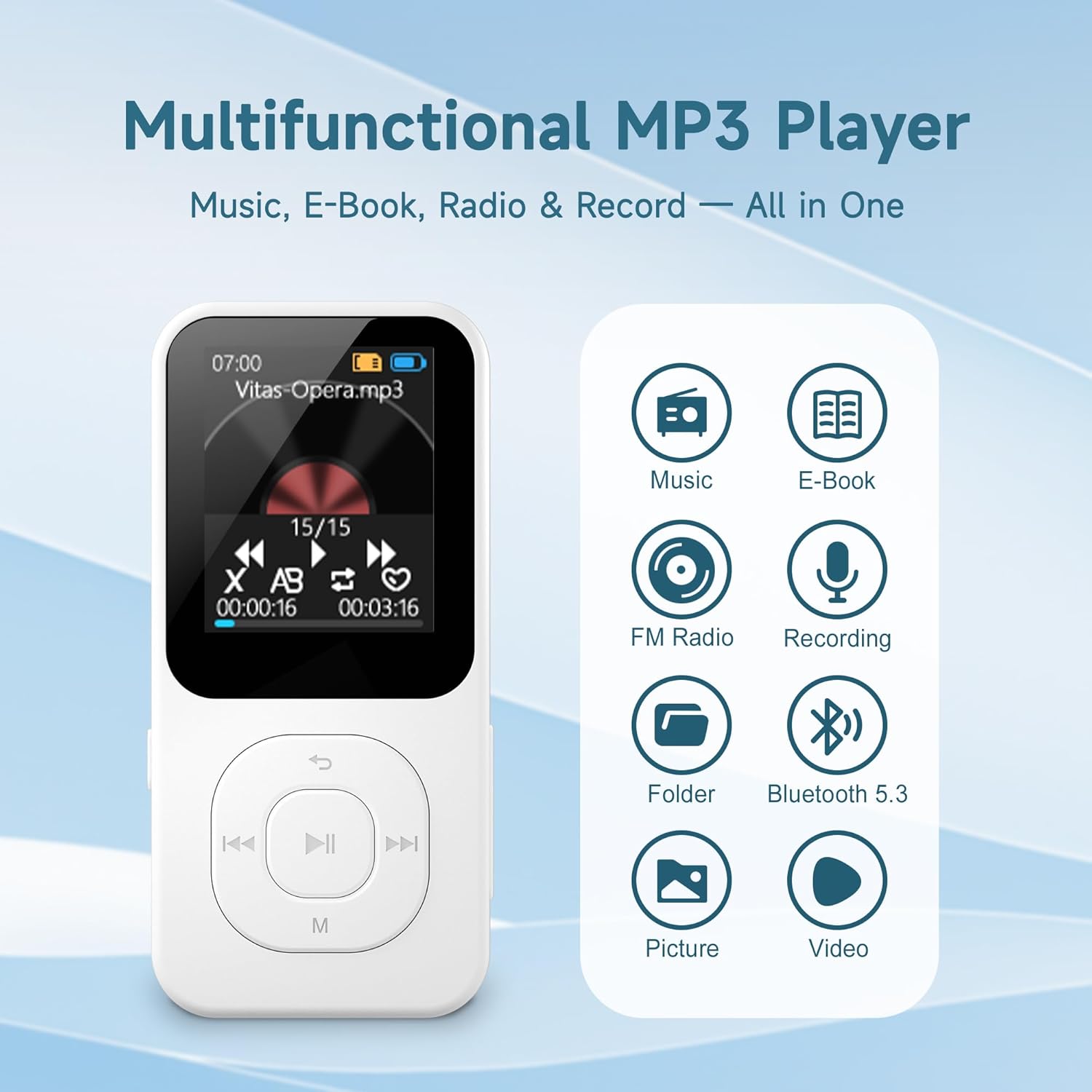
Image: The PECSU S2 MP3 Player displaying its main menu with icons for Music, E-Book, FM Radio, Recording, Folder, Bluetooth 5.3, Picture, and Video functions.
3.2. Playing Music and Creating Playlists
Navigate to the "Music" section to browse and play your transferred audio fileс. Вы можаце view all music, last played, by artist, album, or favorites. To create custom playlists, you can organize your music into folders on your computer before transferring them to the device. These folders will appear in the "Folder" section on the MP3 player.
Video: Official PECSU S2 tutorial demonstrating how to create a custom music playlist by organizing files into folders on a PC.
3.3. Setting Equalizer and Playback Mode
While playing music, press the 'M' button to access the menu. Here you can adjust playback modes (Loop All, Shuffle, Loop Single) and select from various EQ sound effects (Ordinary, Pop, Rock, Jazz, Classical, Dance, Country) to customize your listening experience.
Video: Official PECSU S2 tutorial on how to set up the equalizer and playback mode for music.
3.4. Злучэнне Bluetooth
The PECSU S2 supports Bluetooth 5.3 for connecting to wireless headphones or speakers. Navigate to the "Bluetooth" icon in the main menu, enable Bluetooth, and search for available devices to pair. This ensures faster pairing and stable signal transmission.

Image: The PECSU S2 MP3 Player demonstrating its Bluetooth 5.3 connectivity with various wireless audio devices.
3.5. FM Radio and Voice Recorder
To use the FM Radio function, ensure wired headphones are plugged into the 3.5mm jack, as they act as the antenna. Navigate to the "FM Radio" icon to access. For voice recording, select the "Record" icon. The device features noise reduction for clearer recordings.
3.6. Timer-Off Function
The built-in timer-off function allows you to set a specific duration after which the player will automatically shut down. This is useful for saving battery or for listening before sleep. Access this feature through the device's settings menu.
Video: Official PECSU S2 video highlighting the Timer-off Function and FM Radio features.
4. Тэхнічнае абслугоўванне
To ensure the longevity and optimal performance of your PECSU S2 MP3 player, follow these maintenance guidelines:
- Падтрымлівайце чысціню прылады, праціраючы яе мяккай сухой тканінай. Пазбягайце выкарыстання агрэсіўных хімічных рэчываў або абразіўных матэрыялаў.
- Protect the screen from scratches by using a screen protector if desired.
- Захоўвайце прыладу ў прахалодным, сухім месцы, удалечыні ад прамых сонечных прамянёў, экстрэмальных тэмператур і вільготнасці.
- Не кідайце прыладу і не падвяргайце яе моцным ударам.
- Рэгулярна стварайце рэзервовыя копіі важных files to your computer to prevent data loss.
- Ensure the charging port is free of dust and debris to maintain proper charging.
5. Выпраўленне непаладак
If you encounter issues with your PECSU S2 MP3 player, refer to the following common troubleshooting tips:
5.1. Device Freezes or Becomes Unresponsive
If the MP3 player freezes or becomes unresponsive, press and hold the power button for several seconds to force a restart. This often resolves temporary software glitches.
5.2. Музыка Files Not Appearing or Playing
- Забяспечыць files are transferred correctly to the device's storage.
- Пераканайцеся, што аўдыё files are in a supported format (MP3, FLAC, WAV, APE, OGG, AAC-LC).
- If you recently formatted the memory card, ensure music files are re-transferred.
- Try updating the playlist from the music menu.
5.3. Праблемы з падключэннем Bluetooth
- Ensure Bluetooth is enabled on both the MP3 player and the target device (headphones/speaker).
- Place the devices in close proximity during pairing.
- Check if the target device is already paired with another device.
- Restart both the MP3 player and the Bluetooth accessory.
5.4. Video Playback Problems
If videos do not play smoothly or display incorrectly, ensure they have been converted to the compatible AVI format (160x128 resolution, 90° rotation) using the provided converter tool as described in the Setup section.
6. Тэхнічныя характарыстыкі
| Асаблівасць | Дэталь |
|---|---|
| Памеры прадукту | 0.4 х 3.53 х 1.71 цалі |
| Вага прадмета | 1.06 унцыі |
| Вытворца | Pecsu |
| Нумар мадэлі тавару | S2 |
| Батарэі | 1 нестандартная батарэя (у камплекце) |
| Марка | ПЕКСУ |
| Назва мадэлі | S2 |
| Асаблівасці | Equalizer, FM Radio, Hi-Res Audio, Voice Recorder |
| Тэхналогія падлучэння | Bluetooth |
| Ёмістасць памяці | 64 ГБ (з магчымасцю пашырэння да 256 ГБ) |
| Колер | Белы |
| Памер экрана | 1.77 цалі |
| Сумяшчальныя прылады | Навушнікі, спікер |
| Тып носьбіта | Micro SDHC |
| Уключаныя кампаненты | Earphones, USB Data Cable |
7. Гарантыя і падтрымка
PECSU offers 24/7 support for any issues or warranty concerns. Please refer to the contact information provided in your product packaging or visit the official PECSU webсайт для дапамогі.
Заўвага:
The S2 MP3 player requires a memory card to function. If you accidentally format it and the device freezes, simply press and hold the power button to restart it, and it will work again.