
Bikevee Bikevee Cycling GPS Computer & Bikevee Out Front Mount
Кіраўніцтва карыстальніка
Bikevee Wireless Cycling GPS Computer
Model: Bikevee Cycling GPS Computer & Out Front Mount
1. Уводзіны
This manual provides detailed instructions for the Bikevee Wireless Cycling GPS Computer, a device designed to track and display various cycling data. It features a 2.4-inch LCD display with auto backlight, IPX7 waterproofing, and multi-satellite GPS tracking for accurate data collection.
1.1 Асноўныя магчымасці
- Павялічаны тэрмін службы батарэі: Equipped with a 650mAh rechargeable battery, providing up to 28 hours of continuous use.
- Precision GPS Tracking: Utilizes 5-satellite systems (GPS, BDS, GLONASS, Galileo, QZSS) for stable and accurate signal reception.
- Трывалы і воданепранікальны: IPX7 waterproof rating ensures resistance to rain and splashes.
- Чысты дысплей: 2.4-inch LCD screen with automatic backlight for visibility in various lighting conditions.
- Поўныя дадзеныя: Tracks speed (MPH/KM/H), distance, time, temperature, altitude, gradient, and more.
1.2 Што ў камплекце
Праверце наяўнасць усіх кампанентаў у камплекце:
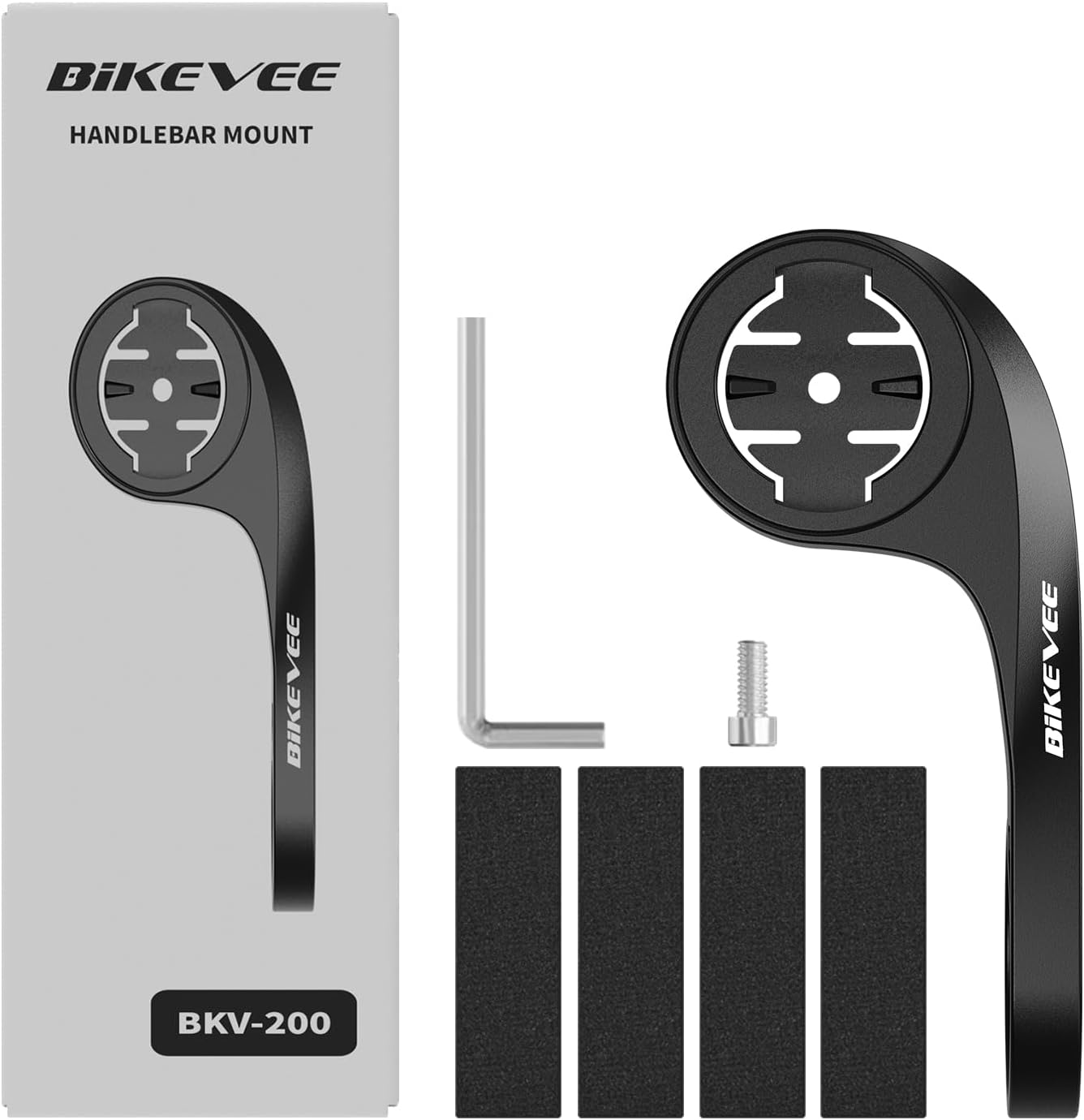
Figure 1.1: Package Contents. Includes Bike Computer, Charging Cable, Rubber Rings, Mount, Rubber Pad, and User Manual.
- Bikevee GPS Cycling Computer
- Стандартнае мацаванне для ровара
- Out Front Mount
- Гумовыя накладкі
- Зарадны кабель (тып C)
- Rubber Rings for Mount Installation
- Кіраўніцтва карыстальніка
2. Настройка і ўстаноўка
2.1 Зарадка прылады
Before first use, fully charge the Bikevee GPS Computer. Connect the provided Type-C charging cable to the device's charging port and a USB power source. The battery indicator on the screen will show charging status.
2.2 Мантаж прылады
The Bikevee GPS Computer comes with both a standard bike mount and an out front mount. Choose the mount that best suits your preference and bicycle setup.
2.2.1 Standard Bike Mount Installation
- Place the rubber pad on your bicycle's handlebar or stem.
- Position the standard bike mount on top of the rubber pad.
- Secure the mount using the provided rubber rings, wrapping them around the handlebar/stem and hooking them onto the mount.
- Align the Bikevee GPS Computer with the mount's grooves and twist clockwise until it locks into place.
2.2.2 Out Front Mount Installation

Figure 2.1: Bikevee Out Front Mount.
- Place the rubber pad around your bicycle's handlebar where you intend to install the mount.
- Position the out front mount over the rubber pad.
- Use the provided Allen key to tighten the screw on the mount's clamp around the handlebar until it is secure.
- Align the Bikevee GPS Computer with the mount's grooves and twist clockwise until it locks into place.
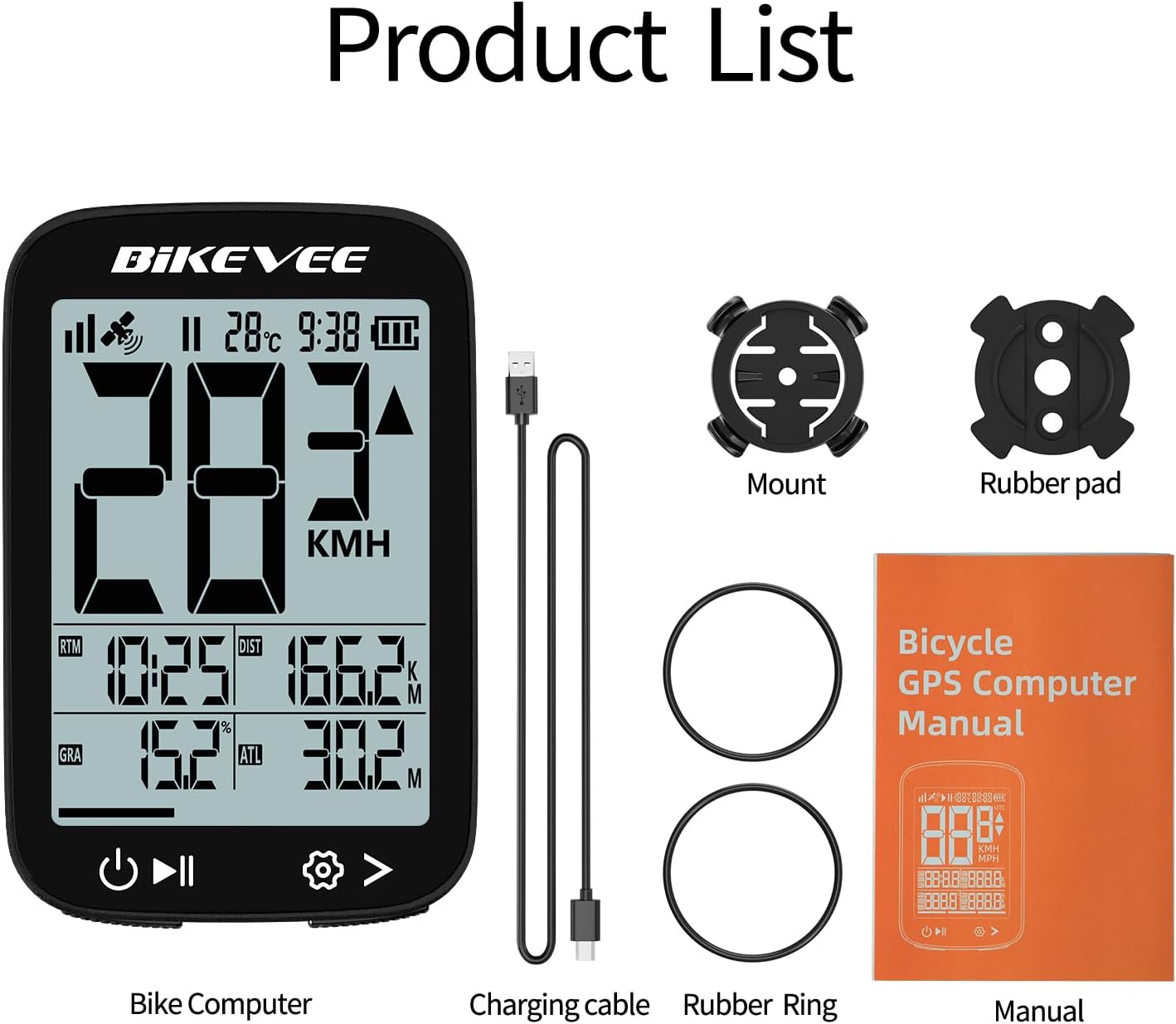
Figure 2.2: Handlebar Mount Components.
2.3 Пачатковае ўключэнне і налады
- Уключэнне: Press and hold the power button (usually located at the bottom left) until the screen illuminates.
- Выбар адзінкі: Upon first power-on or after a reset, you may be prompted to select your preferred unit of measurement (MPH or KM/H). Use the navigation buttons to select and confirm.
- GPS-атрыманне: Take the device outdoors to an open area to allow it to acquire GPS satellite signals. This may take a few moments. A stable GPS signal icon will appear once connected.
3. Інструкцыя па эксплуатацыі
3.1 Асноўныя аперацыі
- Уключэнне/выключэнне харчавання: Press and hold the left button to power on or off.
- Start/Pause/Stop Ride: Press the middle button to start recording a ride. Press again to pause. Press and hold to stop and save the ride data.
- Page Switching: Use the right button to cycle through different data display pages.
- Падсвятленне: The device features an automatic backlight that adjusts based on ambient light conditions.
3.2 Data Display and Interpretation
The Bikevee GPS Computer displays up to 14 types of cycling data, providing comprehensive insights into your ride.
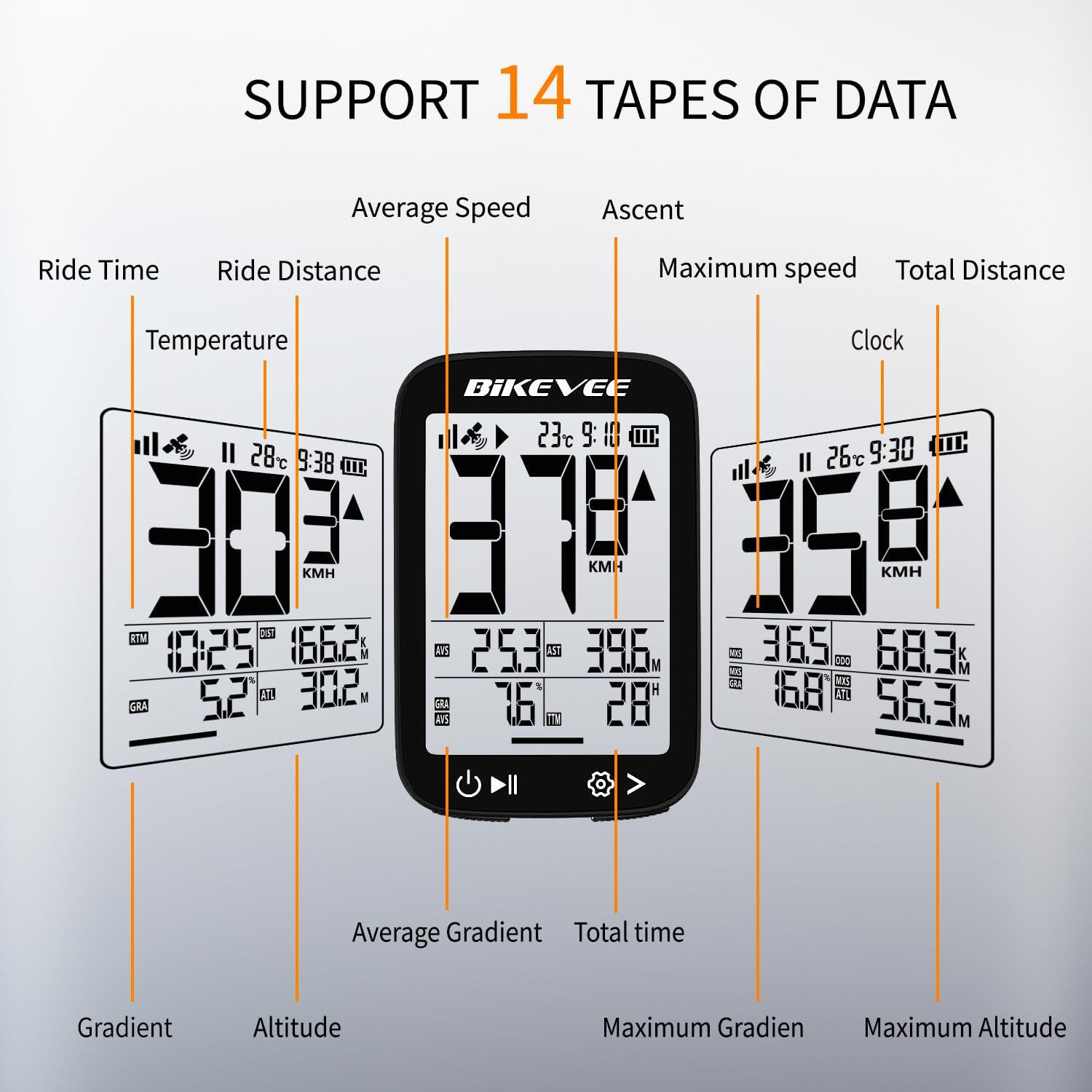
Figure 3.1: Supported Data Types Display.
- Бягучая хуткасць: Displays your real-time speed (MPH or KM/H).
- Сярэдняя хуткасць: The average speed for the current ride.
- Максімальная хуткасць: The highest speed recorded during the current ride.
- Час паездкі: Duration of the current active ride.
- Ride Distance: Distance covered during the current ride.
- Total Distance (Odometer): Cumulative distance recorded by the device.
- тэмпература: Тэмпература навакольнага асяроддзя.
- гадзіннік: Бягучы час.
- Ўздым: Total elevation gained during the ride.
- Градыент: Current incline or decline percentage.
- Вышыня: Current elevation above sea level.

Figure 3.2: Display Icons and Their Meanings.
- Satellite Signal: Паказвае сілу сігналу GPS.
- IPX7: Confirms waterproof rating.
- Узровень батарэі: Паказвае пакінуты зарад батарэі.
- Аўтаматычнае падсвятленне: Indicates auto backlight feature is active.
- Тып C: Denotes the charging port type.
- Параўнанне хуткасці: Arrow indicates if current speed is higher or lower than average speed.
4. Тэхнічнае абслугоўванне і догляд
4.1 Ачыстка прылады
To maintain optimal performance and appearance, clean the device regularly:
- Працірайце экран і корпус мяккай губкайamp тканіна.
- Avoid using abrasive cleaners, solvents, or chemical sprays, as these can damage the device's surface or internal components.
- Пераканайцеся, што вечка зараднага порта шчыльна зачынена, каб прадухіліць трапленне пылу і вады.
4.2 Воданепранікальнасць (IPX7)

Figure 4.1: IPX7 Waterproof Feature.
The Bikevee GPS Computer has an IPX7 waterproof rating, meaning it is protected against temporary immersion in water (up to 1 meter for 30 minutes). However, it is important to note:
- Не апускайце прыладу ў ваду на працяглы час.
- Пазбягайце бруі вады пад высокім ціскам.
- Ensure the charging port cover is sealed before exposure to water.
4.3 Сыход за батарэяй і яе захоўванне
- Калі прылада не выкарыстоўваецца, захоўвайце яе ў прахалодным сухім месцы.
- Пазбягайце працяглага ўздзеяння экстрэмальных тэмператур (высокіх або нізкіх).
- Для працяглага захоўвання зараджайце акумулятар прыкладна да 50%, каб захаваць яго працаздольнасць.
5. Выпраўленне непаладак
If you encounter issues with your Bikevee GPS Computer, refer to the following common problems and solutions:
| праблема | Магчымая прычына | Рашэнне |
|---|---|---|
| Прылада не ўключаецца. | Нізкі акумулятар. | Цалкам зарадзіце прыладу з дапамогай кабеля Type-C, які ўваходзіць у камплект. |
| No GPS signal or inaccurate readings. | Перашкаджалі view of sky; initial signal acquisition. | Move to an open outdoor area. Wait a few minutes for signal acquisition. Avoid dense forests or tunnels. |
| Дысплей цьмяны або нечытэльны. | Auto backlight setting; low battery. | Ensure sufficient battery charge. The backlight adjusts automatically; try moving to a different lighting condition. |
| Прылада завісае або перастае рэагаваць. | Праграмны збой. | Выканайце мяккі скід, націснуўшы і ўтрымліваючы кнопку харчавання на працягу 10-15 секунд, пакуль прылада не перазагрузіцца. |
6. Тэхнічныя характарыстыкі
Detailed technical specifications for the Bikevee Wireless Cycling GPS Computer:

Figure 6.1: Device Dimensions and Weight.
- мадэль: Bikevee Cycling GPS Computer
- Дысплей: 2.4-inch LCD, Automatic Backlight
- акумулятар: 650mAh Rechargeable Lithium-ion
- Тэрмін службы батарэі: Да 28 гадзін (бесперапыннае выкарыстанне)
- GPS Systems: GPS, BDS, GLONASS, Galileo, QZSS (5-satellite tracking)
- Рэйтынг воданепранікальнасці: IPX7
- Памеры: Approximately 70mm (Height) x 45mm (Width) / 2.76in x 1.77in
- Вага: Approximately 50g / 0.11lb
- Порт для зарадкі: Type-C USB
- Data Types Supported: 14 types (e.g., Speed, Distance, Time, Temperature, Altitude, Gradient)
7. Інфармацыя аб гарантыі
The Bikevee Wireless Cycling GPS Computer is covered by a limited manufacturer's warranty. This warranty typically covers defects in materials and workmanship under normal use. Please retain your proof of purchase for warranty claims.
For specific warranty terms and conditions, including duration and coverage details, please refer to the warranty card included with your product or contact Bikevee customer support directly.
8. Падтрымка кліентаў
If you have any questions, require technical assistance, or need to report an issue with your Bikevee Wireless Cycling GPS Computer, please contact our customer support team.
- Інтэрнэт-падтрымка: Visit the official Bikevee webсайт з часта задаванымі пытаннямі, кіраўніцтвамі па ліквідацыі непаладак і кантактнымі формамі.
- Падтрымка па электроннай пошце: Звярніцеся да ўпакоўкі прадукту або да афіцыйнай webсайт для адраса электроннай пошты службы падтрымкі кліентаў.
When contacting support, please be prepared to provide your product model number (Bikevee Cycling GPS Computer) and a detailed description of the issue.