
1. Уводзіны
This manual provides essential information for the safe and effective operation of your ACMER S1-3.5W Laser Engraver. This device is designed for high-precision engraving and cutting on a variety of materials, including wood, bamboo, leather, plastic, PCB, aluminum oxide, ceramics, and glass. Please read these instructions thoroughly before use to ensure optimal performance and safety.
2. Інфармацыя па бяспецы
The ACMER S1-3.5W Laser Engraver is a Class 4 laser product. Adherence to safety precautions is critical to prevent injury.
- Абарона вачэй: Always wear the provided safety glasses when operating the laser engraver. Direct exposure to the laser beam can cause severe eye damage.
- Вентыляцыя: Operate the device in a well-ventilated area to dissipate fumes and smoke produced during engraving and cutting.
- Бяспека матэрыялаў: Ensure materials are suitable for laser processing. Some materials may produce toxic fumes or catch fire.
- Кантроль: Ніколі не пакідайце машыну без нагляду падчас працы.
- Дзеці і хатнія жывёлы: Трымайце дзяцей і хатніх жывёл далей ад працоўнай зоны.
- Аварыйная прыпынак: Азнаёмцеся з месцазнаходжаннем і функцыяй кнопкі аварыйнага прыпынку.
3. Змесціва ўпакоўкі
Праверце, ці ёсць усе прадметы ў вашай упакоўцы:
- ACMER S1-3.5W Laser Engraver Unit
- Адаптар сілкавання
- Кабель USB
- Ахоўныя акуляры
- Кіраўніцтва карыстальніка (гэты дакумент)
- Sample Materials (e.g., wood pieces)
- Інструменты рэгулявання
4. Настройка
Выканайце наступныя дзеянні для першапачатковай налады:
- Распакаванне: Акуратна дастаньце ўсе кампаненты з упакоўкі.
- Laser Head Installation: The device arrives 99% preassembled. Install the laser head by following the quick guide. This typically takes less than one minute.
- Падключэнне сілкавання: Connect the power adapter to the engraver and a suitable power outlet.
- USB-злучэнне: Падключыце гравёр да кампутара з дапамогай прыкладанага кабеля USB.
- Ўстаноўка праграмнага забеспячэння: Install the recommended engraving software. The engraver is optimized for AcmerTool, a free, self-developed software. It also supports LightBurn and LaserGRBL. Refer to the software-specific instructions for installation on macOS, Windows, or Linux.
- Рэгуляванне фокусу: Adjust the laser height using the provided screws to achieve optimal focus for your material.
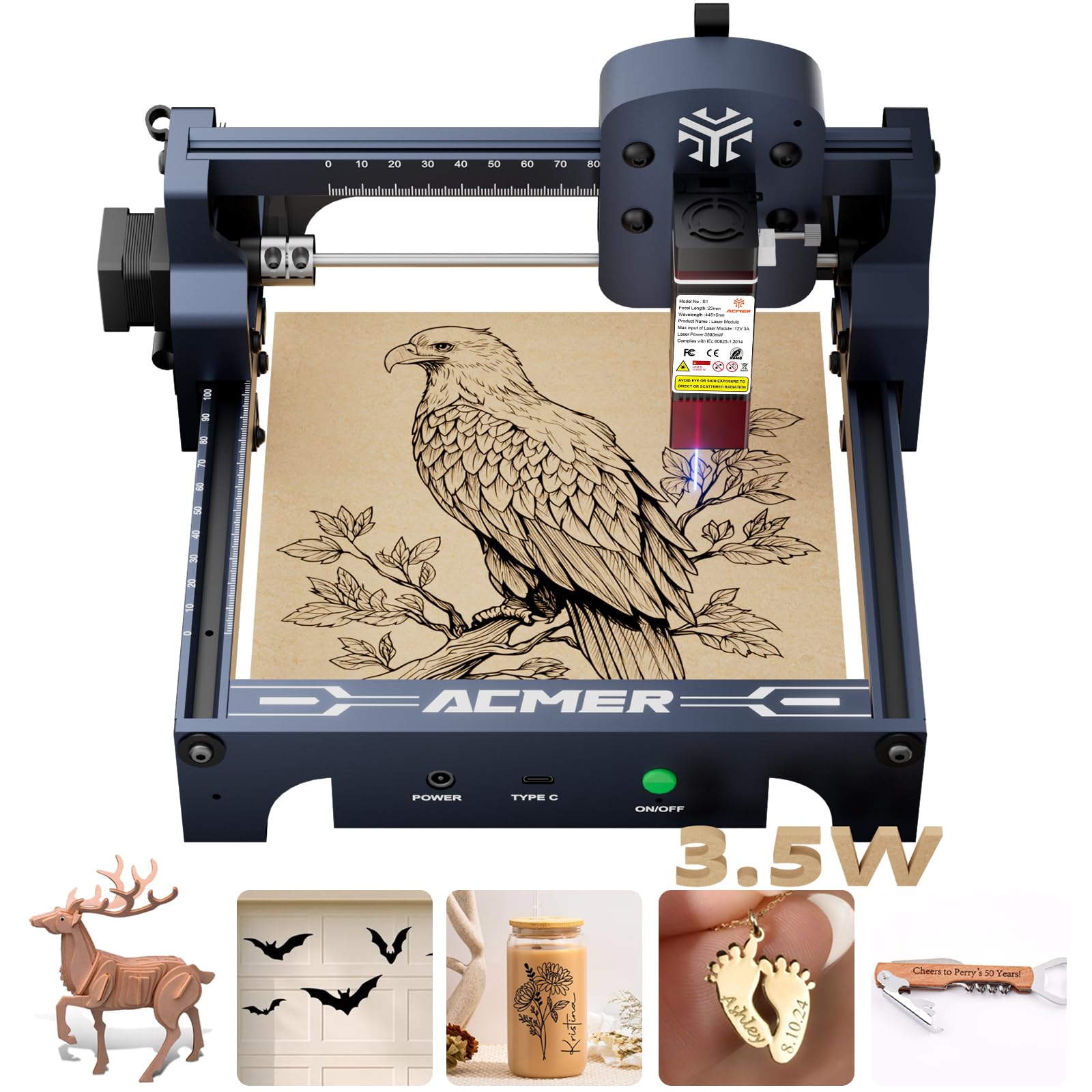
Figure 4.1: The ACMER S1-3.5W Laser Engraver unit.

Figure 4.2: Wide compatibility with various operating systems and software.
5. Аперацыйная
This section outlines the general operating procedure for your laser engraver.
- Падрыхтуйце матэрыял: Place the material to be engraved or cut within the 130x130mm working area. Ensure it is flat and securely positioned.
- Інтэрфейс праграмнага забеспячэння: Open your chosen engraving software (AcmerTool, LightBurn, or LaserGRBL).
- Канструкцыя нагрузкі: Імпартуйце свой дызайн file (NC, DXF, BMP, JPG, PNG formats are supported).
- Задаць параметры: Adjust engraving or cutting parameters such as speed (up to 10,000mm/min for engraving) and power according to the material and desired effect. The device offers 0.01mm repeatable positioning accuracy for detailed work.
- прэview і пасада: Выкарыстоўвайце папярэднюю падрыхтоўку праграмнага забеспячэнняview function to confirm the design's position on the material.
- Пачатак аперацыі: Initiate the engraving or cutting process from the software. Always wear safety glasses during operation.
- Сачыць за прагрэсам: Observe the process to ensure proper function and material response.
Video 5.1: Demonstration of making skull earrings with the ACMER Laser Engraver. This video illustrates the cutting capabilities of the machine on wood.
Відэа 5.2: Прыкладample of laser-cut items created with the ACMER engraver, showcasing precision.
Video 5.3: Tutorial on how to make a magic card box using the ACMER Laser Engraver, demonstrating intricate cutting.

Figure 5.1: Illustration of 0.01mm precision engraving.

Figure 5.2: Speed comparison highlighting the 10,000mm/min engraving speed.
6. Тэхнічнае абслугоўванне
Regular maintenance ensures the longevity and performance of your engraver.
- Чыстая лазерная лінза: After each use, clean the laser lens to maintain optimal beam quality and prevent residue buildup.
- Генеральная ўборка: Periodically clean the machine's frame and rails to remove dust and debris.
- захоўванне: Store the engraver in a dry, dust-free environment when not in use.
7. Выпраўленне непаладак
Звярніцеся да гэтага раздзела, каб знайсці рашэнні распаўсюджаных праблем.
| праблема | Магчымая прычына | Рашэнне |
|---|---|---|
| Machine not connecting to software | Incorrect USB connection, driver issues, software settings. | Check USB cable, reinstall drivers, verify software port settings. |
| Дрэнная якасць гравіроўкі | Incorrect focus, wrong power/speed settings, dirty lens, unsuitable material. | Adjust laser focus, optimize power/speed, clean lens, use recommended materials. |
| Лазер не страляе | Power issue, software command error, laser module malfunction. | Check power connections, restart software, contact customer support if persistent. |
8. Тэхнічныя характарыстыкі
Key technical specifications for the ACMER S1-3.5W Laser Engraver:
- мадэль: С1-3.5Вт
- Магутнасць лазера: 3500mW Diode Laser
- Machine Output: 36 Вт
- Даўжыня хвалі: 455 ± 5 нм
- Фокусная адлегласць: 2 мм
- Хуткасць гравіроўкі: Да 10,000 мм/мін
- Repeatable Positioning Accuracy: 0.01 мм
- Працоўная зона: 130х130 мм
- Памеры прадукту: 9.84 х 9.84 х 6.38 цалі
- Вага прадмета: 4.11 фунта
- Сумяшчальнасць: macOS, Windows, Linux
- Падтрымліваецца File Фарматы: NC, DXF, BMP, JPG, PNG
- Лазерны клас: 4 клас
- Адпаведнасць: IEC 60825-1
- вытворца: ACMER

Figure 8.1: One-pass laser cutting depth capabilities.
9. Гарантыя і падтрымка
ACMER provides comprehensive support for your laser engraver.
- Гарантыя: The ACMER S1-3.5W Laser Engraver comes with a 12-month warranty from the date of purchase. Please retain your proof of purchase for warranty claims.
- Падтрымка кліентаў: 24/7 customer support is available for any technical assistance or inquiries.
- Кантакты: For support, please visit the official ACMER webсайт або звярніцеся да кантактнай інфармацыі, указанай на ўпакоўцы прадукту.