
1. паview
The SEUNKWANG Q1 Wireless Bluetooth Mouse is a versatile and ergonomic peripheral designed for enhanced productivity across multiple devices. Featuring dual-mode connectivity, a visual LED display for battery and DPI, and silent click buttons, it offers a seamless and quiet user experience.
Асноўныя характарыстыкі:
- Visual LED Power & DPI Display: Minimize battery uncertainty with the integrated LED visual screen, displaying real-time energy percentage and DPI levels.
- Type-C Rechargeable & Smart Energy Saving: Features a high-capacity built-in power cell with universal Type-C charging. Includes an intelligent sleep mode after 1 minute of inactivity and a "Double-Click to Wake" feature.
- Dual-Mode Bluetooth & 2.4G Connectivity: Optimize multi-device workflow with advanced Bluetooth 5.0 and a USB-A receiver, allowing instant switching between devices. Provides a stable, cable-free connection up to 33ft.
- Whisper-Quiet Click & Precise Tracking: Silent mouse technology significantly reduces click noise, ideal for quiet environments. Offers 3 adjustable DPI levels (800-1200-1600) for smooth, responsive navigation.
- 65g Ultra-Lightweight & Ergonomic Comfort: Engineered for maximum mobility, weighing only 65g. The ergonomic shape is tailored for small-to-medium hands, reducing wrist fatigue.
2. Змесціва ўпакоўкі
Пераканайцеся, што ўсе прадметы прысутнічаюць у пасылцы:
- SEUNKWANG Q1 Wireless Bluetooth Mouse
- USB-A Receiver (stored in the mouse)
- Зарадны кабель Type-C
- Кіраўніцтва па эксплуатацыі
3. Тэхнічныя характарыстыкі
| Асаблівасць | Апісанне |
|---|---|
| Марка | SEUNKWANG |
| Назва мадэлі | Q1 |
| Тэхналогія падлучэння | 2.4G, Bluetooth 5.0 |
| Ўзроўні DPI | 800, 1200, 1600 |
| Гузікі | 6 (Налева, Направа, Кола пракруткі, Пераключальнік DPI, Наперад, Назад) |
| Асаблівасці | Ergonomic, Lightweight (65g), Rechargeable, Silent Click, LED Display (Battery & DPI) |
| Крыніца харчавання | Працуе з батарэяй (акумулятар Type-C) |
| Сумяшчальныя прылады | Laptop, PC, Smartphone, Tablet (Windows, macOS, Android, iOS) |
| Аперацыйная сістэма | Mac OS 14 Sonoma, Windows 11 (and earlier compatible versions) |
| Матэрыял | Пластыкавыя |
4. Настройка
4.1 Зарадка мышы
Before first use, fully charge the mouse using the provided Type-C cable. The LED display will show the battery percentage.
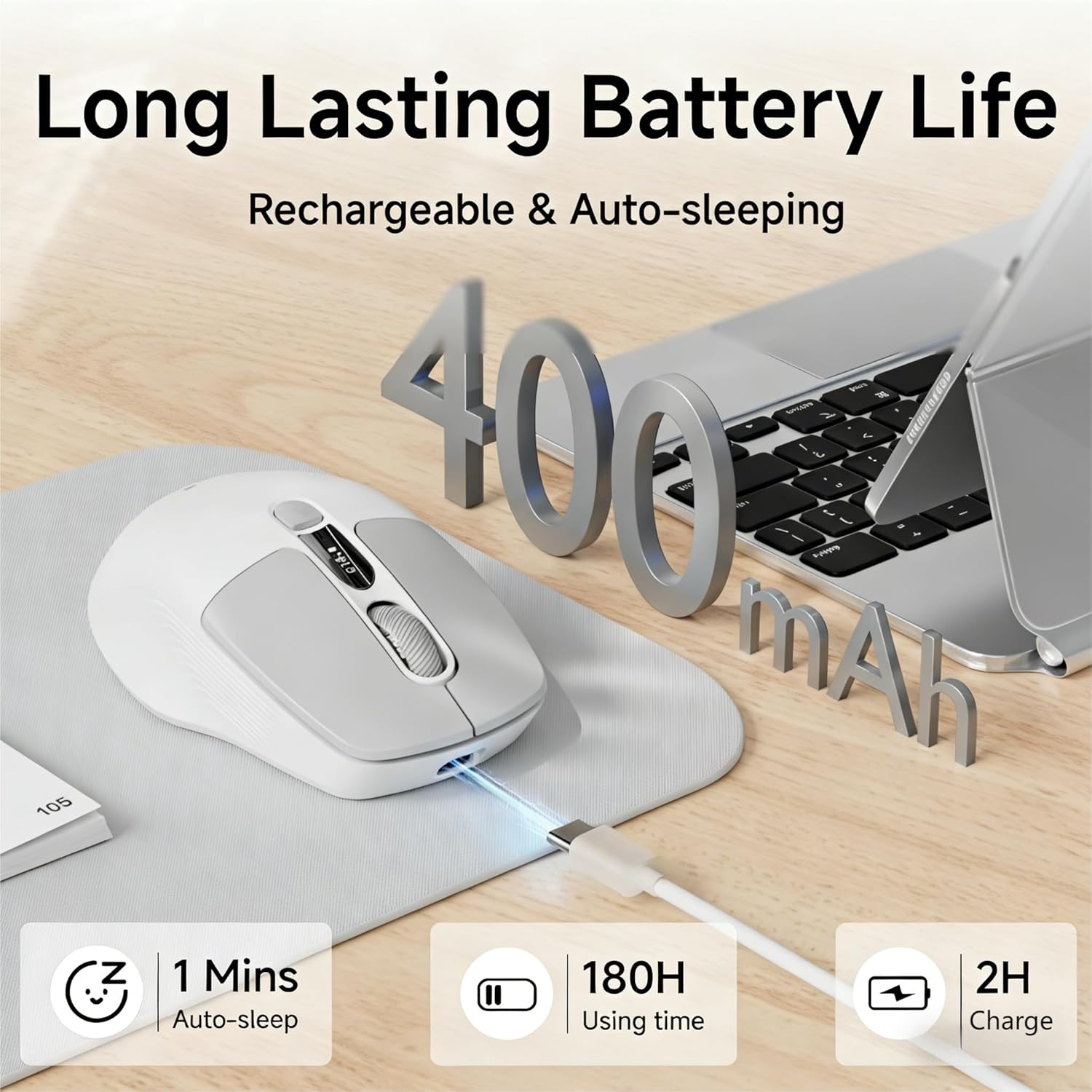
Image: The SEUNKWANG Q1 mouse connected to a Type-C charging cable, highlighting its 400mAh battery, 180H usage time, 1 minute auto-sleep, and 2-hour charge time.
Заўвага: Do not use a fast charger. Use the supplied cable only.
4.2 Падключэнне мышы
The Q1 mouse supports dual-mode connectivity: 2.4G wireless via USB-A receiver and Bluetooth 5.0.
4.2.1 Бесправадное злучэнне 2.4G
- Locate the USB-A receiver stored in the compartment at the bottom of the mouse.
- Падключыце прыёмнік USB-A да даступнага порта USB на вашым кампутары.
- Slide the switch on the bottom of the mouse to the '2.4G' position. The mouse should connect automatically.
4.2.2 Злучэнне Bluetooth
- Перасуньце перамыкач унізе мышы ў становішча «BT».
- На вашай прыладзе (ноўтбуку, планшэце, смартфоне) перайдзіце ў налады Bluetooth.
- Пошук new devices and select 'SEUNKWANG Q1' (or similar) from the list to pair.
- The mouse supports two Bluetooth channels (BT1/BT2). Use the BT1/BT2 switch button on the bottom to toggle between paired Bluetooth devices.
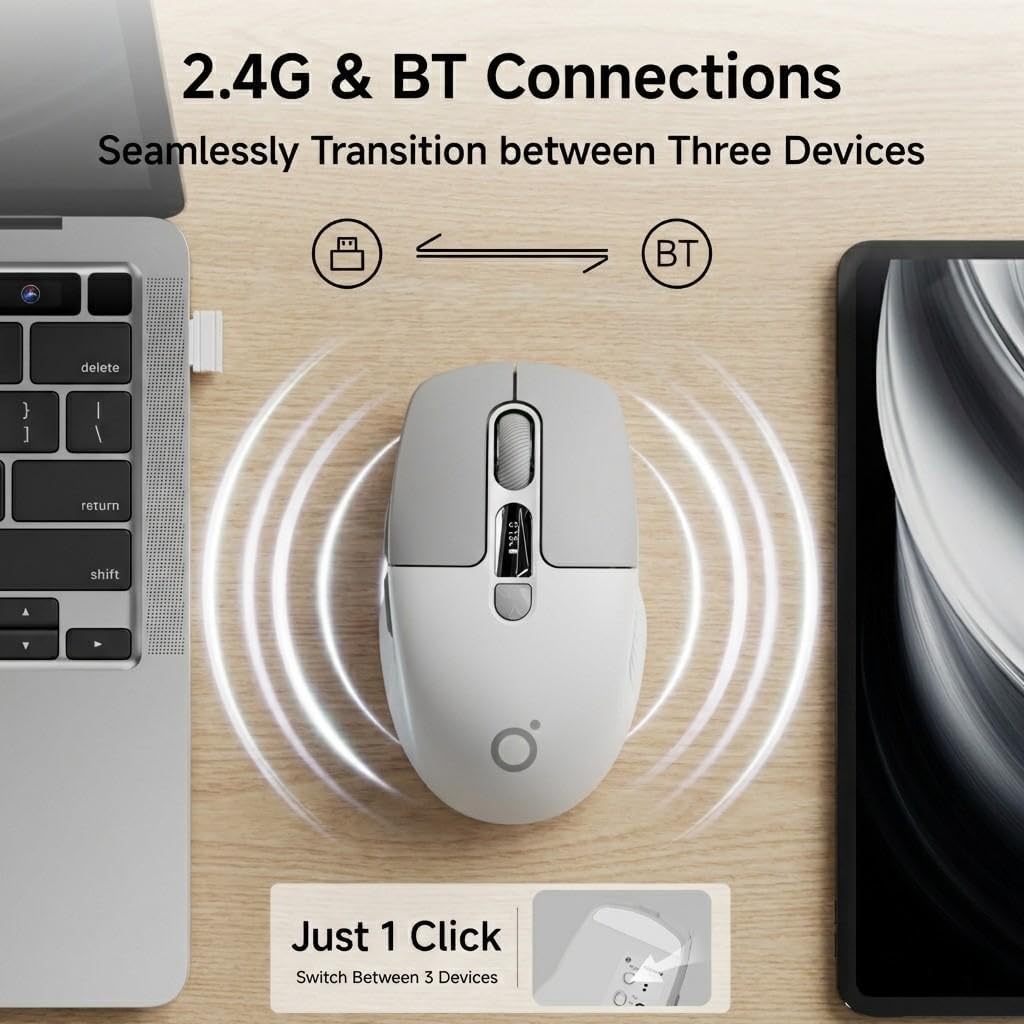
Image: The SEUNKWANG Q1 mouse positioned between a laptop and a tablet, illustrating its dual 2.4G and Bluetooth connectivity for seamless switching between up to three devices with a single click.

Image: An illustration demonstrating the dual-mode connectivity of the SEUNKWANG Q1 mouse, supporting both 2.4GHz wireless and Bluetooth for various operating systems including Android, Windows, macOS, and iOS.
5. Інструкцыя па эксплуатацыі
5.1 Уключэнне/выключэнне сілкавання
Use the 2.4G/OFF/BT switch on the bottom of the mouse to turn it on or off, and to select your preferred connection mode.
5.2 Рэгуляванне DPI
Press the DPI Switch button (button 5 in the diagram below) to cycle through the 3 adjustable DPI levels: 800, 1200, and 1600. The current DPI level will be shown on the LED display.

Image: A visual representation of the SEUNKWANG Q1 mouse's 3 adjustable DPI levels (800, 1200, 1600), emphasizing its adaptability to various usage scenarios and personalized needs.
5.3 святлодыёдны дысплей
The integrated LED screen on the mouse displays the real-time battery percentage and the current DPI level. This allows you to monitor the mouse status at a glance.

Image: The SEUNKWANG Q1 wireless mouse featuring an LED screen display that shows the accurate battery percentage (78%) and selectable DPI levels (800, 1200, 1600).
5.4 Silent Click Buttons
The mouse is designed with silent click technology, significantly reducing operational noise. This feature is beneficial in quiet environments such as libraries, offices, or during late-night work sessions.

Image: A user operating the SEUNKWANG Q1 silent mouse in a quiet environment, demonstrating its 90% noise reduction compared to standard mice, making it ideal for focused work.
5.5 Эрганамічны дызайн
The Q1 mouse features an ultra-lightweight (65g) and ergonomic design, providing comfort and reducing wrist fatigue during extended use. It is suitable for small to medium-sized hands.
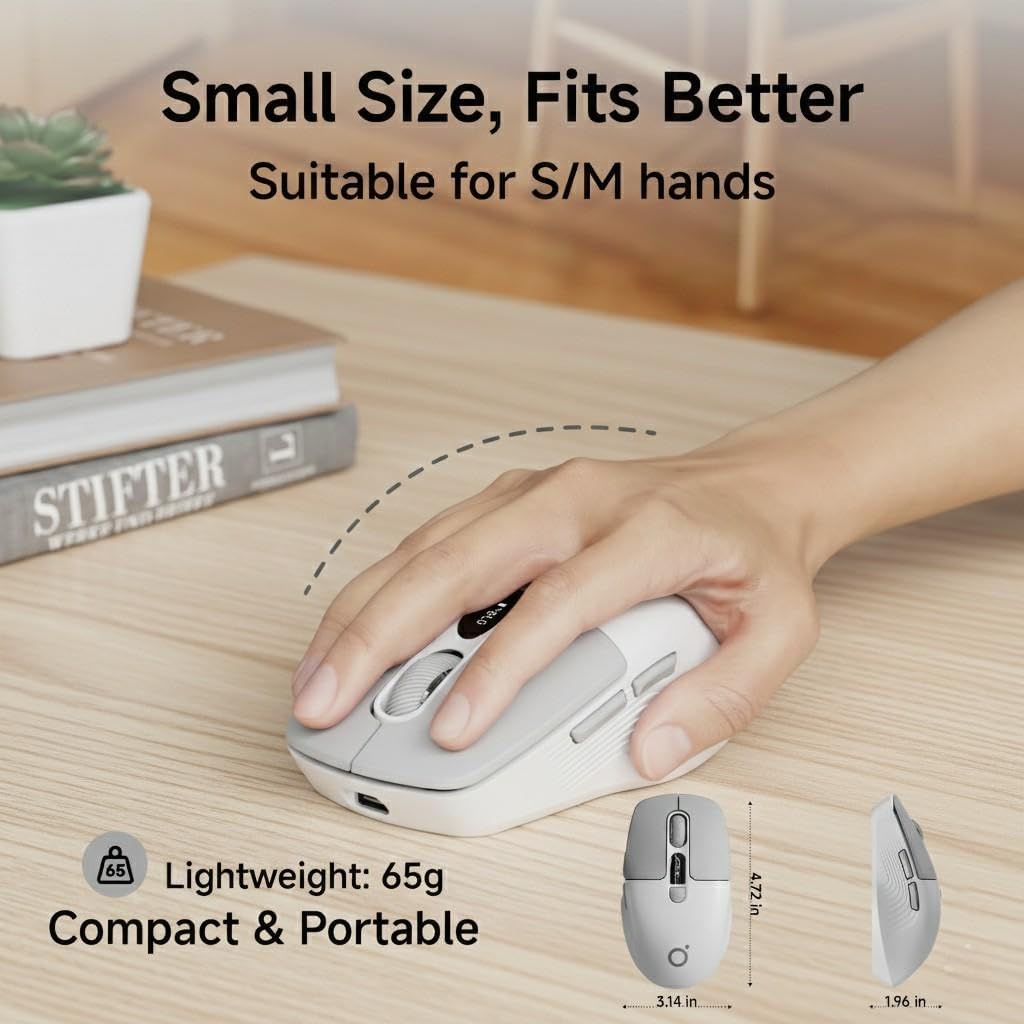
Image: A hand demonstrating the comfortable grip of the SEUNKWANG Q1 mouse, emphasizing its 65g ultra-lightweight, compact, and portable ergonomic design, suitable for small to medium hands.
5.6 Smart Energy Saving
To conserve battery life, the mouse enters an intelligent sleep mode after 1 minute of inactivity. To wake the mouse, simply double-click any button.

Image: A visual guide to the EWEADN-Q1 mouse's fast recharge and auto-sleep functions, detailing the Type-C charging port, 2-3 hours for a full charge, and its automatic entry into sleep mode after 60 seconds of inactivity, with a click to activate.
6. Тэхнічнае абслугоўванне
6.1 Ачыстка
To clean the mouse, use a soft, dry cloth. Avoid using harsh chemicals or abrasive materials that could damage the surface.
6.2 Сыход за акумулятарам
Regularly charge the mouse using the provided Type-C cable to maintain optimal battery health. Avoid extreme temperatures, which can affect battery performance.
7. Выпраўленне непаладак
7.1 Праблемы з падключэннем
- Падключэнне 2.4G: Ensure the USB-A receiver is securely plugged into your device and the mouse switch is set to '2.4G'. Try a different USB port if necessary.
- Злучэнне Bluetooth: Ensure the mouse switch is set to 'BT' and your device's Bluetooth is enabled. Remove any previous pairings and try pairing again.
- Перашкоды: Перамясціце мыш бліжэй да прылады і далей ад іншых бесправадных прылад, якія могуць ствараць перашкоды.
7.2 Мыш не рэагуе
- Нізкі зарад батарэі: Check the LED display for battery percentage. If low, charge the mouse.
- Рэжым сну: Double-click any button to wake the mouse from sleep mode.
- Цыкл харчавання: Выключыце і зноў уключыце мыш.
8. Гарантыя і падтрымка
The SEUNKWANG Q1 Wireless Bluetooth Mouse comes with a 2-гадовая гарантыя ад вытворцы і 48-month brand support.
For any questions, troubleshooting, or support needs, please contact our expert team:
- Падтрымка па электроннай пошце: eweadnkeyboard@outlook.com

Image: An illustration detailing the comprehensive after-sales support provided, including pre-sales Q&A, troubleshooting, accessory reissues, and returns/exchanges, with an email address for support.
Афіцыйныя відэа пра прадукт:
Відэа: Кароткі відэаролікasing the EWEADN Q1 Wireless Silent Mouse, highlighting its suitability for small to medium-sized hands.
Video: A video demonstrating the Q1 Morandi Green mouse, emphasizing its 90% less click noise with Silent Touch technology.
Video: A video introducing the 2026 Q1 New Upgraded Mouse, showcasing its display for battery and DPI levels.
Video: A video highlighting the EWEADN wireless BT&2.4G silent mouse, suitable for laptops.