
1. Уводзіны
The WatchGuard Firebox T185 is a high-performance tabletop firewall designed to provide enterprise-grade security for branch offices and retail environments. This device handles demanding traffic loads and offers flexible connectivity options, including SFP+ fiber, 2.5Gb, and 1Gb Ethernet ports. It integrates advanced threat protection, VPN support, and SD-WAN capabilities to ensure secure and efficient network operations.
2. Інфармацыя па бяспецы
- Перад эксплуатацыяй прылады прачытайце ўсе інструкцыі.
- Забяспечце належнае зазямленне, каб прадухіліць паражэнне электрычным токам.
- Не падвяргайце прыладу ўздзеянню вільгаці або экстрэмальных тэмператур.
- Выкарыстоўвайце толькі блок харчавання, які пастаўляецца з прыладай.
- Не адкрывайце прыладу casinг; звярніцеся па абслугоўванне да кваліфікаванага персаналу.
- Secure the device physically using the Kensington Lock slot to prevent theft.
3. Змесціва ўпакоўкі
Праверце наяўнасць усіх прадметаў у камплекце:
- WatchGuard Firebox T185 Appliance
- Адаптар сілкавання
- Кабель Ethernet
- Кароткае кіраўніцтва
4. Фізічны канецview
Familiarize yourself with the ports, indicators, and features of your Firebox T185.

This image displays the WatchGuard Firebox T185, highlighting its front and rear panels. The front panel features LED indicators for status and mode. The rear panel includes a DC power input, two USB 3.2 ports, one O/WAN 1/LAN port, four 1 Gbps LAN ports (ports 2-5), two 2.5 Gbps PoE ports (ports 6-7), one 10 Gbps SFP+ port, a reset button, and a power switch. A Kensington lock slot is also visible.

The WatchGuard Firebox T185 is shown held in a hand, illustrating its compact tabletop form factor suitable for various environments.

Падрабязны view of the rear panel of the Firebox T185, showing the power input, USB ports, 1GbE LAN ports, 2.5GbE PoE ports, and the SFP+ port.
Святлодыёдныя індыкатары
Святлодыёды на пярэдняй панэлі паказваюць інфармацыю пра стан:
- Індыкатар стану: Паказвае працоўны стан прылады.
- Attn LED: Alerts to system warnings or errors.
- Індыкатар рэжыму: Паказвае бягучы рэжым працы.
- Святлодыёды порта: Indicate link status and activity for each network port.
5. Пачатковая налада
- Распакуйце прыладу: Carefully remove the Firebox T185 and all accessories from the packaging.
- Падключыце сеткавыя кабелі:
- Connect your internet source (modem or upstream router) to the O/WAN 1/LAN порт.
- Connect your internal network devices (switches, computers) to the LAN ports (2-5). For higher speeds, use the 2.5 Gbps PoE ports (6-7) або Порт SFP+ па меры неабходнасці.
- Падключыце харчаванне: Plug the power adapter into the device's power input and then into a power outlet. Turn on the power switch.
- Уключэнне: The device will power on automatically. Observe the LED indicators for boot-up status.
- Першапачатковая канфігурацыя: Доступ да прылады web interface or use WatchGuard Cloud for initial configuration. Refer to the Quick Start Guide for default IP addresses and login credentials.
Гэта відэа прадстаўляе прадукт больш чымview of the WatchGuard Firebox T185, demonstrating its features and potential deployment scenarios. It highlights the device's physical aspects and connectivity options.
6. Інструкцыя па эксплуатацыі
Once configured, the Firebox T185 operates continuously to protect your network. Management is typically performed through the WatchGuard Cloud platform or a local web інтэрфейс.
- Маніторынг: Regularly check the device status through the WatchGuard Cloud dashboard or local interface for alerts and performance metrics.
- Абнаўленні прашыўкі: Keep the device firmware updated to ensure the latest security patches and features. Follow WatchGuard's official update procedures.
- VPN Connections: Utilize the VPN features for secure remote access or site-to-site connectivity as configured.
- SD-WAN: Leverage SD-WAN capabilities for optimized traffic routing and network resilience.
7. Тэхнічнае абслугоўванне
- Рэгулярная ўборка: Keep the device free from dust. Use a soft, dry cloth to clean the exterior. Do not use liquid cleaners.
- Вентыляцыя: Ensure adequate airflow around the device to prevent overheating. Do not block ventilation openings.
- Кіраванне прашыўкай: Periodically check for and apply firmware updates as recommended by WatchGuard.
- Рэзервовае капіраванне канфігурацыі: Regularly back up your device configuration to prevent data loss in case of an issue.
8. Выпраўленне непаладак
- Няма харчавання:
- Check the power cable connection and ensure the power outlet is functional. Verify the power switch is in the 'On' position.
- Няма падключэння да сеткі:
- Verify all Ethernet cables are securely connected. Check the status of the port LEDs. Ensure your internet service is active. Review network configuration settings.
- Нізкая прадукцыйнасць:
- Check network traffic and resource utilization through the management interface. Ensure firmware is up-to-date. Consider reviewing security policies for potential bottlenecks.
- Перагрэў прылады:
- Ensure the device is placed in a well-ventilated area. Clear any dust from the ventilation openings.
9. Тэхнічныя характарыстыкі
| Асаблівасць | Каштоўнасць |
|---|---|
| IPS Throughput (full scan) | 2.40 Гбіт/с |
| Firewall Throughput (IMIX) | 7.90 Гбіт/с |
| VPN Throughput (IMIX) | 1.14 Гбіт/с |
| HTTPS (IPS enabled, full scan) | 1.00 Гбіт/с |
| Сеткавыя інтэрфейсы | 4 x 1 GbE, 4 x 2.5 GbE, 1 x SFP/SFP+ |
| Інтэрфейсы ўводу-вываду | 1 Serial/2 USB-A 3.2 |
| Назва мадэлі | WatchGuard Firebox T185 |
| Асаблівасць | UTM, VPN Support, Integrated SD-WAN |
| Рэкамендуемае выкарыстанне | Бізнес |
| Тэхналогія падлучэння | Ethernet, SFP+ |
| Вага прадмета | 6.8 фунта |
| Аперацыйная сістэма | Fireware |
| Data Transfer Rate (UTM) | 1830 мегабіт у секунду |
| Максімальная хуткасць перадачы дадзеных па ўзыходзячым патоку | 1830 мегабіт у секунду |
| Прапускная здольнасць порта лакальнай сеткі | 2500 Мбіт/с |
| Modem Compatible | няма |
| Пакрыццё | Software and emergency support |
| UPC | 654522437150 |
| Вытворца | WatchGuard |
| Нумар дэталі вытворцы | WGT185000+WGT1850063 |

This image displays a table detailing key performance specifications for the WatchGuard Firebox T185, including IPS, Firewall, VPN, and HTTPS throughputs, as well as network and I/O interfaces.
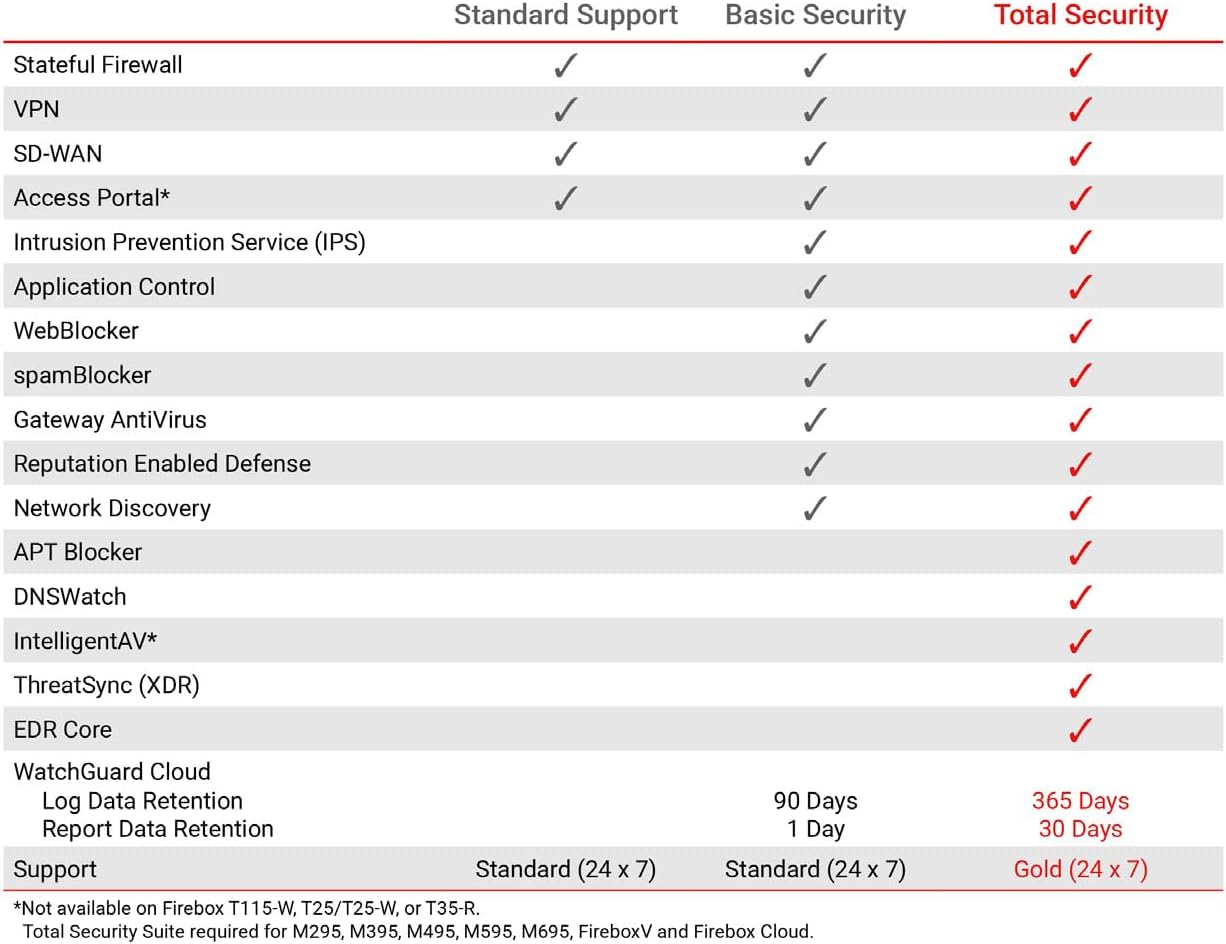
This table compares the security features included with Standard Support, Basic Security Suite, and Total Security Suite for the WatchGuard Firebox T185, showing which features are enabled for each option.
10. Гарантыя і падтрымка
The WatchGuard Firebox T185 comes with a 3-year Standard Support license (WGT185003).
- Стандартная падтрымка: Provides software updates and 24x7 emergency technical assistance, along with business-hours support for routine inquiries.
- Планы абароны: Additional protection plans may be available, such as a 4-Year Protection Plan or a Complete Protect monthly plan. Refer to your purchase documentation for details.
- Падтрымка вытворцы: Каб атрымаць дадатковую дапамогу, звярніцеся на афіцыйны сайт WatchGuard support webсайт або звярніцеся ў службу падтрымкі.