
1. Уводзіны
The Qubo X-247 4G is a user-friendly mobile phone designed for ease of use, particularly suitable for seniors. It features a dual-screen design, large buttons, and essential functions like an SOS button and quick dial keys. This manual provides detailed instructions for setting up, operating, and maintaining your device.
2. Змесціва ўпакоўкі
Калі ласка, пастаўце галачку для наступных пунктаў:
- Qubo X-247 4G Mobile Phone
- Кіраўніцтва па эксплуатацыі
- Зарадны кабель (USB-C)
3. Схема прылады
Familiarize yourself with the key components and buttons of your Qubo X-247 4G phone.

Выява 3.1: Спераду View of Qubo X-247 4G. This image displays the phone in its open position, revealing the internal display and the large, clearly labeled keypad. Key features include the call and end call buttons, navigation keys, and dedicated M1, M2, M3 quick dial buttons.
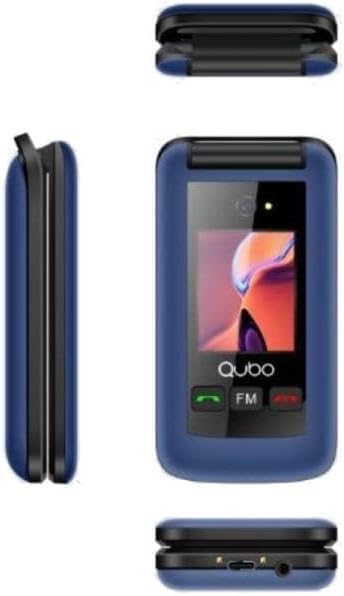
Image 3.2: Multi-angle View of Qubo X-247 4G. This composite image shows the phone from various angles. The top-left shows the phone closed, highlighting the external screen. The middle-left shows the side profile, while the bottom-right provides a view of the phone's base, indicating the USB-C charging port and the 3.5mm audio jack.
Ключавыя кампаненты:
- Унутраны дысплей: Main screen for menus, contacts, and messages.
- Знешні дысплей: Shows time, date, and incoming call information when the phone is closed.
- Клавіятура: Large, backlit buttons for dialing and navigation.
- Кнопкі M1, M2, M3: Dedicated quick dial keys for important contacts.
- Кнопка SOS: Located on the back, for emergency calls.
- Порт USB-C: Для зарадкі прылады.
- 3.5 мм аўдыяраз'ём: Для падлучэння навушнікаў.
4. Настройка
4.1. Усталёўка SIM-карты(-ак) і акумулятара
- Акуратна адкрыйце заднюю крышку тэлефона.
- Калі ёсць, выміце акумулятар.
- Insert your SIM card(s) into the designated slot(s). The Qubo X-247 4G supports Dual SIM. Ensure the gold contacts face downwards and the card is correctly oriented.
- Устаўце батарэйку, пераканаўшыся, што кантакты правільна сумяшчаюцца.
- Зачыніце заднюю крышку, пакуль яна надзейна не зашчоўкнецца.
4.2. Зарадка тэлефона
- Падключыце кабель зарадкі USB-C да порта ў ніжняй частцы тэлефона.
- Падключыце другі канец кабеля да сумяшчальнага адаптара харчавання USB (не ўваходзіць у камплект) або да USB-порта кампутара.
- The phone will indicate that it is charging. A full charge typically takes approximately 3 hours.
5. Інструкцыя па эксплуатацыі
5.1. Уключэнне/выключэнне харчавання
- Каб уключыць: Press and hold the red 'End Call' button until the screen lights up.
- Каб выключыць: Press and hold the red 'End Call' button until the 'Power Off' option appears on the screen, then confirm.
5.2. Здзяйсненне і прыём званкоў
- Каб зрабіць званок: Dial the number using the keypad and press the green 'Call' button.
- Каб прыняць выклік: When the phone rings, press the green 'Call' button to answer.
- Каб завяршыць выклік: Press the red 'End Call' button.
5.3. Выкарыстанне кнопкі SOS
The dedicated SOS button on the back of the phone is for emergencies. When pressed and held, it will automatically dial pre-set emergency contacts and can send emergency messages.
- Налада кантактаў SOS: Navigate to the 'SOS Settings' in the phone's menu to add up to 5 emergency numbers.
- Актывацыя SOS: Press and hold the SOS button for a few seconds. The phone will initiate calls to the emergency contacts in sequence until one answers.
5.4. Quick Dial Keys (M1, M2)
The M1 and M2 buttons allow for quick dialing of frequently used contacts.
- Setting up Quick Dial: Go to 'Contacts' or 'Settings' and assign a number to M1 and M2.
- Using Quick Dial: Simply press and hold the M1 or M2 button to dial the assigned contact.
6. Асаблівасці
- Dual Screen: Enjoy a 2.4-inch internal display for detailed viewing and a 1.77-inch external display for quick information at a glance.
- Камера: Capture moments with the integrated 0.3MP digital camera.
- Bluetooth: Connect wirelessly to compatible headsets or other devices.
- FM-радыё: Слухайце свае любімыя радыёстанцыі ў дарозе.
- Ліхтарык: A convenient built-in flashlight for illumination.
- Organizer Tools: Includes a calendar, calculator, and alarm functions for daily utility.
7. Тэхнічнае абслугоўванне
To ensure the longevity and optimal performance of your Qubo X-247 4G phone, follow these maintenance guidelines:
- Захоўваць сухім: Avoid exposing the phone to moisture or liquids. Although it has some water resistance, it is not fully waterproof.
- Акуратна чысціце: Use a soft, dry cloth to clean the screen and body. Avoid harsh chemicals.
- Пазбягайце экстрэмальных тэмператур: Не падвяргайце тэлефон уздзеянню вельмі высокіх або вельмі нізкіх тэмператур, бо гэта можа паўплываць на тэрмін службы батарэі і ўнутраныя кампаненты.
- Абараніць ад кропель: Handle the phone with care to prevent physical damage from drops or impacts.
8. Выпраўленне непаладак
If you encounter issues with your phone, refer to the following common problems and solutions:
| праблема | Рашэнне |
|---|---|
| Тэлефон не ўключаецца | Пераканайцеся, што акумулятар правільна ўсталяваны і цалкам зараджаны. Паспрабуйце зараджаць тэлефон не менш за 30 хвілін. |
| Немагчыма рабіць або прымаць званкі | Check if the SIM card is properly inserted and activated. Ensure you have network coverage. |
| Дрэнны прыём сігналу | Move to an area with better network coverage. Avoid areas with thick walls or underground locations. |
| Акумулятар хутка разраджаецца | Reduce screen brightness. Close unused applications. Ensure the phone is not in an area with very weak signal, which can cause it to consume more power searching for a network. |
9. Тэхнічныя характарыстыкі
| Асаблівасць | Дэталь |
|---|---|
| мадэль | X-247 4G |
| Працэсар | MTK6261DA |
| Унутраны дысплей | 2.4 цаляў |
| Знешні дысплей | 1.77 цаляў |
| Камера | Лічбавая камера 0.3 МП |
| Памяць | 32MB RAM + 32MB ПЗУ |
| Сеткавыя дыяпазоны | GSM: 850/900/1800/1900 MHz, 4G |
| Падтрымка SIM-карты | Дзве SIM |
| акумулятар | 1000 мАг Li-Ion |
| Час размовы | Да 4 гадзін |
| Час чакання | Да 180 гадзін |
| Порт для зарадкі | USB-C |
| Аўдыёраз'ём | 3.5 мм |
| Сувязь | Bluetooth, USB |
| Асаблівасці | SOS Button, Quick Dial Keys (M1, M2), FM Radio, Flashlight, Calendar, Calculator, Alarm |
| Памеры | 10 x 150 x 15 мм (прыблізна) |
| Вага | 210 г (прыблізна) |
| Воданепранікальнасць | Resistant to water (not fully waterproof) |
10. Гарантыя і падтрымка
Your Qubo X-247 4G mobile phone comes with a трохгадовая гарантыя ад вытворчых дэфектаў з даты пакупкі. Калі ласка, захавайце пацвярджэнне пакупкі для прэтэнзій па гарантыі.
For technical support or warranty inquiries, please refer to the contact information provided with your purchase documentation or visit the official Qubo webсайт.