
Уводзіны
This manual provides detailed instructions for the installation, operation, and maintenance of your Hieasy X24 4MP 2.5K Window Security Camera. Please read this manual thoroughly before using the product to ensure proper functionality and safety. The Hieasy X24 camera offers 2.5K Ultra HD resolution, color night vision, motion detection, and 24/7 recording without subscription fees, utilizing both 2.4G and 5G Wi-Fi connectivity for seamless integration into your home security system.
Што ў скрынцы
Праверце наяўнасць усіх кампанентаў у вашай упакоўцы:
- Корпус камеры
- Зарадны кабель даўжынёй 6.6 футаў
- Кіраўніцтва па эксплуатацыі
- Адаптар сілкавання
- Карта Micro SD на 32 ГБ (папярэдне ўсталяваная або ўваходзіць у камплект асобна)
- Velcro adhesive pads (2)
- Wire holders (2)

Настройка і ўстаноўка
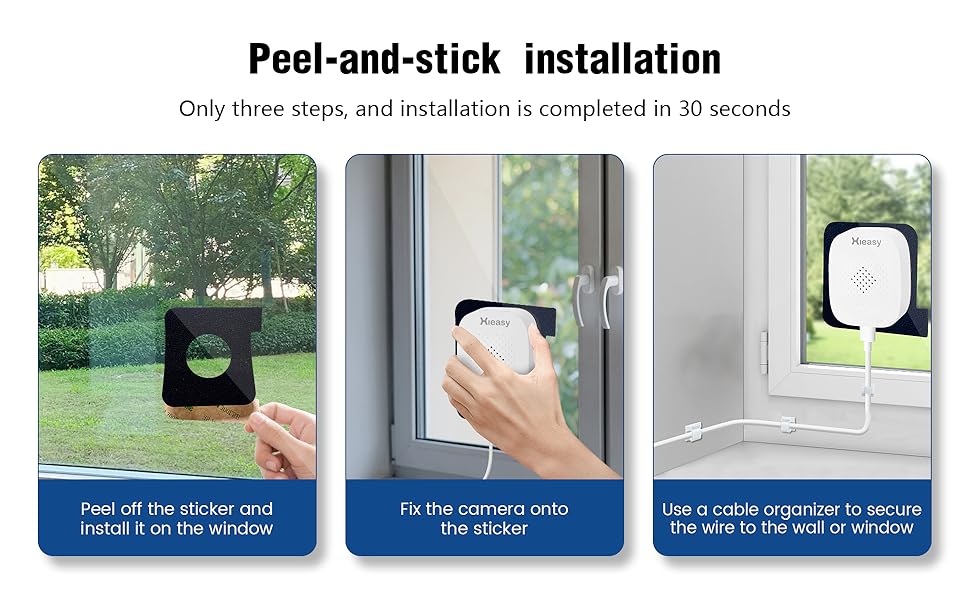
The Hieasy X24 camera features a 3M adhesive mounting design for quick and easy installation without drilling. It supports both Bluetooth and Wi-Fi connectivity for seamless pairing with your mobile phone.
Пакрокавая ўстаноўка
- Clean the Window Surface: Ensure both sides of the window glass where the camera will be mounted are clean and dry. Use a soft cloth to wipe away any dust or smudges.
- Attach Adhesive Pad to Camera: Peel off the protective backing from one of the Velcro adhesive pads. Carefully align and attach the adhesive side to the front of the camera, ensuring the camera lens is centered within the pad's opening.
- Mount Camera to Window: Peel off the remaining protective paper from the adhesive pad attached to the camera. Press the camera firmly onto the desired spot on the window glass from the inside, ensuring a secure bond.
- Падключыце харчаванне: Plug the charging cable into the camera's power port and connect the other end to the power adapter. Plug the power adapter into a wall socket.
- Бяспечныя кабелі: Use the provided cable fixers to neatly secure the charging cable along the window frame or wall, preventing it from dangling or interfering with window operation.

Initial Setup and App Connection
Once powered on, the camera's blue indicator light will illuminate, signifying that the product has started. You will hear an audible prompt stating "Waiting for connection." At this point, you can proceed to link the camera with your smartphone via the dedicated Hieasy app.
Кіраванне камерай
жыць View і запіс
Access the live monitoring feed anytime, anywhere via your smartphone. The camera provides 2.5K (2560×1440) ultra-high-definition resolution for clear video performance. It supports 24/7 continuous recording to capture all moments.
Начное бачанне
Equipped with a 4-megapixel lens and advanced low-light algorithms, the camera delivers full-color images even in low-light environments, ensuring critical details are not missed during nighttime surveillance.


Выяўленне руху і абвесткі
The camera supports customizable motion detection zones. Upon detecting movement, the device will send push notifications to your phone, sound an alarm, and automatically record video to deter intruders effectively.


Захоўванне
The device supports local storage via an SD card up to 512GB. A 32GB memory card is included to allow immediate use. Your data's security and privacy are protected.

Remote Access and Sharing
The Hieasy X24 camera allows you to easily access the live monitoring feed from your smartphone, no matter your location. The device supports sharing with up to 16 users, enabling family and friends to view the camera feed for enhanced peace of mind.


Ліквідацыю непаладак
If you encounter issues with your Hieasy X24 camera, please refer to the following common problems and solutions:
- Не магу падключыцца да Wi-Fi:
- Ensure your Wi-Fi network is 2.4G or 5G compatible.
- Пераканайцеся, што камера знаходзіцца ў зоне дзеяння вашага Wi-Fi маршрутызатара.
- Праверце правільнасць пароля ад Wi-Fi.
- Перазагрузіце маршрутызатар і камеру, а затым паспрабуйце падключыцца зноў.
- Няма Live View or Recording:
- Confirm the camera is powered on and the blue indicator light is active.
- Праверце падключэнне да Інтэрнэту на вашым смартфоне.
- Ensure the Micro SD card is properly inserted and not full.
- If the SD card is full, consider formatting it (this will erase all data).
- Дрэнная якасць выявы:
- Ачысціце аб'ектыў камеры і паверхню акна.
- Пераканайцеся, што ў полі зроку камеры няма перашкод view.
- Check your app settings for resolution options.
- Без аўдыёзапісу:
- Verify that audio recording is enabled in the camera's app settings.
- Пераканайцеся, што мікрафон нічым не перакрыты.
Тэхнічныя характарыстыкі
| Назва мадэлі | 4MP 2.5K Window Camera |
| Нумар мадэлі тавару | X24 |
| Эфектыўнае рашэнне | 4 МП |
| Дазвол відэазахопу | 1440p (2.5K) |
| Тэхналогія падлучэння | Правадное (харчаванне), Wi-Fi (перадача дадзеных) |
| Тэхналогія бесправадной сувязі | 2.4G & 5G Wi-Fi (Dual-Band) |
| Крыніца харчавання | Правадная электрычная (5 вольт) |
| Тып мацавання | Window Mount (Self Adhesive) |
| Выкарыстанне ў памяшканні/на вуліцы | У памяшканні, на адкрытым паветры |
| Дыяпазон начнога бачання | 33 футаў |
| Тэхналогія нізкай асветленасці | Начны колер |
| Viewing кут | 120 градусаў |
| Частата кадраў | 25 кадраў у секунду |
| Памер усталяванай флэш-памяці | 32 ГБ (Micro SD) |
| Максімальны памер флэш-памяці, які падтрымліваецца | 512 ГБ |
| Магчымасці аўдыёвізуальнага запісу | Аўдыё |
| Тып абвесткі | Аўдыё і рух |
| Метад кантролю | дадатак |
| Памеры прадукту | 3.2 х 2 х 1.2 цалі |
| Вага прадмета | 5.9 унцыі (0.17 кілаграма) |