
1. Уводзіны
This manual provides essential information for the proper setup, operation, and maintenance of your NIMO 15.6 inch Laptop Computer. Please read this manual thoroughly before using your device to ensure optimal performance and longevity. Keep this manual for future reference.
2. Прадукт скончыўсяview
2.1. Камплектуючыя ноўтбука
The NIMO 15.6 inch Laptop features a Full HD display, a backlit keyboard, and an integrated fingerprint reader for secure access. It is powered by an AMD Ryzen 5 3500U processor and runs on Windows 11.

Малюнак 2.1: Спераду view of the NIMO 15.6 inch Laptop, showcasinяго дысплей і раскладку клавіятуры.
2.2. Парты і раздымы
Your NIMO laptop is equipped with various ports for comprehensive connectivity, allowing you to connect peripherals and external devices.

Figure 2.2: Expanded Connectivity Options. This image illustrates the location and type of ports available on the laptop, including Type-C (Charge Only), USB 3.0, HDMI, Type-C (Full Function), Charge LED, Micro SD Reader, USB 2.0, USB 3.0, Headphone Combo, and Kensington Lock.
- Type-C (Charge Only): Для падводу магутнасці.
- USB 3.0: Для хуткаснай перадачы дадзеных.
- HDMI: Для падлучэння да знешніх дысплеяў.
- Type-C (Full Function): Supports Power Delivery (PD), DisplayPort (DP), and data transfer.
- Святлодыёд зарада: Паказвае стан зарадкі.
- Счытвальнік мікра SD-карт: For reading Micro SD cards.
- USB 2.0: Для стандартных USB-прылад.
- USB 3.0: Для хуткаснай перадачы дадзеных.
- Headphone Combo: Для аўдыёвыхаду і ўваходу для мікрафона.
- Кенсінгтонскі замак: Для фізічнай бяспекі.
3. Настройка
3.1. Пачатковая зарадка
Before first use, connect the laptop to a power outlet using the provided 65W PD Type-C charger. The Charge LED indicator will illuminate. Allow the battery to charge fully.

Figure 3.1: Type-C 65W PD Charger. This image highlights the versatility of the 65W Power Delivery charger, capable of charging the laptop, tablets, and smartphones, reducing cable clutter.
3.2. Уключэнне
Open the laptop lid. Press the power button located on the keyboard deck. The laptop will boot up, and you will be guided through the Windows 11 initial setup process.
3.3. Усталёўка Windows 11
Follow the on-screen instructions to configure your Windows 11 operating system. This includes selecting your region, language, connecting to a Wi-Fi network, and setting up your user account.
4. Інструкцыя па эксплуатацыі
4.1. Клавіятура і ўвод
The laptop features a backlit keyboard for comfortable typing in various lighting conditions, a responsive touchpad, and a numeric keypad for data entry.

Figure 4.1: Effortless Typing in Any Environment. This image demonstrates the backlit keyboard, touchpad, fingerprint reader, and numeric keypad, enhancing user experience and productivity.
- Клавіятура з падсветкай: Націсніце Fn key and the appropriate function key (usually F3 or F4, indicated by a keyboard icon) to adjust the backlight brightness or turn it on/off.
- Сэнсарная панэль: Use the touchpad for navigation. Supports multi-touch gestures for scrolling, zooming, and other functions.
- Лічбавая клавіятура: Provides dedicated number keys for efficient data entry.
4.2. Распазнаванне адбіткаў пальцаў
The integrated fingerprint reader allows for secure and quick login. Set up your fingerprint in Windows Settings under 'Sign-in options'.
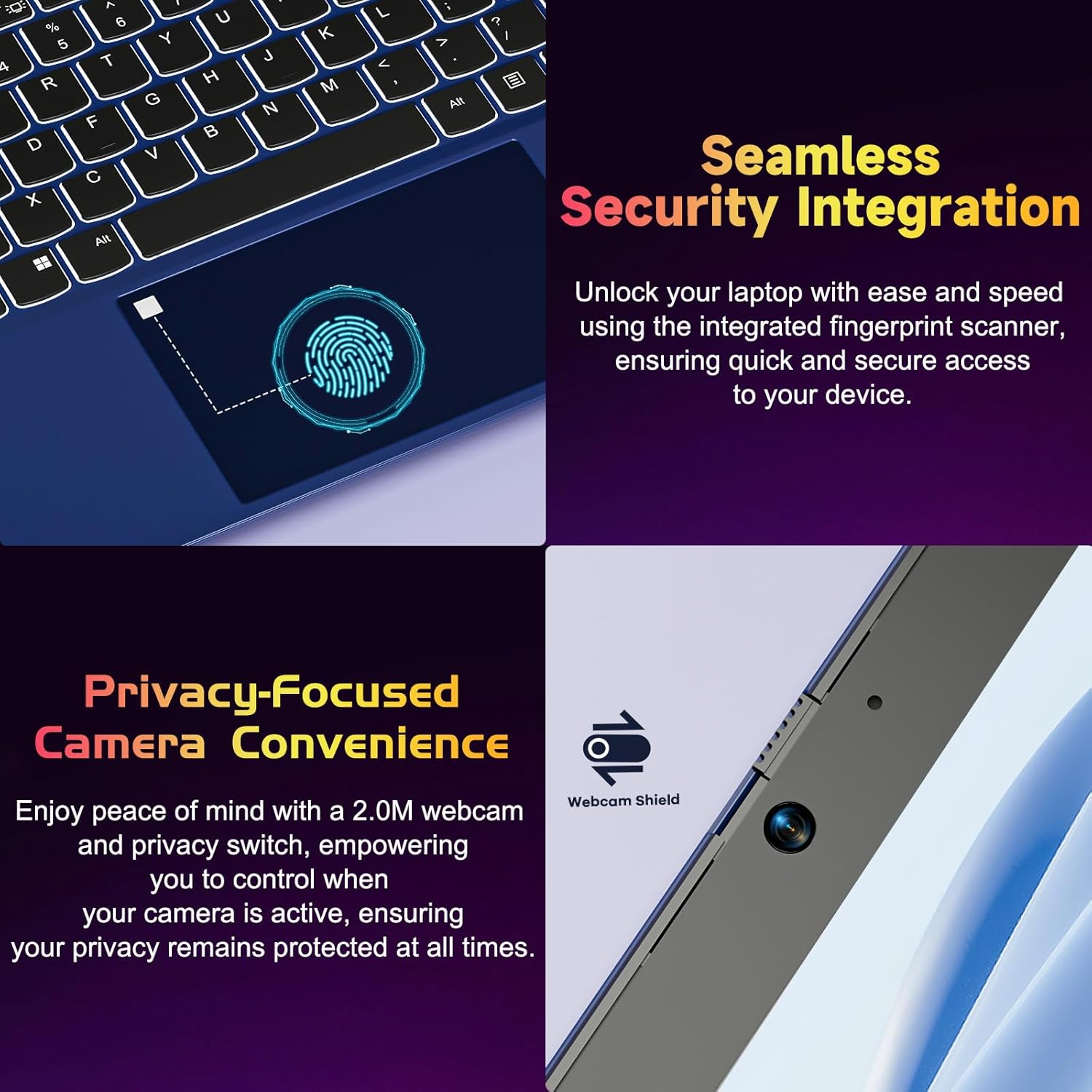
Figure 4.2: Seamless Security Integration and Privacy-Focused Camera. This image highlights the fingerprint scanner for quick and secure access, and the 2.0MP webcam with a physical privacy switch for enhanced user privacy.
4.3. Асаблівасці дысплея
The 15.6 inch Full HD (1920 x 1080 Pixel) IPS display offers vivid visuals and a wide viewing angle. The 180° lay-flat hinge allows for flexible screen positioning, ideal for sharing content.

Figure 4.3: Vivid Full HD Display. This image emphasizes the laptop's 15.6-inch Full HD (1920x1080) IPS display, offering bright visuals and eye protection.

Figure 4.4: 180° Lay-Flat Hinge. This image illustrates the laptop's ability to lay flat, expanding usage scenarios and facilitating content sharing.
4.4. Webcam Privacy
The laptop includes a 2.0MP webcam with a physical privacy switch (Webcam Shield). Slide the switch to cover the camera lens when not in use to ensure your privacy.
5. Тэхнічнае абслугоўванне
- Уборка: Для чысткі экрана і вонкавых паверхняў выкарыстоўвайце мяккую тканіну без ворса. Для выдалення ўстойлівых плям злёгкуampпрацярыце тканіну вадой або сродкам для чысткі экранаў. Пазбягайце агрэсіўных хімічных рэчываў.
- Сыход за батарэяй: Каб падоўжыць тэрмін службы батарэі, пазбягайце частай поўнай разрадкі батарэі. Захоўвайце ноўтбук у прахалодным, сухім месцы, калі ён не выкарыстоўваецца працяглы час.
- Абнаўленні праграмнага забеспячэння: Рэгулярна абнаўляйце аперацыйную сістэму Windows і драйверы, каб забяспечыць аптымальную прадукцыйнасць і бяспеку.
- Пашырэнне сховішча: The laptop supports dual DDR4 SO-DIMM slots and M.2 NVMe SSD for memory and storage expansion. Consult a qualified technician for upgrades.
6. Выпраўленне непаладак
6.1. Праблемы з харчаваннем
- Ноўтбук не ўключаецца: Ensure the laptop is charged. Connect the charger and wait a few minutes before attempting to power on again.
- Акумулятар не зараджаецца: Verify the charger is properly connected to both the laptop and the power outlet. Try a different outlet.
6.2. Праблемы з дысплеем
- Экран пусты: Check if the laptop is powered on. Try adjusting screen brightness using the function keys. If an external monitor is connected, ensure it is properly configured.
6.3. Праблемы з прадукцыйнасцю
- Ноўтбук павольны: Close unnecessary applications. Check for background processes consuming high resources. Ensure sufficient free storage space. Consider performing a system scan for malware.
6.4. Праблемы з падключэннем
- Wi-Fi не падключаецца: Пераканайцеся, што Wi-Fi уключаны. Перазагрузіце маршрутызатар і ноўтбук. Праверце сеткавыя налады ў Windows.
7. Тэхнічныя характарыстыкі
| Асаблівасць | Дэталь |
|---|---|
| Марка | NIMO |
| Назва мадэлі | NIMO N152R |
| Памер экрана | 15.6 цалі |
| Дазвол экрана | 1920 x 1080 пікселяў (Full HD) |
| Працэсар | AMD Ryzen 5 3500U (3.7 GHz, 4 Cores, 8 Threads) |
| АЗП | 8 GB DDR4 (Upgradable) |
| Хуткасць памяці | 3200 МГц |
| Жорсткі дыск | 256 GB SSD (Upgradable M.2 NVMe) |
| Графічны супрацэсар | AMD Integrated graphics (Vega) |
| Аперацыйная сістэма | Windows 11 |
| Бесправадны тып | 802.11abg |
| Парты USB | 1x USB 2.0, 2x USB 3.0, 2x USB-C (1x Charge Only, 1x Full Function) |
| Порт HDMI | так |
| Чытальнік Micro SD | так |
| Сярэдні тэрмін службы батарэі | 5 гадзін |
| Вага прадмета | 3.8 фунта (1.72 кг) |
| Памеры прадукту | 14.07 х 8.98 х 0.76 цалі |
| Колер | Ружа |
| Тыл WebДазвол камеры | 2 МП |
8. Гарантыя і падтрымка
Your NIMO laptop comes with a 2-year warranty, covering manufacturing defects and hardware malfunctions under normal use. Additionally, a 90-day free return policy is provided.

Figure 8.1: After-Sales Support. This image outlines the 2-year warranty, 90-day return policy, and professional customer service available for NIMO products.
8.1. Зварот у службу падтрымкі
For technical assistance, warranty claims, or product-related questions, please contact the NIMO U.S.-based support team. Contact information can typically be found on the official NIMO webсайт або ўпакоўка прадукту.
9. Інфармацыя па бяспецы
To prevent injury or damage to your device, observe the following safety precautions:
- Не падвяргайце ноўтбук уздзеянню экстрэмальных тэмператур, прамых сонечных прамянёў або высокай вільготнасці.
- Не кладзіце цяжкія прадметы на ноўтбук.
- Use only the provided charger or a compatible 65W PD Type-C charger.
- Не спрабуйце разбіраць або рамантаваць ноўтбук самастойна. Звярніцеся да кваліфікаванага спецыяліста па абслугоўванні.
- Трымайце вадкасці далей ад ноўтбука, каб пазбегнуць паражэння электрычным токам або пашкоджанняў.
- Ensure proper ventilation when using the laptop to prevent overheating.