
1. Уводзіны
Thank you for choosing the zelotes F18 Wireless Gaming Mouse. This manual provides detailed instructions for setting up, operating, and maintaining your mouse to ensure optimal performance and an enhanced user experience. Please read this manual thoroughly before using the product.
Змест пакета
- 1 x zelotes F18 Bluetooth Wireless Mouse
- 1 х USB-прыёмнік
- 1 х USB-кабель для зарадкі
- 1 х Кіраўніцтва карыстальніка (гэты дакумент)
2. Прадукт скончыўсяview
The zelotes F18 is an ergonomic vertical gaming mouse designed for comfort and precision. It features dual-mode connectivity (2.4G USB and Bluetooth), a 5-direction joystick, 11 programmable buttons, adjustable DPI up to 24,000, and a built-in rechargeable battery.
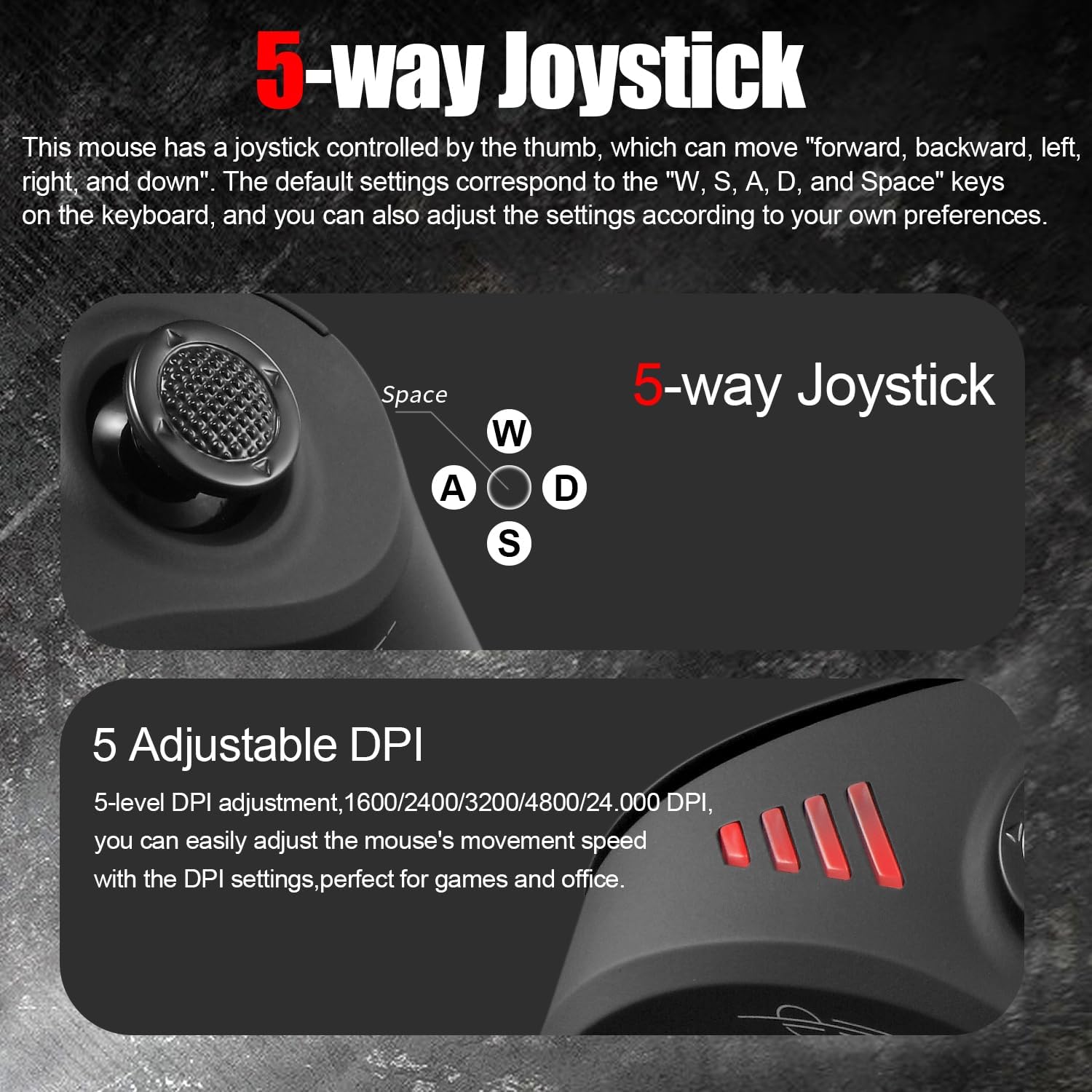
Image: The ergonomic vertical design of the zelotes F18 mouse, promoting a natural wrist posture to reduce strain during extended use.
Асноўныя характарыстыкі
- Эрганамічны вертыкальны дызайн: Reduces wrist pressure and discomfort.
- 5-Direction Joystick: Thumb-controlled for enhanced navigation and gaming commands.
- Двухрэжымнае падключэнне: Seamless switching between 2.4G USB receiver and Bluetooth (BT 5.0/3.0).
- Акумулятарная батарэя: Built-in 800mAh high-capacity battery with USB charging.
- Рэгуляваны DPI: 5 levels (1600/2400/3200/4800/24,000 DPI) for precise control.
- 11 праграмуемых кнопак: Customize functions for various tasks and games.
- Шырокая сумяшчальнасць: Supports Win11/10/8/7, Mac OS, Chrome OS, Android 5.0+.
Раскладка кнопак

Image: A diagram illustrating the 11 programmable buttons on the zelotes F18 mouse, including the left, right, middle, forward, back, DPI, and joystick buttons (W, S, A, D, Space).
- Левая кнопка
- Правая кнопка
- Middle Button (Scroll Wheel)
- Кнопка "Наперад".
- Кнопка "Назад".
- Кнопка DPI
- Joystick (W)
- Joystick (S)
- Joystick (A)
- Joystick (D)
- Joystick (Press/Space Button)
3. Настройка
3.1 Першапачатковая зарадка
Before first use, fully charge the mouse. Connect the provided USB charging cable to the mouse's charging port and to a USB power source (e.g., computer USB port, USB wall adapter).

Image: Illustration of the mouse's charging indicator light and low battery warning. The indicator light illuminates during charging and turns off when fully charged. A rapidly blinking red light indicates low battery.
- Індыкатар зарадкі: The light will illuminate during charging and turn off when fully charged.
- Папярэджанне пра нізкі зарад батарэі: When the battery level drops to 25%, the mouse will rapidly blink a red light, indicating it requires charging.
- Мыш можна выкарыстоўваць падчас зарадкі.
3.2 Падключэнне мышы
The zelotes F18 mouse supports two connection modes: 2.4G USB Wireless and Bluetooth. You can connect to up to three devices simultaneously (one via 2.4G USB and two via Bluetooth) and switch between them.
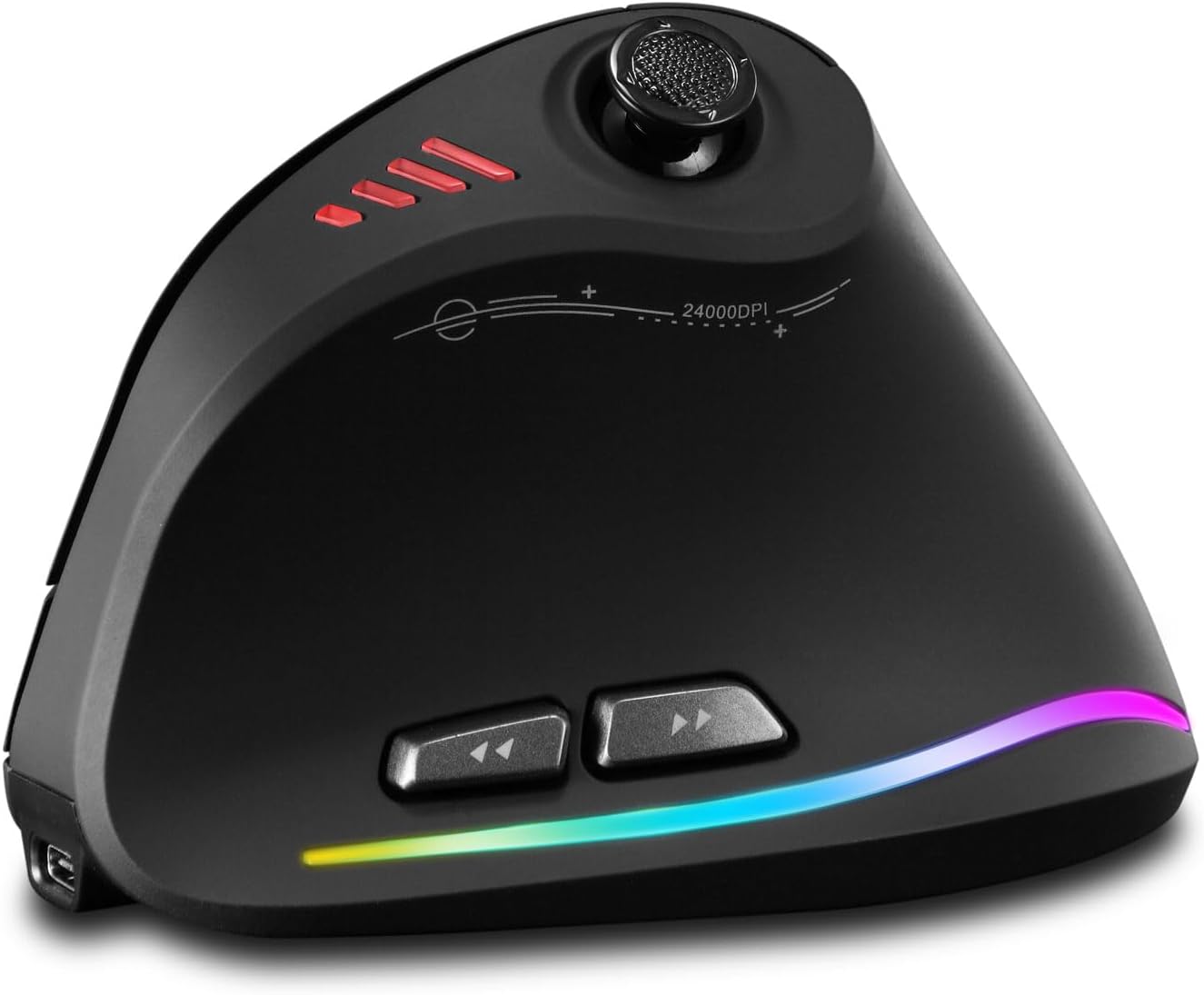
Image: The bottom of the zelotes F18 mouse, highlighting the light switch, Mimi receiver storage, and the Bluetooth/2.4G mode switching button. The indicator light colors (Red for 2.4G, Blue for Bluetooth) are also shown.
2.4G USB Wireless Mode
- Знайдзіце USB-прыёмнік, які знаходзіцца ў адсеку ў ніжняй частцы мышы.
- Падключыце USB-прыёмнік да вольнага порта USB на вашым кампутары.
- Уключыце мыш з дапамогай выключальніка ўнізе.
- Press the connection mode button on the bottom of the mouse until the indicator light turns red. The mouse should connect automatically.
Bluetooth Mode (BT 5.0/3.0)
- Уключыце мыш з дапамогай выключальніка ўнізе.
- Press the connection mode button on the bottom of the mouse until the indicator light turns blue.
- On your device (PC, laptop, tablet), go to Bluetooth settings.
- Пошук new devices and select "zelotes F18" (or similar name) to pair.
- The blue indicator light will stop blinking and remain solid once connected.
Пераключэнне паміж прыладамі
To switch between connected devices, briefly press the connection mode button on the bottom of the mouse. The indicator light will change color (Red for 2.4G, Blue for Bluetooth 1, Green for Bluetooth 2) to show the active connection.
4. Інструкцыя па эксплуатацыі
4.1 Рэгуляванне DPI
The mouse features 5 adjustable DPI levels: 1600, 2400, 3200, 4800, and 24,000 DPI. Press the DPI button (Button 6) located on the top of the mouse to cycle through the sensitivity settings. This allows you to adjust cursor speed to suit different tasks, from precise editing to fast-paced gaming.

Image: An illustration showing the 5 adjustable DPI levels (1600, 2400, 3200, 4800, 24,000) and how to adjust the mouse's movement speed using the DPI settings.
4.2 Joystick Functionality
The thumb-controlled joystick (Buttons 7-11) provides 5-direction input: forward, backward, left, right, and downward (press). By default, these correspond to the keyboard keys W, S, A, D, and Spacebar respectively. This feature is particularly useful for gaming and navigation.
Image: A close-up of the 5-way joystick on the zelotes F18 mouse, indicating its directional inputs and their default mappings to W, S, A, D, and Spacebar keys.
4.3 праграмуемых кнопак
The zelotes F18 mouse features 11 programmable buttons. You can customize the functions of these buttons using the dedicated software (available for download from the zelotes official website). This allows for personalized shortcuts and macros, enhancing productivity and gaming performance.
4.4 Forward & Back Buttons
The dedicated forward (Button 4) and back (Button 5) buttons provide quick navigation for web browsing and document editing, improving efficiency.
5. Тэхнічнае абслугоўванне
5.1 Ачыстка
- Regularly clean the mouse with a soft, dry cloth.
- Для ўстойлівага бруду злёгку ачысціцеampпрацярыце тканіну вадой або мяккім ачышчальным растворам. Пазбягайце агрэсіўных хімічных рэчываў.
- Не дапускайце траплення вадкасцей унутр мышы.
- Clean the optical sensor on the bottom of the mouse periodically to ensure accurate tracking.
5.2 Сыход за акумулятарам
- Пазбягайце частай поўнай разрадкі акумулятара, каб падоўжыць тэрмін яго службы.
- Захоўвайце мыш у прахалодным, сухім месцы, калі яна не выкарыстоўваецца працяглы час.
- Выкарыстоўвайце толькі зарадны кабель, які ўваходзіць у камплект, або яго сертыфікаваны эквівалент.
6. Выпраўленне непаладак
Mouse Not Responding / Connecting
- Пераканайцеся, што мыш уключана.
- Праверце ўзровень зарада батарэі і пры неабходнасці зарадзіце мыш.
- For 2.4G mode, ensure the USB receiver is securely plugged into a working USB port and the mouse is set to 2.4G mode (red indicator light).
- For Bluetooth mode, ensure Bluetooth is enabled on your device, the mouse is in Bluetooth pairing mode (blue indicator light), and it is paired correctly. Try unpairing and re-pairing if issues persist.
- Try connecting the mouse to a different USB port or another device to rule out port or device-specific issues.
Cursor Movement is Erratic or Inaccurate
- Ачысціце аптычны датчык у ніжняй частцы мышы.
- Пераканайцеся, што вы карыстаецеся мышшу на адпаведнай паверхні (небліскучай, непразрыстай).
- Adjust the DPI settings to a lower value if the cursor is too fast or jumpy.
Кнопкі не працуюць
- Пераканайцеся, што мыш правільна падключана.
- If using custom button assignments, check the software settings.
- Перазагрузіце камп'ютар або прыладу.
Software/Driver Download Issues
- If experiencing slow download speeds or disconnections for the customization software, try again during off-peak hours or check your internet connection.
- Ensure you are downloading the correct software for the F18 model from the official zelotes webсайт.
7. Тэхнічныя характарыстыкі
| Асаблівасць | Дэталь |
|---|---|
| Нумар мадэлі | F18 |
| Сувязь | 2.4G USB Wireless, Bluetooth (BT 5.0/3.0) |
| Ўзроўні DPI | 1600 / 2400 / 3200 / 4800 / 24,000 DPI |
| Гузікі | 11 Programmable Buttons (including 5-direction joystick) |
| Ёмістасць батарэі | 800mAh Акумулятарная |
| Памеры прадукту | 110 x 72 x 75 мм (прыбл. 4.33 x 2.83 x 2.95 цалі) |
| Вага прадукту | 130 г (прыбл. 4.58 унцыі) |
| Сумяшчальнасць | Win11, Win10, Win8, Win7, Mac OS, Chrome OS, Android 5.0 or higher |
| Выяўленне руху | Аптычны |
8. Гарантыя і падтрымка
For warranty information, technical support, or to download the latest drivers and customization software, please visit the official zelotes webсайт або звярніцеся да прадаўца. Захоўвайце чэк аб куплі як пацверджанне пакупкі для гарантыйных прэтэнзій.
вытворца: zelotes