
ACEMAGICIAN V1
ACEMAGICIAN Vista Mini V1 PC Instruction Manual
Мадэль: V1
Brand: ACEMAGICIAN
1. Уводзіны
This manual provides essential information for setting up, operating, and maintaining your ACEMAGICIAN Vista Mini V1 PC. The Vista Mini V1 is a compact and efficient mini computer designed for home and office use, powered by the 12th Gen Intel N97 processor and pre-installed with Windows 11 Pro.
2. Змесціва ўпакоўкі
Праверце, ці ўсе пералічаныя ніжэй прадметы ўваходзяць у вашу ўпакоўку:
- ACEMAGICIAN Vista Mini V1 PC
- Адаптар сілкавання
- Кабель HDMI
- VESA Mount Plate with Screws
- Кіраўніцтва карыстальніка

Figure 2.1: Included items in the ACEMAGICIAN Vista Mini V1 PC package.
3. Фізічны канецview
Familiarize yourself with the ports and features of your Vista Mini V1 PC:
- Пярэдняя панэль: Power Button, Power Light, 2x USB 3.2 ports, 3.5mm Audio Jack.
- Задняя панэль: LAN Port (1000Mbps Ethernet), HDMI 2.0 port, DP 1.4 port, 2x USB 2.0 ports, Power Interface.
- Бакі: Ventilation grilles for optimized airflow.

Figure 3.1: Front and rear port layout of the Vista Mini V1 PC.
4. Настройка
Follow these steps to set up your ACEMAGICIAN Vista Mini V1 PC:
- Падключэнне дысплея: Connect your monitor(s) to the PC using the HDMI 2.0 or DP 1.4 ports. The PC supports dual 4K displays.
- Падключэнне перыферыйных прылад: Plug in your USB keyboard and mouse into the available USB 3.2 or USB 2.0 ports.
- Падключыце харчаванне: Connect the power adapter to the PC's power interface and then plug it into a power outlet.
- Уключэнне: Press the power button on the front panel. The power light will illuminate, and the PC will begin to boot.
5. Operating System Initial Configuration
Upon first boot, the pre-installed Windows 11 Pro will guide you through the initial setup process:
- Мова і рэгіён: Выберыце жаданую мову і рэгіён.
- Падключэнне да сеткі: Connect to your network via Wi-Fi or by plugging an Ethernet cable into the LAN port. It is recommended to connect to the internet for updates during setup.
- Абнаўленні: The system may check for and install updates. This process may require a reboot.
- Ліцэнзійнае пагадненне: Review and accept the Windows 11 Pro license agreement.
- Уліковы запіс карыстальніка: Стварыце ўліковы запіс карыстальніка і наладзьце свае перавагі.
6. Тэхнічныя характарыстыкі
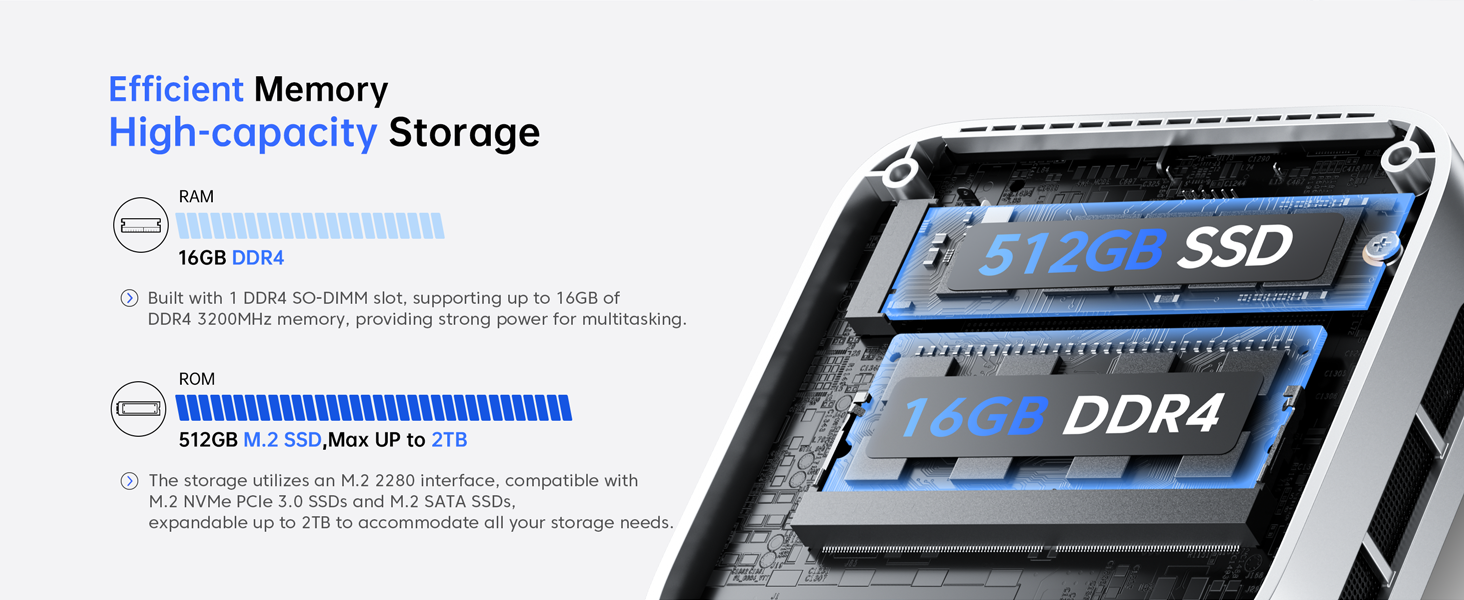
Figure 6.1: Key features of the Vista Mini V1 PC.
| Асаблівасць | Апісанне |
|---|---|
| Працэсар | 12th Gen Intel Alder Lake N97 (4 cores/4 threads, up to 3.6GHz, 6MB cache) |
| АЗП | 16 ГБ DDR4 |
| Захоўванне | 512GB M.2 2280 SSD (Expandable up to 2TB M.2 NVMe/SATA SSD) |
| Графіка | Intel UHD Graphics (24 EUs, 1.20GHz max frequency) |
| Вывад дысплея | HDMI 2.0, DP 1.4 (Supports Dual 4K Displays) |
| Аперацыйная сістэма | Windows 11 Pro (папярэдне ўсталяваная) |
| Сувязь | 1000Mbps Ethernet, Wi-Fi, Bluetooth |
| Парты | 2x USB 3.2, 2x USB 2.0, 3.5mm Audio Jack |
| Памеры | 3.9 х 3.9 х 1.3 цалі |
| Вага | 1.3 фунта |
| Сістэма астуджэння | 2300rpm Silent Fan + Optimized Airflow |
7. Тэхнічнае абслугоўванне
To ensure optimal performance and longevity of your Mini PC, consider the following maintenance tips:
- Трымайце вентыляцыйныя адтуліны чыстымі: Ensure that the ventilation grilles on the sides of the PC are not obstructed to allow for proper airflow and prevent overheating.
- Абнаўленні праграмнага забеспячэння: Regularly check for and install operating system and driver updates to maintain system stability and security.
- Уборка: Use a soft, dry cloth to clean the exterior of the PC. Avoid using liquid cleaners directly on the device.
- Кіраванне сховішчам: Перыядычна пераview and manage your storage to free up space and improve performance. Consider upgrading the SSD if more space is needed.
8. Выпраўленне непаладак
If you encounter issues with your Vista Mini V1 PC, refer to the following common problems and solutions:
- Няма дысплея:
- Ensure the monitor is powered on and the video cables (HDMI/DP) are securely connected to both the PC and the monitor.
- Паспрабуйце іншы відэакабель або манітор, калі такі маецца.
- ПК не ўключаецца:
- Verify that the power adapter is correctly connected to the PC and a working power outlet.
- Праверце працаздольнасць разеткі, падключыўшы да яе іншую прыладу.
- Нізкая прадукцыйнасць:
- Зачыніце непатрэбныя праграмы, якія працуюць у фонавым рэжыме.
- Праверце дыспетчар задач (Ctrl+Shift+Esc) на наяўнасць высокай загрузкі працэсара, памяці або дыска.
- Пераканайцеся, што на SSD-назапашвальніку дастаткова вольнага месца.
- Праблемы з падключэннем да сеткі:
- For Wi-Fi, ensure the Wi-Fi adapter is enabled and you are connected to the correct network with the right password.
- For Ethernet, check the cable connection and ensure your router/modem is working correctly.
- Перазагрузіце маршрутызатар/мадэм і міні-ПК.
9. Гарантыя і падтрымка
Your ACEMAGICIAN Vista Mini V1 PC comes with a 1-year warranty and 2-year quality assurance. For any technical assistance or support, please contact ACEMAGICIAN customer service. 24-hour support is available to address your queries and concerns.
For further assistance, please refer to the contact information provided in the included User Manual or visit the official ACEMAGICIAN webсайт.
Ask a question about this manual
Ask about setup, troubleshooting, compatibility, parts, safety, or missing instructions. Manuals+ will review the question and use this page’s manual context to help answer it.