
1. Уводзіны
This manual provides essential instructions for the installation, operation, and maintenance of your Generic P11 Dual 4K 6MP Outdoor Security Camera. This advanced security camera features dual 4K lenses and a 6MP sensor, delivering clear images for effective surveillance. It includes an integrated police siren for intruder deterrence and offers real-time monitoring via WiFi, accessible through a smartphone application. With infrared LED illumination and night vision capabilities, it ensures 24-hour vigilance. The camera detects suspicious movements and sends instant alerts to your mobile device. Designed for outdoor use, it boasts weather-resistant construction and two antennas for a stable connection. The system also supports two-way audio and high-definition recording. Please read this manual thoroughly before use to ensure proper functionality and safety.
2. Змесціва ўпакоўкі
Праверце наяўнасць усіх прадметаў у камплекце:
- Generic P11 Dual 4K 6MP Outdoor Security Camera
- Адаптар сілкавання
- Мантажныя шрубы і дзюбелі
- Кіраўніцтва карыстальніка (гэты дакумент)
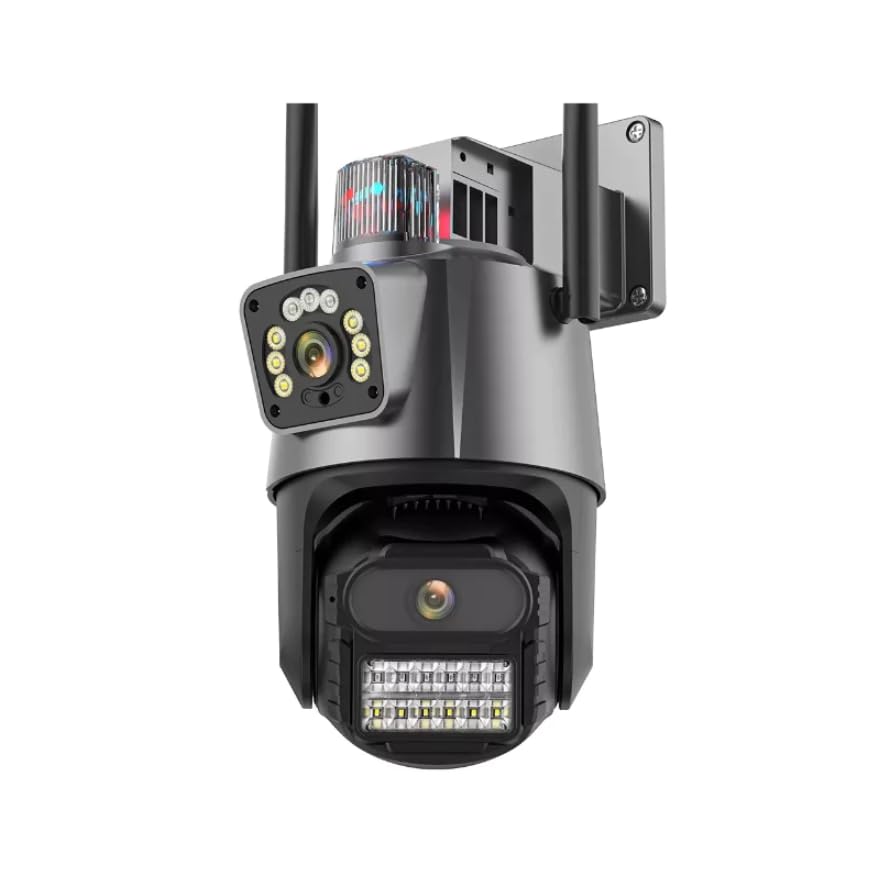
Image: The Generic P11 Dual 4K 6MP Outdoor Security Camera, showing its dual lens design and external antennas.
3. Кіраўніцтва па наладцы
3.1. Першапачатковая падрыхтоўка
- Распакуйце камеру: Акуратна дастаньце ўсе кампаненты з упакоўкі.
- Падключэнне сілкавання: Connect the provided power adapter to the camera and plug it into a power outlet. The camera will initiate its startup sequence.
- Спампаваць прыкладанне: Пошук the recommended security camera application (refer to packaging or quick start guide for app name) on your smartphone's app store (iOS or Android) and install it.
- Стварыць уліковы запіс: Адкрыйце праграму і выконвайце інструкцыі на экране, каб стварыць новы ўліковы запіс карыстальніка.
3.2. Wi-Fi Connection and Pairing
- Дадаць прыладу: У праграме абярыце опцыю, каб дадаць новую прыладу.
- Выберыце тып камеры: Choose the appropriate camera model or type from the list.
- Канфігурацыя сеткі: Follow the app's instructions to connect the camera to your 2.4GHz Wi-Fi network. Ensure your smartphone is connected to the same Wi-Fi network during this process.
- Спалучэнне: The app will guide you through the pairing process, which may involve scanning a QR code on the camera or listening for an audio prompt.
- Назавіце сваю камеру: Assign a name to your camera for easy identification (e.g., "Front Door," "Backyard").
3.3. Фізічная ўстаноўка
- Выберыце месца: Выберыце месца на адкрытым паветры з празрыстым view of the area you wish to monitor, within range of your Wi-Fi signal and a power source. The camera is IP66 rated for outdoor use.
- Мантаж: Use the provided mounting screws and wall plugs to securely attach the camera to a wall or suitable surface. Ensure the camera is mounted at an optimal height for surveillance.
- Наладзіць кут: Адрэгулюйце параметры камеры viewing angle using the app to cover the desired area. The camera offers a 355-degree viewкут нахілу.
4. Інструкцыя па эксплуатацыі
4.1. Маніторынг у рэжыме рэальнага часу
Open the security camera app on your smartphone. Select your camera from the device list to view the live feed. You can pan and tilt the camera remotely within the app to adjust the viewінг вобласці.
4.2. Выяўленне руху і абвесткі
The camera features an advanced motion detection system. When motion is detected, the camera will send instant notifications to your smartphone. You can customize motion detection sensitivity and alert schedules within the app settings.
4.3. Начное бачанне
The camera automatically switches to night vision mode in low-light conditions, utilizing powerful infrared LEDs to provide clear images up to 15 meters. This ensures continuous surveillance day and night.
4.4. Двухбаковая аўдыёсувязь
Use the two-way audio feature in the app to communicate with individuals near the camera. Press the microphone icon to speak and listen through the camera's built-in speaker and microphone.
4.5. Запіс і захоўванне
The camera supports local storage via an SD card (up to 128GB, 32GB installed). Recordings can also be stored on cloud services, if subscribed. Access recorded footagпраз функцыю прайгравання ў дадатку.
4.6. Police Siren
Activate the built-in police siren through the app to deter intruders. This feature emits a high-power sound designed to draw attention and scare off unwanted visitors.
5. Асноўныя магчымасці
- Сістэма падвойных камер: Equipped with two high-resolution 4K and 6MP lenses for detailed day and night monitoring.
- Integrated WiFi Connectivity: Allows real-time remote monitoring via a smartphone application.
- Powerful Alert System: Features a built-in police siren with high-power sound for effective intruder deterrence.
- Пашыранае начное бачанне: Powerful infrared LEDs ensure clear images even in low-light conditions, with a range of 15 meters.
- Разумнае выяўленне руху: An advanced system that provides instant mobile notifications upon detecting movement.
- Двухбаковы аўдыё: Enables communication through the camera via the mobile app.
- Устойлівы да надвор'я дызайн: IP66 international protection rating ensures durability for outdoor installation.
6. Тэхнічнае абслугоўванне
- Уборка: Regularly clean the camera lenses with a soft, dry cloth to ensure optimal image clarity. Do not use harsh chemicals.
- Абнаўленні прашыўкі: Check the app periodically for firmware updates. Keeping the camera's firmware updated ensures optimal performance and security.
- Праверка злучэння: Periodically verify the power and Wi-Fi connections to ensure stable operation.
- Кіраванне SD-картай: If using an SD card, ensure it is functioning correctly and consider formatting it periodically to maintain recording efficiency.
7. Выпраўленне непаладак
| праблема | Магчымая прычына | Рашэнне |
|---|---|---|
| Камера не ўключаецца | Няма блока харчавання; няспраўны адаптар | Праверце падключэнне да электрасеткі; паспрабуйце іншую разетку; пераканайцеся, што адаптар працуе. |
| Немагчыма падключыцца да Wi-Fi | Incorrect Wi-Fi password; camera too far from router; 5GHz network selected | Праверце пароль Wi-Fi; перамясціце камеру бліжэй да маршрутызатара; пераканайцеся, што вы падключаецеся да сеткі 2.4 ГГц. |
| Дрэнная якасць выявы | Dirty lens; insufficient lighting; network bandwidth issues | Clean the lens; ensure adequate lighting for non-night vision mode; check Wi-Fi signal strength. |
| Выяўленне руху не працуе | Settings incorrect; sensitivity too low; object too far | Adjust motion detection settings in the app; increase sensitivity; ensure objects are within detection range. |
| Няма гуку або дрэнная якасць гуку | Microphone/speaker blocked; app volume low; network issues | Ensure microphone/speaker are clear; check app volume settings; verify stable network connection. |
8. Тэхнічныя характарыстыкі
| Асаблівасць | Дэталь |
|---|---|
| Назва мадэлі | P11 |
| Марка | Радавыя |
| Тэхналогія падлучэння | Бесправадная сувязь (Wi-Fi) |
| Асаблівасці | Night Vision, Motion Detection, Two-Way Audio, Police Siren |
| Выкарыстанне ў памяшканні/на вуліцы | Адкрытая пляцоўка |
| Сумяшчальныя прылады | Смартфон |
| Тып кіравання | Мабільнае прыкладанне |
| Тып мацавання | Насценнае мацаванне |
| Колер | Белае і Чорнае |
| Матэрыял | АБС-пластык |
| Узровень воданепранікальнасці | Воданепранікальнасць (IP66) |
| Тып абвесткі | Motion Detection with App Notification |
| Канчатковая рэзалюцыя | 6 MP (Dual 4K Lenses) |
| Дазвол фотадатчыка | 3 МП |
| Дазвол відэазахопу | 2048x1536 |
| Частата кадраў | 30 кадраў у секунду |
| Viewing кут | 355 градусаў |
| Аптычны зум | 4x |
| Тып маштабавання | Digital and Optical |
| Памеры прадмета | 15 х 12 х 15 сантыметраў |
| Вага прадмета | 450 грам |
| Крыніца харчавання | Электраэнергетыка |
| Энергаспажыванне | 5 ват |
| Кадзіроўка відэа | H.264 |
| Фармат захопу відэа | MP4 |
| Дыяпазон начнога бачання | 15 метраў |
| Колькасць ВК-святлодыёдаў | 8 |
| Installed Flash Memory Size | 32 ГБ |
| Тып флэш-памяці | SD-карта |
| Maximum Supported Flash Memory Size | 128 ГБ |
9. Гарантыя і падтрымка
9.1. Інфармацыя аб гарантыі
This product is typically covered by a manufacturer's warranty against defects in materials and workmanship. Specific warranty terms, duration, and conditions may vary by region and retailer. Please refer to the warranty card included with your purchase or contact your point of sale for detailed information. Extended warranty options may also be available from your retailer.
9.2. Падтрымка кліентаў
For technical assistance, troubleshooting not covered in this manual, or warranty claims, please contact the seller or manufacturer's customer support. Have your product model number (P11) and purchase details ready when contacting support.


