
Уводзіны
Дзякуй за пакупкуasing the ROCAM Digital Radio Alarm Clock. This manual provides detailed instructions for setting up, operating, and maintaining your device. Please read this manual thoroughly before use to ensure proper function and longevity of the product.
Інфармацыя па бяспецы
- Ensure the device is connected to a power source with the correct voltage.
- Не падвяргайце прыладу ўздзеянню вады або празмернай вільготнасці.
- Пазбягайце размяшчэння прылады побач з крыніцамі цяпла або пад прамымі сонечнымі прамянямі.
- Не спрабуйце разбіраць або рамантаваць прыладу самастойна. Звярніцеся да кваліфікаванага абслугоўваючага персаналу.
- Захоўваць у месцах, недаступных дзецям.
Прадукт скончаныview
The ROCAM Digital Radio Alarm Clock features a clear display, intuitive controls, and multiple functions including FM radio, Bluetooth speaker, night light, and charging ports.

Фронт view of the ROCAM Digital Radio Alarm Clock, showing the large digital display and speaker grille.
Асноўныя характарыстыкі:
- FM Radio (87.5 MHz - 108.0 MHz) with 20 presets.
- Bluetooth 5.0 speaker with 10m wireless range.
- Adjustable night light.
- USB and Type-C charging ports.
- Large, dimmable LED display (5 brightness levels).
- Dual alarm modes with classic beep or radio sound.
- 12/24 hour format and DST function.
- Battery backup for time and settings during power outagэс.
Настройка
1. Падключэнне сілкавання:
Connect the provided power adapter to the DC input port on the back of the alarm clock and plug it into a wall outlet. The clock requires plug power to operate. The internal battery serves as a backup for settings during power interruptions.
2. Пачатковае ўключэнне:
Once connected, the display will light up. You may need to set the time manually if it's the first use or after a prolonged power disconnection without battery backup.
Інструкцыя па эксплуатацыі
Ўстаноўка часу і даты:
- Націсніце і ўтрымлівайце Усталяваны час button (or similar button, usually indicated by a clock icon). The hour digits will start flashing.
- Павярнуць Time/Volume knob каб наладзіць гадзіну.
- Націсніце Усталяваны час button again to confirm the hour and move to minutes.
- Павярнуць Time/Volume knob каб скарэктаваць хвіліны.
- Націсніце Усталяваны час button once more to save the time.
- Каб пераключыцца паміж 12-гадзінным і 24-гадзінным фарматам, націсніце кнопку 12/24 гадзіны кнопка.
Налада будзільнікаў:
Гадзіннік падтрымлівае два незалежныя будзільнікі.
- Націсніце і ўтрымлівайце Трывога 1 or Трывога 2 кнопка. Лічбы гадзін будзільніка будуць міргаць.
- Павярнуць Time/Volume knob каб усталяваць патрэбную гадзіну будзільніка.
- Націсніце адпаведную Сігналізацыя button again to confirm the hour and move to minutes.
- Павярнуць Time/Volume knob каб усталяваць патрэбныя хвіліны будзільніка.
- Націсніце Сігналізацыя button again to select the alarm sound: classic beep or FM radio.
- Націсніце Сігналізацыя button one last time to save the alarm setting.
- Каб уключыць/выключыць будзільнік, коратка націсніце адпаведную кнопку Сігналізацыя кнопка. На дысплеі з'явіцца/знікне значок сігналу трывогі.
The alarm clock display showing the time and an active alarm icon, indicating the alarm function is set.
Функцыя затрымкі:
Калі гучыць будзільнік, націсніце кнопку Адкласці/запальваць button to temporarily silence the alarm for a few minutes (default snooze time). The alarm will sound again after the snooze period.
Праца FM-радыё:
- Націсніце Рэжым кнопку, каб пераключыцца ў рэжым FM-радыё.
- To perform an automatic scan for stations, press and hold the сканаваць button. The radio will search for and save up to 20 available stations (87.5 MHz to 108.0 MHz).
- To manually tune, short press the Папярэдняя/Наступная кнопкі для рэгулявання частаты.
- Павярнуць Time/Volume knob to adjust the radio volume (16 levels).

The alarm clock display showing an FM radio frequency, indicating it is in radio mode.
Спалучэнне праз Bluetooth:
- Націсніце Рэжым button to switch to Bluetooth mode. The display will show a Bluetooth icon, usually flashing to indicate pairing mode.
- On your mobile device or computer, enable Bluetooth and search for "ROCAM Alarm Clock" (or similar device name).
- Select the device to pair. Once connected, the Bluetooth icon on the clock's display will stop flashing.
- You can now stream audio from your device to the alarm clock.
- Павярнуць Time/Volume knob to adjust the playback volume.

Унутраны view of the ROCAM alarm clock highlighting its Bluetooth 5.0 capabilities and speaker components, demonstrating its audio features.
Функцыя начнога святла:
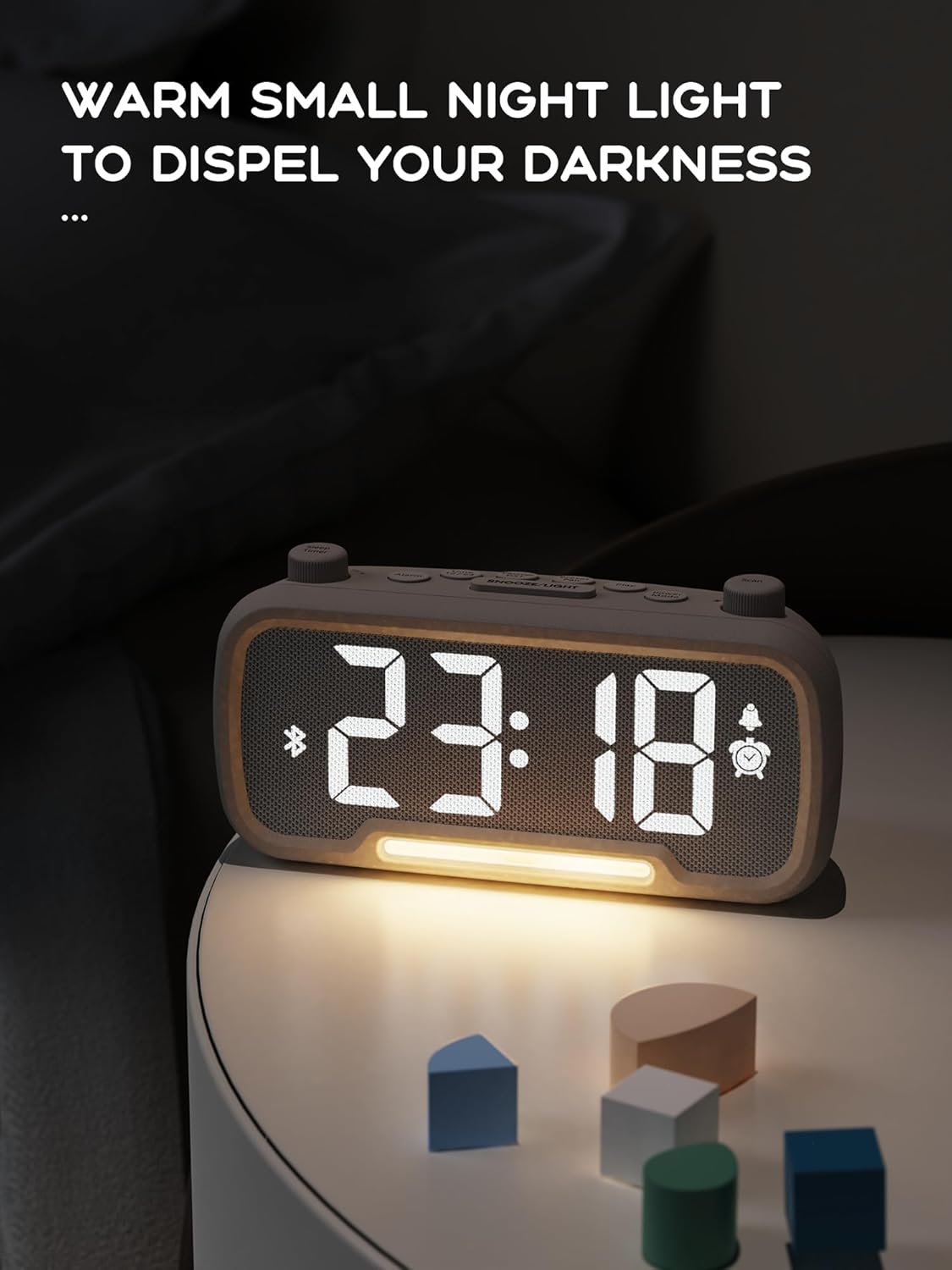
The alarm clock features an integrated night light.
- Кароткае націсканне Адкласці/запальваць кнопка, каб уключыць або выключыць начное святло.
- The night light has adjustable brightness levels. Press and hold the Адкласці/запальваць button to cycle through the brightness options.

The ROCAM alarm clock on a bedside table, with its warm night light illuminated, providing ambient lighting.
Рэгуляванне яркасці дысплея:
The main display has 5 adjustable brightness levels.
- Націсніце Яркасць button (or similar, often combined with Snooze/Light) to cycle through the display brightness levels.
- Выберыце ўзровень, які найбольш камфортны для вашага асяроддзя.
Daylight Saving Time (DST) Function:
Каб наладзіць пераход на летні час:
- Кароткае націсканне летні час button (or similar, often indicated by a sun icon). The time will automatically adjust forward or backward by one hour.
- Press it again to revert the change.
Парты зарадкі USB і Type-C:
The alarm clock includes USB and Type-C ports for charging external devices.
- Connect your device's charging cable to the appropriate USB or Type-C port on the back of the alarm clock.
- Ensure the alarm clock is powered on for the charging ports to function.
Тэхнічнае абслугоўванне
- Працірайце прыладу мяккай сухой тканінай. Не выкарыстоўвайце вадкія ачышчальнікі або абразіўныя матэрыялы.
- Keep the device free from dust and debris to ensure proper ventilation.
- Калі прылада не будзе выкарыстоўвацца працяглы час, адключыце яе ад разеткі.
Ліквідацыю непаладак
| праблема | Магчымая прычына | Рашэнне |
|---|---|---|
| Адлюстраванне гадзінніка выключана. | Няма электрычнасці, электрычнасць адключанаtage, or device is off. | Check power connection. Ensure the power adapter is securely plugged in. If there was a power outage, the battery backup should maintain settings, but the display requires main power. |
| Сігналізацыя не гучыць. | Alarm is not activated, volume is too low, or incorrect time set. | Ensure the alarm icon is visible on the display. Increase alarm volume. Verify alarm time is set correctly. |
| Прыём FM-радыё дрэнны. | Слабы сігнал, не выцягнутая антэна або ёсць перашкоды. | Adjust the position of the device. Extend the FM antenna fully. Try auto-scanning for stations again. Avoid placing near other electronic devices. |
| Прылада Bluetooth не можа быць спалучана. | Clock not in Bluetooth mode, device too far, or already paired with another device. | Ensure the clock is in Bluetooth mode (flashing icon). Move your device closer to the clock. Disconnect from other Bluetooth devices. |
| Зарадка праз USB/Type-C не працуе. | Clock not powered, cable faulty, or device not compatible. | Ensure the alarm clock is plugged into a wall outlet. Try a different charging cable. Verify your device is compatible with standard USB charging. |
Тэхнічныя характарыстыкі
| Асаблівасць | Дэталь |
|---|---|
| Марка | РОКАМ |
| мадэль | B0FNWB172Z |
| Колер | Шэры |
| Памеры | 16.8 х 3.81 х 8.4 см (6.6 х 1.5 х 3.3 цалі) |
| Вага | 350 г (0.77 фунта) |
| Крыніца харчавання | Правадная электрычная |
| акумулятар | 1 Lithium-metal battery (included, for backup) |
| Дыяпазон частот FM | 87.5 МГц - 108.0 МГц |
| Версія Bluetooth | 5.0 |
| Яркасць дысплея | 5 ўзроўню рэгуляваных |
| Узроўні гучнасці | 16 ўзроўню рэгуляваных |
Гарантыя і падтрымка
For warranty information or technical support, please refer to the contact details provided with your purchase or visit the official ROCAM webсайт. Захоўвайце пацвярджэнне пакупкі для прэтэнзій па гарантыі.