
Metapen Air8 Pro X (ME-APP172)
Metapen Pencil Air8 Pro X User Manual
Model: Air8 Pro X (ME-APP172)
Brand: Metapen
1. Уводзіны
The Metapen Pencil Air8 Pro X is a digital stylus designed for a seamless and quiet writing experience on compatible iPad models. Inspired by classic pencil design, it combines a lightweight form factor with advanced technology, including a unique Air-Flex tip and fast charging capabilities. This manual provides detailed instructions for setup, operation, maintenance, and troubleshooting to ensure optimal use of your device.

Image 1.1: Metapen Pencil Air8 Pro X with two spare tips.
2. Сумяшчальнасць
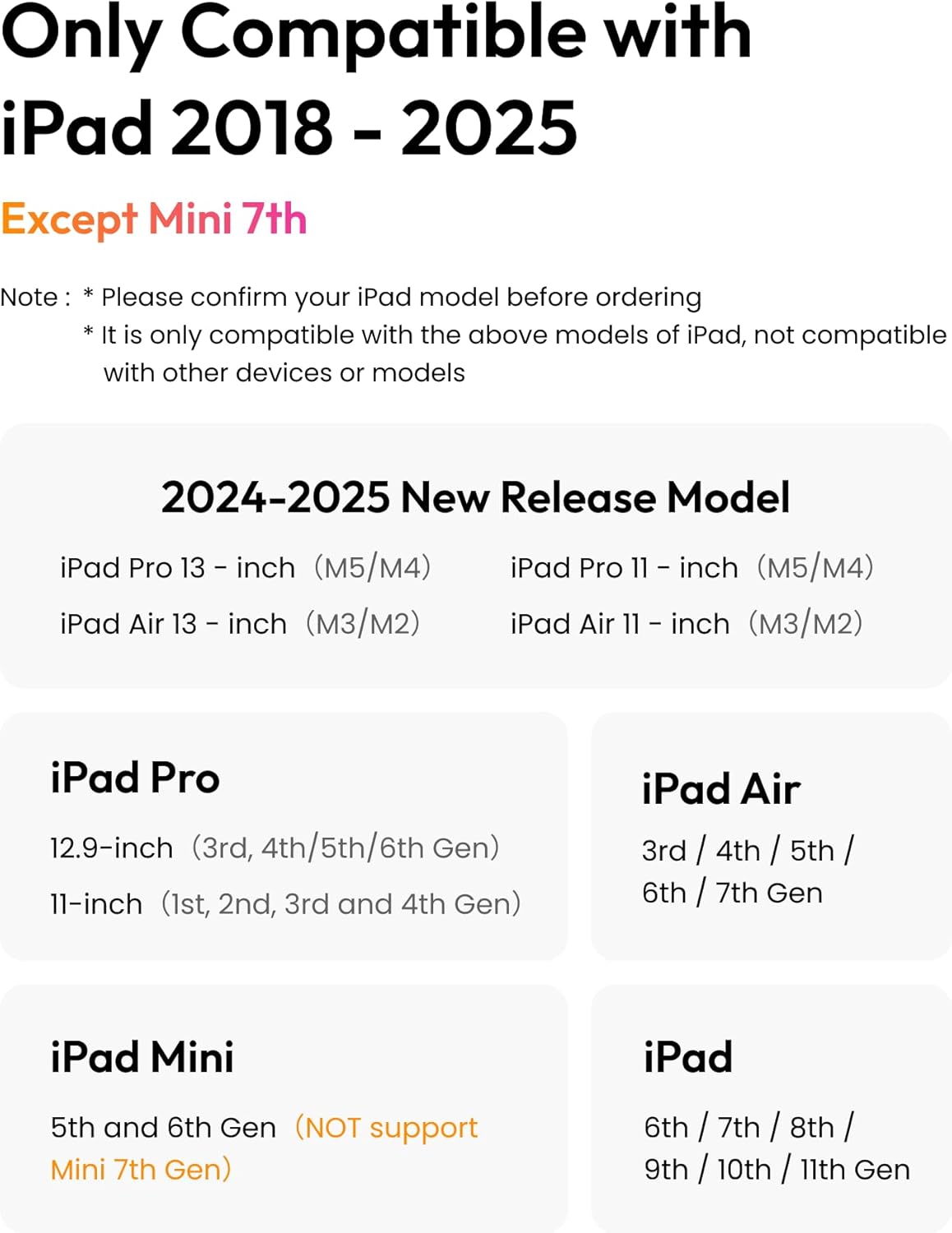
The Metapen Pencil Air8 Pro X is compatible with specific iPad models released between 2018 and 2025. Please verify your iPad model before use. It is not compatible with other devices or models, including the iPad Mini 7th Gen.
Supported iPad Models:
- iPad Pro: 12.9-inch (3rd, 4th, 5th, 6th Gen), 11-inch (1st, 2nd, 3rd, 4th Gen), 13-inch (M5/M4), 11-inch (M5/M4)
- iPad Air: 3rd, 4th, 5th, 6th, 7th Gen, 13-inch (M3/M2), 11-inch (M3/M2)
- iPad: 6th, 7th, 8th, 9th, 10th, 11th Gen
- iPad Mini: 5th, 6th Gen
Заўвага: The Air8 Pro X does not support magnetic attachment.

Image 2.1: Detailed compatibility chart for iPad models.

Image 2.2: Instructions on how to locate your iPad's model name in settings.
3. Змесціва ўпакоўкі
Upon opening your Metapen Pencil Air8 Pro X package, you should find the following items:
- Metapen Pencil Air8 Pro X Stylus
- 3 x Air-Flex Replacement Tips (one pre-installed, two spares)
- Зарадны кабель USB-C - C
- Adhesive Pen Holder
Малюнак 3.1: У разабраным выглядзе view of the Metapen Pencil Air8 Pro X showing its components and included accessories.
4. Настройка
4.1 Уключэнне/выключэнне
To power on the Metapen Pencil Air8 Pro X, simply click the top button once. To power off, long press the top button for 3 seconds. The pen will automatically shut off after 5 minutes of inactivity to conserve battery life.
4.2 Пачатковае падключэнне
No Bluetooth connection is required for the Metapen Pencil Air8 Pro X. Simply turn it on, and it is ready for immediate use with your compatible iPad.
Video 4.1: Demonstrates the instant-on feature and smooth writing capabilities of the Metapen Air8 Pro X.
5. Інструкцыя па эксплуатацыі
5.1 Writing Experience
The Metapen Pencil Air8 Pro X features an Air-Flex soft tip designed to provide a paper-like feel with gentle resistance on the iPad screen. This allows for smooth, precise, and natural strokes without lag or skipping. The tip is also ultra-quiet, operating at approximately 25 dB, ensuring minimal disturbance to others.
The stylus supports palm rejection, allowing you to rest your hand comfortably on the iPad screen while writing or drawing without interfering with the input. This feature enhances the natural writing experience.
Заўвага: The Metapen Pencil Air8 Pro X does not support tilt or pressure sensitivity.
Video 5.1: Highlights the quiet writing experience and the internal structure of the Air-Flex tip, demonstrating smooth and precise input.

Image 5.1: Visual representation of the pen's smooth, precise, and natural writing capabilities, highlighting no lag, continuous lines, and no slip.

Image 5.2: Depicts the Metapen Pencil Air8 Pro X being used in a quiet environment, emphasizing its low noise output.
5.2 LED Power Display
The stylus features a three-color LED indicator to show the power status:
- Зялёны: 60-100% батарэі
- Сіні: 20-60% батарэі
- Чырвоны: Менш за 20% батарэі
6. Зарадка і акумулятар
The Metapen Pencil Air8 Pro X offers extended battery life and fast charging capabilities.
- Час поўнай зарадкі: Прыкладна 45 хвілін
- Full Charge Usage: Да 26 гадзін
- Хуткая зарадка: A 5-minute charge provides approximately 4 hours of use.
The stylus charges via a USB-C to C cable. Connect the provided cable to the USB-C port on the pen and a compatible power source.

Image 6.1: Illustration of the Metapen Pencil Air8 Pro X's 26-hour battery life and USB-C charging interface.

Image 6.2: Visual guide to charging the Metapen Pencil Air8 Pro X, emphasizing ease and reliability.
7. Air-Flex Tip Technology
The Metapen Pencil Air8 Pro X features the world's first Air-Flex soft tip with micro air chambers. This innovative design provides a unique writing experience:
- Paper-like Feel: Offers gentle resistance on the iPad screen, mimicking the sensation of writing on paper.
- Ультраціхі: Stays as quiet as 25 dB, significantly quieter than traditional hard tips (55 dB), preventing distractions.
- Smooth & Scratch-Free: Glides smoothly across the screen without causing scratches.

Малюнак 7.1: Крупны план view of the Air-Flex tip, highlighting its micro-shock absorption for a true pencil feel.
Image 7.2: Internal diagram illustrating the micro-porous elastic core of the Air-Flex tip, responsible for its unique writing properties.
8. Тэхнічнае абслугоўванне
8.1 Replacing the Air-Flex Tip
The Metapen Pencil Air8 Pro X comes with three Air-Flex tips (one pre-installed and two spares) for long-lasting use. If the tip shows signs of wear or damage, it can be easily replaced.
- Gently twist the old tip counter-clockwise to remove it.
- Align a new tip with the pen's barrel and twist clockwise until securely fastened.

Image 8.1: Visual guide for swapping the Air-Flex tips, showing the twist-off and twist-on process.
8.2 Ачыстка
To clean your stylus, gently wipe the body with a soft, dry, lint-free cloth. Avoid using harsh chemicals or abrasive materials, as these may damage the finish or internal components.
9. Выпраўленне непаладак
If you encounter issues with your Metapen Pencil Air8 Pro X, please refer to the following common solutions:
| праблема | Рашэнне |
|---|---|
| Пяро не ўключаецца. | Ensure the pen is charged. Connect it to a USB-C power source using the provided cable. Click the top button once to power on. |
| Pen is not writing on iPad. | Verify your iPad model is compatible (refer to Section 2). Ensure the pen is powered on. Check if the tip is securely attached and not worn out. Restart your iPad. |
| Ручка нечакана выключаецца. | The pen has an auto shut-off feature after 5 minutes of inactivity. If it turns off during use, check the battery level using the LED indicator and recharge if necessary. |
| Writing feels rough or inconsistent. | Inspect the Air-Flex tip for wear or damage. Replace the tip if necessary (refer to Section 8.1). Ensure your iPad screen is clean. |
| Palm rejection is not working. | Ensure your iPad's software is up to date. Some applications may have specific settings for stylus input; check the app's preferences. |
If the issue persists after trying these solutions, please contact Metapen customer support for further assistance.
10. Тэхнічныя характарыстыкі
| Асаблівасць | Дэталь |
|---|---|
| Нумар мадэлі | ME-APP172 |
| Памеры прадукту | 6.54 х 0.39 х 0.39 цалі |
| Вага прадмета | 2.11 унцыі |
| Тып батарэі | 1 батарэя CR5 (у камплекце) |
| Сярэдні тэрмін службы батарэі (у рэжыме чакання) | 26 гадзін |
| Порт для зарадкі | USB-C |
| Матэрыял | Пластыкавыя |
| Колер | Аранжавы |
| Minimum Required Operating System | iPadOS 13 |
| Асаблівасці | Ultra-Quiet Air-Flex Tip, 2X Fast Charging, Palm Rejection, LED Power Display, Auto Shut-off |
| Сумяшчальнасць | iPad models 2018-2025 (excluding Mini 7th Gen) |
11. Гарантыя і падтрымка
Metapen is committed to providing high-quality products and excellent customer service. Your Metapen Pencil Air8 Pro X comes with a 12-month troubleshooting period.
Падтрымка кліентаў:
For any questions, technical assistance, or warranty claims, please contact Metapen Official customer support. We offer 24-hour support to address your needs promptly.
- Інтэрнэт-падтрымка: Visit the official Metapen website or contact through your purchase platform.
- Падтрымка па электроннай пошце: Refer to your product packaging or the Metapen webсайт для кантактнай электроннай пошты.

Выява 11.1: Канецview of Metapen's customer support, including 12 months troubleshooting and 24-hour support.
Звязаныя дакументы - Air8 Pro X (ME-APP172)
 |
Metapen Pencil Air 8 Pro X User Manual - Digital Stylus Pen Guide Comprehensive user manual for the Metapen Pencil Air 8 Pro X digital stylus pen, covering setup, usage, troubleshooting, compatibility, and safety information. |
 |
Metapen Air8 Pro X Stylus User Manual and Specifications Comprehensive user manual for the Metapen Air8 Pro X stylus, detailing features, setup, charging, troubleshooting, and compatibility for iPad devices. Includes FCC compliance information. |
 |
Стылус Porodo Smart для iPad (мадэлі 2018-2025 гг.) - кіраўніцтва карыстальніка і характарыстыкі Падрабязная інструкцыя карыстальніка і характарыстыкі стылуса Porodo Smart Stylus Pen, сумяшчальнага з мадэлямі iPad з 2018 па 2025 год. Даведайцеся пра зарадку, выкарыстанне, сумяшчальнасць і ліквідацыю непаладак. |
 |
K11K-1-D-US Stylus User Manual User manual for the K11K-1-D-US stylus, detailing its features, compatibility with various iPad models, usage instructions, maintenance, specifications, and package contents. |
 |
Porodo Smart Stylus Pen for iPad (PDSPP7C) - User Guide and Specifications Detailed user guide and specifications for the Porodo Smart Stylus Pen (PDSPP7C), compatible with iPad models from 2018-2025. Learn about charging, usage, replacement tips, and precautions. |
 |
Стылус S-Pen для iPad: кіраўніцтва карыстальніка, функцыі і сумяшчальнасць Падрабязнае кіраўніцтва карыстальніка для стылуса S-Pen з падрабязным апісаннем такіх функцый, як адхіленне далоні і датчык вугла нахілу, сумяшчальнасць з мадэлямі iPad 2018–2022 гадоў, зарадка і абслугоўванне. У камплекце мадэль ZYKPGB-1-US. |
Ask a question about this manual
Ask about setup, troubleshooting, compatibility, parts, safety, or missing instructions. Manuals+ will review the question and use this page’s manual context to help answer it.