
1. Уводзіны
This manual provides comprehensive instructions for the Cleyver T57W IP Phone and the Cleyver ODHW25V2 DECT Headset System. This professional VoIP package is designed to enhance communication efficiency in business environments.
Сістэма ўключае ў сябе:
- Cleyver T57W IP Phone: A Voice over IP (VoIP) phone featuring a 7-inch color touchscreen, Wi-Fi, and Bluetooth connectivity.
- Cleyver ODHW25V2 DECT Duo Headset: A wireless DECT headset with dual earcups and noise cancellation for clear audio.
- Electronic Hook Switch (EHS) Module: Enables remote call control directly from the headset.

Figure 1.1: Cleyver T57W IP Phone, ODHW25V2 DECT Headset, and connecting cables.
2. Змесціва ўпакоўкі
Before proceeding with installation, verify that all items are present in the package:
- Cleyver T57W IP Phone
- Тэлефон і шнур тэлефона
- Кабель Ethernet
- Power Adapter for IP Phone
- Cleyver ODHW25V2 DECT Duo Headset
- DECT Headset Base Station
- Power Adapter for Headset Base Station
- EHS Module and Connecting Cables
- Кароткае кіраўніцтва карыстальніка (калі ўключана)
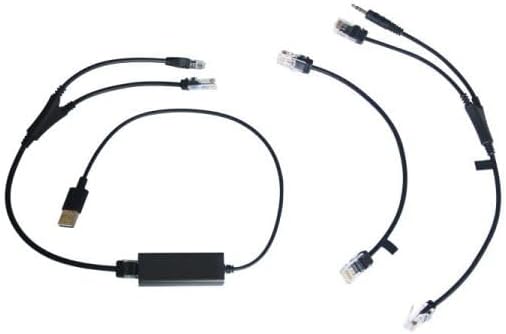
Figure 2.1: Included connecting cables for the IP phone and headset system.
3. Настройка
3.1. Cleyver T57W IP Phone Setup
- Падключыце тэлефон: Plug one end of the coiled handset cord into the handset port on the IP phone and the other end into the handset.
- Падключэнне да сеткі: Connect one end of the Ethernet cable to the Internet port on the IP phone and the other end to your network router or switch.
- Падключыце харчаванне: Plug the power adapter into the power port on the IP phone and then into an electrical outlet. The phone will power on automatically.
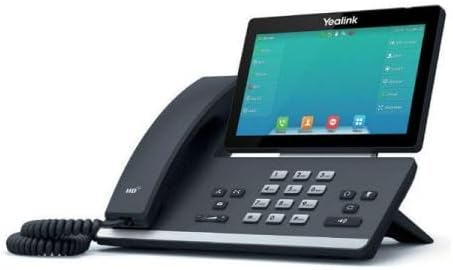
Малюнак 3.1: бок view of the Cleyver T57W IP Phone, illustrating port locations for connections.
3.2. Cleyver ODHW25V2 DECT Headset Setup
- Connect Headset Base Power: Plug the power adapter into the power port on the DECT headset base station and then into an electrical outlet.
- Connect to IP Phone (EHS): Use the provided EHS module and cables to connect the headset base station to the appropriate ports on the Cleyver T57W IP Phone. Refer to the EHS module's specific instructions for detailed connection steps, as ports may vary.
- Place Headset on Base: Place the ODHW25V2 headset onto the charging cradle of the base station. Ensure it is seated correctly for charging.
- Спалучэнне (пры неабходнасці): The headset and base station are usually pre-paired. If pairing is required, follow the instructions in the headset's specific manual.
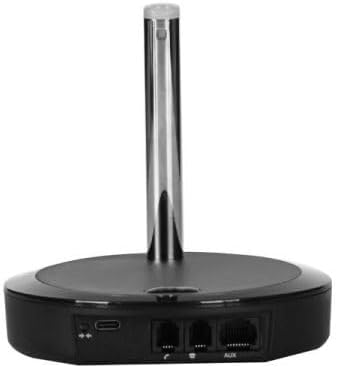
Малюнак 3.2: Задняя частка view of the DECT headset base station, showing power and connection ports.
3.3. Пачатковая канфігурацыя
Upon first power-up, the T57W IP Phone will guide you through initial setup steps on its 7-inch touchscreen. This typically includes:
- Налады сеткі: Configure IP address (DHCP or Static), DNS.
- Рэгістрацыя SIP-акаўнта: Enter your SIP server address, username, password, and other credentials provided by your VoIP service provider.
- Дата і час: Set the correct date and time or configure NTP server.
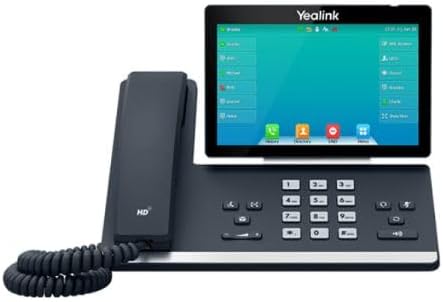
Малюнак 3.3: Спераду view of the Cleyver T57W IP Phone, highlighting the 7-inch color touchscreen.
4. Інструкцыя па эксплуатацыі
4.1. T57W IP Phone Basic Operations
- Здзяйсненне званка: Lift the handset or press the Speaker button, then dial the number and press the Dial/Send key. Alternatively, use the touchscreen to select a contact.
- Адказ на званок: Lift the handset, press the Speaker button, or press the Answer soft key on the touchscreen.
- Завяршэнне выкліку: Replace the handset or press the End Call soft key.
- Трымайце: During a call, press the Hold soft key.
- Перадача: During a call, press the Transfer soft key and follow the on-screen prompts.
- Канферэнцыя: During a call, press the Conference soft key and follow the on-screen prompts to add participants.
- Рэгуляванне гучнасці: Use the volume keys on the phone to adjust handset, speaker, or ringer volume.
4.2. ODHW25V2 DECT Headset Usage
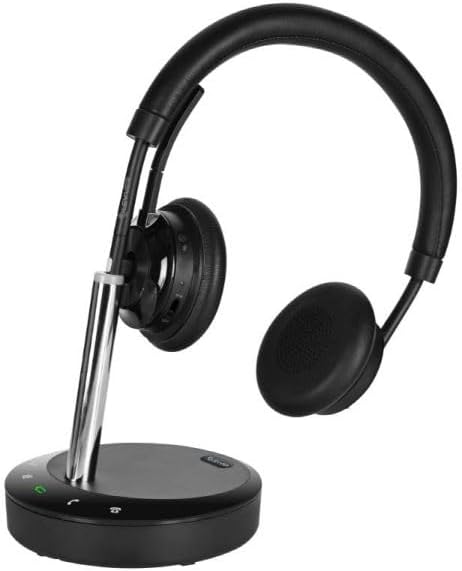
Figure 4.1: Cleyver ODHW25V2 DECT Headset on its charging base, ready for use.
- Нашэнне гарнітуры: Adjust the headband and microphone boom for a comfortable fit. The dual earcups provide passive noise isolation.
- Answering/Ending Calls (EHS): When connected via EHS, you can answer or end calls by pressing the call control button on the headset.
- Рэгулятар гучнасці: Use the volume buttons on the headset to adjust listening volume.
- Адключэнне гуку: Press the mute button on the headset to mute your microphone during a call.
- Зарадка: Always return the headset to its base station when not in use to ensure it remains charged.

Малюнак 4.2: Выпample of a user operating the Cleyver T57W IP Phone and headset for business communication.
5. Тэхнічнае абслугоўванне
5.1. Уборка
- Use a soft, dry, anti-static cloth to clean the phone's surface and touchscreen.
- For the headset, gently wipe earcups and headband with a slightly damp тканінай. Пазбягайце празмернай вільгаці.
- Не выкарыстоўвайце агрэсіўныя хімікаты, ачышчальныя растваральнікі або абразіўныя ачышчальнікі.
5.2. Абнаўленне праграмнага забеспячэння
Periodically check for firmware updates for your Cleyver T57W IP Phone through the phone's web interface or system settings. Updates can provide new features, performance improvements, and security enhancements. Consult your IT administrator or VoIP service provider for guidance on applying updates.
5.3. Headset Battery Care
- Always return the headset to its charging base when not in use to maintain optimal battery life.
- Пазбягайце частай поўнай разрадкі акумулятара.
- Store the headset in a cool, dry place if not used for extended periods.
6. Выпраўленне непаладак
If you encounter issues with your Cleyver T57W IP Phone and ODHW25V2 DECT Headset System, refer to the following common problems and solutions:
| праблема | Магчымая прычына | Рашэнне |
|---|---|---|
| Тэлефон не ўключаецца | Адаптар харчавання не падключаны або няспраўны. | Ensure the power adapter is securely connected to the phone and a working electrical outlet. Try a different outlet. |
| Няма гудка / Немагчыма рабіць званкі | Network connection issue; SIP account not registered. | Check Ethernet cable connection. Verify network status on the phone's screen. Ensure SIP account details are correctly entered and registered. Contact your VoIP provider if registration fails. |
| Headset not connecting or poor audio | Headset out of range; low battery; EHS module issue. | Ensure headset is within range of the base station. Place headset on base to charge. Verify EHS module connections and configuration. Re-pair headset if necessary. |
| Сэнсарны экран не рэагуе | Часовы збой праграмнага забеспячэння. | Restart the IP phone by unplugging and re-plugging the power adapter. |
7. Тэхнічныя характарыстыкі
Key technical specifications for the Cleyver T57W IP Phone and ODHW25V2 DECT Headset System:
| Асаблівасць | Дэталь |
|---|---|
| Марка | Cleyver |
| Нумар мадэлі | YEALINKT57WHW20V2 |
| IP Phone Display | 7-цалевы каляровы сэнсарны экран |
| Connectivity (IP Phone) | SIP-VoIP, Built-in Wi-Fi, Bluetooth |
| Тып гарнітуры | DECT Duo, Wireless, Noise Cancellation |
| Кіраванне званкамі | Electronic Hook Switch (EHS) support |
| Крыніца харчавання | Wired (Power Adapters included) |
| Матэрыял | Пластык, метал |
| Памеры прадукту | 30 x 22 x 23.5 см (Д x Ш x У) |
| Вага прадмета | 1.2 кг |
| Сумяшчальныя прылады | DECT phone systems, VoIP SIP phones |
8. Гарантыя і падтрымка
8.1. Інфармацыя аб гарантыі
The Cleyver T57W IP Phone and ODHW25V2 DECT Headset System comes with a двухгадовая гарантыя з даты пакупкі. Гэтая гарантыя распаўсюджваецца на вытворчыя дэфекты і няспраўнасці пры нармальным выкарыстанні. Калі ласка, захавайце пацвярджэнне пакупкі для прэтэнзій па гарантыі.
8.2. Падтрымка кліентаў
For technical assistance, troubleshooting beyond this manual, or warranty inquiries, please contact your vendor or Cleyver customer support. Refer to the contact information provided with your purchase documentation or visit the official Cleyver webсайт для рэсурсаў падтрымкі.