
1. Уводзіны
This manual provides essential information for the safe and efficient operation of your Thomson 43UF4S35 43-inch 4K UHD Smart LED TV with Fire TV. Please read this manual thoroughly before using your television and retain it for future reference. This television combines a stunning 4K UHD display with the intuitive Fire TV operating system, offering integrated Alexa voice control, Apple AirPlay support, and comprehensive connectivity options for a complete entertainment experience.
2. Інфармацыя па бяспецы
Выконвайце наступныя меры бяспекі, каб пазбегнуць пажару, паражэння электрычным токам або траўмаў:
- Не падвяргайце тэлевізар уздзеянню дажджу або вільгаці.
- Забяспечце належную вентыляцыю; не блакуйце вентыляцыйныя адтуліны.
- Не стаўце тэлевізар на няўстойлівыя каляскі, падстаўкі, штатывы, кранштэйны або стол.
- Абараніце сеткавы шнур ад наступання або заціскання.
- Адключайце тэлевізар ад сеткі падчас навальніцы або калі ён не выкарыстоўваецца працяглы час.
- Звяртайцеся да кваліфікаванага абслугоўваючага персаналу.
3. Змесціва ўпакоўкі
Праверце наяўнасць усіх прадметаў ва ўпакоўцы:
- Thomson 43UF4S35 43-inch 4K UHD Smart LED TV
- Адаптар сілкавання
- Сілавы кабель
- Пульт дыстанцыйнага кіравання (з батарэйкамі)
- Тумба пад тэлевізар (2 штукі)
- Кіраўніцтва карыстальніка (гэты дакумент)
4. Фізічны канецview
4.1. Памеры

выява: Фронт view of the Thomson 43UF4S35 TV with key dimensions labeled in centimeters. The TV measures 97 cm in width, 60 cm in total height with the stand, and has a screen height of 56 cm. The TV's depth is 9 cm, and the stand's depth is 27 cm.

выява: Бокавы профіfile of the Thomson 43UF4S35 TV, illustrating its slim design and the attached stand.
4.2. Злучэнне задняй панэлі

выява: Падрабязны view of the rear connection panel of the Thomson 43UF4S35 TV. Ports are clearly labeled for Audio Out, CI+ slot, Headphone jack, three HDMI 2.1 inputs, LAN (Ethernet) port, Satellite input, Antenna input, and two USB 2.0 ports.
- АЎДЫЯ: Для падлучэння знешніх аўдыёсістэм.
- CI+: Common Interface Plus slot for conditional access modules (CAM) to decrypt pay-TV channels.
- НАВУШНІКІ: Раз'ём 3.5 мм для падлучэння навушнікаў.
- 3x HDMI 2.1: Уваходы мультымедыйнага інтэрфейсу высокай выразнасці для падключэння такіх прылад, як прайгравальнікі Blu-ray, гульнявыя прыстаўкі або тэлевізійныя прыстаўкі.
- LAN: Порт Ethernet для падлучэння да правадной сеткі.
- СПАДУТНІК: Input for satellite dish connection (DVB-S2).
- антэнамі: Input for terrestrial antenna connection (DVB-T2) or cable TV (DVB-C).
- 2x USB 2.0: Universal Serial Bus ports for connecting USB storage devices for media playback or software updates.
5. Настройка
5.1. Мантаж стэнда
- Асцярожна пакладзеце тэлевізар экранам уніз на мяккую, роўную паверхню, каб пазбегнуць пашкоджання экрана.
- Attach the two stand pieces to the designated slots on the bottom of the TV using the provided screws. Ensure they are securely fastened.
- Падніміце тэлевізар вертыкальна і пастаўце яго на ўстойлівую, роўную паверхню.
5.2. Падключэнне сілкавання
Connect the power adapter to the TV's power input, then plug the power cable into a wall outlet. The TV will enter standby mode.
5.3. Initial Setup (Fire TV)
- Націсніце кнопку харчавання на пульце дыстанцыйнага кіравання, каб уключыць тэлевізар.
- Выконвайце інструкцыі на экране, каб выбраць мову, падключыцца да сеткі Wi-Fi і ўвайсці ў свой уліковы запіс Amazon.
- The Fire TV interface will guide you through setting up live TV channels (via the Triple Tuner) and installing your favorite streaming applications.
- Стварыце карыстальніка profiles for personalized recommendations and settings.
6. Кіраванне тэлевізарам
6.1. Пульт дыстанцыйнага кіравання

выява: The Bluetooth remote control for the Thomson 43UF4S35 TV, featuring a central navigation pad, number buttons, and dedicated quick access buttons for popular streaming services like Netflix, Prime Video, Amazon Music, and an Alexa voice control button.
The included Bluetooth remote control allows for easy navigation. It features dedicated buttons for quick access to popular streaming services such as Netflix, Prime Video, and Amazon Music. The central navigation pad is used for menu selection and browsing.
6.2. Інтэрфейс пажарнага тэлебачання

выява: A visual representation of the Fire TV home screen, displaying a selection of streaming applications and options for multiple user profiles, indicating the personalized nature of the interface.
The Fire TV operating system provides a user-friendly interface for accessing streaming services, live TV, and apps. Navigate using the remote control to browse content, launch applications, and manage settings. User profiles can be created to tailor recommendations and settings for different household members.
6.3. Галасавое кіраванне Alexa
Press the Alexa button on your remote control and speak your commands. You can ask Alexa to:
- Пошук фільмы ці тэлеперадачы.
- Запуск прыкладанняў.
- Кіруйце прыладамі разумнага дома.
- Check the weather or get information.
6.4. Apple AirPlay
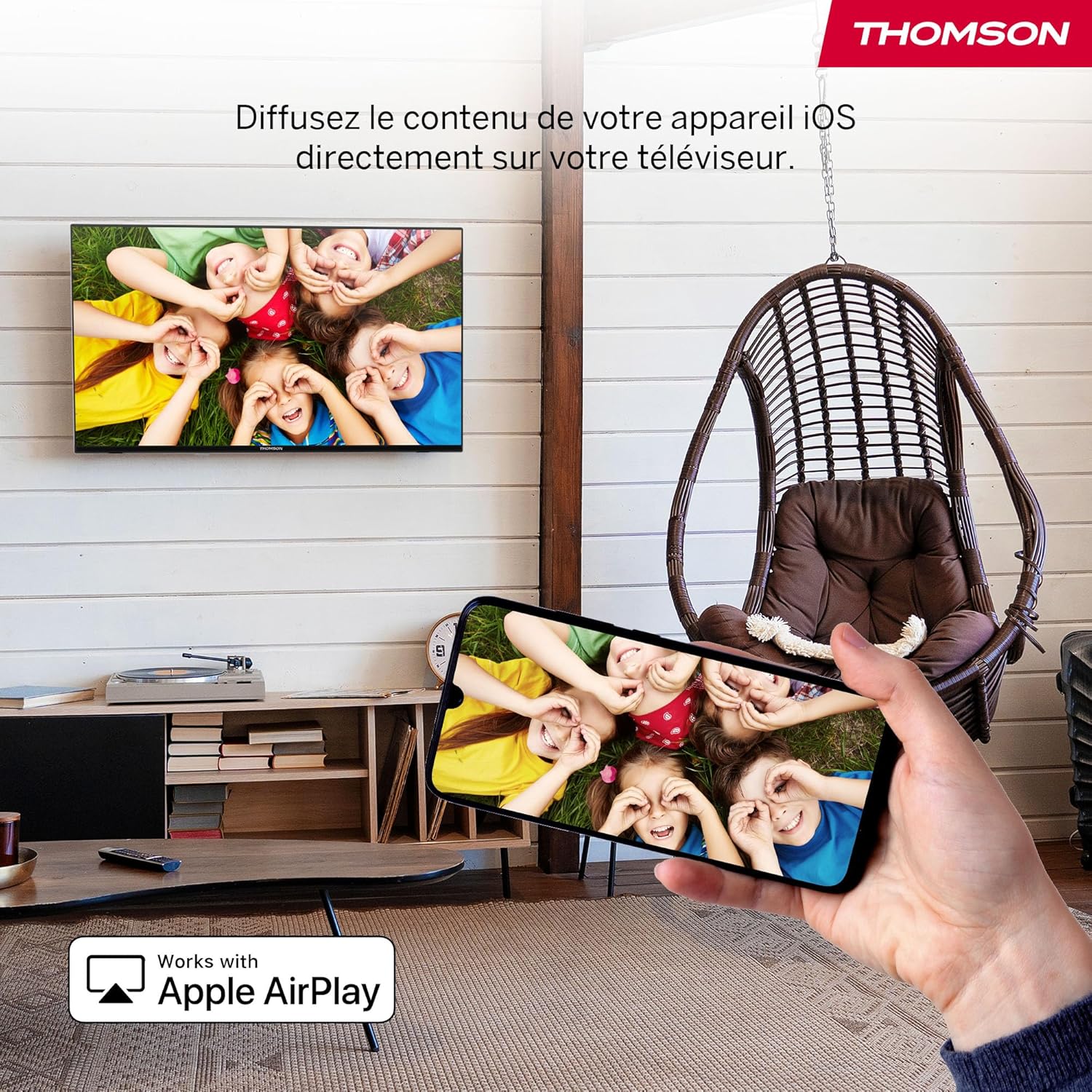
выява: An illustration of Apple AirPlay in use, showing content from an iPhone being wirelessly streamed or mirrored to the Thomson TV, enabling seamless content sharing from iOS devices.
The TV supports Apple AirPlay, allowing you to stream content directly from your iPhone, iPad, or Mac. Ensure your Apple device and the TV are connected to the same Wi-Fi network. Select the AirPlay icon on your Apple device and choose your Thomson TV from the list of available devices.
6.5. Triple Tuner
The integrated Triple Tuner supports DVB-C (cable), DVB-S2 (satellite), and DVB-T2 (terrestrial antenna) signals. Connect your preferred signal source to the corresponding input on the rear panel. During initial setup or via the TV settings, you can scan for available channels.
6.6. Smart Home Dashboard

выява: A view of the Smart Home Dashboard accessible on the Thomson TV, presenting an organized interface for managing and controlling various smart home devices, including cameras and lighting, directly from the television screen.
Access the integrated Smart Home Dashboard to control compatible connected devices in your home. This feature allows you to manage smart lights, cameras, and other smart appliances directly from your TV screen.
7. Picture and Sound
7.1. 4K UHD with Dolby Vision

выява: A side-by-side comparison illustrating the visual difference between Standard Dynamic Range (SDR) and Dolby Vision. The Dolby Vision image on the right displays significantly improved contrast, brighter highlights, and more vibrant colors in a landscape scene.
Experience exceptional clarity with 4K UHD resolution, offering four times the detail of Full HD. Dolby Vision further enhances the visual experience by providing superior brightness, contrast, and color accuracy, bringing scenes to life with stunning realism.
7.2. Гук Dolby Atmos
выява: A visual representation of the Dolby Atmos audio experience, showing sound waves expanding from the television screen to envelop viewers, suggesting a multi-dimensional and immersive sound environment.
Dolby Atmos delivers rich, multi-dimensional sound that flows around you, creating an immersive audio experience. For the full effect, connect your TV to a compatible Dolby Atmos sound system.
8. Сувязь
Your Thomson TV offers a variety of connection options:
- HDMI: Connect up to three HDMI devices for high-definition audio and video.
- USB: Use the two USB 2.0 ports to play media from USB drives or for service updates.
- Лакальная сетка (Ethernet): Для стабільнага праваднога падключэння да Інтэрнэту.
- Wi-Fi: Connect wirelessly to your home network for streaming and online features.
- Bluetooth: Спалучыце прылады з падтрымкай Bluetooth, такія як навушнікі або саўндбары.
- CI+: Insert a Conditional Access Module for encrypted digital TV services.
9. Тэхнічнае абслугоўванне
Каб забяспечыць даўгавечнасць і аптымальную працу вашага тэлевізара:
- Уборка: Gently wipe the screen with a soft, dry, lint-free cloth. For stubborn marks, use a screen-specific cleaner applied to the cloth, not directly to the screen. Clean the TV body with a soft, dry cloth.
- Вентыляцыя: Пераканайцеся, што вентыляцыйныя адтуліны на задняй панэлі тэлевізара не заблакаваныя.
- Абнаўленні праграмнага забеспячэння: The Fire TV system will periodically check for and install software updates automatically when connected to the internet.
10. Выпраўленне непаладак
Калі ў вас узнікнуць праблемы, звярніцеся да наступных распаўсюджаных рашэнняў:
| праблема | Магчымае рашэнне |
|---|---|
| Няма ўлады | Check if the power cable is securely connected to the TV and the wall outlet. Ensure the outlet is functioning. |
| Няма выявы, але гук ёсць | Пераканайцеся, што выбрана правільная крыніца ўваходнага сігналу. Праверце падключэнне знешніх прылад. |
| Няма гуку, але выява ёсць | Check volume levels and mute settings. Ensure external audio devices are correctly connected and powered on. |
| Пульт дыстанцыйнага кіравання не працуе | Replace batteries. Ensure there are no obstructions between the remote and the TV. Re-pair the Bluetooth remote if necessary (refer to Fire TV settings). |
| Немагчыма падключыцца да Wi-Fi | Ensure your router is on and functioning. Re-enter the Wi-Fi password. Try restarting both the TV and the router. |
| Нізкая якасць выявы | Check antenna/cable/satellite connections. Adjust picture settings (brightness, contrast, sharpness). Ensure the content source is high quality. |
11. Тэхнічныя характарыстыкі
| Асаблівасць | Дэталь |
|---|---|
| Марка | Томсан |
| Нумар мадэлі | 43UF4S35 |
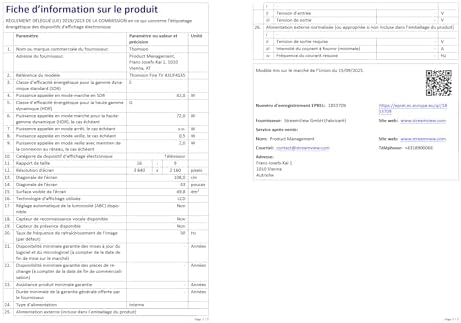
| Памер экрана | 43 цалі (109 см) |
| дазвол | 4K UHD (3840 x 2160) |
| Тэхналогія адлюстравання | ВК |
| Частата абнаўлення | 50 Гц |
| Аперацыйная сістэма | Пажарны тэлевізар |
| Асаблівасці | Dolby Vision, Dolby Atmos, Alexa Voice Control, Apple AirPlay, Smart Home Dashboard |
| Сувязь | Wi-Fi, Bluetooth, Ethernet (LAN), 3x HDMI 2.1, 2x USB 2.0, CI+, Audio Out, Headphones, Satellite, Antenna |
| Triple Tuner | DVB-C, DVB-S2, DVB-T2 |
| Колер | Чорны |
| Суадносіны бакоў | 16:9 |
| Памеры прадукту (Д х Ш х У) | 9 см х 97 см х 60 см |
| Уключаныя кампаненты | Power Adapter, Power Cable, Remote Control, Stand, User Manual |
| Вытворца | СТРУМVIEW GMBH |
| Краіна паходжання | Турцыя |
12. Гарантыя і падтрымка
Your Thomson 43UF4S35 TV comes with a 3-гадовая гарантыя вытворцыГэтая гарантыя распаўсюджваецца на дэфекты матэрыялаў і вырабу пры нармальным выкарыстанні. Калі ласка, захавайце пацвярджэнне пакупкі для прэтэнзій па гарантыі.
For technical support, troubleshooting assistance, or warranty service, please contact your retailer or the manufacturer, STREAMVIEW GMBH. Refer to your purchase documentation for specific contact details.