
1. Уводзіны
Thank you for choosing the Bontempi 24-Key Mini Electronic Keyboard. This manual provides essential information for the safe and proper use, setup, operation, and maintenance of your new musical instrument. Please read these instructions carefully before use and retain them for future reference.
2. Інфармацыя па бяспецы
- Папярэджанне: Не падыходзіць для дзяцей да 3 гадоў з-за дробных дэталяў.
- Заўсёды сачыце за дзецьмі падчас гульні.
- Не змешвайце старыя і новыя батарэі. Не змешвайце шчолачныя, стандартныя (вугляродна-цынкавыя) або акумулятарныя (нікель-кадміевыя) батарэі.
- Устаўце батарэйкі з правільнай палярнасцю (+ і -).
- Выміце з вырабу разряженные батарэі.
- Выміце батарэі, калі прадукт не плануецца выкарыстоўваць на працягу доўгага перыяду.
- Не выкідвайце батарэі ў агонь.
- Беражыце прадукт ад вады і вільгаці.
3. Змесціва ўпакоўкі
Пераканайцеся, што ўсе прадметы прысутнічаюць у пасылцы:
- Bontempi 24-Key Mini Electronic Keyboard
- Battery cover (pre-installed or separate)

Image 1: Bontempi 24-Key Mini Electronic Keyboard in its retail packaging. The keyboard is red with black and white keys, and the packaging highlights its 24-key feature and various functions.
4. Настройка
4.1 Устаноўка батарэі
- Знайдзіце адсек для батарэек на ніжняй панэлі клавіятуры.
- Using a screwdriver (not included), carefully open the battery compartment cover.
- Insert 4 x AA 1.5V alkaline batteries (not included) into the compartment, ensuring the correct polarity (+/-) as indicated inside.
- Замяніце крышку батарэйнага адсека і замацуеце яе шрубай.
4.2 Уключэнне
Locate the 'POWER ON' switch, usually on the front panel of the keyboard. Slide the switch to the 'ON' position to power on the device. Slide it to 'OFF' when not in use.
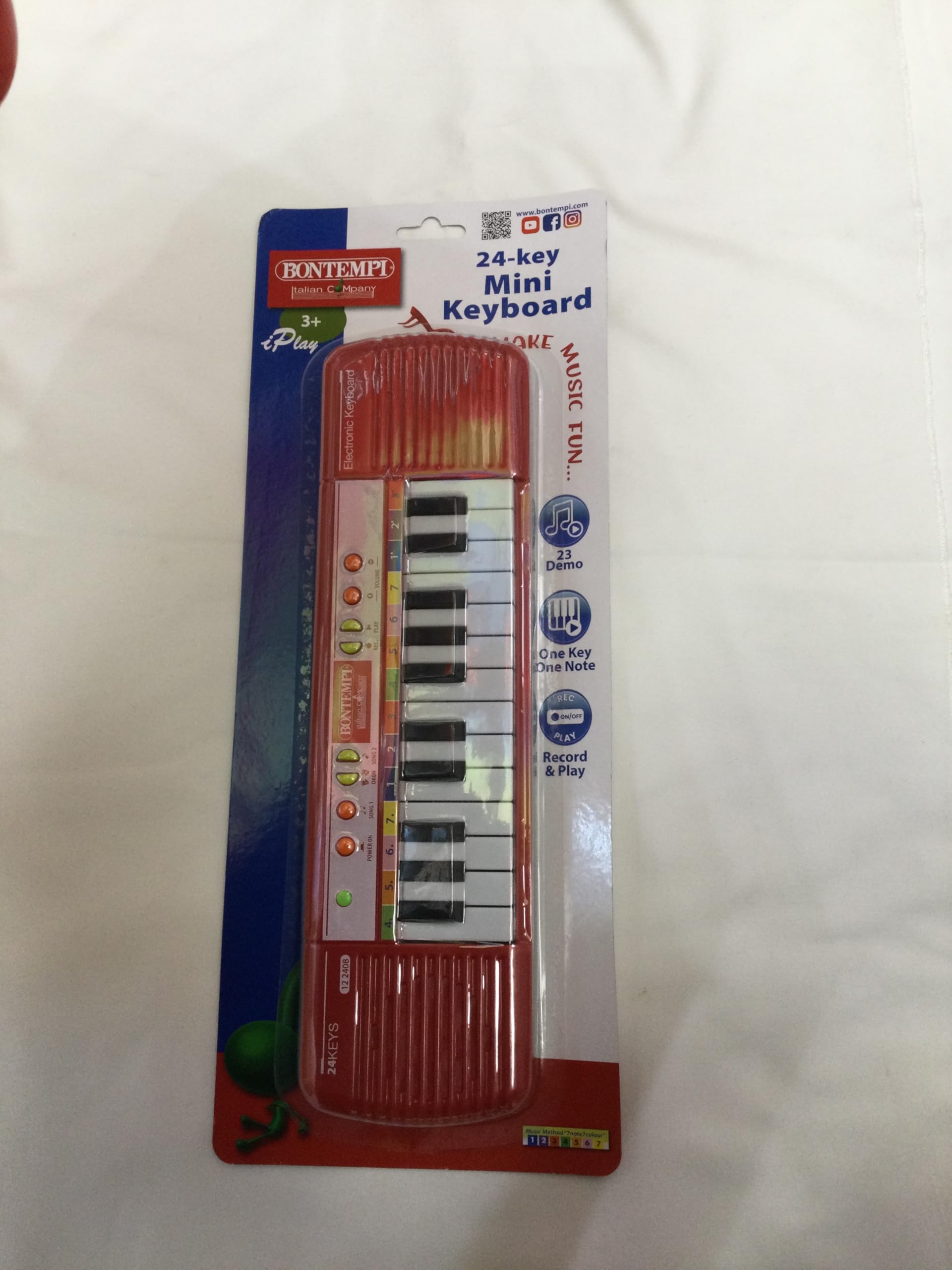
Малюнак 2: Верх view of the Bontempi 24-Key Mini Electronic Keyboard. Shows the 24 keys, speaker grilles on both sides, and control buttons including 'POWER ON', 'SONG 1', 'SONG 2', 'DEMO', 'ONE KEY ONE NOTE', 'RECORD & PLAY', and 'VOLUME +/-'.
5. Інструкцыя па эксплуатацыі
5.1 Playing Notes
Press any of the 24 black and white keys to play individual musical notes.
5.2 Рэгуляванне гучнасці
Use the 'VOLUME +' and 'VOLUME -' buttons to increase or decrease the sound output of the keyboard.
5.3 дэманстрацыйных песень
Press the 'SONG 1', 'SONG 2', or 'DEMO' buttons to listen to pre-recorded melodies. Press the button again to stop the playback.
5.4 One Key One Note Function
Press the 'ONE KEY ONE NOTE' button to activate this mode. In this mode, pressing any key will play the next note of a pre-selected melody, allowing for simplified play-along.
5.5 Запіс і прайграванне
- запіс: Press the 'RECORD' button. Play your desired melody on the keys. The keyboard will record your sequence of notes.
- гуляць: After recording, press the 'PLAY' button to listen to your recorded melody.
6. Тэхнічнае абслугоўванне
6.1 Ачыстка
To clean the keyboard, wipe it with a soft, dry cloth. Do not use abrasive cleaners, solvents, or immerse the product in water. Avoid spraying liquids directly onto the keyboard.
6.2 Захоўванне
Store the keyboard in a cool, dry place, away from direct sunlight and extreme temperatures. If the keyboard will not be used for an extended period, remove the batteries to prevent leakage.
7. Выпраўленне непаладак
- Няма гуку або гук скажоны:
- Праверце, ці ўключана клавіятура.
- Ensure the volume is not set to minimum.
- Заменіце батарэі новымі, выконваючы палярнасць.
- Клавішы не рэагуюць:
- Праверце зарад батарэі і пры неабходнасці заменіце яе.
- Пераканайцеся, што пад клавішамі няма смецця.
8. Тэхнічныя характарыстыкі
- Нумар мадэлі: 12 2404
- Колькасць клавіш: 24
- Памеры (Д х Ш х У): 36 х 10 х 2 см (14.17 х 3.94 х 0.79 цалі)
- Вага: 400 грам (0.88 фунта)
- Крыніца харчавання: 4 x AA 1.5V batteries (Alkaline recommended, not included)
- матэрыял: Пластыкавыя
- Рэкамендаваны ўзрост: 3 гады і вышэй
- GTIN/UPC: 047663336374
9. Гарантыя і падтрымка
This product is covered by the standard warranty provided by your retailer at the time of purchase. Please retain your proof of purchase for any warranty claims.
For technical support, spare parts, or further assistance, please contact your retailer or the manufacturer directly. Information regarding spare parts availability is currently not provided by the manufacturer.