
1. Уводзіны
This manual provides essential information for the safe and efficient operation of your iSinbox AC311 Projector. Please read it thoroughly before using the device and keep it for future reference.
2. Інфармацыя па бяспецы
Заўсёды выконвайце асноўныя меры бяспекі пры выкарыстанні гэтага вырабу, каб знізіць рызыку пажару, паражэння электрычным токам і траўмаў людзей.
- Не перакрывайце вентыляцыйныя адтуліны.
- Не падвяргайце праектар уздзеянню дажджу або вільгаці.
- Пазбягайце глядзець прама ў аб'ектыў праектара, калі lamp уключаны.
- Выкарыстоўвайце толькі насадкі/аксэсуары, указаныя вытворцам.
- Адключайце шнур сілкавання падчас навальніцы або калі прылада не выкарыстоўваецца працяглы час.
3. Змесціва ўпакоўкі
Праверце наяўнасць усіх прадметаў у камплекце:
- iSinbox AC311 Projector
- Пульт дыстанцыйнага кіравання
- Кабель HDMI
- AV-кабель
- Сілавы кабель
- Кіраўніцтва карыстальніка (гэты дакумент)
4. Прадукт скончыўсяview
Азнаёмцеся з кампанентамі і інтэрфейсамі праектара.

Выява: спераду view of the iSinbox AC311 Projector, showcasinдзякуючы кампактнаму дызайну і аб'ектыву.
Інтэрфейсы:
- Порт HDMI: Connect to HDMI-enabled devices like laptops, game consoles, or streaming sticks.
- Порт USB: Падключыце USB-назапашвальнікі для прайгравання медыяфайлаў.
- 3.5 мм аўдыяраз'ём: Падключыце знешнія дынамікі або навушнікі.
- Спажываная магутнасць: Падключыце кабель харчавання.
5. Настройка
- Размяшчэнне: Place the projector on a stable, flat surface or mount it according to your preference (floor, ceiling, tripod, wall). Ensure adequate ventilation around the device. The projector supports short-throw projection, allowing a 100-inch screen from approximately 2.4 meters away.

Image: Diagram illustrating optimal projection distances for various screen sizes with the iSinbox AC311 Projector.
- Падключэнне сілкавання: Падключыце кабель харчавання да ўваходу харчавання праектара, а затым да электрычнай разеткі.
- Першапачатковае ўключэнне: Націсніце кнопку харчавання на праектары або пульце дыстанцыйнага кіравання, каб уключыць прыладу.
- Фокус і карэкцыя трапецеідальных скажэнняў: The iSinbox AC311 features automatic focus and 6D keystone correction. The projector will automatically adjust the image for clarity and correct distortion. Manual adjustments can also be made if needed.

Image: Visual representation of the automatic focus and 6D keystone correction capabilities of the iSinbox AC311 Projector.
- Падключэнне да сеткі: Connect the projector to your Wi-Fi network using the settings menu. The projector supports ultra-fast WiFi 6 for stable streaming.
6. Інструкцыя па эксплуатацыі
6.1 Пульт дыстанцыйнага кіравання
The included remote control allows you to navigate the projector's interface and control playback.

Image: The iSinbox AC311 Projector remote control, showing dedicated buttons for popular streaming services like Netflix and YouTube.
6.2 Выбар крыніцы
Use the remote control to select your desired input source (HDMI, USB, or built-in streaming apps).
6.3 Прыкладанні для струменевай перадачы
The iSinbox AC311 Projector comes with a Movin Smart operating system and is compatible with popular streaming services such as Netflix, Prime Video, YouTube, Disney, and Apple TV. Access these directly from the home screen.
6.4 Якасць выявы
The projector supports 4K resolution with HDR10+ and features AI Image Enhance technology, delivering vibrant and detailed visuals. It boasts 1200 ANSI lumens for bright images.
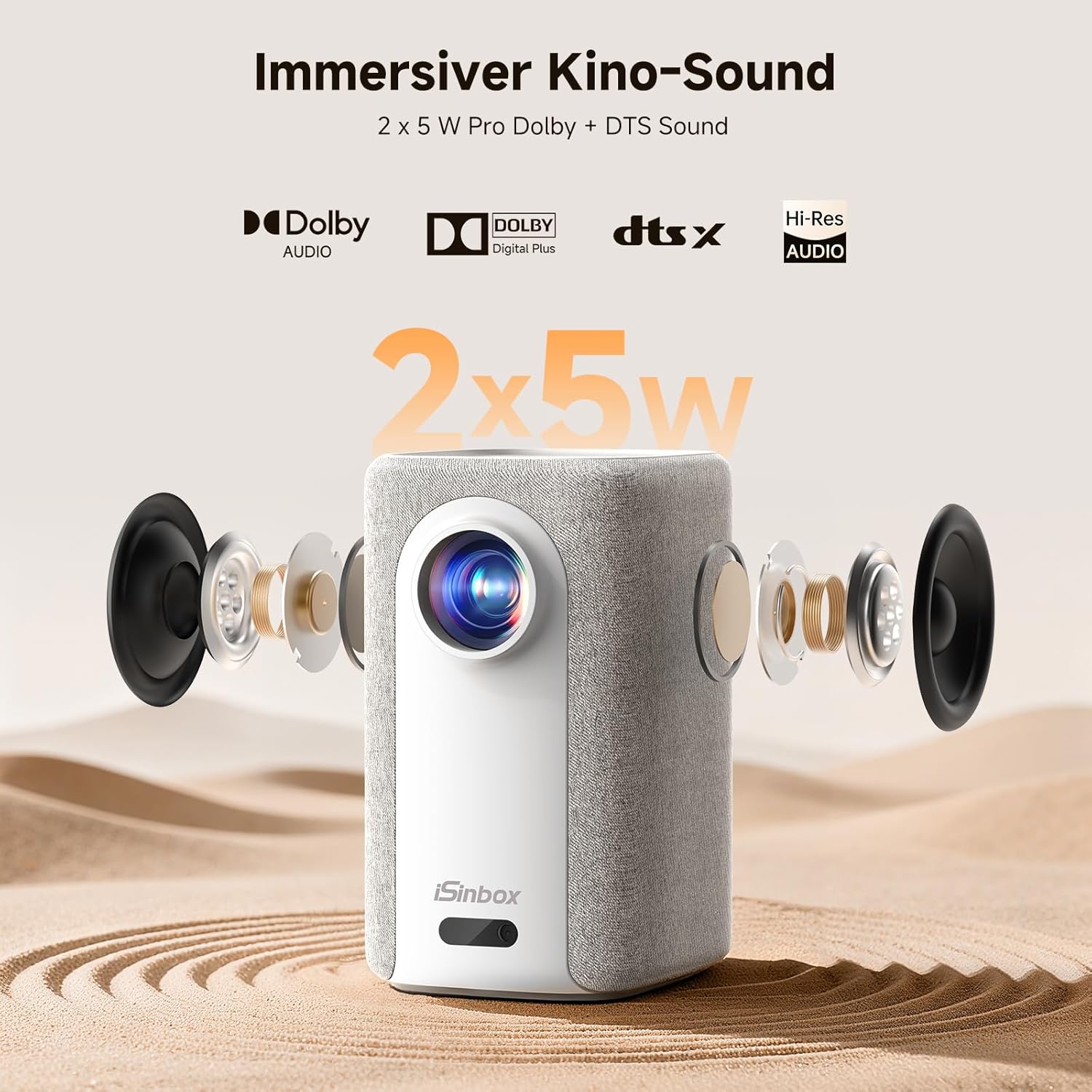
Image: A split-screen comparison demonstrating the superior image quality, vibrant colors, and detail of the iSinbox AC311 Projector (AC311) compared to other projectors.
6.5 Злучэнне Bluetooth
The projector features bidirectional Bluetooth 5.4, allowing you to connect external speakers or headphones for enhanced audio, or use the projector as a Bluetooth speaker.

Image: Illustration of the iSinbox AC311 Projector's advanced WiFi 6 and Bluetooth 5.4 capabilities, highlighting smooth and low-latency connections.
6.6 Аўдыёвыхад
The projector is equipped with 2 x 5W speakers and supports Dolby Audio and DTS Sound for an immersive audio experience.

Выява: Разабраная view of the iSinbox AC311 Projector, detailing its 2x5W speakers and support for Dolby Audio and DTS Sound.
6.7 360-Degree Projection
The projector's design, including a dual-mode stand and integrated handle, allows for flexible placement and 360-degree projection, enabling you to project onto ceilings or walls from various angles.
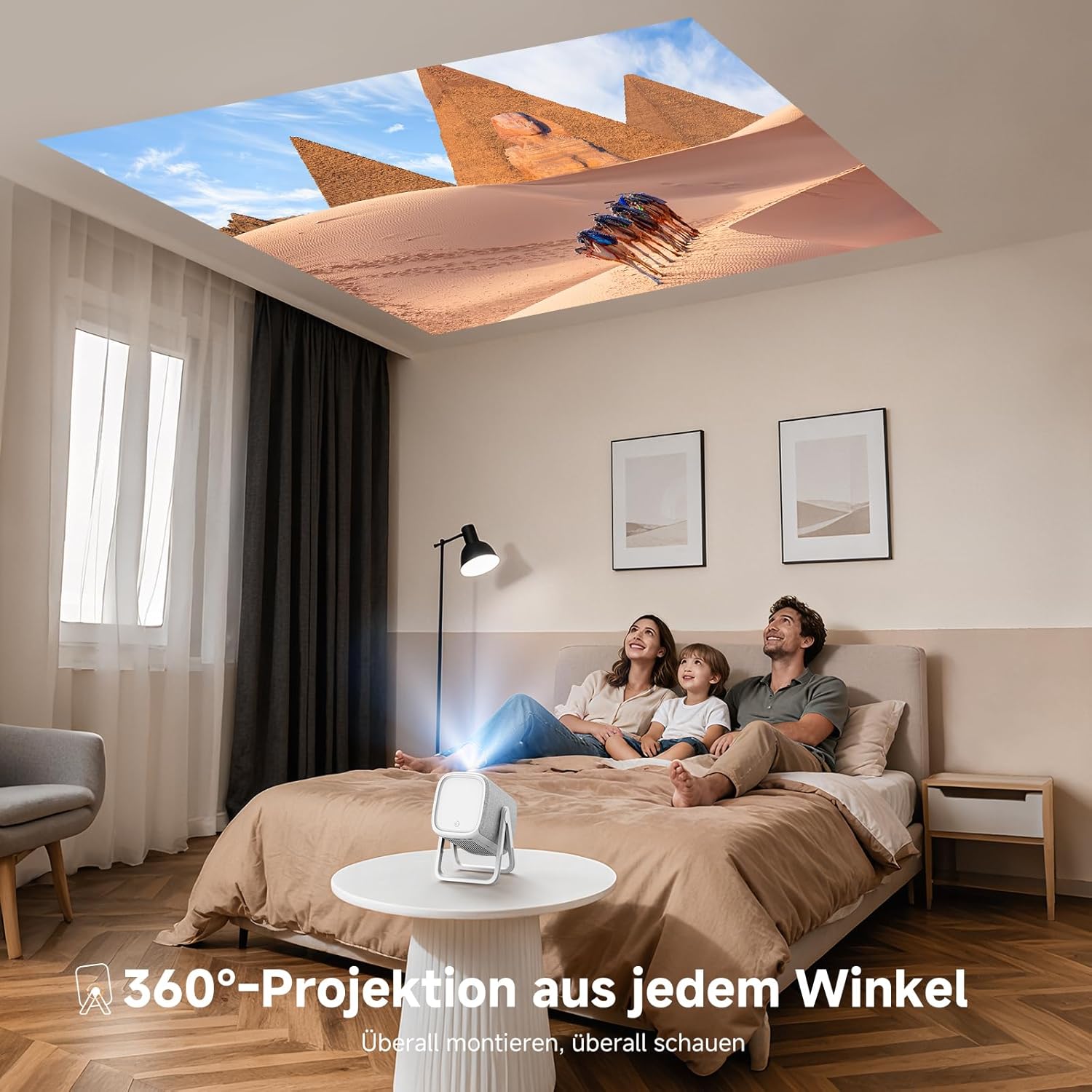
Image: The iSinbox AC311 Projector projecting an image onto a ceiling, illustrating its 360-degree projection feature and portable design.
7. Тэхнічнае абслугоўванне
- Ачыстка аб'ектыва: Выкарыстоўвайце мяккую тканіну без ворса, спецыяльна прызначаную для аптычных лінзаў. Не выкарыстоўвайце абразіўныя ачышчальнікі або растваральнікі.
- Ачыстка Casing: Працярыце знешнія паверхні праектара мяккай сухой тканінай. Для выдалення ўстойлівых плям выкарыстоўвайце злёгкуamp тканінай, а затым старанна высушыце.
- Вентыляцыя: Пераканайцеся, што вентыляцыйныя адтуліны чыстыя ад пылу і перашкод, каб прадухіліць перагрэў.
- захоўванне: Калі праектар не выкарыстоўваецца працяглы час, захоўвайце яго ў прахалодным, сухім месцы, удалечыні ад прамых сонечных прамянёў і экстрэмальных тэмператур.
8. Выпраўленне непаладак
| праблема | Магчымая прычына | Рашэнне |
|---|---|---|
| Не адлюстроўваецца выява | Power cable disconnected; incorrect input source; device not powered on. | Праверце падключэнне да сілкавання; выберыце правільную крыніцу ўваходнага сігналу; пераканайцеся, што падключаная прылада ўключана. |
| Размыты малюнак | Out of focus; projector not perpendicular to screen. | Allow auto-focus to adjust or manually adjust focus; use keystone correction. |
| Няма гуку | Volume too low; external audio device not connected properly; mute enabled. | Increase volume; check audio cable/Bluetooth connection; disable mute. |
| Пульт дыстанцыйнага кіравання не працуе | Batteries depleted; obstruction between remote and projector. | Replace batteries; ensure clear line of sight to IR receiver. |
9. Тэхнічныя характарыстыкі
| Асаблівасць | Дэталь |
|---|---|
| мадэль | AC311 |
| Марка | iSinbox |
| Тэхналогія адлюстравання | ВК |
| Роднае дазвол | 1920 x 1080 (Full HD) |
| Максімальны дазвол | 3840 x 2160 (4K Support) |
| Суадносіны бакоў | 4:3 |
| Каэфіцыент кантраснасці | Высокі |
| Энергаспажыванне | 65 ват |
| Частата абнаўлення | 60 Гц |
| Сувязь | Bluetooth 5.4 (Bidirectional), WiFi 6, HDMI, USB, 3.5mm Audio Jack, IR |
| Сумяшчальныя прылады | Speakers, Game Consoles, Laptops, Smartphones, Tablets |
| Асаблівасці | Automatic Focus, 6D Keystone Correction, Dual-mode Stand, Movin Smart OS, Built-in Streaming Apps (Netflix, Prime Video, YouTube, Disney, Apple TV), Dolby Audio, DTS Sound, 360-degree Projection |
| Памеры (Д х Ш х У) | 27.6 х 20.5 х 16.3 см |
| Вага | 1.92 кг |
| Варыянты мантажу | Floor, Ceiling, Tripod, Table, Wall |
10. Гарантыя і падтрымка
For warranty information and technical support, please refer to the official iSinbox webсайт або звярніцеся непасрэдна ў службу падтрымкі кліентаў. Звычайна падрабязная інфармацыя падаецца на ўпакоўцы прадукту або ў асобным гарантыйным талоне.
The product was first available on Amazon.es from October 23, 2025.