
xTool IF2 2.0
xTool SafetyPro IF2 2.0 Hyper Flow Inline Duct Fan User Manual
Model: MXA-K013-001
1. Інфармацыя па бяспецы
Please read all safety instructions carefully before operating the xTool SafetyPro IF2 2.0. Failure to follow these instructions may result in electric shock, fire, or serious injury.
- Электрабяспека: Ensure the power supply matches the fan's requirements. Do not operate with damaged cords or plugs.
- Вентыляцыя: Always ensure proper ventilation when using the fan, especially when connected to a laser engraver. Exhaust fumes must be directed outdoors or into an appropriate filtration system.
- Ўздзеянне вады: The main unit is not waterproof. While the fan components are washable, ensure the main electrical connections and motor housing remain dry.
- Дзеці і хатнія жывёлы: Захоўвайце прыладу ў месцах, недаступных дзецям і хатнім жывёлам.
- Тэхнічнае абслугоўванне: Адключыце электраэнергію перад выкананнем любога тэхнічнага абслугоўвання або чысткі.
2. Прадукт скончыўсяview
The xTool SafetyPro IF2 2.0 is a high-performance inline duct fan designed for efficient smoke and fume extraction, particularly for laser cutting and engraving applications. It features dual high-speed fans and intelligent control for optimal performance.
2.1 Асноўныя магчымасці
- Unmatched Smoke Extraction Efficiency: Two ultra-speed 14,000 RPM fans generate 135 CFM airflow with up to 1300 Pa pressure.
- Кампактны дызайн: Integrated smart EC motor design in a compact 5-inch body.
- Auto-Sync Control: Wirelessly connects with xTool laser engravers for hands-free operation and intelligent power/airflow adjustment.
- Лёгкае абслугоўванне: IP55 rated for easy disassembly and cleaning of fan components.
- Ціхая праца: Built-in sound-absorbing cotton reduces operating noise.
- Гнуткая ўстаноўка: Retractable 2.3-meter durable PP tube.
2.2 Кампаненты
- SafetyPro IF2 2.0 Unit
- Ключ Bluetooth
- Шасцігранны ключ
- Pipe connector 1
- Pipe connector 2
- Труба клamp
- Ribbed plastic anchors (8x)
- Шрубы (8x)
- Wall-mounting fixture
- Smoke exhaust pipe (2.3m)
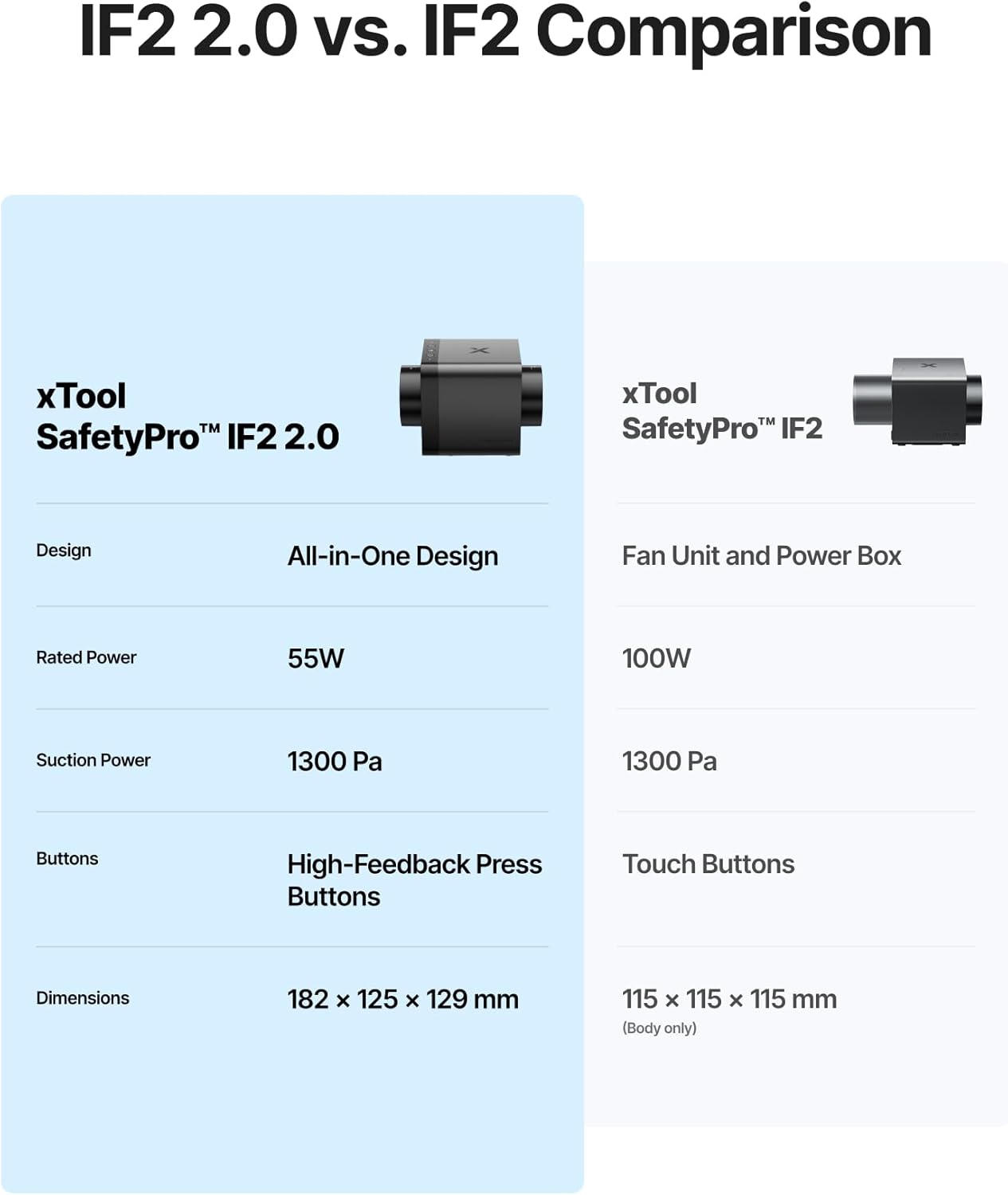
Image: The xTool SafetyPro IF2 2.0 main unit, showcasinг яго кампактны дызайн.

Image: The xTool SafetyPro IF2 2.0 connected to its flexible smoke exhaust pipe.
3. Настройка і ўстаноўка
Follow these steps to properly set up your xTool SafetyPro IF2 2.0.
3.1 Мантаж вентылятара
- Choose a suitable location near your laser engraver, ensuring access to an exhaust point (window, vent, or filtration system).
- Use the provided wall-mounting fixture, screws, and ribbed plastic anchors to securely attach the fan to a wall. Alternatively, the compact design allows for placement on a stable surface.
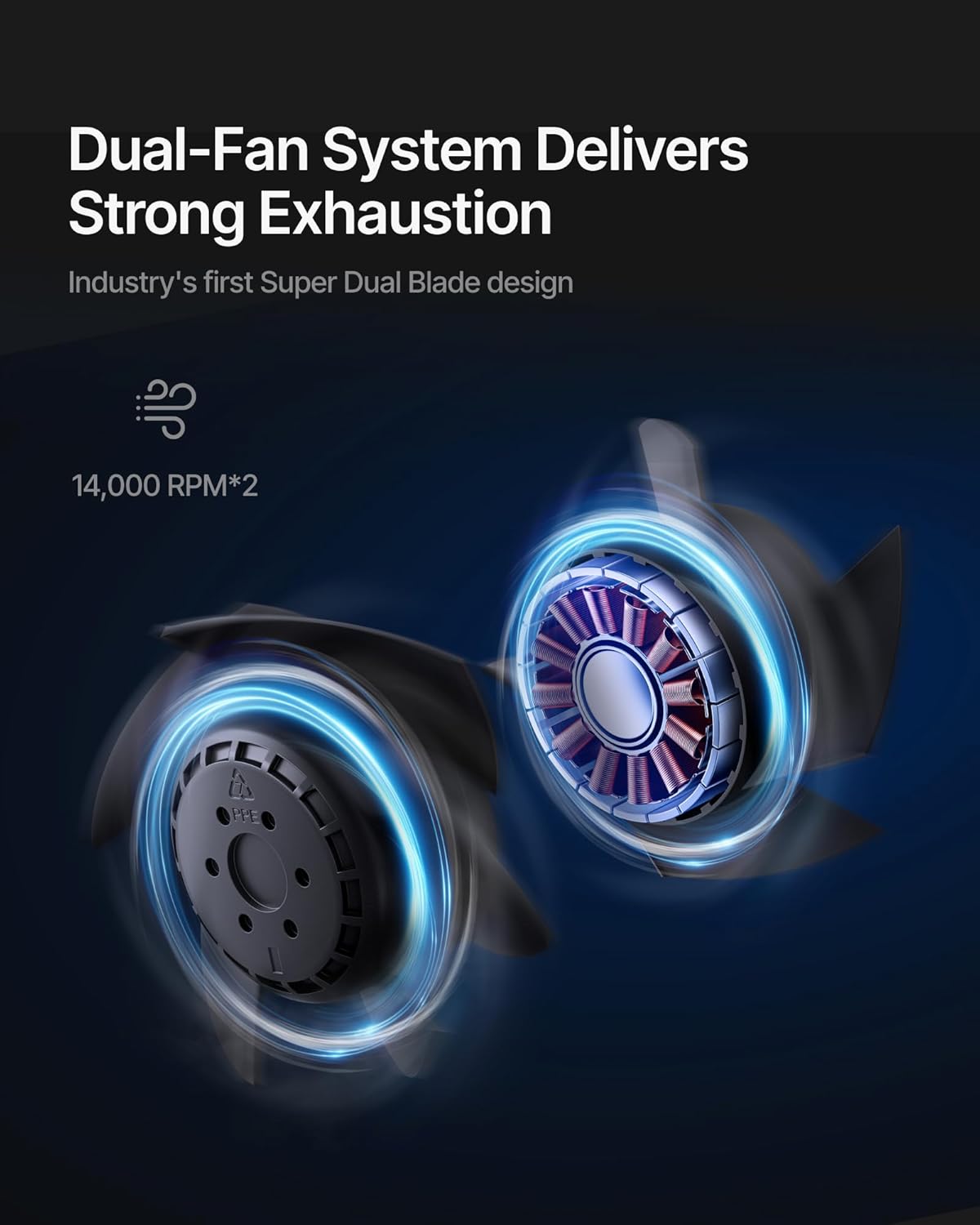
Image: The xTool SafetyPro IF2 2.0 installed using the wall-mounting fixture, with the exhaust pipe connected.
3.2 Connecting the Exhaust Pipe
- Attach one end of the smoke exhaust pipe to the fan unit using the appropriate pipe connector and pipe clamp.
- Connect the other end of the smoke exhaust pipe to your laser engraver's exhaust port or direct it to a safe outdoor venting location. Ensure all connections are secure to prevent smoke leakage.

Image: Illustration of the easy detachable pipe connection for simplified maintenance and the washable fan components.
3.3 Харчаванне і падключэнне
- Plug the power adapter into the fan unit and then into a suitable power outlet.
- Insert the Bluetooth dongle into your xTool laser engraver (if applicable) to enable auto-sync functionality.
4. Аперацыя
The xTool SafetyPro IF2 2.0 is designed for seamless integration and efficient operation.
4.1 Auto-Sync Control
- When connected to a compatible xTool laser engraver via Bluetooth, the IF2 2.0 will automatically turn on/off with the laser engraver.
- The fan intelligently adjusts its power and airflow based on the material being processed, optimizing smoke extraction.
4.2 Manual Control and Quiet Mode
- The fan features high-feedback press buttons for manual control of power and fan speed.
- Activate Quiet Mode for operations that produce less smoke or when a lower noise level is desired.
4.3 Smart Connect via xTool Creative Space
- For enhanced control and monitoring, connect the IF2 2.0 through the xTool Creative Space software. This allows for fine-tuning settings and provides a comprehensive user experience.

Image: The xTool SafetyPro IF2 2.0 demonstrating intelligent control, connected to an xTool laser engraver and a laptop running xTool Creative Space software.
5. Тэхнічнае абслугоўванне
Regular maintenance ensures optimal performance and longevity of your SafetyPro IF2 2.0.
5.1 Cleaning the Fan Components
- The fan components are designed for easy disassembly and are washable.
- Before cleaning, always disconnect the power supply.
- Carefully disassemble the fan unit as per the instructions in the full manual (not provided here).
- Rinse the fan blades and housing components with water. Ensure they are completely dry before reassembly.
- Важна: The exposed wires and main electrical unit are not waterproof. Do not submerge or expose these parts to water.
5.2 Exhaust Pipe Maintenance
- Periodically inspect the smoke exhaust pipe for any blockages, kinks, or damage.
- Clean the interior of the pipe if excessive residue builds up, which can reduce airflow efficiency.
6. Выпраўленне непаладак
If you encounter issues with your xTool SafetyPro IF2 2.0, refer to the following common solutions:
- Вентылятар не ўключаецца: Check power connection, ensure the power outlet is functional, and verify the fan is properly connected to the laser engraver if using auto-sync.
- Слабае ўсмоктванне: Inspect the exhaust pipe for blockages or kinks. Ensure all pipe connections are sealed. Clean fan components if they are dirty.
- Празмерны шум: Check for any foreign objects in the fan blades. Ensure the fan is securely mounted and not vibrating against other surfaces.
- Auto-Sync Not Working: Ensure the Bluetooth dongle is correctly inserted and your xTool laser engraver is compatible and properly configured in xTool Creative Space.
- Уцечка дыму: Verify all pipe connections are tight and sealed. Check the exhaust pipe for any tears or holes.
For persistent issues, please contact xTool customer support.
7. Тэхнічныя характарыстыкі
| Асаблівасць | Дэталь |
|---|---|
| Нумар мадэлі | MXA-K013-001 |
| Марка | xTool |
| Вытворца | Кампанія Makeblock Co., Ltd. |
| Вага прадмета | 6.29 фунта |
| Памеры прадукту | 7.19 х 4.92 х 4.92 цалі |
| Колер | Чорны |
| Матэрыял | Acrylonitrile Butadiene Styrene, PC |
| Хуткасць вентылятара | Up to 14,000 RPM (Dual Fans) |
| Струмень паветра | 135 CFM |
| Статычны ціск | Да 1300 Па |
| Exhaust Pipe Length | 2.3 meters (retractable) |
| Рэйтынг воданепранікальнасці | IP55 (for fan components, not main unit) |
| Патрабуюцца батарэі | няма |
8. Гарантыя і падтрымка
8.1 Інфармацыя аб гарантыі
For detailed warranty information, please refer to the official xTool webсайт або гарантыйны талон, які ўваходзіць у камплект пастаўкі прадукту. Захоўвайце пацвярджэнне пакупкі для прэтэнзій па гарантыі.
8.2 Падтрымка кліентаў
If you require assistance, have questions, or need technical support, please contact xTool through the following channels:
- Падтрымка па электроннай пошце: For general inquiries and technical assistance.
- Жывы чат: Даступна на афіцыйным xTool website for real-time support.
- Падтрымка па тэлефоне: Contact numbers may be available on the xTool webсайт.
- Група ў Facebook: Join the official xTool community for peer support and updates.

Выява: Зверхуview of xTool's multi-channel customer service options.