
1. Уводзіны
This manual provides comprehensive instructions for the installation, operation, and maintenance of your Ossuret 7-inch Android 13 Carplay Autoradio. Please read this manual thoroughly before using the device to ensure proper functionality and safety. This unit is designed to enhance your driving experience with advanced multimedia and navigation features.
2. Змесціва ўпакоўкі
Праверце, ці ўсе пералічаныя ніжэй прадметы ўваходзяць у камплект. Калі якія-небудзь прадметы адсутнічаюць або пашкоджаныя, звярніцеся ў службу падтрымкі кліентаў.
- Main Autoradio Unit
- Сілавы кабель
- USB Cable (4-pin)
- USB Cable (6-pin)
- GPS антэна
- RCA кабель
- Знешні мікрафон
- Rear Camera Input RCA Cable
- Canbus Decoder (if applicable)
- Radio Antenna Adapter Cable

3. Сумяшчальныя мадэлі аўтамабіляў
This Ossuret Autoradio is compatible with the following Opel/Vauxhall/Holden models:
- Opel/Vauxhall/Holden Antara (from 2005)
- Opel/Vauxhall/Holden Astra H (from 2004)
- Opel/Vauxhall/Holden Corsa C (2004-2006)
- Opel/Vauxhall/Holden Corsa D (from 2006)
- Opel/Vauxhall/Holden Meriva (from 2004)
- Opel/Vauxhall/Holden Signum (from 2003)
- Opel/Vauxhall/Holden Tigra Twintop (from 2004)
- Opel/Vauxhall/Holden Vectra C (from 2004)
- Opel/Vauxhall/Holden Vivaro 6
- Opel/Vauxhall/Holden Zafira (from 2005)
4. Настройка і ўстаноўка
Installation of this autoradio requires technical knowledge and experience with car electronics. It is highly recommended to seek professional installation to avoid damage to the unit or your vehicle.
4.1 Праверка перад устаноўкай
- Перад пачаткам усталёўкі пераканайцеся, што запальванне аўтамабіля выключана, а акумулятар адключаны.
- Confirm compatibility with your vehicle model and year.
- Identify the existing wiring harness and dashboard opening.
4.2 Правадныя злучэнні
- Сілавы кабель: Connect the provided power cable to the vehicle's power supply, ensuring correct polarity (ACC, B+, GND).
- Кабелі USB: Connect the 4-pin and 6-pin USB cables to the corresponding ports on the autoradio. These can be routed to a convenient location for external USB devices.
- GPS-антэна: Усталюйце антэну GPS у месцы з добра прагляднай паверхняй view неба, звычайна на прыборнай панэлі або пад лабавым шклом, і падключыце яго да прылады.
- Кабелі RCA: Connect RCA cables for audio output (e.g., to external amplifiers) or video input/output as needed.
- Знешні мікрафон: Connect the external microphone for improved call quality and route it to a suitable position (e.g., near the sun visor).
- Уваход для камеры задняга віду: Калі ўсталёўваецца задняя view camera, connect its video output to the dedicated RCA input on the autoradio.
- Дэкодэр CANbus: If your vehicle requires a Canbus decoder for steering wheel controls or other vehicle data integration, connect it according to the vehicle-specific wiring diagram.
- Антэна радыё: Connect the vehicle's radio antenna using the provided adapter cable if necessary.
4.3 Мантаж прылады
Carefully insert the autoradio into the dashboard opening, securing it with the appropriate mounting brackets. Ensure all cables are properly routed and not pinched.

5. Інструкцыя па эксплуатацыі
5.1 Уключэнне/выключэнне сілкавання
The unit will typically power on automatically with the vehicle's ignition. To manually power off, press and hold the power button (if available) or turn off the vehicle's ignition.
5.2 Бесправадны Carplay / Android Auto
This autoradio supports wireless Apple Carplay and Android Auto via the pre-installed Zlink application. This allows seamless integration with your smartphone for navigation, music, calls, and other apps.
- Пераканайцеся, што на вашым смартфоне ўключаны Wi-Fi і Bluetooth.
- On the autoradio, open the Zlink application.
- Follow the on-screen prompts to connect your phone via Bluetooth first, then confirm the Wi-Fi connection.
- Once connected, your phone's Carplay or Android Auto interface will appear on the autoradio screen.

5.3 Функцыянальнасць Bluetooth
The unit features Bluetooth for hands-free calling and audio streaming.
- Спалучэнне: Go to the Bluetooth settings on the autoradio and your smartphone. Пошук available devices on your phone and select the autoradio (e.g., "Ossuret Car"). Confirm the pairing code if prompted.
- Гучная сувязь: Once paired, you can make and receive calls directly from the autoradio screen. The built-in microphone captures your voice.
- Музыка праз Bluetooth (A2DP): Stream audio from your phone to the autoradio wirelessly.
- Phonebook Download: The unit supports downloading your phone's contacts for easy access.

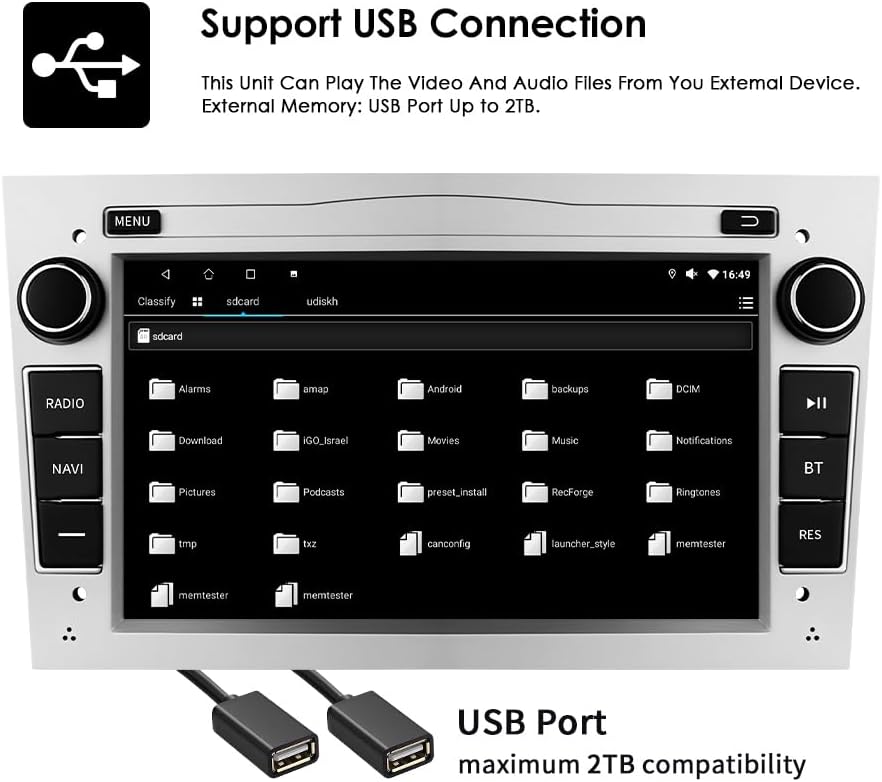
5.4 USB-злучэнне
Connect external USB devices to play audio and video files or access other data. The unit supports USB storage up to 2TB.
- Insert your USB drive into one of the provided USB ports.
- Перайдзіце да file explorer or media player application on the autoradio.
- Select the USB device to browse and play your media files.
5.5 Прайграванне мультымедыя
The autoradio supports various audio and video formats for local playback.
- Music Formats: MP3, WMA, AAC, RM, FLAC, etc.
- Фарматы відэа: MPEG-1/2/4, H.264, H.263, VC1, RV, RMVB, DivX, Sorenson Spark, VP8, AVS Stream, etc.

5.6 GPS-навігацыя
The unit comes with preloaded European maps and supports both online and offline navigation.
- Доступ да навігацыйнай праграмы можна атрымаць з галоўнага меню.
- Enter your destination to receive turn-by-turn voice guidance.
- Connect to Wi-Fi for online map updates and real-time traffic information.
5.7 Кіраванне рулявым колам
The autoradio is compatible with your vehicle's factory steering wheel controls, allowing you to manage volume, change tracks, and answer calls without taking your hands off the wheel. Configuration may be required in the unit's settings menu.
5.8 Ззаду View Увод з камеры
Калі сумяшчальны задні view camera is connected, the display will automatically switch to the camera feed when the vehicle is put into reverse gear, providing a clear view перашкод ззаду аўтамабіля.
6. Тэхнічнае абслугоўванне
To ensure the longevity and optimal performance of your Ossuret Autoradio, follow these maintenance guidelines:
- Ачыстка экрана: Выкарыстоўвайце мяккую тканіну без ворса, каб акуратна працерці сэнсарны экран. Для выдалення ўстойлівых плям злёгкуampПрацярыце тканіну вадой або сродкам для ачысткі экрана. Пазбягайце агрэсіўных хімічных рэчываў або абразіўных матэрыялаў.
- Генеральная ўборка: Трымайце прыладу чыстай ад пылу і смецця. Выкарыстоўвайце мяккую шчотку або сціснутае паветра для ачысткі вентыляцыйных адтулін і шчылін паміж кнопкамі.
- Абнаўленні праграмнага забеспячэння: Перыядычна правярайце наяўнасць абнаўленняў праграмнага забеспячэння ад вытворцы, каб пераканацца, што ў вас ёсць найноўшыя функцыі і выпраўленні памылак.
- Пазбягайце экстрэмальных тэмператур: Do not expose the unit to extreme heat or cold, as this can affect performance and lifespan.
7. Выпраўленне непаладак
If you encounter issues with your autoradio, refer to the following common problems and solutions:
| праблема | Магчымая прычына | Рашэнне |
|---|---|---|
| Няма ўлады | Incorrect wiring, blown fuse, vehicle battery issue | Check power connections, inspect fuses, ensure vehicle battery is charged. |
| Няма гуку | Volume too low, incorrect audio settings, speaker wiring issue | Павялічце гучнасць, праверце налады аўдыёвыхаду, праверце падключэнне дынамікаў. |
| GPS signal lost/weak | Закаркаванне антэны, няправільнае размяшчэнне антэны | Пераканайцеся, што антэна GPS мае чысты view of the sky, reposition if necessary. |
| Bluetooth не падключаецца | Bluetooth выключаны, няправільнае спалучэнне, перашкоды | Ensure Bluetooth is enabled on both devices, re-pair, move away from other wireless devices. |
| Сэнсарны экран не рэагуе | Збой праграмнага забеспячэння, пашкоджанне экрана | Перазапусціце прыладу. Калі праблема не знікне, звярніцеся ў службу падтрымкі. |
If the problem persists after attempting these solutions, please contact Ossuret customer support for further assistance.
8. Тэхнічныя характарыстыкі
Below are the technical specifications for the Ossuret Autoradio Model B0FPLCMTNZ:
| Асаблівасць | Спецыфікацыя |
|---|---|
| Марка | Ossuret |
| Нумар мадэлі | B0FPLCMTNZ |
| Аперацыйная сістэма | Android 13 |
| АЗП | 2 ГБ |
| ПЗУ | 32 ГБ |
| працэсар | 4Core*A53 1.5Ghz |
| Памер экрана | 7 цалі |
| Дазвол экрана | 1024 х 600 |
| Тып сэнсарнага экрана | Ёмісты |
| Тэхналогія падлучэння | Bluetooth, USB, Wi-Fi |
| Асаблівасці | Wireless Carplay/Android Auto, GPS Navigation, DSP Support |
| Сумяшчальныя прылады | Смартфон |
| Усяго партоў HDMI | 1 |
| Рэжым выхаду гуку | Стэрэа |
| Кадзіроўка відэа | H.264, H.265/HEVC, MPEG-4 |
| Колькасць каналаў | 4 |
| Метад кантролю | Дотык, голас |
| Паходжанне | Кітай |
9. Гарантыя і падтрымка
9.1 Інфармацыя аб гарантыі
This Ossuret Autoradio comes with a 1-гадовая гарантыя вытворцы from the date of purchase. This warranty covers defects in materials and workmanship under normal use. It does not cover damage caused by improper installation, accident, misuse, abuse, neglect, unauthorized modification, or normal wear and tear.
9.2 Падтрымка кліентаў
For technical assistance, warranty claims, or any questions regarding your Ossuret Autoradio, please contact your retailer or the Ossuret customer support team. Have your model number (B0FPLCMTNZ) and proof of purchase ready when contacting support.