
Уводзіны
This manual provides essential information for the setup, operation, maintenance, and troubleshooting of your AWOW Mini PC, Model BA7. Please read these instructions carefully before using the device.

Выява: Зверхуview of the AWOW BA7 Mini PC, highlighting its compact design and key features.
Змест пакета
Праверце наяўнасць усіх прадметаў у камплекце:
- AWOW BA7 Mini PC
- Адаптар сілкавання
- Крапежныя шрубы
- кранштэйны VESA
- Кабель HDMI
- Кіраўніцтва карыстальніка (гэты дакумент)

Image: Illustration of the AWOW BA7 Mini PC and its included accessories: power adapter, screws, VESA mount, HDMI cable, and user manual.
Інструкцыя па наладзе
- Падключэнне перыферыйных прылад: Connect your keyboard, mouse, and monitor(s) to the appropriate ports on the Mini PC.
Выява: спераду view of the Mini PC showing the Power Button, Type-C port, USB 3.2 ports, and 3.5mm Audio Jack.

Выява: Задняя частка view of the Mini PC showing the DC IN, DP1.2, HDMI2.0, USB 2.0 ports, and RJ45 LAN port.
- Падключэнне сілкавання: Падключыце адаптар сілкавання да порта DC IN на міні-ПК, а затым падключыце адаптар да разеткі.
- Уключэнне: Націсніце кнопку харчавання, размешчаную на пярэдняй панэлі міні-ПК. Сістэма загрузіцца.
- Першапачатковая ўстаноўка: Выконвайце інструкцыі на экране, каб завяршыць пачатковую наладу Windows 11 Pro, у тым ліку мову, рэгіён, сеткавае падключэнне і стварэнне ўліковага запісу карыстальніка.
- Падключэнне да сеткі:
- Wired: Connect an Ethernet cable to the RJ45 LAN port for a stable wired connection.
- Бесправадная сувязь: During Windows setup or via Windows settings, connect to your Wi-Fi network using the built-in WiFi 6.
Інструкцыя па эксплуатацыі
Базавая аперацыя
- Уключэнне/выключэнне харчавання: Press the power button to turn on the PC. To shut down, use the Windows Start menu options (Shut down, Restart, Sleep). A short press on the power button can put the PC to sleep. A long press (approx. 5 seconds) will force a shutdown.
- Вывад дысплея: The Mini PC supports up to three 4K displays simultaneously via DP, HDMI, and USB-C. Connect your monitors and configure display settings in Windows.

Image: A user working with a triple monitor setup, demonstrating the Mini PC's multi-display capability.
- Падключэнне USB: Utilize the USB 2.0 and USB 3.0 ports for connecting external devices such as external hard drives, USB flash drives, printers, and other peripherals. The Type-C port also supports data transfer and display output.
- Аўдыё: Падключыце навушнікі або дынамікі да аўдыёраздыма 3.5 мм.
Пашыранае выкарыстанне
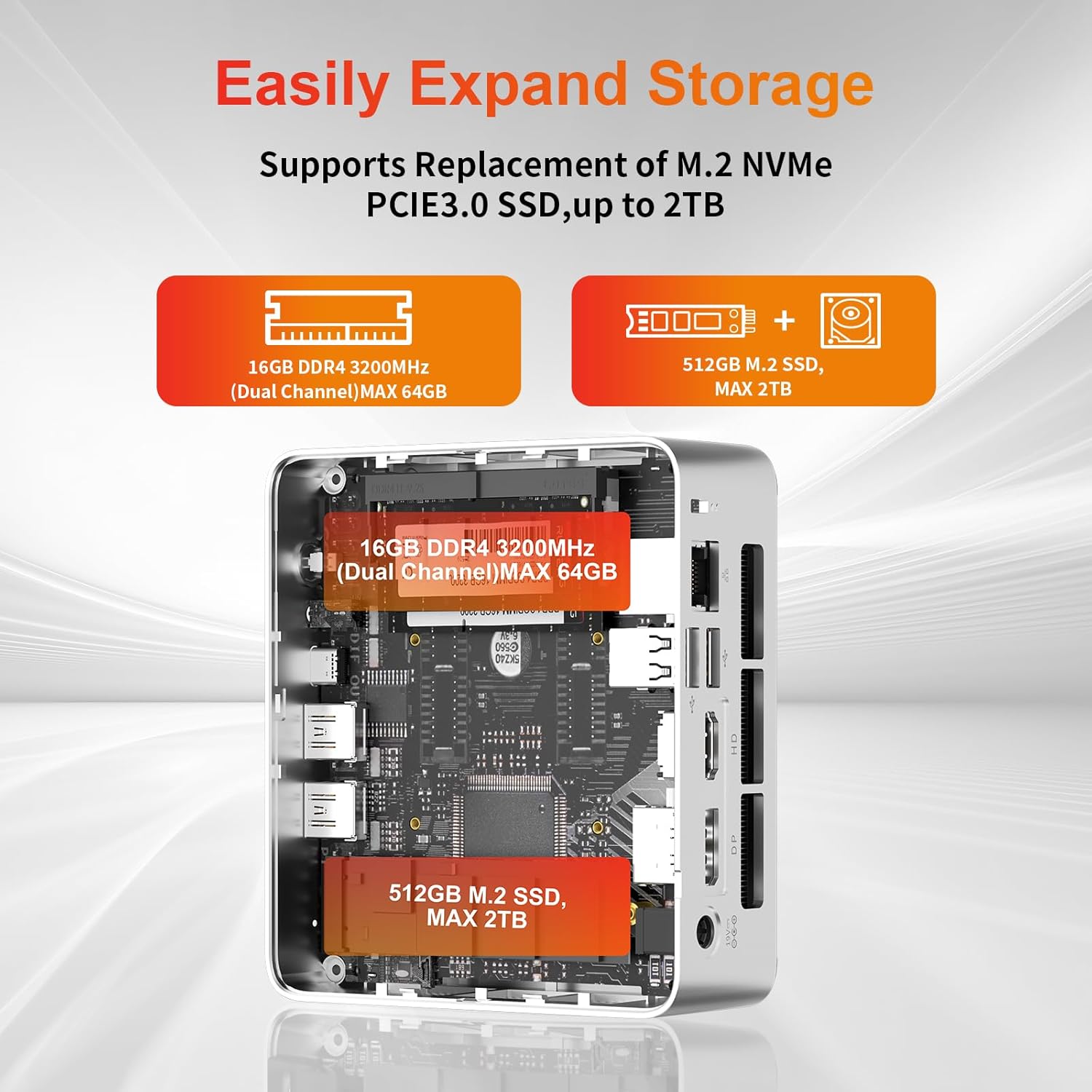
- Пашырэнне сховішча: The Mini PC supports replacement of the M.2 NVMe PCIe 3.0 SSD up to 2TB. It also supports memory expansion up to 64GB DDR4.

Image: Diagram illustrating the internal components and options for expanding storage (M.2 SSD up to 2TB) and RAM (DDR4 up to 64GB).
- Мацаванне VESA: Use the included VESA mount bracket to attach the Mini PC to the back of a compatible monitor or to a wall mount, saving desk space.
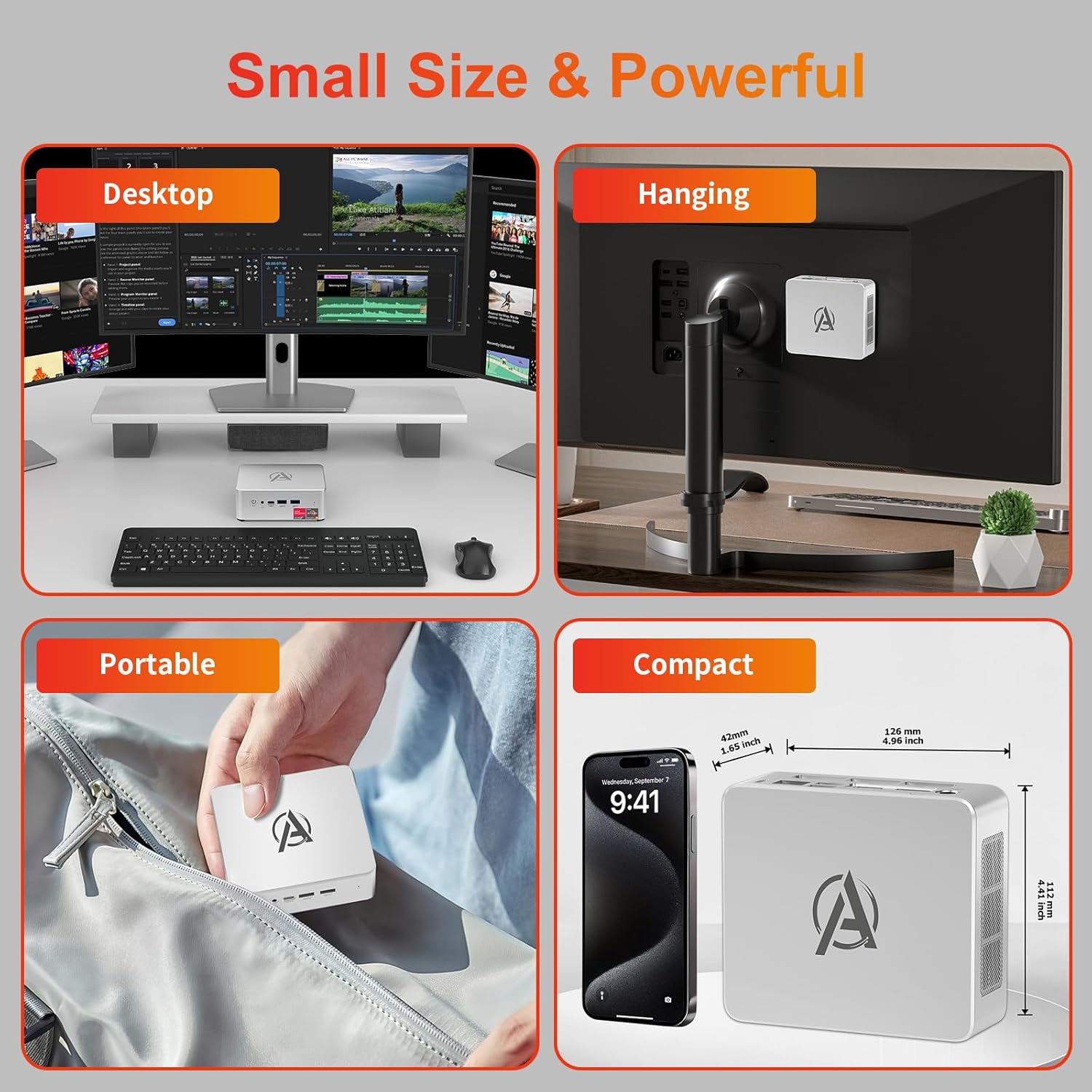
Image: Various usage scenarios for the Mini PC, including desktop, VESA-mounted behind a monitor, portable, and compact size comparison.
Тэхнічнае абслугоўванне
- Уборка: Use a soft, dry cloth to clean the exterior of the Mini PC. Do not use liquid cleaners or aerosols. Ensure ventilation openings are free from dust.
- Абнаўленні праграмнага забеспячэння: Рэгулярна правярайце наяўнасць абнаўленняў і драйвераў Windows і ўсталёўвайце іх, каб забяспечыць аптымальную прадукцыйнасць і бяспеку.
- Кіраванне цяплом: Ensure the Mini PC is placed in a well-ventilated area. Avoid blocking the air vents. The intelligent cooling system is designed for low noise and efficient heat dissipation.

Image: Diagram illustrating the internal cooling fan and heat sink, showing airflow for efficient heat dissipation.
- Кіраванне сховішчам: Перыядычна прыбірайце непатрэбнае files and applications to maintain system performance.
Ліквідацыю непаладак
- Няма харчавання:
- Праверце, ці надзейна падключаны адаптар сілкавання да міні-ПК і разеткі.
- Пераканайцеся, што разетка працуе.
- Паспрабуйце іншую разетку.
- Няма дысплея:
- Verify that the HDMI/DP/USB-C cable is securely connected to both the Mini PC and the monitor.
- Пераканайцеся, што манітор уключаны і настроены на правільную крыніцу ўваходнага сігналу.
- Паспрабуйце іншы кабель дысплея або манітор, калі такі маецца.
- Нізкая прадукцыйнасць:
- Зачыніце непатрэбныя праграмы, якія працуюць у фонавым рэжыме.
- Праверце і ўсталюйце ўсе чакаючыя абнаўлення Windows або абнаўлення драйвераў.
- Пераканайцеся, што на SSD-назапашвальніку дастаткова вольнага месца.
- Monitor CPU and RAM usage in Task Manager to identify resource-intensive processes.
- Праблемы з падключэннем да сеткі:
- For wired connections, ensure the Ethernet cable is properly connected and the router is working.
- For Wi-Fi, check if the Wi-Fi adapter is enabled and connected to the correct network. Restart your router/modem.
- Завісанні/збоі сістэмы:
- Перазагрузіце міні-ПК.
- Ensure the system is not overheating (check ventilation).
- Run a system diagnostic or check Windows Event Viewдля паведамленняў пра памылкі.
Тэхнічныя характарыстыкі
| мадэль | AWOW BA7 Mini PC |
| Працэсар | AMD Ryzen 5 7430U (6 ядраў, 12 патокаў, да 4.3 ГГц) |
| Графіка | Інтэграваная відэакарта AMD Radeon |
| АЗП | 16 ГБ DDR4 (пашырэнне да 64 ГБ) |
| Захоўванне | 512GB PCIe 3.0 M.2 SSD (Expandable up to 2TB) |
| Аперацыйная сістэма | Windows 11 Pro |
| Відэавыхад | DP1.2 (4K@60Hz), HDMI2.0 (4K@60Hz), USB-C (4K@60Hz) - Supports Triple Display |
| Сувязь | WiFi 6, Bluetooth 5.2, 1000Mbps RJ45 LAN |
| Парты | 2x USB 3.2, 2x USB 2.0, 1x Type-C (Full Function), 1x DP1.2, 1x HDMI2.0, 1x RJ45 LAN, 1x 3.5mm Audio Jack, 1x DC IN |
| Памеры | 126 мм х 112 мм х 42 мм (прыблізна 4.96 х 4.41 х 1.65 цалі) |
| Вага | 398 г (толькі прылада) Image: The Mini PC with its dimensions (126mm x 112mm x 42mm) and weight (398g) labeled. |
Гарантыя і падтрымка
AWOW provides comprehensive support for its products.
- Гарантыя: This product includes a 12-month service period from the date of purchase, covering manufacturing defects.
- Тэхнічная падтрымка: Lifetime technical support is available for all AWOW products.
- Кантакты: For technical assistance, warranty claims, or any product-related inquiries, please visit the official AWOW webсайт або звярніцеся ў службу падтрымкі кліентаў.

Image: AWOW brand message emphasizing fulfillment, lifetime technical support, and 12-month service.