
1. Уводзіны
This manual provides detailed instructions for the installation, operation, and maintenance of your CP PLUS 4MP Smart Wi-Fi CCTV Camera, model CP-E41Q. Please read this manual thoroughly before using the product to ensure proper function and safety. Keep this manual for future reference.
2. Інфармацыя па бяспецы
- Ensure the power supply matches the camera's requirements.
- Do not expose the camera to water or moisture. This product is designed for indoor use only.
- Пазбягайце размяшчэння камеры пад прамымі сонечнымі прамянямі або побач з крыніцамі цяпла.
- Do not attempt to disassemble or modify the camera. Contact authorized service personnel for repairs.
- Трымайце камеру і яе аксэсуары ў месцах, недаступных для дзяцей.
3. Змесціва ўпакоўкі
Праверце, ці ёсць усе прадметы ў вашай упакоўцы:
- CP PLUS CP-E41Q Camera
- Адаптар сілкавання
- Зарадны кабель
- Стаяць
- Крапежныя шрубы
- Кіраўніцтва карыстальніка (гэты дакумент)
выява: CP PLUS CP-E41Q Camera and included accessories. This image displays the main camera unit, power adapter, charging cable, stand, and mounting screws, which are typically found in the product packaging.
4. Прадукт скончыўсяview
The CP PLUS CP-E41Q is a 4MP Smart Wi-Fi CCTV Camera designed for indoor security. It features 360° pan and tilt capabilities, 15-meter night vision, two-way audio, and smart detection functions to enhance your home or office security.
Асноўныя характарыстыкі:
- Разрозненне Ultra HD 4 Мп: Captures clear 2560x1440 video.
- Панарамаванне і нахіл на 360°: Offers 355° horizontal pan and 71° vertical tilt for wide coverage.
- 15M IR Night Vision: Provides clear surveillance in low-light conditions up to 15 meters.
- Двухбаковы аўдыё: Дазваляе весці сувязь у рэжыме рэальнага часу праз камеру.
- Smart Detection Suite: Includes motion detection, human detection, sound detection, and motion tracking with instant alerts.
- Cloud Recording & MicroSD Support: Flexible storage options up to 256GB.
- CTC Cyber Secure Tech: Ensures data privacy and security.

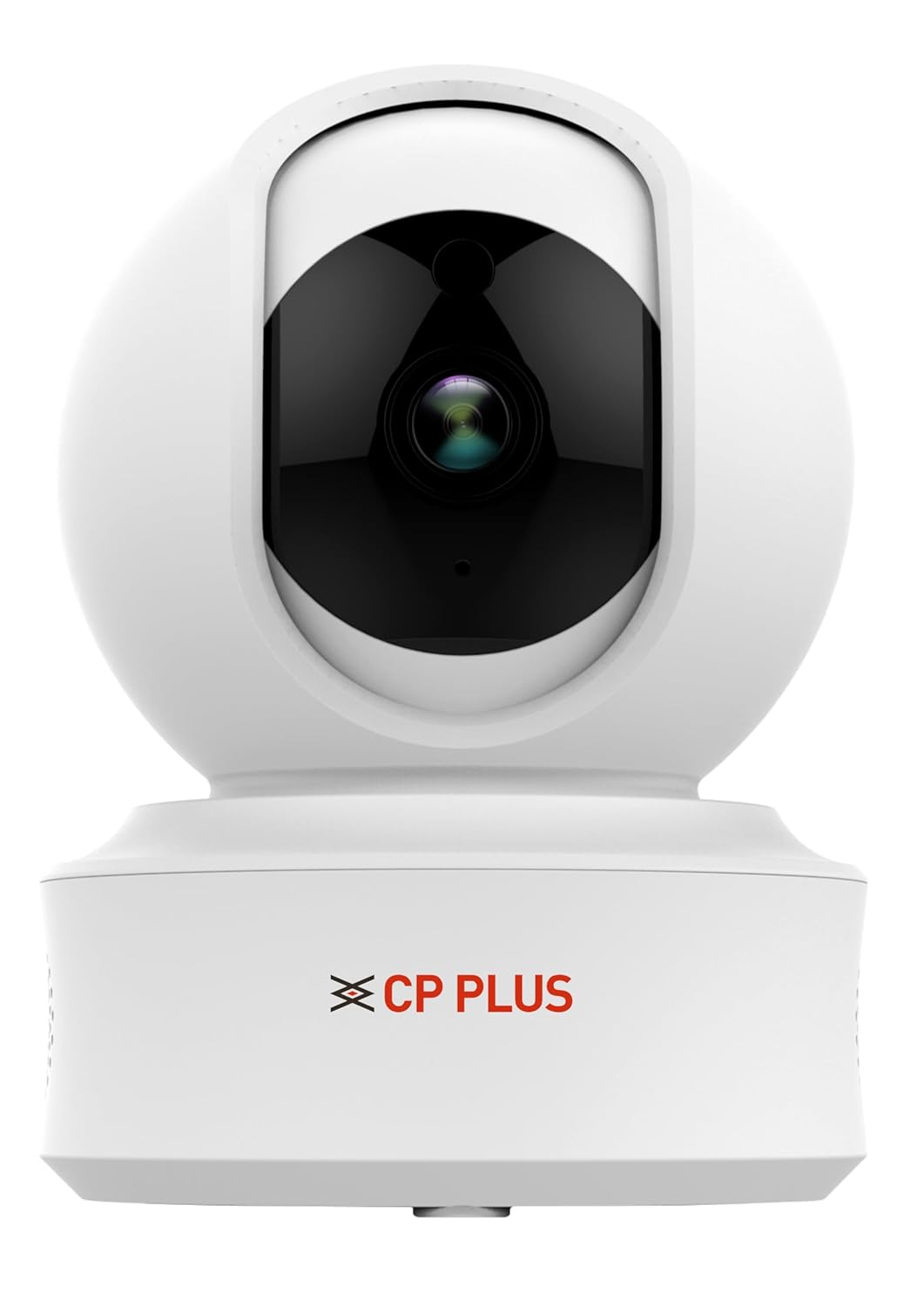
выява: Фронт view of the CP PLUS CP-E41Q Smart Wi-Fi Camera. This image shows the camera lens, indicator lights, and the CP PLUS branding on the base.
5. Кіраўніцтва па наладцы
5.1 Фізічная ўстаноўка
- Выберыце месца: Select an indoor location with a stable Wi-Fi signal and a power outlet nearby. The camera can be placed on a tabletop or mounted on a ceiling/wall using the provided stand and screws.
- Уключэнне: Connect the charging cable to the camera and the power adapter, then plug the adapter into a power outlet. The camera will power on and initiate its startup sequence.
- Устаўце карту MicroSD (неабавязкова): If you plan to use local storage, gently insert a MicroSD card (up to 256GB, Class 10 or higher recommended) into the designated slot on the camera. Ensure the camera is powered off before inserting or removing the card.
5.2 App Installation and Network Connection (EZYKAM+ App Integration)
To set up your camera and connect it to your Wi-Fi network, follow these steps using the EZYKAM+ app:
- Download EZYKAM+ App: Download the "EZYKAM+" app from the Apple App Store (for iOS devices) or Google Play Store (for Android devices).
- Зарэгістраваць уліковы запіс: Open the app and register a new user account or log in if you already have one.
- Дадаць прыладу: On the app's home page, click the "+" icon to add a new device. Select the model number of your camera (CP-E41Q) from the list.
- Падключыцеся да Wi-Fi: Enter your Wi-Fi network name (SSID) and password when prompted in the app. Ensure your phone is connected to a 2.4GHz Wi-Fi network, as the camera supports 2.4GHz only.
- Сканаванне QR -кода: The app will generate a QR code. Hold your phone with the QR code in front of the camera lens (approximately 15-20 cm away) until you hear a voice prompt from the camera indicating successful scanning ("Heard the beep").
- Поўная канфігурацыя: Wait for the camera's indicator light to turn steady blue, signifying a successful connection and configuration. The camera is now ready for use.
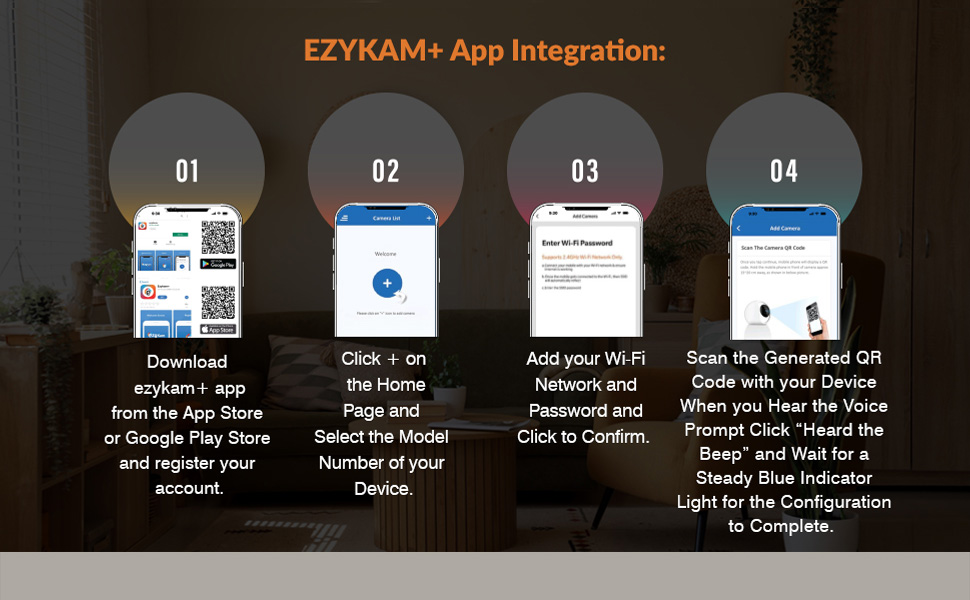
выява: EZYKAM+ App Integration Steps. This visual guide illustrates the four main steps for connecting the camera to the EZYKAM+ mobile application: downloading the app, adding the device, entering Wi-Fi details, and scanning the QR code.
6. Інструкцыя па эксплуатацыі
Once your camera is set up and connected, you can access and control it via the EZYKAM+ app.
6.1 У прамым эфіры View and Pan & Tilt Control
- Open the EZYKAM+ app and select your CP-E41Q camera from the device list to access the live video feed.
- Use the on-screen joystick or swipe gestures to control the camera's 355° pan (horizontal rotation) and 71° tilt (vertical movement) to view розных абласцей.

выява: CP PLUS CP-E41Q demonstrating 360-degree view. This image shows the camera's ability to pan and tilt, providing full room coverage without blind spots, as indicated by the circular arrows around the camera.
6.2 Двухбаковае аўдыё
- З прамога эфіру view screen, tap the microphone icon to enable two-way audio.
- Press and hold the talk button to speak through the camera's speaker. Release to listen.

выява: CP PLUS CP-E41Q Two-Way Communication feature. This image depicts a user interacting with someone via the camera's two-way audio function, allowing for remote conversation.
6.3 Начное бачанне
- The camera automatically switches to infrared (IR) night vision mode in low-light conditions, providing clear black-and-white video up to 15 meters.
- You can manually toggle night vision settings (Auto/On/Off) within the app's camera settings.
6.4 Запіс і захоўванне
- Запіс на карту MicroSD: If a MicroSD card is inserted, the camera will record continuously or based on motion detection, depending on your settings. Access recorded footage via the app's playback feature.
- Воблачны запіс: Subscribe to CP PLUS cloud storage services for secure, off-site storage of your video recordings. This ensures footage is safe even if the camera is tampэрэд с.

выява: CP PLUS CP-E41Q Cloud Recording feature. This image illustrates how video data is securely stored in the cloud, accessible from various devices, ensuring memories are safely preserved.
6.5 Smart Detection Suite
Configure these features in the EZYKAM+ app settings for your camera:
- Выяўленне руху: Receive instant alerts on your smartphone when motion is detected in the camera's field of view.
- Выяўленне чалавека: Advanced algorithms differentiate human shapes from other moving objects, reducing false alarms.
- Вызначэнне гуку: Get alerts for unusual sounds detected by the camera's microphone.
- Адсочванне руху: When motion is detected, the camera can automatically pan and tilt to follow the moving object or person.
- Убудаваная сірэна: Activate the camera's siren remotely or set it to trigger automatically upon detection of suspicious activity.

выява: CP PLUS CP-E41Q Motion Tracking feature. This image demonstrates the camera's ability to automatically track movement, ensuring continuous surveillance of moving subjects.

выява: CP PLUS CP-E41Q Sound Detection feature. This image illustrates the camera's capability to detect and alert users to sounds, providing an additional layer of security monitoring.

выява: CP PLUS CP-E41Q Built-in Siren feature. This image shows the camera's siren function, designed to deter intruders or alert occupants to detected security events.
6.6 Рэжым прыватнасці
- Activate Privacy Mode through the EZYKAM+ app to temporarily disable video recording and live viewing, ensuring privacy when desired. The camera lens will physically retract or turn away.

выява: CP PLUS CP-E41Q Privacy Mode. This image illustrates the camera in privacy mode, where the lens is obscured or retracted, ensuring personal privacy when monitoring is not required.
7. Тэхнічнае абслугоўванне
- Уборка: Выкарыстоўвайце мяккую сухую тканіну для чысткі аб'ектыва і корпуса камеры. Не выкарыстоўвайце вадкія ачышчальнікі або абразіўныя матэрыялы.
- Абнаўленні прашыўкі: Regularly check the EZYKAM+ app for available firmware updates. Keeping your camera's firmware updated ensures optimal performance, security, and access to new features.
- Цыкл харчавання: Калі ў камеры ўзніклі праблемы, паспрабуйце адключыць яе ад крыніцы харчавання на 10 секунд, а затым зноў падключыць.
8. Выпраўленне непаладак
| праблема | Магчымая прычына | Рашэнне |
|---|---|---|
| Камера не падключаецца да Wi-Fi. | Incorrect Wi-Fi password, weak signal, 5GHz network used. |
|
| No live video feed. | Camera offline, network issue, app error. |
|
| Motion detection alerts are too frequent or not working. | Sensitivity settings, detection zone. |
|
| Дрэнная якасць начнога бачання. | Obstructions, IR reflection. |
|
9. Тэхнічныя характарыстыкі
| Нумар мадэлі | CP-E41Q |
| дазвол | 4 МП (2560x1440) |
| Дыяпазон павароту/нахілу | Панарамаванне: 355°, нахіл: 71° |
| Начное бачанне | 15 meters IR Night Vision |
| Сувязь | Wi-Fi (толькі 2.4 ГГц) |
| Параметры захоўвання | MicroSD card (up to 256GB), Cloud Recording |
| Аўдыё | Двухбаковае аўдыё |
| Асаблівасці выяўлення | Motion Detection, Human Detection, Sound Detection, Motion Tracking |
| Крыніца харчавання | Правадная электрычная |
| Выкарыстанне ў памяшканні/на вуліцы | У памяшканні |
| Памеры (ДхШхВ) | 7.7 х 7.7 х 10.7 см |
| Вага | 176 г |
10. Гарантыя і падтрымка
CP PLUS products are designed for reliability and performance. For warranty information, please refer to the warranty card included with your product or visit the official CP PLUS webсайт. Захоўвайце чэк аб куплі як пацверджанне пакупкі.
For technical support, troubleshooting assistance, or service inquiries, please contact CP PLUS customer support through their official channels. You can typically find contact information on the CP PLUS website or within the EZYKAM+ app.
Інтэрнэт-рэсурсы: For additional guides, FAQs, and software downloads, visit the official CP PLUS support page.