
Уводзіны
This manual provides comprehensive instructions for the setup, operation, maintenance, and troubleshooting of your T-Wolf T60 Wired 60% Mechanical Keyboard. Please read this manual carefully before using the product to ensure proper function and longevity.
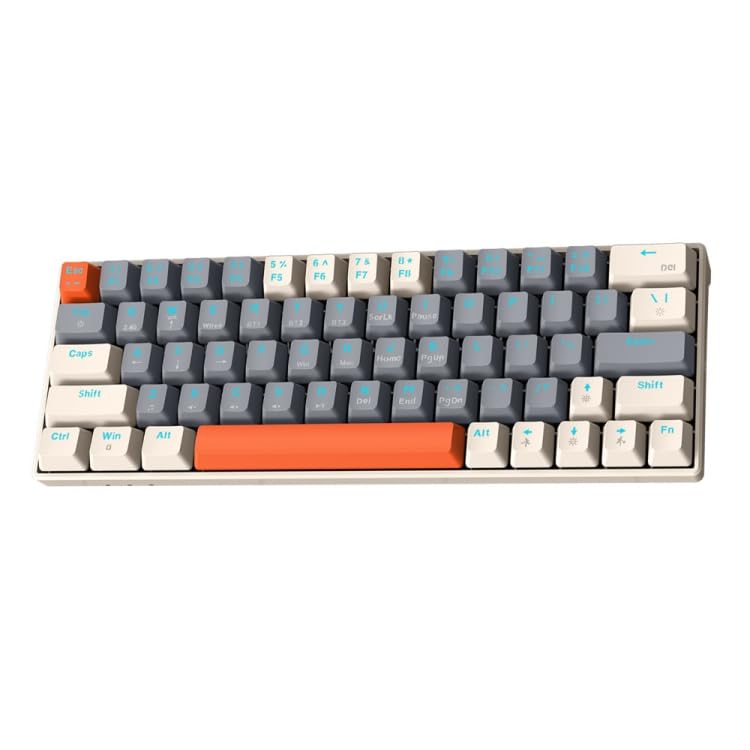
Image: T-Wolf T60 Wired 60% Mechanical Keyboard. This image displays the compact design of the keyboard, highlighting its 63-key layout and wired connectivity.
Настройка
- Распакоўка: Carefully remove the keyboard and all included accessories from the packaging. Verify that all components are present: T-Wolf T60 keyboard and USB-C to USB cable.
- Падключэнне клавіятуры:
- Знайдзіце порт USB-C на клавіятуры.
- Insert the USB-C end of the provided cable into the keyboard's USB-C port.
- Insert the USB-A end of the cable into an available USB 2.0 port on your computer (PC, desktop, or laptop).
- Ўстаноўка драйвера: The T-Wolf T60 keyboard is plug-and-play. Your operating system should automatically detect and install the necessary drivers. No manual driver installation is typically required.
- Пачатковы тэст: Open a text editor or word processor and type to confirm the keyboard is functioning correctly.
Аперацыя
The T-Wolf T60 is a 60% mechanical keyboard with 63 keys, designed for efficient typing and gaming. It features RGB backlighting and multi-key anti-ghosting.
- Асноўныя ключавыя функцыі: All standard alphanumeric and symbol keys function as expected. Due to the compact 60% layout, some functions (like F-keys, arrow keys, and navigation keys) are accessed via a Function (Fn) key combination. Refer to the keyboard's keycap legends for specific Fn key combinations.
- RGB-падсветка: The keyboard features customizable RGB backlighting.
- To cycle through different lighting modes, use the designated Fn key combination (e.g., Fn + \ or Fn + P).
- To adjust brightness, use the designated Fn key combination (e.g., Fn + Up/Down arrow keys, if available via Fn layer).
- To change lighting speed, use the designated Fn key combination (e.g., Fn + Left/Right arrow keys, if available via Fn layer).
- Multi-Key Anti-Ghosting: This feature ensures that multiple simultaneous key presses are registered accurately, which is beneficial for fast-paced gaming and complex commands.
Тэхнічнае абслугоўванне
Proper maintenance helps extend the lifespan of your keyboard.
- Уборка:
- Адключыце клавіятуру ад кампутара перад чысткай.
- Выкарыстоўвайце балон са сціснутым паветрам, каб выдаліць пыл і смецце паміж клавішамі.
- Працірайце клавішы і паверхню клавіятуры мяккай, злёгку змочанай губкайamp, тканіна без ворса. Пазбягайце празмернай вільгаці.
- Do not use harsh chemicals, abrasive cleaners, or solvents, as these can damage the keyboard's finish and keycap legends.
- захоўванне: Калі клавіятура не выкарыстоўваецца працяглы час, захоўвайце яе ў чыстым, сухім месцы, удалечыні ад прамых сонечных прамянёў і экстрэмальных тэмператур.
- Сыход за кабелем: Avoid bending or twisting the USB-C cable excessively to prevent internal damage.
Ліквідацыю непаладак
If you encounter issues with your T-Wolf T60 keyboard, refer to the following common solutions:
- Клавіятура не адказвае:
- Пераканайцеся, што кабель USB-C надзейна падключаны як да клавіятуры, так і да кампутара.
- Паспрабуйце падключыць клавіятуру да іншага USB-порта на вашым кампутары.
- Праверце клавіятуру на іншым камп'ютары, каб вызначыць, ці праблема звязана з клавіятурай, ці з наладамі зыходнага камп'ютара.
- Перазагрузіце кампутар.
- RGB Backlighting Not Working or Incorrect:
- Пераканайцеся, што клавіятура правільна падключана і атрымлівае харчаванне.
- Try cycling through the RGB modes using the Fn key combinations mentioned in the Operation section.
- Check if the brightness is set to maximum.
- Клавішы не рэгіструюцца або набіраюцца два разы:
- Clean the keyboard thoroughly, especially around the affected keys, using compressed air.
- Пераканайцеся, што пад клавішамі няма смецця.
- Калі праблема не знікне, гэта можа сведчыць аб няспраўнасці абсталявання.
Тэхнічныя характарыстыкі
| Асаблівасць | Дэталь |
|---|---|
| Марка | Т-ВОЎК |
| мадэль | Т60 |
| Тэхналогія падлучэння | USB-C (правадны) |
| Сумяшчальныя прылады | PC, desktop, laptop |
| Апісанне клавіятуры | Гульнявыя, механічныя |
| Колькасць ключоў | 63 |
| Асаблівасці | RGB Backlighting, Multi-Key Anti-Ghosting |
| Матэрыял | Пластыкавыя |
| Раскладка клавіятуры | QWERTY |
Гарантыя і падтрымка
Каб атрымаць інфармацыю аб гарантыі і тэхнічнай падтрымцы, звярніцеся да дакументацыі, якая пастаўляецца з пакупкай, або звярніцеся непасрэдна да прадаўца/вытворцы. Захоўвайце пацвярджэнне пакупкі для прэтэнзій па гарантыі.
Manufacturer: T-Wolf