
Уводзіны
This manual provides essential information for setting up, operating, maintaining, and troubleshooting your Apple Watch Series 11 GPS + Cellular 42mm. Please read it thoroughly to ensure proper use and to maximize your device's capabilities.
- Know Your Sleep Score: Track and understand your sleep quality for improved rest.
- Health Insights: Take ECGs, receive notifications for heart rate irregularities, and monitor blood oxygen levels with the Vitals app.
- дызайн: The thin and lightweight design ensures comfort for continuous wear, including during exercise and sleep.
- Fitness Partner: Utilize advanced metrics for workouts, including Pacer, Heart Rate Zones, training load, and Workout Buddy powered by Apple Intelligence (requires nearby iPhone).
- Тэрмін службы батарэі: Enjoy up to 24 hours of normal use, with fast charging providing up to 8 hours of use in just 15 minutes.

Выява: Зверхуview of Apple Watch Series 11 features including health insights, battery life, sleep score, and 5G connectivity.
Што ў скрынцы
Праверце наяўнасць усіх кампанентаў ва ўпакоўцы:
- Чахол для Apple Watch
- Sport Band (M/L size for 160–210mm wrists)
- 1м магнітны зарадны кабель

Image: The Apple Watch Series 11 packaging contents, showing the watch case, sport band, and USB-C magnetic fast charging cable.
Настройка
1. Прымацаванне бранзалета
Slide the band into the slots on the top and bottom of the Apple Watch case until you feel and hear a click. Ensure the band is securely fastened before wearing.
2. Зарадка Apple Watch
Connect the 1m Magnetic Charging Cable to a USB-C power adapter (sold separately) and plug it into a power outlet. Place the back of your Apple Watch on the magnetic charger. The watch will display a charging indicator. Allow the watch to charge fully before initial use.
3. Спалучэнне з iPhone
- Ensure your iPhone is updated to the latest iOS version and has Bluetooth and Wi-Fi enabled.
- Уключыце Apple Watch, націснуўшы і ўтрымліваючы бакавую кнопку, пакуль не з'явіцца лагатып Apple.
- Паднясіце iPhone да Apple Watch. На вашым iPhone з'явіцца анімацыя спалучэння. Націсніце «Працягнуць».
- Размясціце iPhone так, каб ваш Apple Watch з'явіўся ў viewпошукавік у дадатку Apple Watch.
- Выконвайце інструкцыі на экране абедзвюх прылад, каб завяршыць працэс спалучэння, у тым ліку наладзіць сотавую сувязь пры неабходнасці.
Інструкцыя па эксплуатацыі
Базавая навігацыя
- Лічбавая карона: Павярніце, каб пракручваць, маштабаваць або рэгуляваць значэнні. Націсніце адзін раз, каб перайсці да цыферблата гадзінніка або спісу праграм. Двойчы націсніце, каб пераключыцца паміж двума апошнімі праграмамі. Націсніце і ўтрымлівайце, каб уключыць Siri.
- Бакавая кнопка: Press once to open the Dock (recent apps). Double-press for Apple Pay. Press and hold for emergency services or to power off.
- Сэнсарны дысплей: Tap to select, swipe to navigate, force touch for additional options (if available).
Маніторынг здароўя
The Apple Watch Series 11 offers advanced health features:
- Праграма ЭКГ: Take an electrocardiogram to record your heart's electrical activity. Open the ECG app and follow the on-screen instructions.
- Маніторынг сардэчнага рытму: The watch continuously monitors your heart rate. You will receive notifications for unusually high or low heart rates, and irregular rhythms.
- Прыкладанне для аналізу крыві на кісларод: Measure your blood oxygen saturation on demand.
- Адсочванне сну: Wear your watch to bed to track your sleep stages and receive a sleep score in the Vitals app.
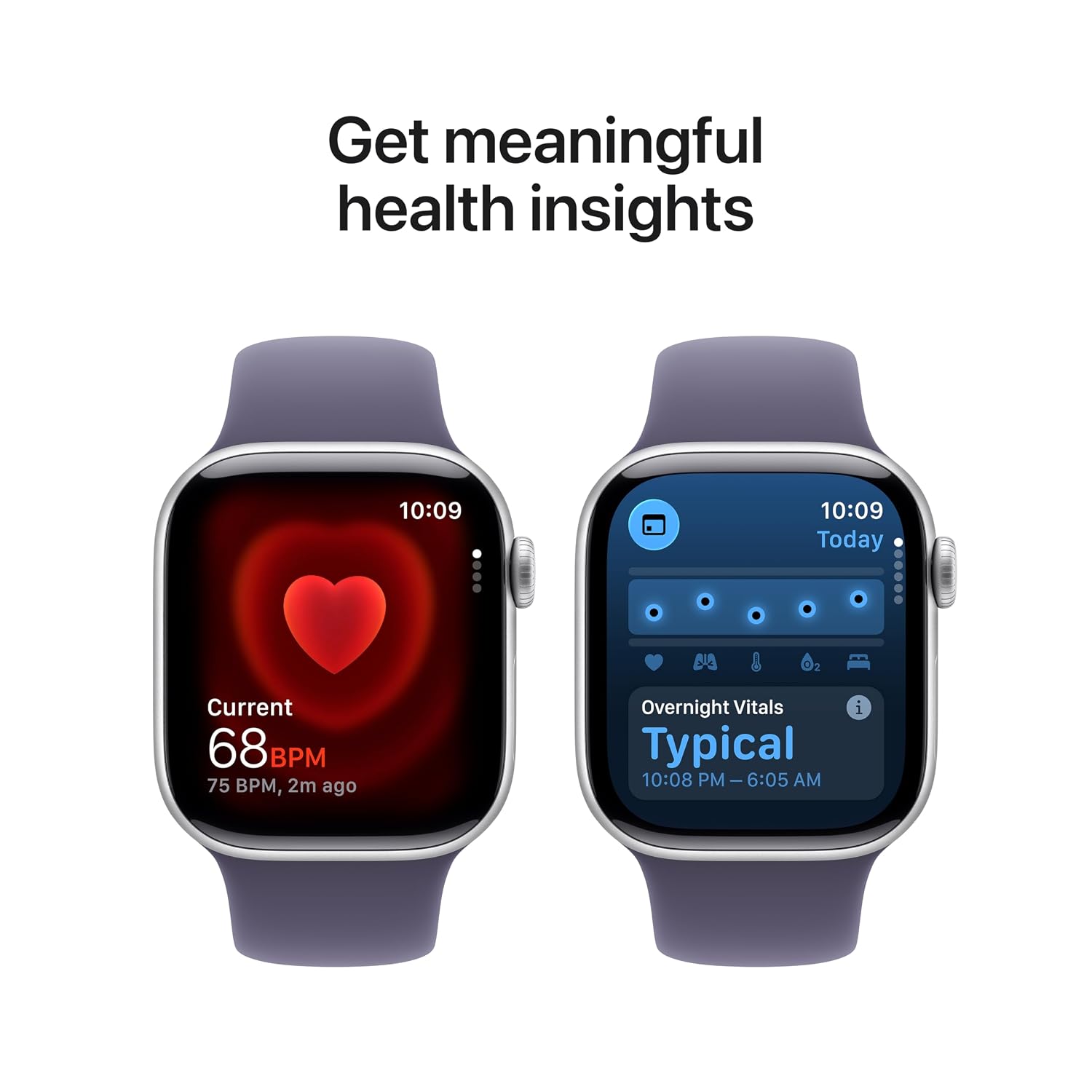
Image: The Apple Watch Series 11 showing current heart rate and overnight vitals within the Vitals app.
Адсочванне фізічнай формы
Track your daily activity and workouts with precision:
- Кольцы актыўнасці: Monitor your Move, Exercise, and Stand goals throughout the day.
- Праграма для трэніровак: Select from various workout types, including running, cycling, swimming, and more. The watch provides advanced metrics like Pacer, Heart Rate Zones, and training load.
- Workout Buddy: Utilize Apple Intelligence features from your nearby iPhone for enhanced workout guidance.

Image: The Apple Watch Series 11 showing activity rings on one screen and the interface for an Outdoor Run workout on another.
Сотавая сувязь
With GPS + Cellular, your Apple Watch can make calls, send messages, and stream music even when your iPhone is not nearby, provided you have an active cellular plan with a compatible carrier.

Image: A person wearing an Apple Watch Series 11, highlighting its 5G connectivity for independent use.
Тэхнічнае абслугоўванне
Чыстка Apple Watch
- Выключыце Apple Watch і адлучыце яго ад зараднай прылады.
- Працярыце гадзіннік неабразіўнай тканінай без ворса. Пры неабходнасці злёгку працярыцеampbe тканіну з чыстай вадой.
- For the band, follow specific cleaning instructions based on its material (e.g., silicone bands can be wiped with a damp cloth and mild soap).
- Не выкарыстоўвайце агрэсіўныя хімікаты або абразіўныя матэрыялы.
Воданепранікальнасць
The Apple Watch Series 11 is water resistant, but not waterproof. It can be used for shallow-water activities like swimming in a pool or ocean. It should not be used for scuba diving, waterskiing, or other activities involving high-velocity water or submersion below shallow depths. Water resistance may decrease over time. Avoid exposing the watch to soap, shampoo, conditioner, lotions, perfumes, solvents, detergent, acids, acidic foods, insect repellent, sunscreen, oil, or hair dye, as these can negatively affect water seals and acoustic membranes.
Абнаўлення праграмнага забеспячэння
Keep your Apple Watch software updated to ensure optimal performance and access to the latest features and security enhancements. Updates are managed through the Apple Watch app on your paired iPhone.
Ліквідацыю непаладак
Агульныя праблемы і рашэнні
- Гадзіннік не ўключаецца: Ensure the watch is charged. Place it on the magnetic charging cable for at least 30 minutes. If it still doesn't turn on, force restart it by holding both the side button and Digital Crown for at least 10 seconds until you see the Apple logo.
- Праблемы спалучэння: Ensure your iPhone's Bluetooth is on and both devices are close to each other. Restart both your iPhone and Apple Watch. If issues persist, unpair the watch from your iPhone (if previously paired) and attempt to pair again.
- Дрэнны тэрмін службы батарэі: Check for background app refresh settings. Reduce screen brightness. Disable 'Always On Display' if not needed. Ensure software is up to date.
- Праграмы не адказваюць: Force quit the app by pressing the side button, then swipe left on the app and tap the 'X' button. Reopen the app. If the issue continues, restart your Apple Watch.
- Cellular Connectivity Problems: Verify your cellular plan is active and compatible with Apple Watch. Check your carrier's coverage in your area. Ensure cellular data is enabled on your watch.
Зварот у службу падтрымкі
If you encounter issues that cannot be resolved using this guide, please visit the official Apple Support website or contact Apple customer service for further assistance.
Тэхнічныя характарыстыкі
| Асаблівасць | Дэталь |
|---|---|
| Нумар мадэлі | MF8J4HN/A |
| Аперацыйная сістэма | WatchOS |
| Ёмістасць памяці | 64 ГБ |
| Асаблівасці | Activity Tracker, Alarm Clock, Always On Display, Fall Detection, GPS |
| Ёмістасць батарэі | 0.1 Міліamp Hours (up to 24 hours normal use) |
| Тэхналогія падлучэння | Bluetooth, сотавая сувязь |
| Вага прадмета | 29.6 г |
| Вытворца | яблык |
| Краіна паходжання | Кітай |
Гарантыя і падтрымка
Інфармацыя аб гарантыі
Your Apple Watch Series 11 is covered by Apple's standard limited warranty. For detailed terms and conditions, please refer to the warranty documentation included with your product or visit the official Apple website. Extended coverage, such as '1 Year Protect+ with AppleCare Service', may be available for purchase separately.
Падтрымка кліентаў
For technical assistance, service, or to find authorized service providers, please visit the official Apple Support webсайт (support.apple.com) or contact Apple customer service directly. Have your device's serial number ready when contacting support.