
1. Прадукт скончыўсяview
The Baseus BS1 NC Semi-in-Ear Noise Cancelling Earbuds offer a blend of comfort and advanced audio technology. Featuring Adaptive Hybrid Active Noise Cancellation (ANC), Hi-Res Audio with LDAC support, and a lightweight design, these earbuds are engineered for extended listening and clear communication. They are also equipped with a 6-microphone AI system for clear calls and IP55 water and dust resistance.

Image: Baseus BS1 NC Semi-in-Ear Noise Cancelling Earbuds and their charging case in black.
2. Змесціва ўпакоўкі
Пераканайцеся, што ўсе прадметы прысутнічаюць у пасылцы:
- Baseus Bass BS1 NC Semi-in-Ear Earbuds (Left and Right)
- Чахол для зарадкі
- Зарадны кабель USB-C
- Кароткае кіраўніцтва

Image: The complete retail package for the Baseus BS1 NC Earbuds, showing the earbuds, charging case, USB-C cable, and quick start guide.
3. Зарадка навушнікаў і чахла
For optimal performance, fully charge the earbuds and charging case before first use.
3.1 Зарадка навушнікаў
- Устаўце навушнікі ў зарадны чахол. Пераканайцеся, што яны правільна ўсталяваны ў адпаведныя гнязда (L для левага, R для правага).
- Close the charging case. The earbuds will begin charging automatically.
3.2 Зарадка корпуса
- Падключыце зарадны кабель USB-C з камплекта да зараднага порта на корпусе.
- Падключыце другі канец кабеля да адаптара харчавання USB (не ўваходзіць у камплект) або да USB-порта кампутара.
- The LED indicator on the case will show the charging status:
- Зялёны: 75% - 100% зараджана
- Жоўты: 25% - 75% зараджана
- Чырвоны: Below 25% charged
- A full charge for the case provides up to 40 hours of total playtime for the earbuds (with ANC off). A 10-minute charge can provide up to 2 hours of playback.

Image: The Baseus BS1 NC Earbuds resting in their open charging case, highlighting the 40-hour total playtime and rapid charging capabilities.
4. Спалучэнне і падключэнне
4.1 Пачатковае спалучэнне
- Адкрыйце зарадны кейс. Навушнікі аўтаматычна пяройдуць у рэжым спалучэння.
- На вашай прыладзе (смартфоне, планшэце, камп'ютары) уключыце Bluetooth.
- Пошук "Baseus Bass BS1 NC" in the list of available Bluetooth devices.
- Select "Baseus Bass BS1 NC" to connect. A voice prompt will confirm successful pairing.
4.2 Аўтаматычнае паўторнае падключэнне
Once paired, the earbuds will automatically reconnect to the last connected device when removed from the charging case and within Bluetooth range.
4.3 Шматкропкавае падключэнне
The Baseus BS1 NC supports Baseus Smart-Connect (BSC) technology, allowing simultaneous connection to two devices. This enables seamless switching between audio sources without manual re-pairing.
To use multipoint connection:
- Pair the earbuds with your first device.
- Disconnect the earbuds from the first device's Bluetooth settings (do not unpair).
- Падключыце навушнікі да другой прылады.
- Зноў падключыце навушнікі да першай прылады з яе налад Bluetooth. Цяпер навушнікі павінны быць падключаны да абедзвюх прылад.
Аўдыё аўтаматычна пераключыцца на прыладу, якая прайгравае кантэнт або прымае званок.
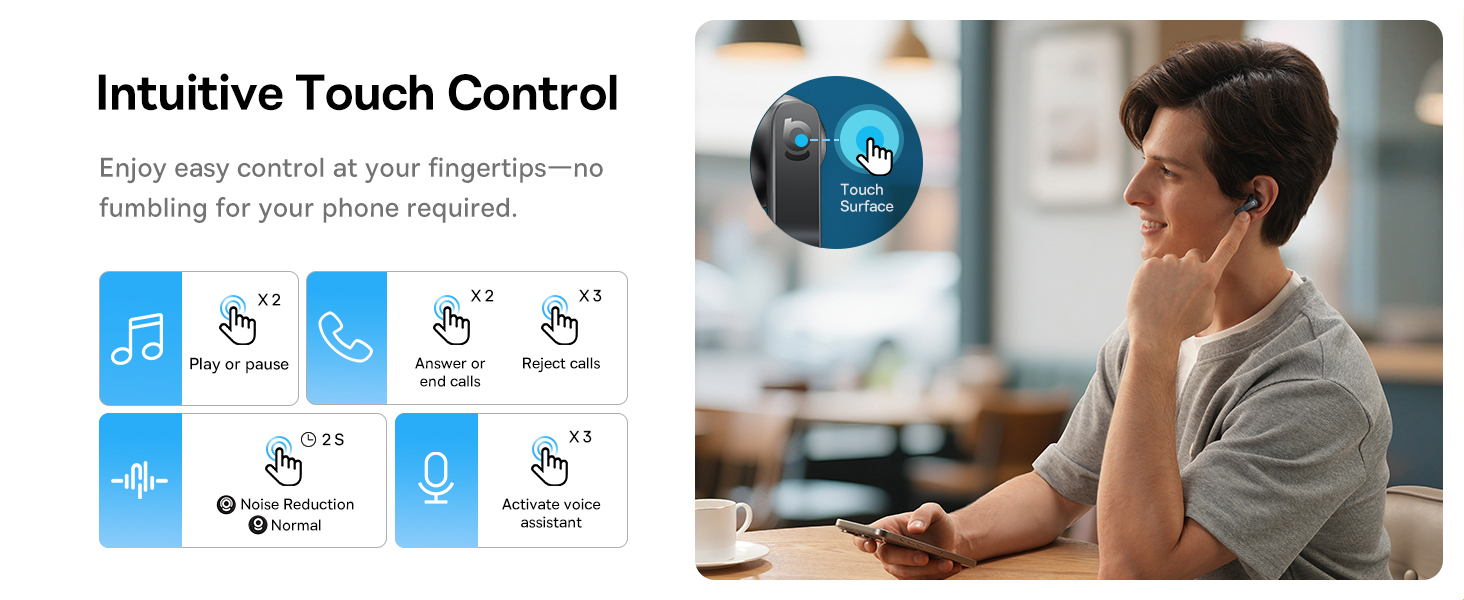
Image: A visual representation of the Baseus BS1 NC Earbuds connected to both a laptop and a smartphone, showcasing the instant multipoint connection feature.
5. Нашэнне навушнікаў-ўкладышаў
The Baseus BS1 NC earbuds feature a semi-in-ear design for comfortable, pressure-free wear. For optimal sound quality and noise cancellation, ensure a proper fit.
- Вызначце левы (L) і правы (R) навушнікі.
- Акуратна ўстаўце кожны навушнік у слыхавы праход.
- Adjust the earbud until it feels secure and comfortable. The stem should point slightly forward or downward.

Image: A person wearing the Baseus BS1 NC Earbuds, illustrating their ergonomic and lightweight design for all-day comfort.
6. Інструкцыя па эксплуатацыі
6.1 Сэнсарнае кіраванне
The earbuds feature intuitive touch controls on their stems. The following are default functions, which may be customizable via the Baseus app:
| Дзеянне | Функцыя |
|---|---|
| Double-tap (Left or Right Earbud) | Прайграванне/прыпыненне музыкі, адказ/завяршэнне выкліку |
| Triple-tap (Left or Right Earbud) | Reject call, Activate voice assistant |
| Націсніце і ўтрымлівайце (2 секунды) | Switch Noise Control Mode (ANC/Normal/Transparency) |

Image: An illustration detailing the intuitive touch controls on the Baseus BS1 NC Earbuds for various functions like play/pause, call management, noise reduction, and voice assistant activation.
6.2 Рэжымы кіравання шумам
The Baseus BS1 NC earbuds offer three noise control modes:
- Adaptive Hybrid ANC (Active Noise Cancellation): Reduces ambient noise for an immersive listening experience. Ideal for noisy environments.
- Рэжым празрыстасці: Дазваляе чуць наваколле, адначасова атрымліваючы асалоду ад аўдыё. Карысна для ўважлівасці ў гарадскіх умовах або падчас размоў.
- Звычайны рэжым: Standard audio playback without active noise cancellation or transparency features.
Switch between modes by pressing and holding the touch area on either earbud for 2 seconds.

Image: A cutaway diagram of a Baseus BS1 NC earbud in an ear, illustrating the semi-in-ear fit and the availability of Adaptive Noise Cancelling and Transparency Mode.
6.3-канальны гук высокай выразнасці з LDAC
These earbuds support LDAC technology, enabling high-resolution audio transmission for a detailed and rich sound experience. Ensure your device supports LDAC and activate it in your device's Bluetooth settings for the best audio quality.

Image: The Baseus BS1 NC Earbuds surrounded by sound waves, emphasizing features like Hi-Res Audio, SuperBass 2.0, and 13mm dynamic drivers for powerful sound.
6.4 6-Mic AI Clear Calls
The earbuds are equipped with 6 microphones and AI noise isolation technology to ensure your voice is clear during calls, even in noisy environments. Wind noise reduction further enhances call clarity outdoors.
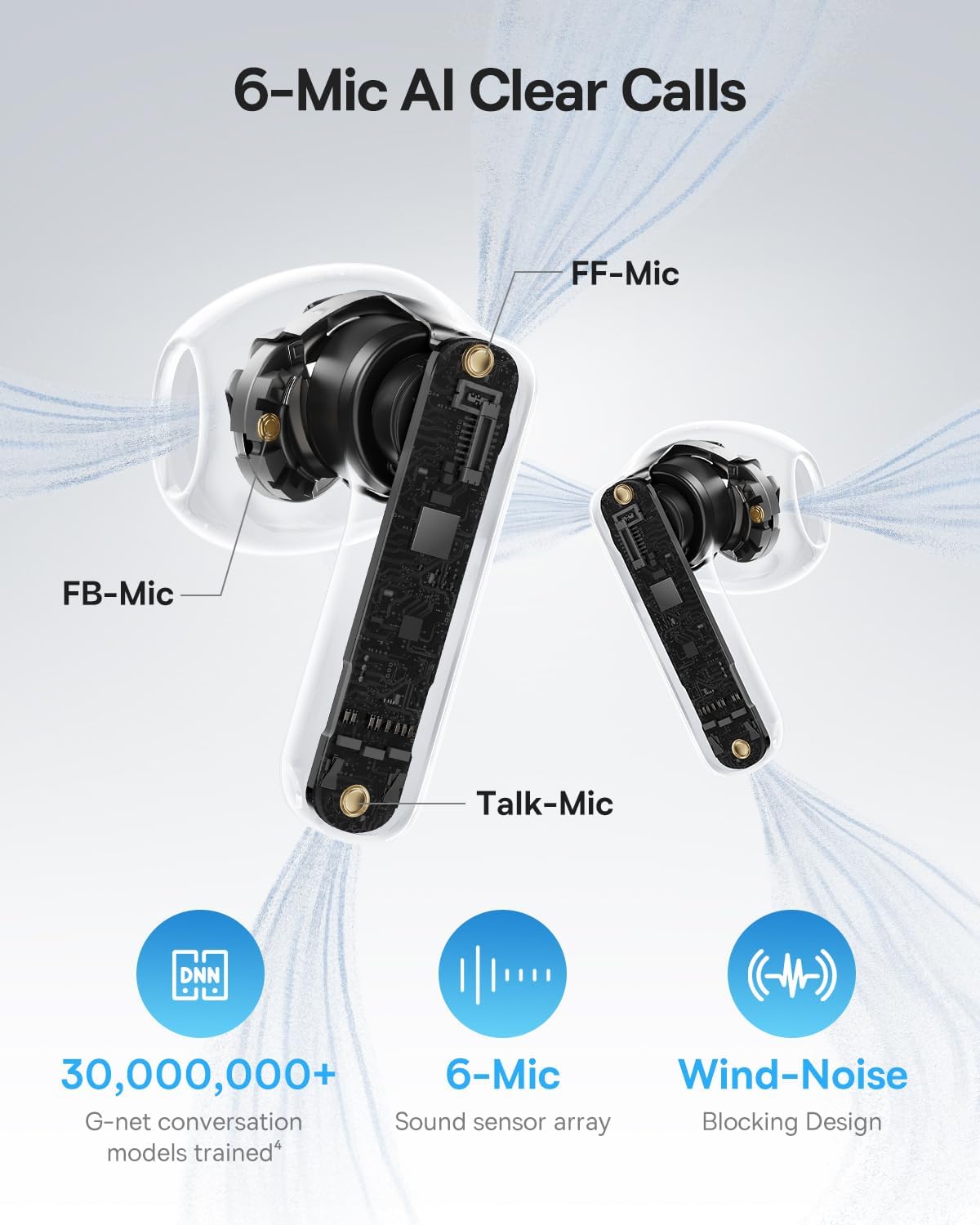
Image: A detailed diagram of the Baseus BS1 NC earbud, highlighting the placement of the FF-Mic, FB-Mic, and Talk-Mic, which contribute to the 6-Mic AI Clear Call technology and wind-noise blocking design.
6.5 Інтэлектуальнае кіраванне праграмамі
Download the dedicated Baseus app for enhanced control and customization options. The app allows you to:
- Adjust Bass Boost levels.
- Select from various EQ Modes.
- Control Spatial Acoustics settings.
- Use the "Find Your Earbuds" feature.
Note: In guest mode, no account creation or permissions are required to customize features, but GPS access is needed to locate lost earbuds.

Image: A smartphone displaying the Baseus app interface, which offers various sound control options including Bass Boost, EQ Modes, Spatial Acoustics, and a "Find Your Earbuds" function.
7. Тэхнічнае абслугоўванне і догляд
7.1 Ачыстка
- Рэгулярна працірайце навушнікі і зарадны футляр мяккай, сухой тканінай без ворса.
- Не выкарыстоўвайце агрэсіўныя хімічныя рэчывы, ачышчальныя растваральнікі або моцныя мыйныя сродкі.
- Gently remove any earwax or debris from the earbud mesh and charging contacts using a small, soft brush or cotton swab.
7.2 Воданепранікальнасць і пыланепранікальнасць (IP55)
The earbuds are rated IP55, meaning they are protected against limited dust ingress and low-pressure water jets from any direction. This makes them suitable for workouts and light rain exposure.
- Не апускайце навушнікі ў ваду.
- Перад тым, як змясціць навушнікі назад у зарадны футляр, пераканайцеся, што яны сухія, каб пазбегнуць пашкоджання кантактаў зарадкі.
- Чахол для зарадкі не воданепранікальны.

Image: The Baseus BS1 NC Earbuds shown with water droplets, signifying their IP55 rating for dust and water resistance.
7.3 Захоўванне
Захоўвайце навушнікі-ўкладышы ў зарадным чахле, калі яны не выкарыстоўваюцца, каб абараніць іх і падтрымліваць зарад.
8. Выпраўленне непаладак
If you encounter issues with your Baseus BS1 NC earbuds, refer to the following common solutions:
- Няма праблем з гукам/падключэннем:
- Пераканайцеся, што навушнікі зараджаныя.
- Verify Bluetooth is enabled on your device and "Baseus Bass BS1 NC" is selected.
- Try placing earbuds back in the case, closing it, and then reopening to reset the connection.
- Забудзьцеся пра прыладу ў наладах Bluetooth і зноў падключыце прыладу.
- Адзін навушнік не працуе:
- Пераканайцеся, што абодва навушнікі зараджаны.
- Змясціце абодва навушнікі назад у чахол, зачыніце яго і зноў адкрыйце.
- Ачысціце зарадныя кантакты на абодвух навушніках і ўнутры кейса.
- Дрэнная якасць гуку:
- Пераканайцеся, што навушнікі правільна размешчаны ў вушах.
- Ачысціце сетку навушнікаў, каб выдаліць любыя перашкоды.
- Check your device's audio settings and ensure LDAC is enabled if supported.
- АНК неэфектыўны:
- Ensure ANC mode is activated via touch control or the Baseus app.
- Adjust the earbuds for a better seal in your ears.
9. Тэхнічныя характарыстыкі
| Асаблівасць | Дэталь |
|---|---|
| Назва мадэлі | Baseus Bass BS1 NC |
| Кантроль шуму | Adaptive Noise Cancellation, Environmental Noise Cancellation, Hybrid Noise Cancellation |
| Тэхналогія падлучэння | Bluetooth 6.0, бесправадная сувязь |
| Тэхналогія бесправадной сувязі | Bluetooth 6.0 |
| Дыяпазон Bluetooth | 10 метраў |
| Тып аўдыё драйвера | Дынамічны драйвер |
| Памер аўдыё драйвера | 13 міліметра |
| АЧХ | 40 кГц |
| Затрымка аўдыя | 60 мілісекунд |
| Тэрмін службы батарэі (навушнікі) | 7 гадзін (шумнае акустычнае напружанне выключана) |
| Агульны час прайгравання (з кейсам) | 40 гадзін (шумнае акустычнае напружанне выключана) |
| Charging Time (Rapid Charge) | 10 хвілін для 2 гадзін прайгравання |
| Узровень воданепранікальнасці | IP55 (толькі навушнікі-ўкладышы) |
| Тып кіравання | Сэнсарнае кіраванне |
| Матэрыял | Акрыланітрылбутадыенстырол (АБС), полікарбанат (ПК) |
| Вага прадмета (навушнікі) | 4 г на навушнік |
| Product Dimensions (Earbuds) | 1.2 х 0.7 х 0.7 цалі |
| Сумяшчальныя прылады | Devices with Bluetooth Audio Capability, including iOS, Android, Windows, Mac OS and Switch. |
10. Афіцыйнае відэа прадукту
Watch the official product video for a visual guide on the Baseus BS1 NC Earbuds:
Відэа: Афіцыйнае відэа прадукту з прэзентацыі Baseusasing the features and usage of the Baseus BS1 NC Semi-in-Ear True Wireless Earbuds.
11. Гарантыя і падтрымка
For warranty information, technical support, FAQs, and further assistance, please visit the official Baseus support center.
Refer to the Quick Start Guide included in your package for a direct link or visit the Baseus webсайт.
Note: Protection plans may be available for purchase separately.