
OHAYO X10 Max
OHAYO X10 Max Bluetooth Speaker Instruction Manual
Welcome to your new OHAYO X10 Max Portable Bluetooth Speaker.
1. Важная інфармацыя па бяспецы
- Не падвяргайце дынамік уздзеянню экстрэмальных тэмператур або прамых сонечных прамянёў на працягу доўгага часу.
- Keep the speaker away from heat sources, sharp objects, and corrosive materials.
- Не разбірайце, не рамантуйце і не мадыфікуйце дынамік самастойна. Пры неабходнасці звярніцеся да кваліфікаванага абслугоўваючага персаналу.
- Ensure the charging port cover is securely closed when using the speaker near water to maintain its IPX7 waterproof rating.
- Выкарыстоўвайце для зарадкі толькі той зарадны кабель, які ўваходзіць у камплект, або сертыфікаваны кабель USB-C.
2. Змесціва ўпакоўкі
- 1 x OHAYO X10 Max Bluetooth Speaker (White)
- 1 x USB-C Charging Cable (charging plug not contained)
- 1 х 3.5 мм AUX кабель
- 1 х Кіраўніцтва карыстальніка
- 1 х шнурок
3. Прадукт скончыўсяview
The OHAYO X10 Max is a versatile portable Bluetooth speaker designed for high-quality audio and durability. It features a powerful 25W sound output with active bass, IPX7 waterproofing, and a long-lasting 24-hour battery. Enjoy dynamic sound with colorful RGB lighting effects, dual pairing for stereo sound, and multiple input modes.
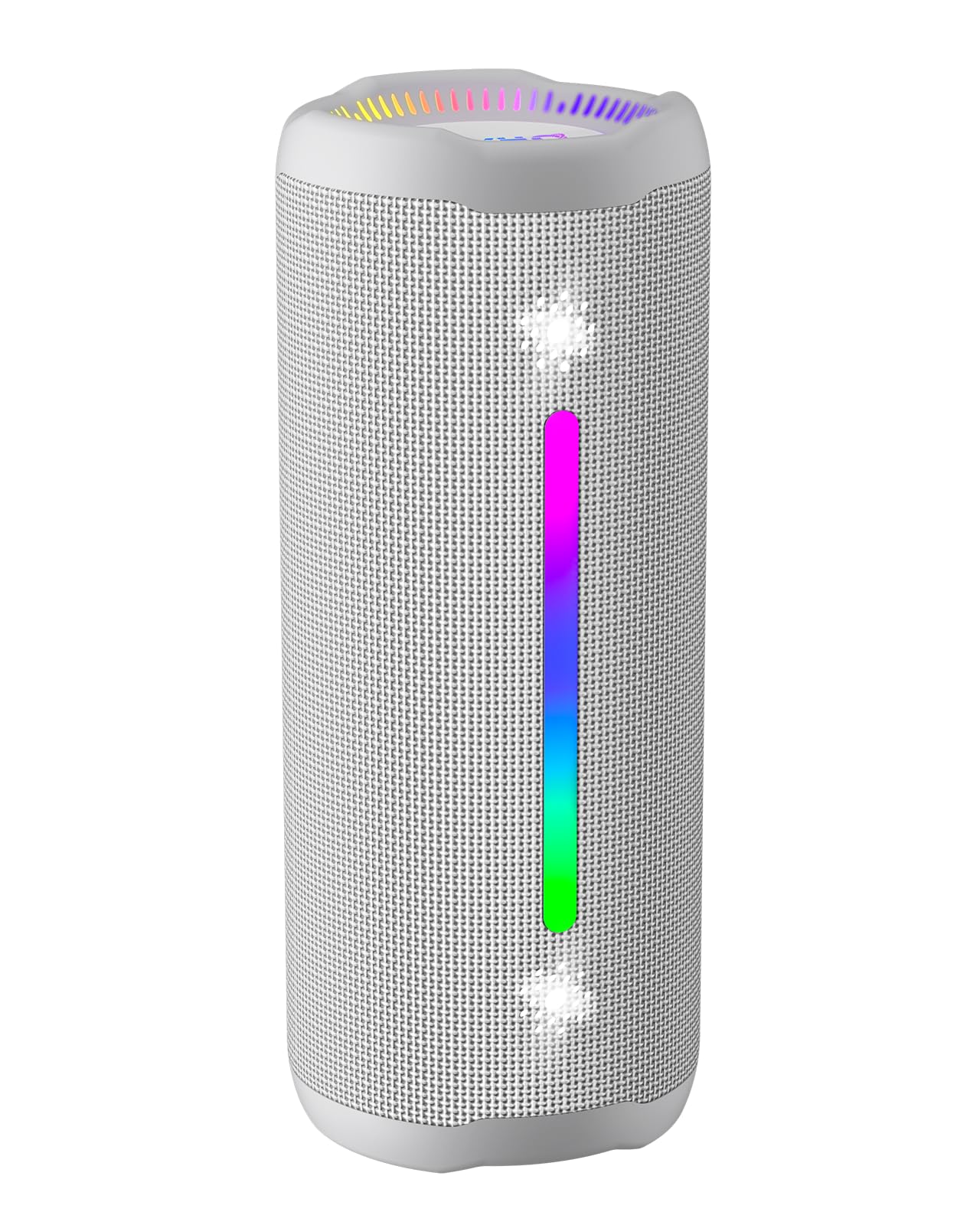
Figure 3.1: OHAYO X10 Max Bluetooth Speaker (White)

Figure 3.2: OHAYO X10 Max Bluetooth Speaker - Fully upgraded from appearance to performance.

Figure 3.3: 25W Deep Bass Sound - Independent channel design for accurate audio performance.

Figure 3.4: 6 Dazzling RGB Light Effects - Syncs with music for an immersive experience.

Figure 3.5: IPX7 Waterproof - Highly sealed design for use in various environments.

Figure 3.6: 24H Ultra-Long Battery Life - 6600mAh battery for extended playback.
4. Элементы кіравання і індыкатары
The OHAYO X10 Max features intuitive controls for easy operation.

Малюнак 4.1: Панэль кіравання і парты
- Кнопка харчавання: Press and hold to power on/off. Short press to switch between input modes (Bluetooth, AUX, TF Card, USB-Audio).
- Volume Up (>): Кароткае націсканне для павелічэння гучнасці. Доўгае націсканне для наступнай кампазіцыі.
- Volume Down (<): Кароткае націсканне для памяншэння гучнасці. Доўгае націсканне для папярэдняга трэка.
- Кнопка баса: Press to activate/deactivate Bass Boost mode.
- Кнопка прайгравання/паўзы/выкліку: Short press to play/pause music. Short press to answer/end calls. Long press to reject calls. Double press to activate voice assistant.
- Індыкатар батарэі: Four LED lights indicate battery level.
- RGB-светлавая паласа: Displays various colorful lighting effects.
- Порт зарадкі (USB-C): Для зарадкі калонкі.
- Порт AUX-in: Для праваднога падключэння аўдыё.
- Слот TF карты: Для прайгравання музыкі непасрэдна з карты MicroSD.
5. Настройка
5.1 Зарадка дынаміка
Before first use, fully charge the speaker. Connect the provided USB-C charging cable to the speaker's charging port and the other end to a 5V/2A USB power adapter (not included). The battery indicator lights will blink during charging and remain steady when fully charged.
5.2 Уключэнне/выключэнне
Press and hold the Power button for approximately 3 seconds to turn the speaker on or off. A voice prompt will confirm the action.
5.3 Спалучэнне па Bluetooth
- Turn on the speaker. It will automatically enter Bluetooth pairing mode, indicated by a blinking blue LED.
- Уключыце Bluetooth на вашай прыладзе (смартфоне, планшэце і г.д.).
- Пошук "X10 Max" in your device's Bluetooth list and select it to connect.
- Пасля падключэння галасавая падказка пацвердзіць паспяховае спалучэнне.
5.4 Спалучэнне з сапраўдным бесправадным стэрэа (TWS)
To achieve a true wireless stereo experience, you can pair two OHAYO X10 Max speakers together.

Figure 5.1: True Wireless Stereo Pairing
- Ensure both X10 Max speakers are powered on and not connected to any other Bluetooth device.
- На адным дынаміку (гэта будзе асноўны дынамік) двойчы націсніце кнопку харчавання. Прылада ўвойдзе ў рэжым спалучэння TWS.
- Дзве калонкі аўтаматычна падключацца адна да адной. Паспяховае спалучэнне TWS пацвердзіць галасавое паведамленне.
- Цяпер падключыце прыладу да асноўнага дынаміка праз Bluetooth, як апісана ў раздзеле 5.3.
5.5 Падключэнне праз AUX
Use the provided 3.5mm AUX cable to connect the speaker to devices without Bluetooth capability.
Figure 5.2: 4 Input Modes - Including AUX, TF, and USB-Audio.
- Connect one end of the AUX cable to the speaker's AUX-in port.
- Падключыце другі канец да аўдыёвыхаду вашай прылады.
- The speaker will automatically switch to AUX mode. If not, short press the Power button to cycle through modes until AUX mode is activated.
5.6 Using TF Card
Insert a MicroSD (TF) card with MP3/WAV/FLAC/WMA audio files into the TF card slot. The speaker will automatically switch to TF card mode and begin playback. Short press the Power button to cycle through modes if needed.
5.7 Using USB-Audio
Connect the speaker to a computer using the USB-C cable. The speaker can function as an external audio output device for your computer. Short press the Power button to cycle through modes if needed.
6. Інструкцыя па эксплуатацыі
6.1 Прайграванне музыкі
- Прайграванне/Паўза: Кароткачасова націсніце кнопку прайгравання/паўзы/выкліку.
- Рэгулятар гучнасці: Short press the Volume Up (>) or Volume Down (<) buttons.
- Наступны трэк: Long press the Volume Up (>) button.
- Папярэдні трэк: Long press the Volume Down (<) button.
Функцыя ўзмацнення басоў 6.2
Press the 'BASS' button to activate or deactivate the enhanced bass mode. This feature provides deeper and richer low frequencies for a more impactful audio experience.
6.3 рэжыму асвятлення RGB
The speaker features dynamic RGB lighting. The lights will automatically sync with the music beat. To turn the lights on/off, refer to the specific control instructions in your quick start guide or experiment with the mode button if available.
6.4 Званкі ў рэжыме гучнай сувязі
When connected via Bluetooth to your smartphone, the speaker can be used for hands-free calls.

Малюнак 6.1: Функцыя званкоў у рэжыме гучнай сувязі
- Адказ/завяршэнне выкліку: Кароткачасова націсніце кнопку прайгравання/паўзы/выкліку.
- Адхіліць выклік: Доўга націсніце кнопку прайгравання/паўзы/выкліку.
- Актываваць галасавы памочнік: Double press the Play/Pause/Call button.
7. Тэхнічнае абслугоўванне
- Уборка: Працярыце дынамік мяккім, damp тканіна. Не выкарыстоўвайце агрэсіўныя хімікаты або абразіўныя ачышчальнікі.
- захоўванне: Захоўвайце дынамік у прахалодным, сухім месцы, удалечыні ад прамых сонечных прамянёў і экстрэмальных тэмператур, калі ён не выкарыстоўваецца працяглы час.
- Сыход за батарэяй: Каб падоўжыць тэрмін службы батарэі, зараджайце дынамік хаця б раз на тры месяцы, калі ён не выкарыстоўваецца рэгулярна.
8. Выпраўленне непаладак
| праблема | Магчымая прычына | Рашэнне |
|---|---|---|
| Дынамік не ўключаецца. | Нізкі акумулятар. | Цалкам зарадзіце дынамік. |
| Немагчыма падключыцца праз Bluetooth. | Дынамік не ў рэжыме спалучэння; Bluetooth прылады выключаны; занадта далёка ад прылады. | Ensure speaker is in pairing mode (blinking blue LED). Turn on device Bluetooth. Move device closer to speaker (within 10 meters). |
| Няма гуку або нізкі ўзровень гучнасці. | Volume too low on speaker or device; incorrect input mode. | Increase volume on both speaker and device. Check if the correct input mode (Bluetooth, AUX, TF) is selected. |
| Памылка спалучэння TWS. | Дынамікі занадта далёка адзін ад аднаго; адзін дынамік ужо падключаны да іншай прылады. | Ensure speakers are close to each other. Disconnect any existing Bluetooth connections before TWS pairing. |
| Скажэнне гуку. | Занадта высокая гучнасць; нізкі зарад батарэі. | Зменшце гучнасць. Зарадзіце дынамік. |
9. Тэхнічныя характарыстыкі
| Асаблівасць | Спецыфікацыя |
|---|---|
| Назва мадэлі | X10 Макс |
| Версія Bluetooth | 5.3 |
| Тэхналогія бесправадной сувязі | Bluetooth |
| Максімальная выхадная магутнасць дынаміка | 35 Watts (25W effective) |
| Ёмістасць батарэі | 6600 мАг |
| Час гульні | Up to 24 hours (varies with volume and light use) |
| Узровень воданепранікальнасці | IPX7 (воданепранікальны) |
| Уваходны кнtage | 5 В (пастаянны ток) |
| АЧХ | 20 кГц |
| Стаўленне сігнал / шум | 80 дБ |
| Тып аўдыё драйвера | Дынамічны драйвер |
| Дыяметр НЧ-дынаміка | 75 міліметра |
| Дыяметр твітэра | 26 міліметра |
| Памеры прадукту | 2.95" Г x 2.95" Ш x 7.28" У |
| Вага прадмета | 450 грам (15.9 унцый) |
| Матэрыял | Акрыланітрылбутадыенстырол (АБС), алюміній |
| Метад кантролю | Кнопка |
| Асаблівасці | Bass Boost, AUX, Hi-Res Audio, 24-Hour Playtime, IPX7 Waterproof, TF Card Port, Dual Passive Radiators, Hands-free, True Wireless Stereo Pairing, Shockproof |
10. Гарантыя і падтрымка
The OHAYO X10 Max Bluetooth Speaker comes with an extended warranty. For specific warranty details and to register your product, please refer to the information provided in your quick start guide or contact OHAYO customer support.
For technical support or customer service inquiries, please contact OHAYO Direct. Contact information may be found in your product packaging or on the official OHAYO webсайт.
11. Афіцыйнае відэа прадукту
Video 11.1: Official OHAYO Portable Bluetooth Speaker overview by OHAYO Direct. This video highlights key features and design elements of the speaker.