
Уводзіны
This manual provides detailed instructions for the setup, operation, and maintenance of your Auvoda S300 Portable Bluetooth Speaker. Please read this guide thoroughly to ensure optimal performance and longevity of your device. The Auvoda S300 combines a portable Bluetooth speaker with 15W fast wireless charging, a 13-color dimmable night light, white noise functions, an alarm clock, and an FM radio.
Што ў скрынцы
- Auvoda S300 Bluetooth Speaker
- Зарадны кабель Type-C
- Інструкцыя па эксплуатацыі (гэты дакумент)
Прадукт скончаныview
Familiarize yourself with the various components and controls of your Auvoda S300 speaker.

Image: Front controls and rear ports of the Auvoda S300 speaker.
Элементы кіравання і парты:
- Power/Light Switch Button: Long press to turn on/off power. Short press to switch or turn off lights.
- Кнопка рэжыму (M): Long press to switch between Bluetooth (BT), White Noise (NS), and FM Radio (FM) modes. When NS or FM is displayed, short press to switch between options using the '+' and '-' buttons.
- Кнопка прайгравання/паўзы: Кароткае націсканне для прайгравання або прыпынення аўдыё.
- Previous Track/Volume Down (-): Short press for previous track. Long press to decrease volume. In conjunction with alarm clock, clock, white noise, FM radio settings, use to decrease values.
- Next Track/Volume Up (+): Short press for next track. Long press to increase volume. In conjunction with alarm clock, clock, white noise, FM radio settings, use to increase values.
- Timer/Bluetooth Pairing Button: Short press to set timer (15/30/60 seconds). Long press to pair Bluetooth devices.
- Alarm Settings Button: Long press until the alarm symbol flashes to enter alarm setting mode. Short press to make it flash, and use '+' and '-' to set the time.
- Clock Settings Button: Long press to switch between 12-hour and 24-hour modes. Short press to make it flash, and use '+' and '-' to set the time.
- Порт DC5V: Для зараднага кабеля Type-C.
- Слот TF карты: Для прайгравання з TF-карты.
- Порт USB: For USB playback.
- AUX порт: For 3.5mm audio input.
- Бесправадная зарадная пляцоўка: Located on top surface for Qi-enabled devices.
Настройка
1. Зарадка прылады
Before first use, fully charge the Auvoda S300 using the provided Type-C charging cable. Connect the cable to the DC5V port on the back of the speaker and plug the other end into a compatible USB power adapter (not included). The device supports up to 6 hours of battery life.
2. Уключэнне/выключэнне харчавання
Long press the Power/Light Switch button to turn the speaker on or off.
3. Спарванне Bluetooth
- Turn on the Auvoda S300 speaker.
- Long press the Mode button (M) until 'BT' appears on the display, indicating Bluetooth mode.
- On your mobile device, enable Bluetooth and search for 'Auvoda S300'.
- Select 'Auvoda S300' to pair. A confirmation sound will indicate successful pairing.
4. Спалучэнне TWS (сапраўднае бесправадное стэрэа)
To achieve expansive stereo sound, you can pair two identical Auvoda S300 speakers:
- Ensure both Auvoda S300 speakers are powered on and in Bluetooth mode.
- On one of the speakers, long press the Timer/Bluetooth Pairing button. It will enter TWS pairing mode.
- Два дынамікі аўтаматычна падключацца адзін да аднаго. Гукавы сігнал пацверджання будзе пацверджаны паспяховым спалучэннем TWS.
- Connect your mobile device to one of the paired speakers via Bluetooth as described above. Audio will now play in stereo across both speakers.
5. Наладжванне гадзінніка
- Long press the Clock Settings button to switch between 12-hour and 24-hour modes.
- Short press the Clock Settings button to make the hour display flash. Use the '+' and '-' buttons to adjust the hour.
- Short press the Clock Settings button again to make the minute display flash. Use the '+' and '-' buttons to adjust the minutes.
- Short press the Clock Settings button one more time to confirm and exit clock setting mode.
6. Налада сігналізацыі
- Long press the Alarm Settings button until the alarm symbol flashes on the display.
- Short press the Alarm Settings button to make the hour display flash. Use the '+' and '-' buttons to adjust the alarm hour.
- Short press the Alarm Settings button again to make the minute display flash. Use the '+' and '-' buttons to adjust the alarm minutes.
- Short press the Alarm Settings button one more time to confirm and exit alarm setting mode.
- To activate or deactivate the alarm, short press the Alarm Settings button when the alarm symbol is not flashing.
Інструкцыя па эксплуатацыі
1. Прайграванне аўдыё праз Bluetooth
Once paired, you can stream audio from your device to the Auvoda S300. Use the Play/Pause button to control playback, and the '+' and '-' buttons for volume adjustment or track navigation.
2. Функцыя начніка
The Auvoda S300 features a 13-color dimmable night light.

Image: The Auvoda S300 speaker showcasing its adjustable lighting modes.
- Пераключэнне колераў: Short press the Power/Light Switch button to cycle through the 13 available colors and lighting effects.
- Turning Off Lights: Continue short pressing the Power/Light Switch button until the lights turn off.
3. White Noise Function
The speaker includes 7 soothing white noise sounds for relaxation or sleep.

Image: The Auvoda S300 speaker illustrating its selection of white noise sounds.
- Long press the Mode button (M) until 'NS' appears on the display, indicating White Noise mode.
- Use the '+' and '-' buttons to cycle through the 7 available white noise sounds (e.g., Ocean waves, Rain, Forest).
- Adjust the volume using the '+' and '-' buttons (long press).
4. Функцыя FM-радыё
Слухайце свае любімыя FM-радыёстанцыі.
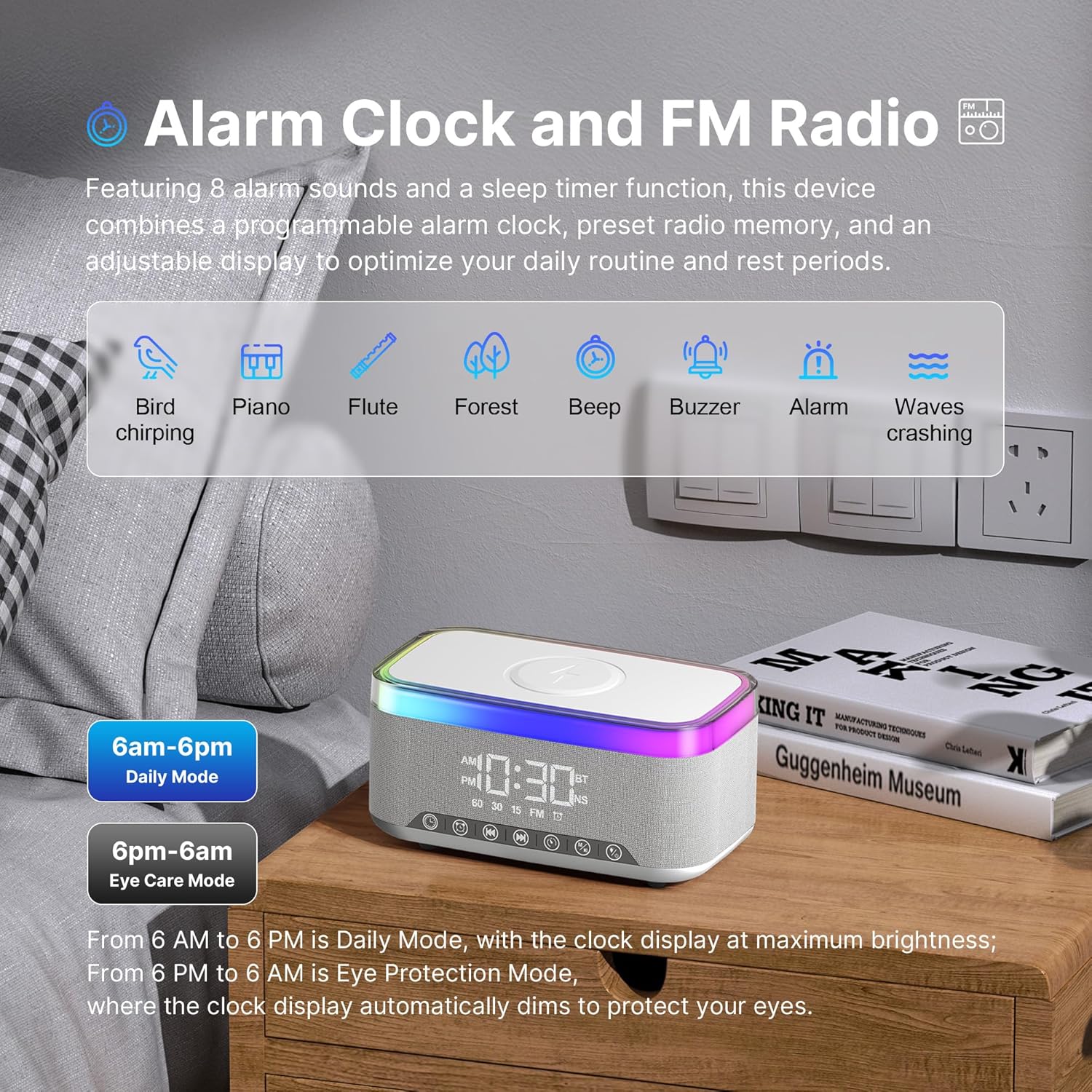
Image: The Auvoda S300 speaker highlighting its alarm clock and FM radio functionalities.
- Long press the Mode button (M) until 'FM' appears on the display, indicating FM Radio mode.
- Use the '+' and '-' buttons to tune to different FM frequencies.
- Adjust the volume using the '+' and '-' buttons (long press).
5. Бесправадная зарадка
The Auvoda S300 features a 15W fast wireless charging pad for Qi-enabled devices.
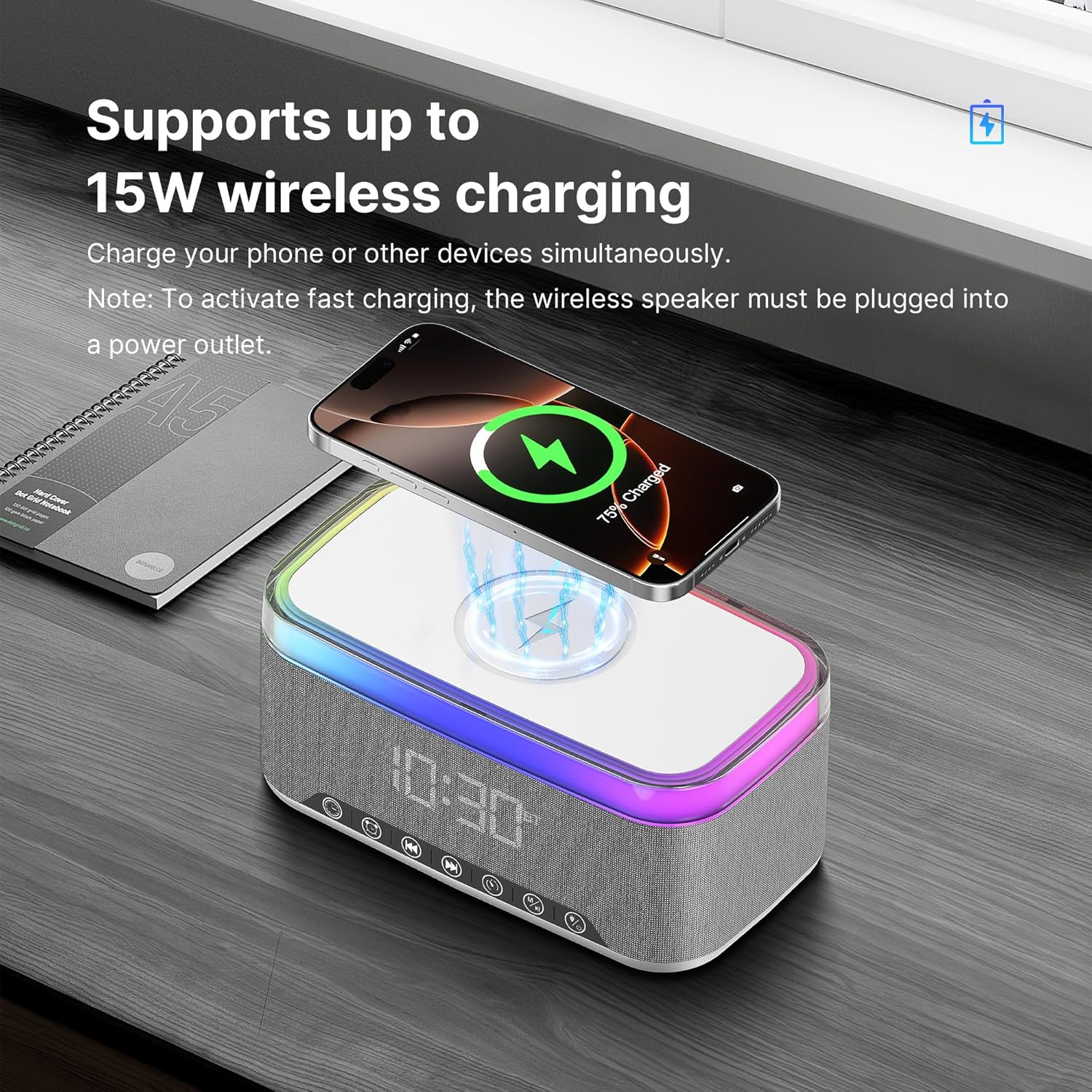
Image: A smartphone being wirelessly charged on the Auvoda S300 speaker.
- Place your Qi-enabled device on the wireless charging pad located on the top surface of the speaker.
- Ensure the speaker is plugged into a power outlet to activate fast wireless charging.
- The charging indicator on your device will confirm charging has begun.
6. AUX, TF Card, and USB Playback
The speaker supports audio playback via AUX input, TF card, and USB drive.
- Уваход AUX: Connect an audio device using a 3.5mm AUX cable to the AUX port. The speaker will automatically switch to AUX mode.
- Прайграванне з карты TF/USB: Insert a TF card into the TF card slot or a USB drive into the USB port. The speaker will automatically detect and play audio files. Use the '+' and '-' buttons for track navigation and volume control.
7. Відэадэманстрацыя
Watch this video for a visual guide on operating the Auvoda S300 Multi-function Bluetooth Speaker.
Video: A demonstration of the Auvoda S300 Multi-function Bluetooth Speaker's features, including power on, volume adjustment, light switching, FM radio, white noise, alarm clock, and wireless charging.
Тэхнічнае абслугоўванне
- Працірайце дынамік мяккай сухой тканінай. Не выкарыстоўвайце абразіўныя ачышчальнікі або растваральнікі.
- Keep the device away from extreme temperatures, direct sunlight, and moisture. The device is IPX3 splash-resistant, but not waterproof.
- Пазбягайце падзення дынаміка або моцных удараў.
- Захоўвайце ў прахалодным сухім месцы, калі не выкарыстоўваеце яго працяглы час.
Ліквідацыю непаладак
Няма харчавання / Прылада не ўключаецца
- Пераканайцеся, што прылада цалкам зараджана або падключана да крыніцы харчавання.
- Verify the power cable is securely connected to both the speaker and the power outlet.
Праблемы спалучэння Bluetooth
- Make sure the speaker is in Bluetooth pairing mode ('BT' displayed).
- Ensure your mobile device's Bluetooth is enabled and within range (up to 10 meters).
- Forget 'Auvoda S300' from your device's Bluetooth list and try pairing again.
- Перазагрузіце і дынамік, і мабільную прыладу.
Дрэнная якасць гуку
- Ensure the speaker and your audio source are within Bluetooth range and there are no obstructions.
- Праверце ўзровень гучнасці як на дынаміку, так і на падлучанай прыладзе.
- If using AUX, TF card, or USB, ensure the cable/card/drive is properly inserted and functional.
Бесправадная зарадка не працуе
- Ensure the speaker is plugged into a power outlet (wireless charging does not work on battery power alone).
- Verify your device is Qi-enabled and properly centered on the charging pad.
- Зніміце з тэлефона ўсе тоўстыя чахлы, якія могуць перашкаджаць бесправадной зарадцы.
Будзільнік не гучыць
- Confirm the alarm time is set correctly and the alarm is activated (alarm symbol visible on display).
- Check the speaker's volume level.
Тэхнічныя характарыстыкі
| Асаблівасць | Спецыфікацыя |
|---|---|
| Назва мадэлі | S300 |
| Марка | Auvoda |
| Тып дынаміка | Партатыўная калонка Bluetooth |
| Тэхналогія падлучэння | Bluetooth 5.3 |
| Выхад для бесправадной зарадкі | 15 Вт |
| Максімальная выхадная магутнасць дынаміка | 10 Вт (два дынамікі па 5 Вт) |
| Рэжым выхаду гуку | Stereo (supports TWS pairing) |
| Колеры начнога святла | 13 Dimmable Colors |
| Гукі белага шуму | 7 (e.g., Ocean waves, Rain, Forest) |
| Асаблівасці | Alarm Clock, FM Radio, LED Night Light, White Noise, Wireless Charging |
| Узровень воданепранікальнасці | IPX3 Splash-Resistant |
| Памеры прадукту | 3.94" Г x 7.09" Ш x 3.54" У |
| Вага прадмета | 1.79 фунта |
| Матэрыял | Acrylonitrile Butadiene Styrene (ABS), Fabric |
| Метад кантролю | Дакранацца |
| Дыяпазон Bluetooth | 10 метраў |
Гарантыя і падтрымка
The Auvoda S300 Portable Bluetooth Speaker comes with a limited warranty. For specific warranty terms, duration, and support inquiries, please refer to the warranty card included with your product or contact Auvoda customer service directly. Contact information can typically be found on the manufacturer's official webсайт або ўпакоўка прадукту.