
Уводзіны
The Rapoo M308 is a versatile multi-mode wireless mouse designed for efficiency and comfort. It features an ambidextrous design, allowing comfortable use for both right-handed and left-handed individuals. With its dual connectivity options, Bluetooth 5.0 and 2.4 GHz wireless, you can seamlessly connect to up to three devices and switch between them with ease. The mouse is engineered for long-lasting performance, offering a battery life of up to 12 months.
Змест пакета
- Rapoo M308 Multi-mode Wireless Mouse
- USB-прыёмнік (захоўваецца ўнутры мышы)
- 2 батарэйкі АА
- Кароткае кіраўніцтва (гэта кіраўніцтва)
Прадукт скончаныview
Familiarize yourself with the components of your Rapoo M308 mouse.
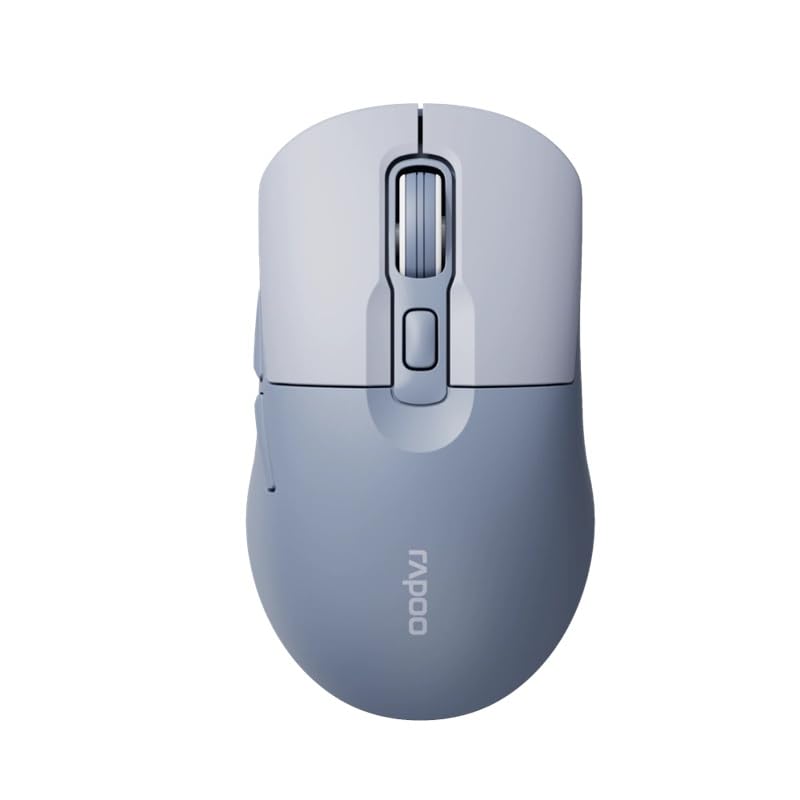
Image: The Rapoo M308 Multi-mode Wireless Mouse in blue, showcasing its ergonomic, ambidextrous design with a scroll wheel and multiple buttons.
- Левая кнопка: Стандартная функцыя левага кліку.
- Правая кнопка: Стандартная функцыя правай кнопкі мышы.
- Кола пракруткі: For scrolling and middle-click function.
- Кнопка DPI: Рэгулюе адчувальнасць курсора (DPI).
- Mode Switch Button/Indicator: Switches between connected devices (2.4G, Bluetooth 1, Bluetooth 2) and indicates current mode.
- Бакавыя кнопкі: Forward/Backward navigation (programmable).
- Батарэйны адсек: Located on the underside, holds 2 AA batteries.
- USB Receiver Slot: Located inside the battery compartment for storage.
Настройка
1. Устаноўка батарэі
- Адкрыйце вечка батарэйнага адсека на ніжняй частцы мышы.
- Устаўце дзве батарэйкі тыпу АА, сачыце за правільнай палярнасцю (+/-).
- Зачыніце крышку батарэйнага адсека.
2. Падключэнне праз бесправадную сувязь 2.4 ГГц
- Remove the USB receiver from its storage slot inside the battery compartment.
- Падключыце USB-прыёмнік да вольнага порта USB на вашым кампутары.
- Turn on the mouse. The mouse should automatically connect to your computer. The mode indicator light will show a steady green light for a few seconds.
3. Падключэнне праз Bluetooth
The M308 mouse supports two Bluetooth connections (BT1 and BT2).
- Уключыце мышку.
- Press the mode switch button to select either Bluetooth 1 (blue light flashes slowly) or Bluetooth 2 (blue light flashes slowly).
- Press and hold the mode switch button for 3 seconds until the blue light starts flashing rapidly. This indicates the mouse is in pairing mode.
- На вашым камп'ютары або прыладзе перайдзіце ў налады Bluetooth і знайдзіце новыя прылады.
- Select "Rapoo M308" from the list of available devices to pair.
- Once paired, the blue light will become steady for a few seconds and then turn off.
Інструкцыя па эксплуатацыі
Пераключэнне паміж прыладамі
The Rapoo M308 allows you to connect to up to three devices (one 2.4G wireless and two Bluetooth devices) and switch between them.
- Briefly press the mode switch button to cycle through the connected devices: 2.4G (green light), Bluetooth 1 (blue light), Bluetooth 2 (blue light).
- The indicator light will briefly illuminate in the corresponding color to confirm the selected mode.
Рэгуляванне DPI
Press the DPI button (usually located behind the scroll wheel) to cycle through different DPI settings. This changes the cursor speed and sensitivity. The indicator light may flash to show the current DPI level (e.g., one flash for low DPI, two for medium, etc.).
Тэхнічнае абслугоўванне
- Уборка: Для чысткі мышы выкарыстоўвайце мяккую сухую тканіну. Для ўстойлівага бруду злёгкуamp можна выкарыстоўваць тканіну, але сачыце за тым, каб вільгаць не трапляла ўнутр прылады.
- Замена батарэі: When the mouse performance degrades or the indicator light signals low battery, replace the two AA batteries following the installation steps.
- захоўванне: When not in use for extended periods, turn off the mouse to conserve battery life. Store the USB receiver inside the mouse to prevent loss.
Ліквідацыю непаладак
- Мышка не рэагуе:
- Праверце, ці ўключана мыш.
- Пераканайцеся, што батарэйкі ўсталяваны правільна і не разраджаны. Пры неабходнасці замяніце.
- Для падключэння 2.4G пераканайцеся, што USB-прыёмнік надзейна падключаны да спраўнага USB-порта. Паспрабуйце іншы USB-порт.
- For Bluetooth connection, ensure the mouse is in the correct Bluetooth mode (BT1 or BT2) and successfully paired with your device. Re-pair if needed.
- Рух курсора няўстойлівы або павольны:
- Ачысціце аптычны датчык на ніжняй частцы мышы.
- Пераканайцеся, што вы карыстаецеся мышшу на адпаведнай паверхні (небліскучай, непразрыстай).
- Адрэгулюйце налады DPI з дапамогай кнопкі DPI.
- Cannot switch between devices:
- Ensure all devices are properly connected (2.4G receiver plugged in, Bluetooth devices paired).
- Briefly press the mode switch button to cycle through modes. A long press will initiate Bluetooth pairing mode.
Тэхнічныя характарыстыкі
| Фірмовае найменне | Рапу |
| мадэль | М308 |
| Тэхналогія падлучэння | Bluetooth 5.0, 2.4 GHz Radio Frequency |
| Асаблівасці | Лёгкі |
| Дэтэктар руху | Аптычны |
| Колькасць кнопак | 4 |
| Рука арыентацыі | Амбідэкстр |
| Рэкамендуемае выкарыстанне | Офіс |
| Сумяшчальныя прылады | Персанальны камп'ютар, ноўтбук |
| Вага прадмета | 50 грамаў |
| Аперацыйная сістэма | Лінукс, Мак, Віндовс |
| Тэрмін службы батарэі | 12 месяцаў |
| Колькасць батарэек | 2 AA (у камплекце) |
| Крыніца харчавання | Харчаванне ад батарэі |
| Патрабуецца мінімальная АС | Mac OS 14 Sonoma, Windows 11 |
| Матэрыял | Пластыкавыя |
| Краіна паходжання | Кітай |
| Уключаныя кампаненты | Мышка |
Гарантыя і падтрымка
The Rapoo M308 Multi-mode Wireless Mouse comes with a Гарантыя 2 год з даты пакупкі. Гэтая гарантыя распаўсюджваецца на вытворчыя дэфекты і няспраўнасці пры нармальным выкарыстанні.
For technical support, warranty claims, or further assistance, please refer to the contact information provided on the Rapoo official website or your local distributor's support channels. Please retain your proof of purchase for warranty validation.