
KAIWEETS KT301P, KT301T
Кіраўніцтва карыстальніка для пошуку аўтаматычных выключальнікаў KAIWEETS KT301P і тэстара разетак GFCI KT301T
Model: KT301P, KT301T
Уводзіны
This manual provides detailed instructions for the safe and effective use of your KAIWEETS KT301P Circuit Breaker Finder and KAIWEETS KT301T GFCI Outlet Tester. These tools are designed to assist in identifying circuit breakers, testing outlet wiring, and verifying GFCI functionality in residential and commercial electrical systems. Please read this manual thoroughly before operation and retain it for future reference.
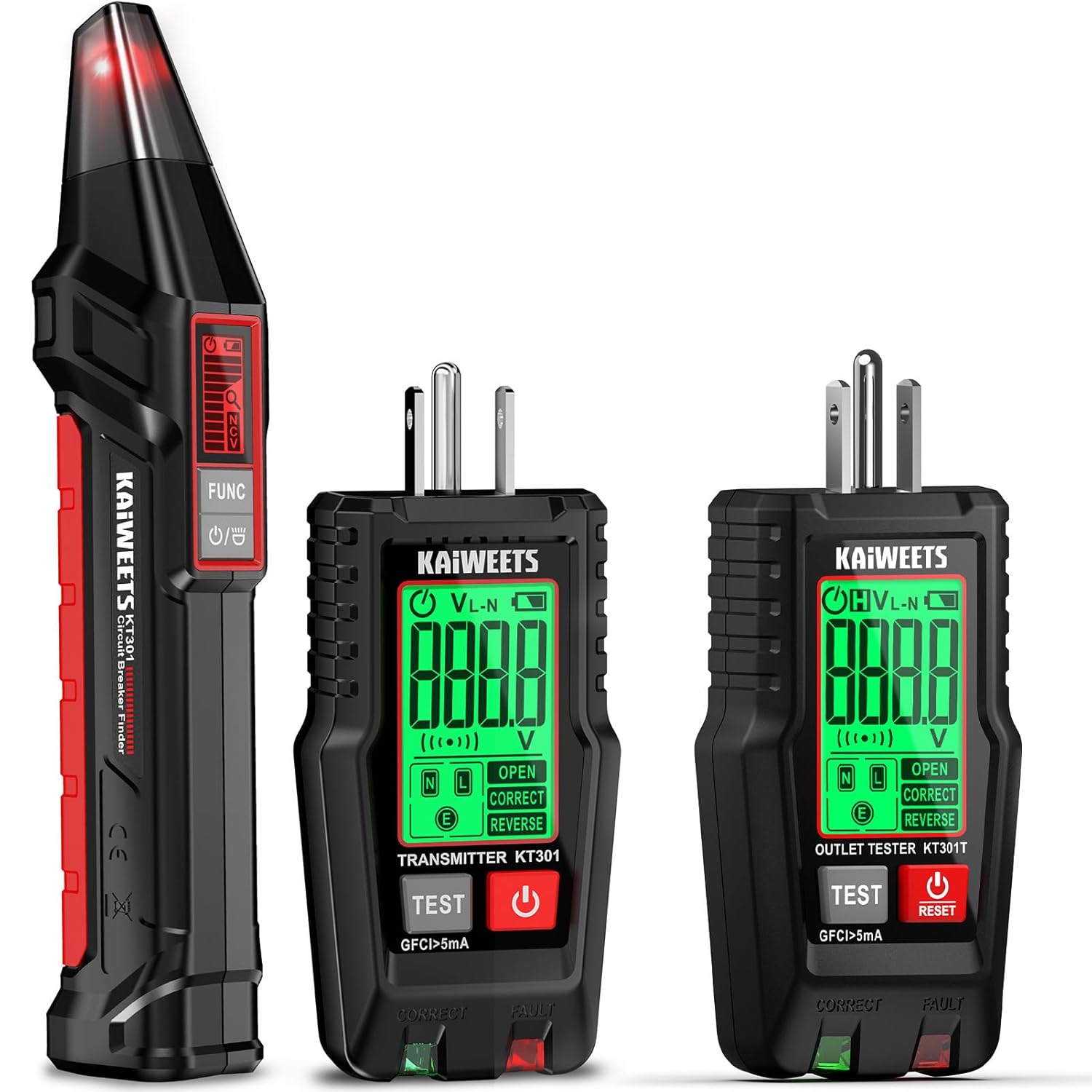
Image: The KAIWEETS KT301P Circuit Breaker Finder (left) and two KAIWEETS KT301T GFCI Outlet Testers (right), showcasing the complete product set.
Інфармацыя па бяспецы
Always observe the following safety precautions to prevent injury and damage to the devices:
- Do not use the devices if they appear damaged or are not operating correctly.
- Ensure the devices are rated for the voltage and current of the circuit being tested. These devices are designed for North American 3-wire 120V outlets.
- Always assume circuits are live until verified otherwise.
- Wear appropriate personal protective equipment (PPE), such as safety glasses and insulated gloves, when working with electrical systems.
- Do not attempt to open or modify the devices. There are no user-serviceable parts inside.
- Keep the devices dry and clean. Avoid exposure to moisture or extreme temperatures.
- The KT301P Circuit Breaker Finder is rated CAT II 125V. The KT301T GFCI Outlet Tester is rated CAT II 110-125V. Adhere to these safety ratings.
Прадукт скончаныview
KAIWEETS KT301P Circuit Breaker Finder (Receiver)
- ВК-дысплей: Shows signal strength, voltage, and NCV status.
- Function Button (FUNC): Toggles between modes.
- Кнопка харчавання: Уключае/выключае прыладу.
- Датчык NCV: Detects non-contact voltage.
- Святлодыёдны індыкатар: Забяспечвае візуальную зваротную сувязь.
KAIWEETS KT301T GFCI Outlet Tester (Transmitter)
- ВК-дысплей: Паказвае аб'ём у рэжыме рэальнага часуtage, wiring status, and GFCI test results.
- Wiring Status Indicators: LEDs (Green/Orange) for correct/faulty wiring.
- Кнопка ТЭСТ: Initiates GFCI trip test.
- Кнопка скіду: Resets the GFCI after a trip test.
- Кнопка харчавання: Уключае/выключае прыладу.
Настройка
Both devices are typically ready for use out of the box. Ensure any protective films are removed from the displays. No battery installation is typically required for the KT301T as it draws power from the outlet. The KT301P receiver may require batteries (check packaging for type and installation instructions if applicable, usually AAA or 9V).
Інструкцыя па эксплуатацыі
A. Using the KT301P Circuit Breaker Finder
- Падключыце перадатчык: Plug the KT301T GFCI Outlet Tester (acting as the transmitter) into the outlet connected to the circuit you wish to identify. Ensure the outlet is live.
- Прыёмнік пры ўключэнні: Turn on the KT301P Circuit Breaker Finder (receiver).
- First Scan (Learn Mode):
Slowly scan the receiver along the circuit breakers in your electrical panel. The receiver will emit audible and visual indications. During this "Learn" phase, ignore these initial indications. The device is mapping the electrical signatures of the breakers.
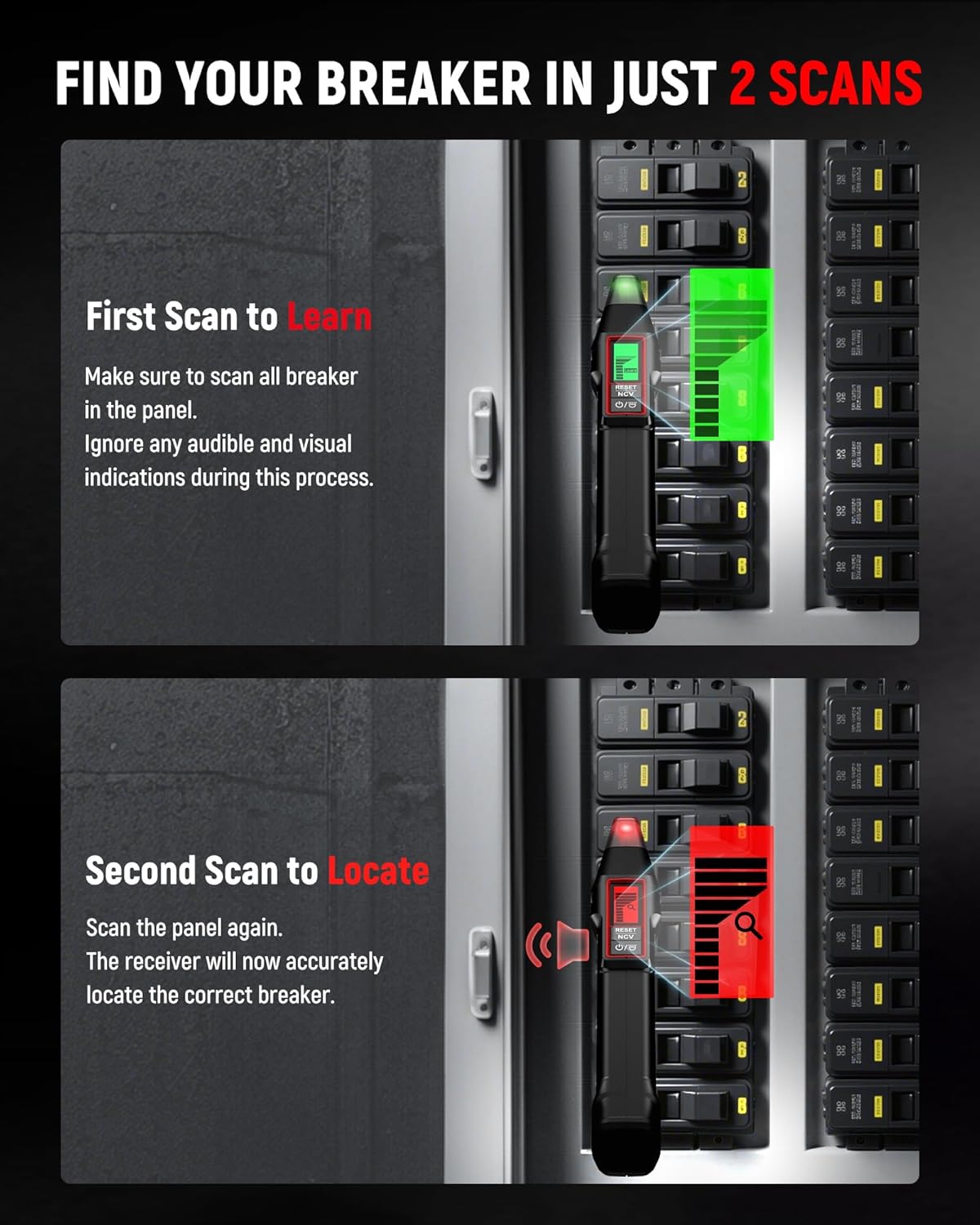
Image: Illustration of the first scan (Learn mode) where the receiver is passed over circuit breakers in a panel, showing a green indication.
- Second Scan (Locate Mode):
Scan the circuit breakers again, moving slowly. The receiver will now accurately identify the correct breaker associated with the plugged-in transmitter by providing a distinct audible tone and a strong visual signal on its LCD display.

Image: The KT301P receiver accurately identifying a circuit breaker with a clear red visual indication and sound icon.
Image: Illustration of the second scan (Locate mode) where the receiver pinpoints the correct circuit breaker with a red indication and audible alert.
- Бескантактавы выпtage (NCV) Testing:
The KT301P receiver also functions as an NCV tester. Hold the NCV sensor near wires, outlets, or other electrical components to detect the presence of AC voltage without direct contact. The device will provide visual and audible alerts if voltagе выяўляецца.

Image: A hand holding the KT301P receiver near an electrical outlet, demonstrating its non-contact voltage detection capability with a red light and sound icon.
B. Using the KT301T GFCI Outlet Tester
- Падключыце да разеткі: Insert the KT301T GFCI Outlet Tester into a standard 3-prong 120V North American outlet.
- Read Wiring Status: The LCD display will immediately show the real-time voltage and the wiring status. The bottom LED indicators will also illuminate (Green for correct, Orange for fault).
- GFCI Trip Test:
For GFCI outlets, press the ТЭСТ button. A functional GFCI outlet should trip, cutting power to the outlet. The tester's display will indicate a successful trip (e.g., "PAS" or similar). If the GFCI does not trip, it indicates a fault and the GFCI should be replaced.
After testing, press the СКІД button on the GFCI outlet itself to restore power.
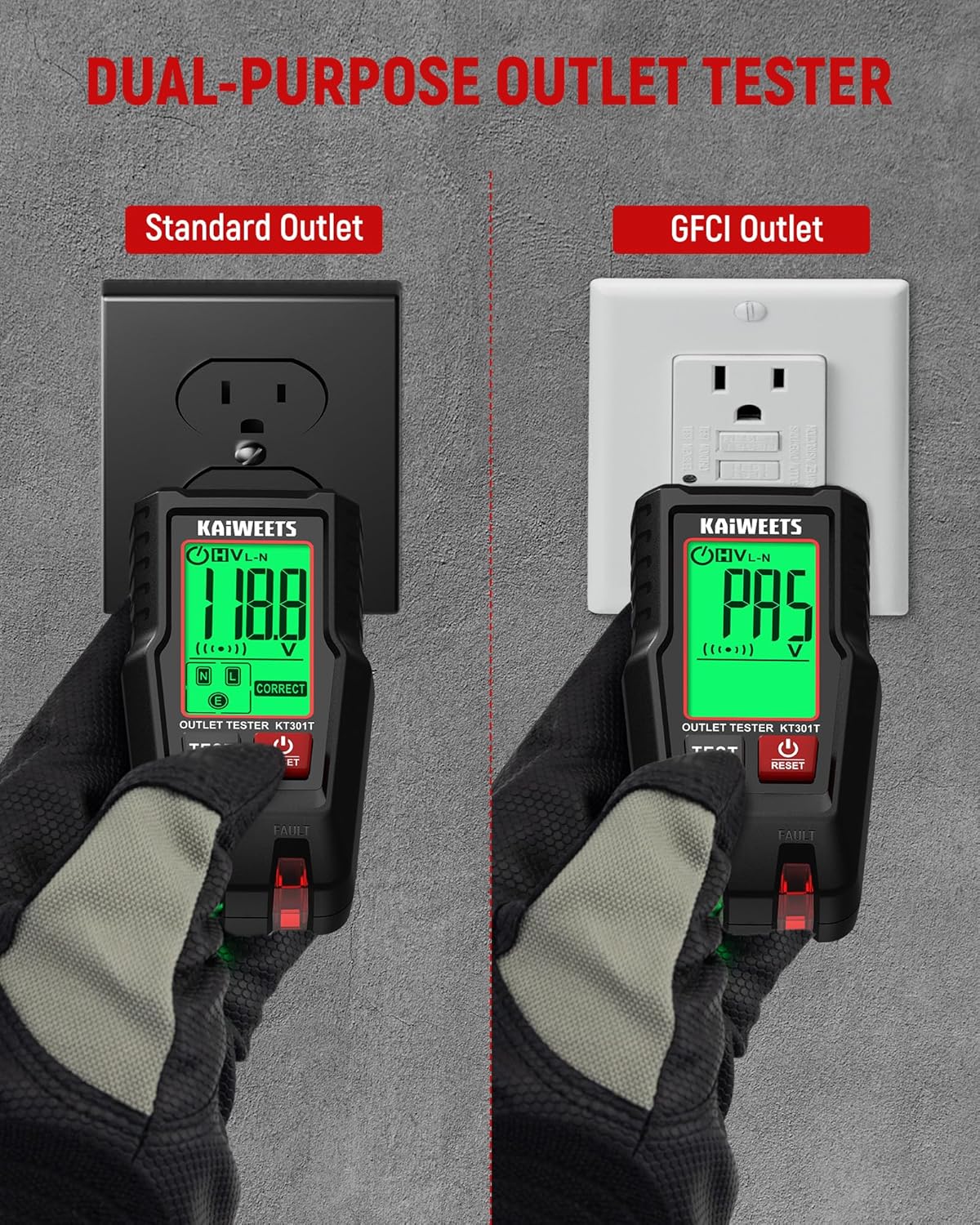
Image: Comparison of the KT301T testing a standard outlet (displaying voltage) and a GFCI outlet (displaying "PAS" after a successful trip test).
- Interpreting Display and Indicators:
The large LCD screen provides detailed information. Refer to the legend on the device or in this manual for specific fault indications. Green LEDs typically signify correct wiring, while orange/red LEDs indicate a fault.

Image: The KT301T GFCI Outlet Tester highlighting its features: auto-hold data, GFCI and standard outlet testing, intuitive wiring condition display, bright LED indicators, low battery alert, and 5-minute auto power-off.

Image: The KT301T GFCI Outlet Tester plugged into an outlet, showcasing its 1.8-inch backlit LCD color screen displaying voltage and correct wiring status, with icons for various features.
- Функцыя аўтаматычнага ўтрымання: The KT301T retains the latest outlet test results and voltage reading for 5 minutes even after unplugging, allowing for convenient review.
- Аўтаматычнае адключэнне: The KT301T features a 5-minute auto power-off to conserve energy.
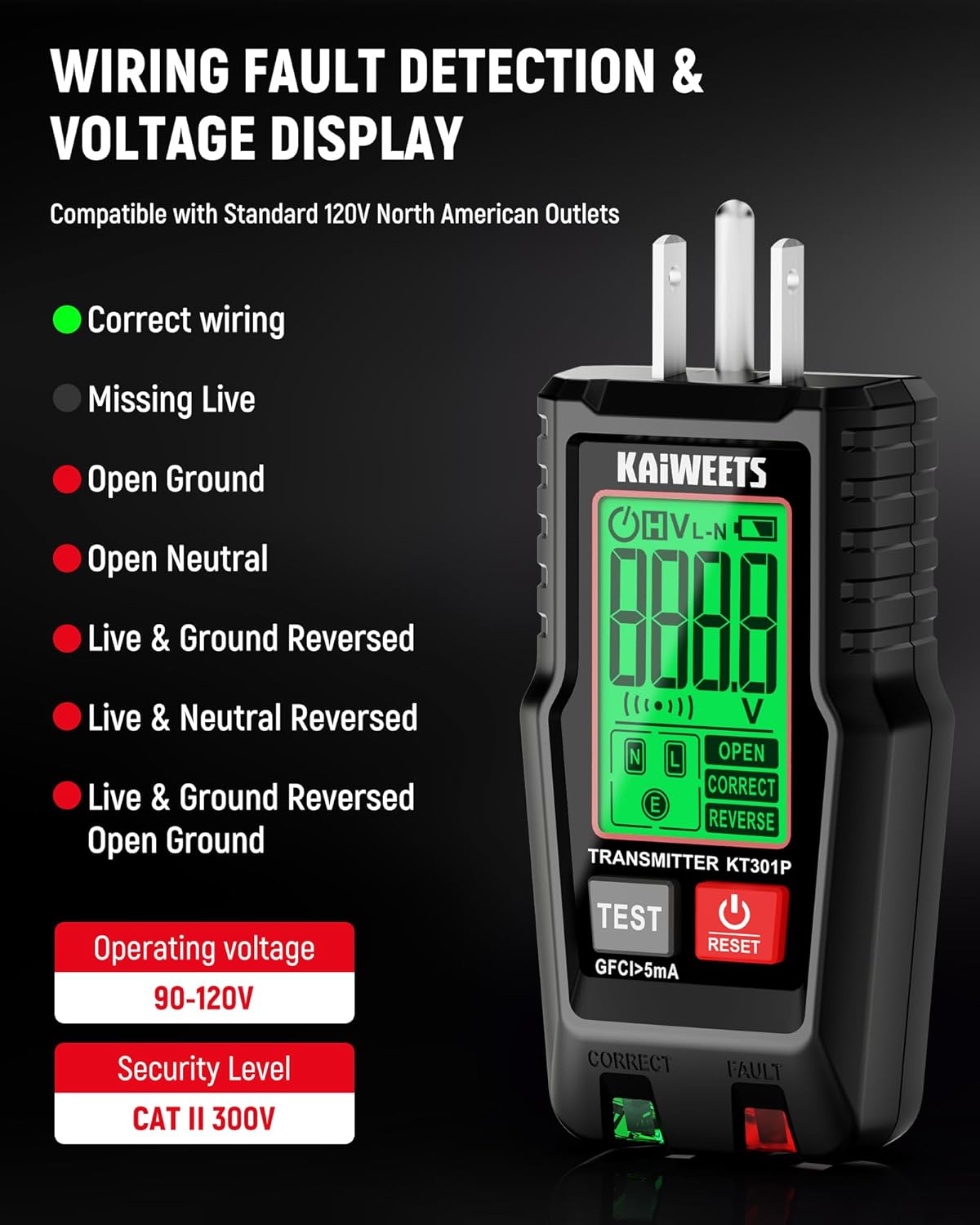
Image: The KT301T GFCI Outlet Tester displaying wiring fault detection and voltage. It lists various wiring conditions like Correct Wiring, Open Ground, Open Neutral, Missing Live, Live & Ground Reversed, and Live & Neutral Reversed.

Image: A grid showing different wiring fault indications on the KT301T, including Correct Wiring, Open Ground, Open Neutral, Missing Live, Live & Ground Reversed, and Live & Neutral Reversed Open Ground, each with a distinct display and LED pattern.
Тэхнічнае абслугоўванне
- Уборка: Wipe the devices with a dry, soft cloth. Do not use abrasive cleaners or solvents.
- захоўванне: Store the devices in a cool, dry place, away from direct sunlight and extreme temperatures.
- Battery Replacement (KT301P): If the KT301P receiver uses batteries, replace them when the low battery indicator appears on the display. Refer to the battery compartment for the correct battery type and orientation.
Ліквідацыю непаладак
| праблема | Магчымая прычына | Рашэнне |
|---|---|---|
| KT301P receiver not powering on. | Разраджаныя або няправільна ўсталяваныя батарэйкі. | Заменіце батарэйкі новымі, выконваючы палярнасць. |
| KT301P receiver not detecting breaker. | Transmitter not plugged in or circuit is dead; improper scanning technique. | Ensure KT301T transmitter is plugged into a live outlet. Perform both "Learn" and "Locate" scans slowly and thoroughly. |
| KT301T display is blank. | No power from the outlet; device auto-powered off. | Ensure the outlet is live. Press the power button to turn it on if it auto-powered off. |
| GFCI outlet does not trip during test. | Faulty GFCI outlet; incorrect wiring. | The GFCI outlet is likely faulty and requires replacement. Consult a qualified electrician. |
| Inaccurate wiring fault indication. | Poor connection; complex wiring issue. | Ensure the tester is fully inserted into the outlet. Re-test. If issues persist, consult a qualified electrician. |
Тэхнічныя характарыстыкі
| Асаблівасць | Дэталь |
|---|---|
| Марка | КАЙВІЦЫ |
| Мадэлі | KT301P (Circuit Breaker Finder), KT301T (GFCI Outlet Tester) |
| Power Source (KT301T) | Corded Electric (from outlet) |
| Аперацыйная Voltage (KT301T) | 90-120V AC (for wiring detection) |
| Мін. Аперацыйная Voltage (KT301P) | 120 вольт (пераменны ток) (Note: Original data specified DC, but AC is assumed for typical circuit breaker finder operation.) |
| Safety Certification (KT301P) | CAT II 125В |
| Safety Certification (KT301T) | CAT II 110-125V |
| Дысплей | ВК -дысплей з падсветкай |
| Выпрабавальны ток GFCI | >5 мА |
| Wiring Faults Detected | Correct Wiring, Open Ground, Open Neutral, Missing Live, Live & Ground Reversed, Live & Neutral Reversed, Live & Ground Reversed Open Ground |
| Auto-Hold (KT301T) | 5 хвілін |
| Auto Power-Off (KT301T) | 5 хвілін |
Гарантыя і падтрымка
KAIWEETS products are designed for reliability and performance. For specific warranty information, please refer to the warranty card included with your product or visit the official KAIWEETS website. For technical support, troubleshooting assistance, or to inquire about replacement parts, please contact KAIWEETS customer service through their official channels.
You can visit the KAIWEETS Store for more information: KAIWEETS Official Store