
Уводзіны
This manual provides comprehensive instructions for the installation, operation, and maintenance of your Fenvi FU-AX900BT Wi-Fi 6 USB Adapter with Bluetooth 5.2. Please read this manual carefully before using the device to ensure proper functionality and to maximize its performance. The FU-AX900BT is designed to provide high-speed Wi-Fi 6 (802.11ax) connectivity and Bluetooth 5.2 capabilities to your desktop or laptop computer.

Малюнак 1: Fenvi FU-AX900BT Wi-Fi 6 USB Adapter. This image shows the compact USB adapter with its high-gain external antenna attached, ready for connection to a computer's USB port.
Змест пакета
Праверце наяўнасць усіх прадметаў у камплекце:
- Fenvi FU-AX900BT Wireless USB Adapter
- Інструкцыя па эксплуатацыі (гэты дакумент)
Асноўныя характарыстыкі
The Fenvi FU-AX900BT offers the following key features:
- Знешняя антэна з высокім узмацненнем: Provides stronger signal reception and extended range, beneficial for systems located further from the router or in environments with obstacles.
- 2-in-1 Combo: Integrates both Wi-Fi 6 (802.11ax) AX900 and Bluetooth 5.2 connectivity.
- Хуткасці ў двух дыяпазонах: Supports up to 600 Mbps on the 5 GHz band and 287 Mbps on the 2.4 GHz band for efficient data transfer.
- MU-MIMO і OFDMA: Enhances network efficiency and performance, especially in busy network environments with multiple devices.
- Бяспека WPA3: Provides advanced encryption for secure wireless connections.
- Інтэрфейс USB 3.0: Ensures high throughput for optimal Wi-Fi and Bluetooth performance.
- Шырокая сумяшчальнасць: Сумяшчальны з аперацыйнымі сістэмамі Windows 11 і Windows 10.

Малюнак 2: Скончанаview of Fenvi FU-AX900BT features. This graphic highlights Wi-Fi 6 (802.11ax) upgrade, dual-band speeds (900 Mbps total), high-gain antenna, 3-year warranty, Bluetooth 5.3 (note: product description states 5.2), WPA3 security, and OFDMA technology.

Малюнак 3: Wi-Fi 6 Performance with OFDMA and MU-MIMO. This illustration compares Wi-Fi 5 and Wi-Fi 6 data transmission, showing how OFDMA and MU-MIMO improve efficiency by allowing multiple devices to communicate simultaneously without waiting.
Сістэмныя патрабаванні
- Аперацыйная сістэма: Windows 11 or Windows 10 (64-bit recommended).
- Порт USB: Available USB 3.0 port (backward compatible with USB 2.0, but USB 3.0 is recommended for optimal performance).
- Працэсар: Intel Core i3 / AMD Ryzen 3 or higher recommended.
- Аператыўная памяць: 4 ГБ або больш.
Інструкцыя па наладзе
1. Фізічная ўстаноўка
- Распакуйце адаптар: Carefully remove the Fenvi FU-AX900BT USB adapter from its packaging.
- Вызначце порт USB 3.0: Locate an available USB 3.0 port on your desktop or laptop computer. USB 3.0 ports are typically blue internally or marked with a "SS" (SuperSpeed) symbol.
- Устаўце адаптар: Gently insert the FU-AX900BT adapter into the chosen USB 3.0 port. Ensure it is fully seated.
- Адрэгулюйце антэну: Position the high-gain external antenna for optimal signal reception. The antenna can typically be rotated 180 degrees and tilted 90 degrees to find the best orientation.

Малюнак 4: Antenna Benefits and Adjustment. This image illustrates the benefits of the external antenna, including stronger signal, wider coverage, faster data transfer, and better penetration, along with showing its multi-directional adjustment capabilities (180° rotation, 90° tilt).
2. Ўстаноўка драйвера
For Windows 11/10, the operating system may automatically detect and install the necessary drivers. If automatic installation does not occur or if you experience issues, manual driver installation is required.
- Праверце дыспетчар прылад:
- Right-click on the Start button and select "Device Manager".
- Look for "Network adapters" and "Bluetooth" sections. If you see an unrecognized device or a device with a yellow exclamation mark, drivers need to be installed.
- Спампаваць драйверы: Visit the official Fenvi support website (refer to the product packaging or Fenvi's main webсайт для дакладнага URL) and download the latest drivers for the FU-AX900BT model.
- Ўстаноўка драйвераў:
- Extract the downloaded driver file (if it's a compressed archive).
- Run the setup executable (e.g., "setup.exe" or "install.exe") and follow the on-screen instructions.
- Перазагрузіце кампутар, калі будзе прапанавана.
- Праверце ўстаноўку: After restarting, check Device Manager again. The Fenvi FU-AX900BT should now appear correctly under "Network adapters" and "Bluetooth".
Інструкцыя па эксплуатацыі
1. Падключэнне да Wi-Fi
- Налады сеткі доступу: Click on the Wi-Fi icon in the system tray (usually in the bottom-right corner of your screen).
- Выберыце сваю сетку: З'явіцца спіс даступных сетак Wi-Fi. Выберыце патрэбную сетку (SSID).
- Увядзіце пароль: If prompted, enter the Wi-Fi password (security key) for your network.
- Падключыць: Click "Connect". Your computer should now be connected to the Wi-Fi network.
2. Спалучэнне прылад Bluetooth
The FU-AX900BT supports Bluetooth 5.2, allowing you to connect various Bluetooth peripherals.
- Уключыць Bluetooth:
- Перайсці да Налады > Bluetooth і прылады (Windows 11) або Налады > прылады > Bluetooth і іншыя прылады (Windows 10).
- Пераканайцеся, што Bluetooth уключаны.
- Перавядзіце прыладу ў рэжым спалучэння: Refer to your Bluetooth device's manual to put it into pairing mode. This usually involves holding a button until an indicator light flashes.
- Дадаць прыладу:
- In Windows Bluetooth settings, click "Add device" or "Add Bluetooth or other device".
- Select "Bluetooth" from the options.
- Your computer will scan for nearby Bluetooth devices. Select your device from the list.
- Поўнае спалучэнне: Follow any on-screen prompts or enter a PIN if required by your device. Once paired, the device will appear in your list of connected Bluetooth devices.

Малюнак 5: Bluetooth 5.3 Connectivity. This graphic illustrates the Fenvi adapter connecting to various Bluetooth devices such as headphones, mobile phones, gaming consoles, and wireless mice, highlighting improved connection stability over longer distances.
Тэхнічнае абслугоўванне
- Захоўваць у чысціні: Перыядычна працірайце адаптар мяккай сухой тканінай. Пазбягайце выкарыстання вадкіх ачышчальнікаў або растваральнікаў.
- Пазбягайце перашкод: Ensure the antenna is not obstructed by other objects to maintain optimal signal strength.
- Цвёрдае злучэнне: Ensure the adapter is always firmly seated in the USB port.
- Абнаўленні праграмнага забеспячэння: Regularly check the Fenvi official webсайт для абноўленых драйвераў, каб забяспечыць сумяшчальнасць і палепшыць прадукцыйнасць.
Ліквідацыю непаладак
| праблема | Магчымае рашэнне |
|---|---|
| No Wi-Fi connection or slow speeds. |
|
| Bluetooth devices cannot pair or connect. |
|
| Adapter not recognized by the computer. |
|
Тэхнічныя характарыстыкі
| мадэль | FU-AX900BT |
| Марка | Fenvi |
| Стандарт Wi-Fi | IEEE 802.11ax (Wi-Fi 6) |
| Версія Bluetooth | 5.2 |
| Інтэрфейс | USB 3.0 |
| Data Transfer Rate (Wi-Fi) | Up to 600 Mbps (5 GHz), Up to 287 Mbps (2.4 GHz) |
| Бяспека | WPA3 |
| Асаблівасці | MU-MIMO, OFDMA, High-Gain External Antenna |
| Сумяшчальнасць з АС | Windows 11, Windows 10 |
| Памеры прадукту | 10 х 2 х 2 см |
| Вага прадмета | 60 г |
| Краіна паходжання | Кітай |
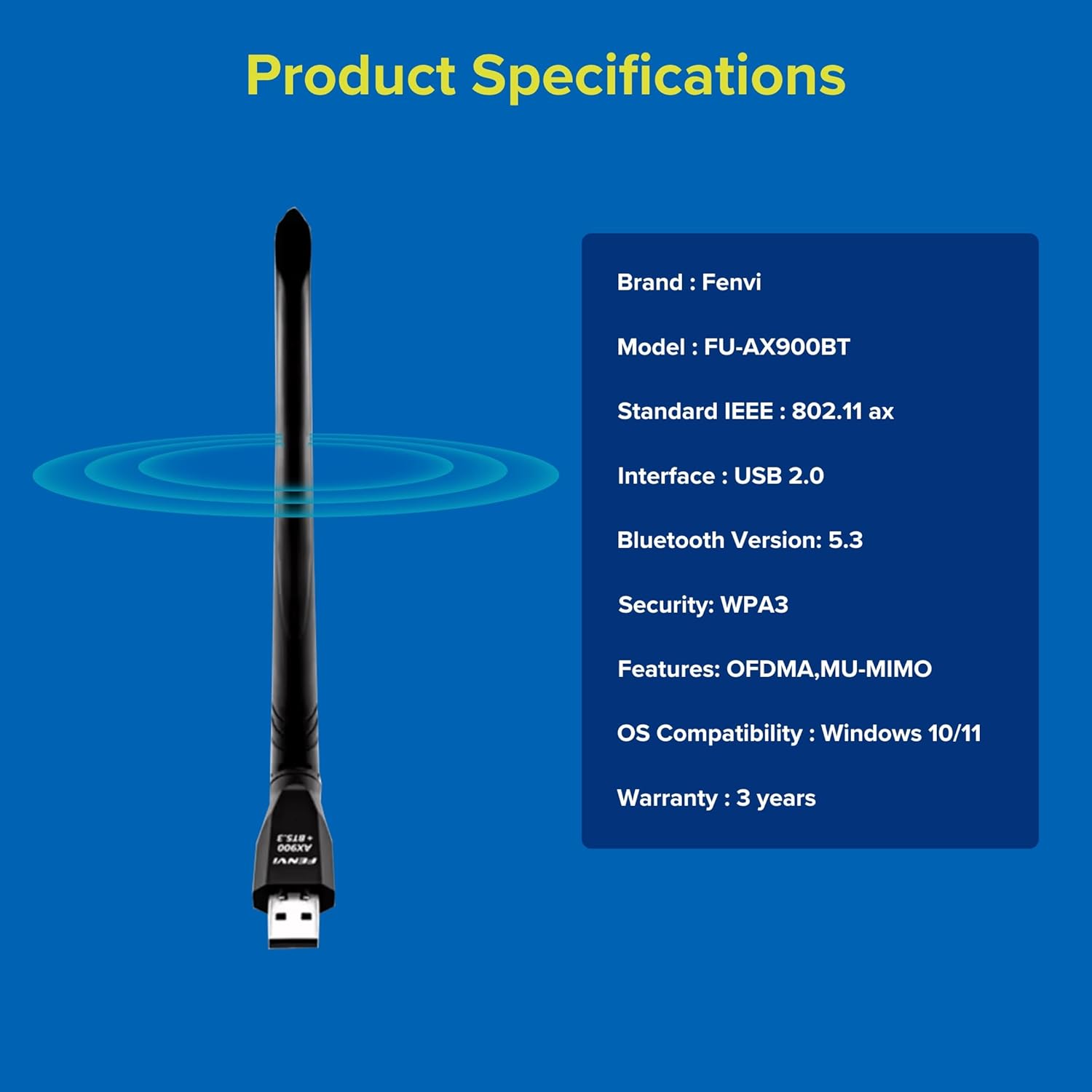
Малюнак 6: Fenvi FU-AX900BT Product Specifications. This graphic summarizes key specifications such as brand, model, Wi-Fi standard, interface, Bluetooth version, security, features, OS compatibility, and warranty.
Гарантыя і падтрымка
The Fenvi FU-AX900BT comes with a 3-Year India Warranty. For technical support, warranty claims, or further assistance, please contact Fenvi customer support through their official webсайт або прадаўца, дзе быў набыты тавар.
Калі ласка, захавайце чэк аб куплі ў якасці пацверджання пакупкі для гарантыйных мэт.