
1. Прадукт скончыўсяview
The E-YOOSO Hz-61 is a 60% compact RGB mechanical gaming keyboard featuring advanced Hall Effect magnetic switches. Designed for high-performance gaming, it offers rapid response times, customizable actuation, and a durable build. This manual provides instructions for setup, operation, and maintenance of your Hz-61 keyboard.
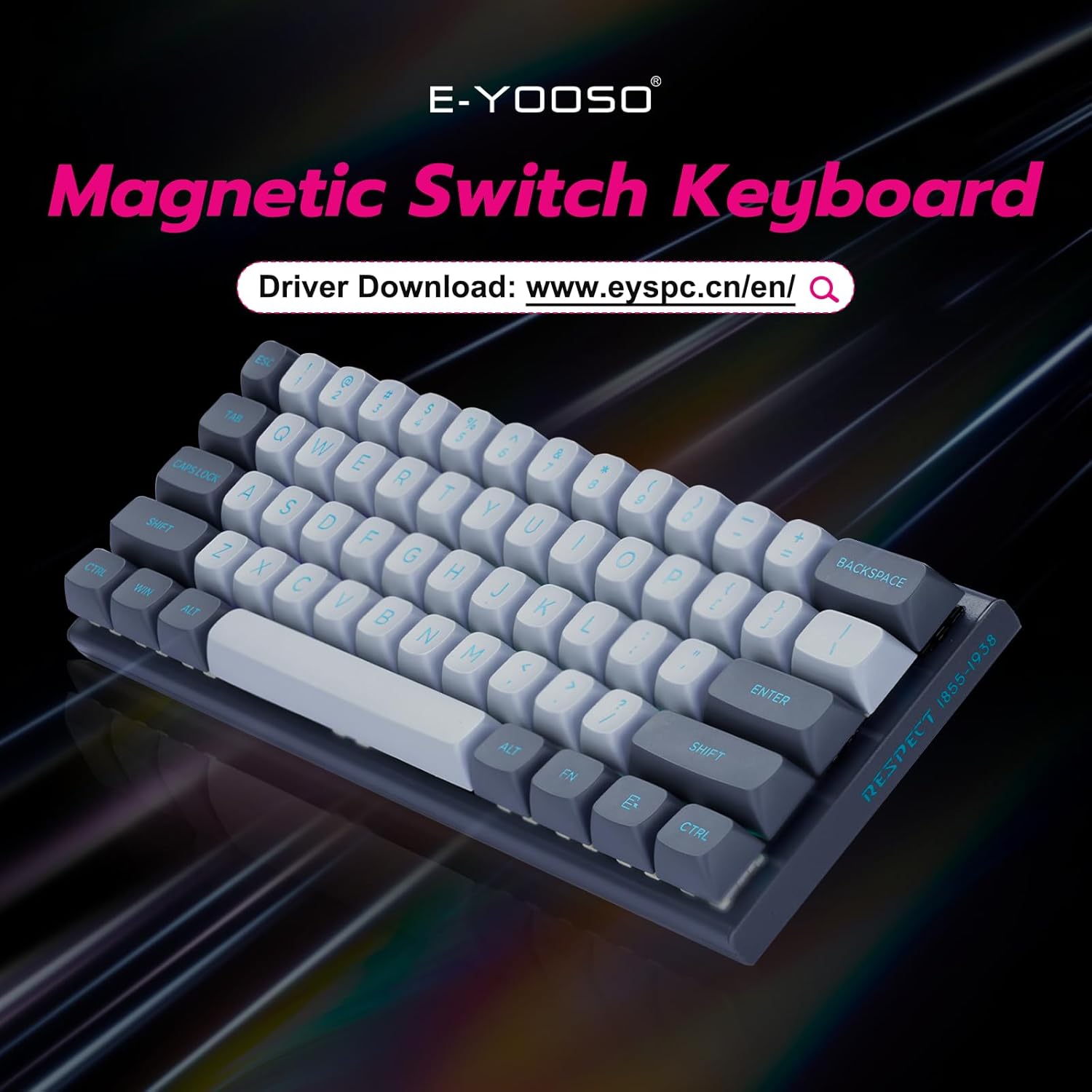
Figure 1: E-YOOSO Hz-61 60% RGB Mechanical Gaming Keyboard.
Асноўныя характарыстыкі:
- High-Performance Magnetic Switches: Utilizes Hall Effect magnetic switches for precise and rapid trigger response without physical contact, reducing wear.
- 8000 Hz Polling Rate: Ensures ultra-fast response times for competitive gaming.
- Customizable Driver Software: Supports Rapid Trigger, DKS (Dynamic Key Stroke), MT (Macro Trigger), and TGL (Toggle) functions for personalized settings and macro commands.
- Дызайн з магчымасцю гарачай замены: Allows easy replacement of both switches and keycaps (tools included).
- Трывалыя каўпачкі клавіш з PBT: Double-shot injection molded PBT keycaps provide clear, fade-resistant legends and enhanced durability.
- Яркая RGB-падсветка: Features 14 RGB lighting effects, 5 brightness levels, and 5 speed settings.
- Кампактны макет 60%: Space-saving design for portability and a clutter-free desktop.
- Шырокая сумяшчальнасць: Compatible with Windows and Mac systems via a detachable Type-C cable.
2. Кіраўніцтва па наладцы
2.1 Змест пакета
- Механічная гульнявая клавіятура E-YOOSO Hz-61
- Здымны кабель USB тыпу C
- Здымальнік клавішнай шапкі
- Пераключальнік
- Extra Magnetic Switches (2 pieces)
- Кіраўніцтва карыстальніка (гэты дакумент)
2.2 Падключэнне клавіятуры
- Locate the USB Type-C port on the side of the keyboard.
- Connect the detachable USB Type-C cable to the keyboard's Type-C port.
- Connect the other end of the USB cable to an available USB port on your computer (PC or Mac).
- Клавіятура будзе аўтаматычна распазнана вашай аперацыйнай сістэмай.

Figure 2: Connecting the USB Type-C cable to the side-mounted port.
2.3 Рэгуляванне вугла нахілу клавіятуры
The keyboard features adjustable feet on the underside to set your preferred typing angle. Flip out the feet for an elevated position or keep them folded for a flatter profile.

Figure 3: Adjustable keyboard feet for ergonomic comfort.
3. Інструкцыя па эксплуатацыі
3.1 Асноўныя функцыі клавіш
The Hz-61 is a 60% layout keyboard, meaning some functions are accessed via the FN key in combination with other keys. Refer to the diagram below for common combinations.

Figure 4: FN key combinations for various functions.
- FN + W/A/S/D: Toggles between standard arrow keys and WASD for gaming.
- FN + WIN: Блакуе/разблакуе клавішу Windows, каб прадухіліць выпадковае націсканне падчас гульні.
- FN + M: Adjusts lighting brightness.
- FN + ALT: Пераключаецца паміж рознымі рэжымамі RGB-падсветкі.
- FN + < / >: Adjusts lighting speed.
- FN + 1-12: Accesses F1-F12 functions.
3.2 Кіраванне RGB-падсветкай
The Hz-61 keyboard features customizable RGB backlighting. Use the FN key combinations mentioned above to cycle through 14 lighting effects, adjust 5 brightness levels, and set 5 different speeds.

Figure 5: RGB lighting in action on the Hz-61 keyboard.
3.3 Driver Software for Advanced Customization
For advanced customization, including Rapid Trigger settings, DKS, MT, TGL functions, macro commands, and key rebindings, download the official E-YOOSO driver software. Visit the E-YOOSO official webСайт апошняй версіі драйвера.

Figure 6: E-YOOSO driver software interface for customization.
The driver allows you to fine-tune actuation points and reset points for each key, providing a competitive edge in gaming. You can also create complex macros to streamline your workflow.
3.4 Magnetic Switch Technology
The Hz-61 utilizes Hall Effect magnetic switches, which detect key presses based on magnetic fields rather than physical contact. This design offers superior durability, faster response, and allows for features like Rapid Trigger, where key actuation and de-actuation can be customized based on travel distance.

Малюнак 7: падрабязна view of a Hall Effect magnetic switch.
The 8000 Hz polling rate ensures that every key press is registered almost instantaneously, providing a significant advantagу хутка развіваючыхся праграмах і гульнях.

Figure 8: Visual representation of the 8K polling rate for ultra-fast response.
4. Тэхнічнае абслугоўванне
4.1 Чыстка клавіятуры
The Hz-61 features a floating keycap design, which makes cleaning easier. To clean your keyboard:
- Адключыце клавіятуру ад кампутара.
- Выкарыстоўвайце балон са сціснутым паветрам, каб выдзьмуць пыл і смецце паміж клавішамі.
- Працірайце клавішы і паверхню клавіятуры мяккай, злёгку змочанай губкайamp тканінай. Пазбягайце празмернай вільгаці.
- For deeper cleaning, you can remove the keycaps using the included keycap puller.

Figure 9: Floating keycap design for easy cleaning.
4.2 Hot-Swappable Switches and PBT Keycaps
The Hz-61 supports hot-swappable switches, allowing you to change switches without soldering. The included keycap and switch pullers facilitate this process.
- Выкарыстоўвайце здымнік для клавіш, каб акуратна зняць патрэбную клавішу.
- Once the keycap is removed, use the switch puller to carefully grip and pull out the switch.
- Align the pins of the new switch with the holes on the PCB and gently press it into place until it clicks.
- Заменіце каўпачок клавішы.

Малюнак 10: Трывалыя каўпачкі клавіш з PBT.

Figure 11: Hot-swappable switches for easy customization.
The keyboard comes with two extra magnetic switches for convenience.
5. Выпраўленне непаладак
- Клавіятура не адказвае:
- Пераканайцеся, што кабель USB Type-C надзейна падключаны як да клавіятуры, так і да кампутара.
- Паспрабуйце падключыць клавіятуру да іншага USB-порта на вашым кампутары.
- Праверце клавіятуру на іншым кампутары, каб выключыць праблемы, характэрныя для сістэмы.
- RGB-асвятленне не працуе:
- Check FN key combinations for lighting control (FN + ALT for modes, FN + M for brightness).
- Ensure the driver software is installed and updated, and check its settings for lighting control.
- Клавішы не рэгіструюцца або набіраюцца два разы:
- This can sometimes be resolved by reseating the switch. Use the switch puller to remove and reinsert the affected switch.
- Ensure the driver software is correctly configured, especially if using advanced features like Rapid Trigger.
- If the issue persists, try replacing the switch with one of the included spare switches.
- Driver Software Issues:
- Download the latest driver from the official E-YOOSO webсайт.
- Пераканайцеся, што ваша аперацыйная сістэма абноўлена.
- Temporarily disable any antivirus or firewall software that might interfere with the driver installation.
6. Тэхнічныя характарыстыкі
| Нумар мадэлі | Гц-61 |
| Макет | 60% (61 клавішы) |
| Тып перамыкача | Магнітныя перамыкачы на эфекте Хола |
| Стаўка апытання | 8000 Гц |
| Клавішы | Падвойны ўдар ПБТ |
| Падсвятленне | RGB (14 effects, 5 brightness, 5 speed) |
| Сувязь | Wired USB Type-C (detachable) |
| Сумяшчальныя прылады | Ноўтбук, ПК |
| Аперацыйная сістэма | Windows, Mac |
| Памеры прадукту | 11.4 х 4.1 х 1.3 цалі (28.96 х 10.41 х 3.3 см) |
| Вага прадмета | 1.7 фунта (0.77 кг) |
| Вытворца | Кампанія Eastern Times Technology Co., Ltd. |
7. Гарантыя і падтрымка
E-YOOSO products are designed for reliability and performance. For warranty information, technical support, or to download the latest driver software, please visit the official E-YOOSO webсайт або звярніцеся ў службу падтрымкі кліентаў праз прадаўца.
Калі ласка, захавайце пацвярджэнне пакупкі для любых гарантыйных прэтэнзій.
8. Відэадэманстрацыя прадукту
Video 1: Official E-YOOSO Hz-61 60% Wired Gaming Keyboard demonstration, showcasing features like RGB lighting, hot-swappable switches, and compact design.