
1. Уводзіны
This user manual provides comprehensive instructions for the NICGIGA 10-Port 10Gbps Unmanaged Ethernet Switch, Model S25-0802T. It covers product features, installation, operation, and troubleshooting to ensure optimal performance and longevity of your device. Please read this manual thoroughly before using the switch.
2. Прадукт скончыўсяview
The NICGIGA S25-0802T is an unmanaged Ethernet switch designed to expand your network capabilities with high-speed connectivity. It features a durable metal casing and a fanless design for quiet operation.
- Канфігурацыя порта: 8 x 2.5Gb Base-T RJ45 ports and 2 x 10Gb RJ45 uplink ports.
- Speed Compatibility: Ports 1-8 support 2.5G/1G/100Mbps. Ports 9-10 support 10G/5G/2.5G/1G/100Mbps.
- Аўтаматычны MDI/MDIX: Automatically detects and adjusts for straight-through or crossover cables.
- Plug and Play: No software configuration required for operation.
- High Switching Capacity: Up to 60Gbps.
- Цеплавы дызайн: Fanless for silent operation, with double-sided cooling holes and a metal case for efficient heat dissipation.
- Варыянты мантажу: Supports desktop placement and wall mounting.

3. Змесціва ўпакоўкі
Праверце наяўнасць усіх прадметаў у камплекце:
- NICGIGA 10-Port Unmanaged Ethernet Switch (Model: S25-0802T)
- Адаптар сілкавання (DC 12V 1.5A)
- Кіраўніцтва карыстальніка (гэты дакумент)
4. Інструкцыі па ўсталёўцы
The NICGIGA S25-0802T switch is designed for simple plug-and-play operation. No software installation or complex configuration is required.
- Падключэнне сілкавання: Connect the included DC 12V 1.5A power adapter to the switch's power input port and then to a power outlet. The Power LED on the switch will illuminate.
- Падключэнне сеткавай прылады: Connect your network devices (e.g., computers, NAS, routers, access points) to any of the RJ45 ports (1-10) on the switch using standard Ethernet cables.
- Праверце злучэнне: Once connected, the corresponding Link/Act LEDs for each port will illuminate, indicating an active connection.

5. Інструкцыя па эксплуатацыі
The switch operates automatically once powered on and devices are connected. It supports auto-negotiation for speed and duplex mode, and auto MDI/MDIX for cable type detection.
- Automatic Speed Detection: The switch ports automatically detect the speed of the connected device (100Mbps, 1Gbps, 2.5Gbps, 5Gbps, or 10Gbps) and adjust accordingly.
- Поўны дуплексны рэжым: All ports support full-duplex mode for maximum data throughput.
- Non-Blocking Architecture: The switch provides full wire-speed forwarding on all ports, ensuring efficient data transfer without bottlenecks.

6. Ўстаноўка
The NICGIGA S25-0802T switch offers flexible installation options:
- Размяшчэнне на працоўным стале: Размясціце камутатар на роўнай, устойлівай паверхні. Забяспечце дастатковую вентыляцыю вакол прылады.
- Насценны мацаванне: The switch can be mounted on a wall using appropriate screws (not included) and the mounting slots on the underside of the device. Ensure the mounting surface is sturdy enough to support the switch's weight.


7. Святлодыёдныя індыкатары
The switch features LED indicators to provide real-time status information for each port and the device itself.
| Індыкатар | Статус | Апісанне |
|---|---|---|
| Магутнасць | On | Перамыкач уключаны. |
| Ports 1-8 Green Light | On | 2.5G Link Connect Normal. |
| Выкл | Спасылка выключана. | |
| Ports 1-8 Yellow Light | On | 10/100/1000M/2.5G Link Connect Normal. |
| Мігае | Data Transmission. | |
| Выкл | Спасылка выключана. | |
| Ports 9-10 Green Light | On | 10G Link Connect Normal. |
| Выкл | Спасылка выключана. | |
| Ports 9-10 Yellow Light | On | 10/100/1000M/2.5G/5G/10G Link Connect Normal. |
| Мігае | Data Transmission. | |
| Выкл | Спасылка выключана. |
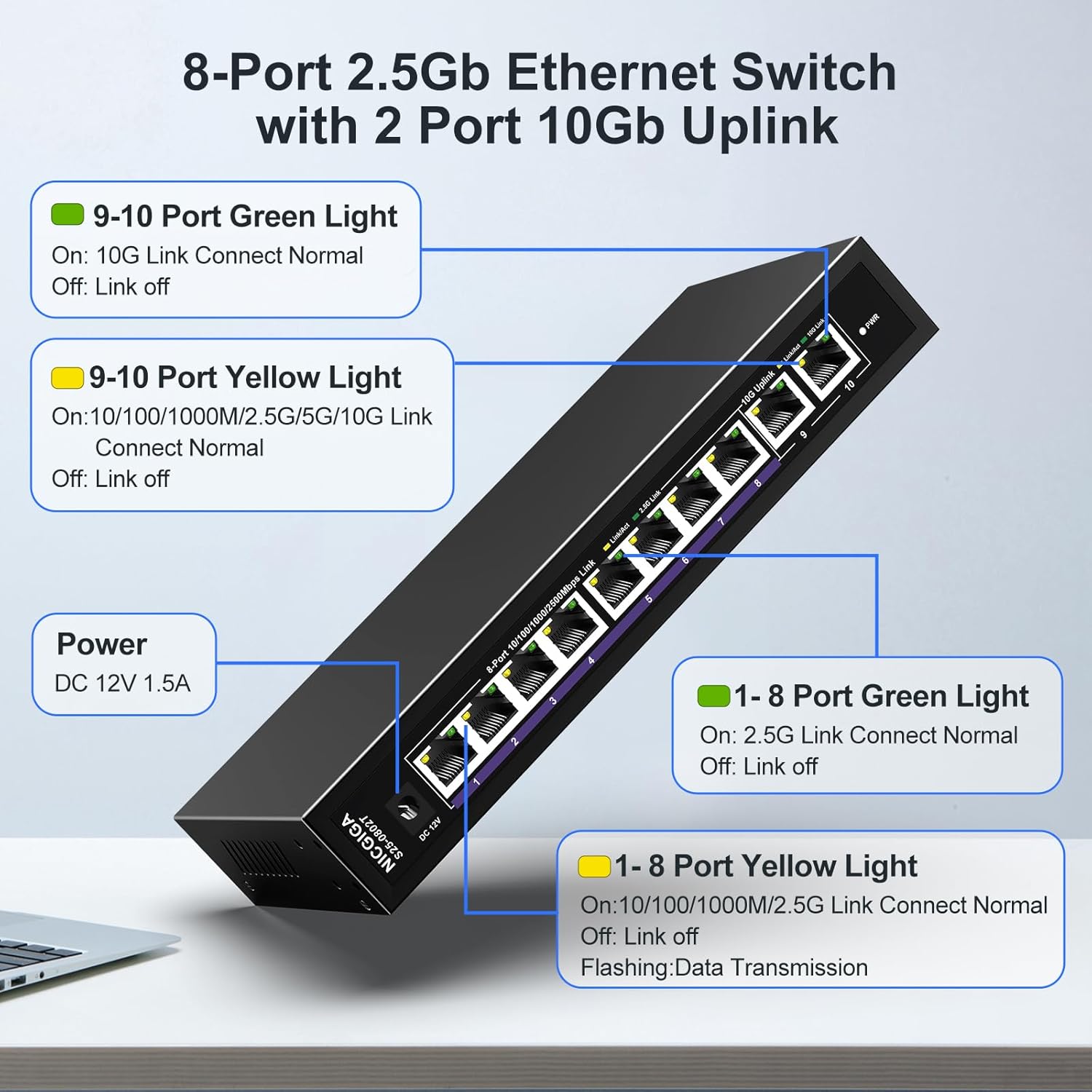
8. Network Cable Compatibility
Using appropriate Ethernet cables is crucial for achieving optimal network speeds.
- For 2.5Gbps Ports (1-8):
- CAT5e Cable (≤100m)
- CAT6/6a Cable (≤100m)
- CAT7 Cable (≤100m)
- For 10Gbps Ports (9-10):
- CAT6 Cable (≤55m)
- CAT6a Cable (≤100m)
- CAT7 Cable (≤100m)


9. Тэхнічныя характарыстыкі
| Асаблівасць | Дэталь |
|---|---|
| Нумар мадэлі | С25-0802Т |
| Колькасць партоў | 10 (8 x 2.5Gb RJ45, 2 x 10Gb RJ45) |
| Тып інтэрфейсу | RJ45 |
| Хуткасць перадачы даных | 60 гігабіт у секунду (камутуючая ёмістасць) |
| Верхняя адзнака тэмпературы | 50 градусы па Цэльсіі |
| Вага прадмета | 1.76 фунта |
| Памеры ўпакоўкі | 9.8 х 9.61 х 2.99 цалі |
| Колер | Чорны |
| Сумяшчальныя прылады | Desktop, Gaming Console, Laptop, Printer, Router |
| Вытворца | НІКГІГА |
10. Выпраўленне непаладак
If you encounter issues with your NICGIGA switch, refer to the following common troubleshooting steps:
- Няма харчавання:
- Пераканайцеся, што адаптар сілкавання надзейна падключаны да камутатара і спраўнай разеткі.
- Пераканайцеся, што разетка працуе.
- Няма індыкатара сувязі:
- Check if the Ethernet cable is securely connected to both the switch port and the network device.
- Паспрабуйце іншы кабель Ethernet.
- Пераканайцеся, што падключаная прылада ўключана, а яе сеткавы адаптар уключаны.
- Verify the cable type is appropriate for the desired speed (refer to Section 8).
- Павольная хуткасць сеткі:
- Ensure your network cables are rated for the desired speed (e.g., CAT6a or CAT7 for 10Gbps).
- Check the network adapter settings on your connected devices to ensure they are configured for auto-negotiation or the correct speed.
- Confirm that the connected devices themselves support the higher speeds (2.5Gbps or 10Gbps).
- Перарывістае злучэнне:
- Inspect Ethernet cables for damage.
- Ensure the switch is placed in a well-ventilated area to prevent overheating, although its fanless design is optimized for heat dissipation.
- Avoid placing the switch near strong electromagnetic interference sources.
11. Тэхнічнае абслугоўванне
Каб забяспечыць даўгавечнасць і аптымальную працу вашага выключальніка, выконвайце наступныя рэкамендацыі па тэхнічным абслугоўванні:
- Уборка: Для чысткі вонкавага боку перамыкача выкарыстоўвайце мяккую сухую тканіну. Не выкарыстоўвайце вадкія або аэразольныя ачышчальнікі.
- Вентыляцыя: Пераканайцеся, што вентыляцыйныя адтуліны па баках камутатара не заблакіраваны, каб забяспечыць належны адвод цяпла.
- Асяроддзе: Operate the switch within its specified temperature range (-10~50°C) and humidity levels.
- Цыкл харчавання: If the switch becomes unresponsive, disconnect the power adapter, wait for 10 seconds, and then reconnect it.

12. Гарантыя і падтрымка
NICGIGA provides the following support for this product:
- Гарантыя: Прадастаўляецца гадавая гарантыя з моманту пакупкі.
- Тэхнічная падтрымка: Lifetime technical support is available for the product.
For warranty claims or technical assistance, please contact NICGIGA customer support through the retailer where the product was purchased or visit the official NICGIGA webсайт.