
1. Уводзіны
This manual provides essential information for the VIMIN 10-Port 10G/2.5G Unmanaged Ethernet Switch. This device is designed to expand your network capacity with high-speed connectivity, featuring 8x 2.5 Gigabit Ethernet ports and 2x 10 Gigabit Ethernet ports. It offers a non-blocking 80Gbps switching capacity, ensuring efficient data transfer for demanding applications like 4K streaming, gaming, and NAS connections. The switch operates on a plug-and-play principle, requiring no complex configuration for immediate use.
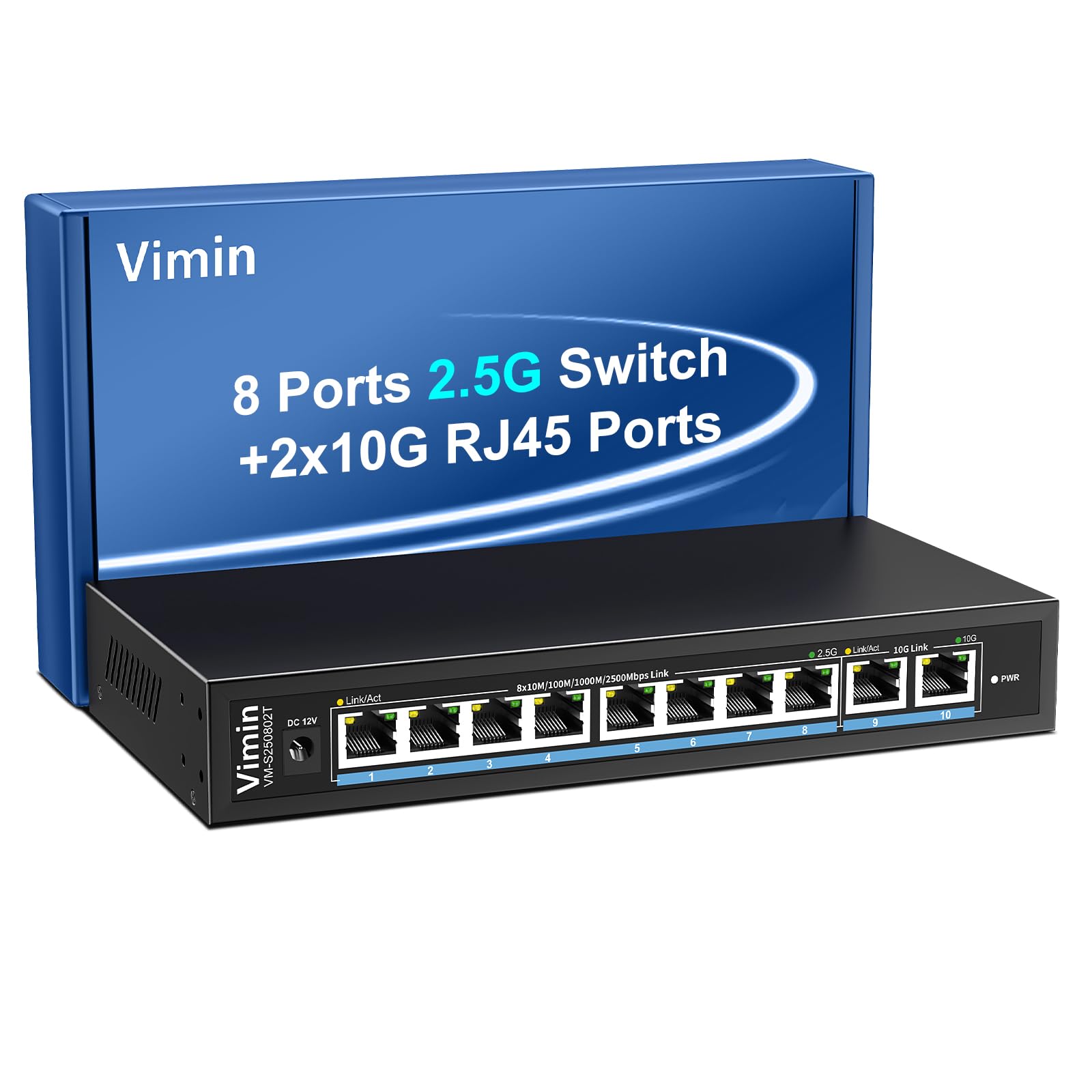
Figure 1: VIMIN 10-Port 2.5Gb Unmanaged Ethernet Switch in a typical setup.
2. Змесціва ўпакоўкі
Please verify that all items are present and in good condition upon opening the package. If any items are missing or damaged, please contact customer support.
- 1x VIMIN 10-Port 2.5G Unmanaged Ethernet Switch
- 1x Кіраўніцтва карыстальніка
- 1x кабель харчавання

Figure 2: Package contents of the VIMIN 10-Port 2.5G Ethernet Switch.
3. Прадукт скончыўсяview
3.1 Пярэдняя панэль
The front panel of the switch features ten RJ45 Ethernet ports and LED indicators for status monitoring.
- Парты 1-8: 2.5 Gigabit Ethernet ports (10/100/1000/2500Mbps auto-negotiation).
- Парты 9-10: 10 Gigabit Ethernet ports (10/100/1000/2500/5000/10000Mbps auto-negotiation).
- Link/Act LED (Yellow/Green): Indicates link status and data activity.
- 2.5G Link LED (Green, for ports 1-8): Indicates a 2.5Gbps connection.
- 10G Link LED (Green, for ports 9-10): Indicates a 10Gbps connection.
- Святлодыёд PWR: Паказвае стан харчавання.

Figure 3: Front and rear panel of the VIMIN 10-Port 2.5G Ethernet Switch.

Малюнак 4: падрабязна view of the RJ45 ports and LED indicators.
3.2 Задняя панэль
The rear panel includes the DC 12V 1A power input port.
4. Настройка
The VIMIN 10-Port Ethernet Switch is designed for simple plug-and-play operation, requiring no software configuration.
4.1 Падключэнне харчавання
- Connect the provided power adapter to the DC 12V 1A power input port on the rear panel of the switch.
- Plug the power adapter into a standard electrical outlet. The PWR LED on the front panel will illuminate, indicating the switch is powered on.
4.2 Падключэнне прылады
- Connect your network devices (e.g., NAS, PC, Wireless AP, WiFi 7 Routers, 10G Adapter/NIC, Gaming PC, 4K/8K Video devices) to any of the RJ45 ports (1-10) using appropriate Ethernet cables.
- The switch automatically detects the speed and duplex mode of the connected device. The Link/Act LED for the respective port will light up when a valid connection is established and flash during data transmission.

Figure 5: Plug and Play connectivity with various network devices.

Малюнак 6: Выпample applications for the 10-Port 2.5G Ethernet Switch.
4.3 Cable Type Recommendations
For optimal performance, especially for 2.5G and 10G connections, use appropriate Ethernet cable types:
| Тып кабеля | 10М | 100М | 1G | 2.5G | 5G | 10G |
|---|---|---|---|---|---|---|
| КОТ 3/4 | ✓ | ✗ | ✗ | ✗ | ✗ | ✗ |
| 5 КАТ | ✓ | ✓ | ✗ | ✗ | ✗ | ✗ |
| КОТКА 5e | ✓ | ✓ | ✓ | ✗ | ✗ | ✗ |
| 6 КАТ | ✓ | ✓ | ✓ | ✓ | ✓ | (<55m) |
| CAT 6A/7 | ✓ | ✓ | ✓ | ✓ | ✓ | ✓ |
Figure 7: Ethernet cable type compatibility and performance.
4.4 Варыянты мантажу
The compact design of the switch allows for both desktop placement and wall mounting to save space.

Малюнак 8: Варыянты ўстаноўкі на працоўным стале і на сцяне.
5. Інструкцыя па эксплуатацыі
The VIMIN 10-Port Unmanaged Ethernet Switch operates automatically once connected, requiring no user intervention for basic network functions.
Аўтаматычнае ўзгадненне 5.1
Each port on the switch supports auto-negotiation, automatically adjusting the transmission method and speed (10/100/1000/2500Mbps for ports 1-8, and up to 10Gbps for ports 9-10) to match the connected device. This ensures optimal performance without manual configuration.

Figure 9: Self-Negotiation Functionality.
5.2 Кіраванне патокам
The switch supports IEEE 802.3x flow control for full-duplex mode and backpressure for half-duplex mode. These mechanisms prevent data packet loss during periods of high network traffic by temporarily pausing data transmission from congested devices, ensuring stable and reliable connections.
6. Тэхнічнае абслугоўванне
To ensure the longevity and optimal performance of your VIMIN Ethernet Switch, follow these maintenance guidelines:
- Уборка: Для чысткі вонкавага боку перамыкача выкарыстоўвайце мяккую сухую тканіну. Не выкарыстоўвайце вадкія або аэразольныя ачышчальнікі.
- Вентыляцыя: Ensure proper airflow around the switch. Do not block ventilation openings. The fanless design relies on natural convection for cooling.
- Асяроддзе: Размясціце выключальнік у прахалодным, сухім месцы, удалечыні ад прамых сонечных прамянёў, крыніц цяпла і празмернай вільгаці.
- Магутнасць: Use only the provided power adapter. Disconnect power during electrical storms or when unused for long periods.
7. Выпраўленне непаладак
If you encounter issues with your VIMIN Ethernet Switch, refer to the following common troubleshooting steps:
- Няма харчавання:
- Пераканайцеся, што адаптар сілкавання надзейна падключаны як да камутатара, так і да спраўнай электрычнай разеткі.
- Праверце працаздольнасць разеткі, падключыўшы да яе іншую прыладу.
- Праверце, ці гарыць святлодыёд PWR на перамыкачы.
- Няма спасылкі/актыўнасці на порце:
- Пераканайцеся, што кабель Ethernet надзейна падключаны як да порта камутатара, так і да падлучанай прылады.
- Пераканайцеся, што падключаная прылада ўключана і працуе належным чынам.
- Паспрабуйце іншы кабель Ethernet, каб выключыць паломку кабеля.
- Праверце з іншым портам на камутатары.
- Павольная хуткасць сеткі:
- Ensure you are using appropriate cable types (e.g., CAT6 or CAT6A/7 for 2.5G/10G connections) as indicated in Section 4.3.
- Check the network adapter settings on your connected device to ensure it supports the desired speed.
- Verify that the Link/Act LED indicates the expected speed (e.g., green for 2.5G/10G).
- Зменшце перагрузку сеткі, абмежаваўшы адначасовую актыўнасць з высокай прапускной здольнасцю.
- Перарывістае злучэнне:
- Праверце наяўнасць аслабленых злучэнняў кабеляў.
- Ensure the switch is placed in a stable environment, free from excessive vibrations or temperature fluctuations.
- Consider potential electromagnetic interference from other electronic devices.
8. Тэхнічныя характарыстыкі
| Асаблівасць | Апісанне |
|---|---|
| Марка | ВІМІН |
| Нумар мадэлі | 8x2.5G Ethernet (Unmanaged) |
| Колькасць партоў | 10 (8x 2.5G RJ45, 2x 10G RJ45) |
| Тып інтэрфейсу | RJ45 |
| Хуткасць перадачы даных | 10 Gigabits Per Second (Max) |
| Камутацыйны патэнцыял | 80 Гбіт/с |
| Кантроль патоку | IEEE 802.3x (Full-Duplex), Backpressure (Half-Duplex) |
| Стандарты | IEEE 802.3bz, IEEE 802.3u, IEEE 802.3ab, IEEE 802.3z |
| Увод магутнасці | DC 12V 1A (AC 100-240V adapter) |
| Вага прадмета | 1.83 фунта (прыблізна 0.83 кг) |
| Памеры ўпакоўкі | 9.53 х 6.5 х 2.99 цалі (прыблізна 24.2 х 16.5 х 7.6 см) |
| Колер | Чорны |
| Сумяшчальныя прылады | Desktop, Gaming Console, Laptop, NAS, Wireless AP |
9. Гарантыя і падтрымка
VIMIN products are designed for reliability and performance. For warranty information, technical support, or any product-related inquiries, please refer to the warranty card included with your product or visit the official VIMIN website. You may also contact VIMIN customer service through the retailer where the product was purchased.
Каб атрымаць дадатковую дапамогу, наведайце VIMIN Store on Amazon.