
GEONEO S200
GEONEO S200 Under Desk Elliptical Machine User Manual
Model: S200 | Brand: GEONEO
1. Уводзіны
This manual provides essential information for the safe and effective use of your GEONEO S200 Under Desk Elliptical Machine. This electric seated pedal exerciser is designed to offer a low-impact workout, promoting circulation and muscle engagement while seated. Please read this manual thoroughly before operating the device and retain it for future reference.

Figure 1: GEONEO S200 Under Desk Elliptical Machine. The image displays the compact elliptical unit with its pedals and integrated control panel, alongside two remote controls.
2. Важныя інструкцыі па бяспецы
- Прачытайце ўсе інструкцыі перад выкарыстаннем прыбора.
- Do not stand on the machine. This device is designed for seated use only.
- Трымайце дзяцей і хатніх жывёл далей ад машыны падчас працы.
- Consult a physician before starting any exercise program, especially if you have pre-existing medical conditions or are pregnant.
- Пераканайцеся, што машына размешчана на роўнай, устойлівай паверхні, каб прадухіліць перакульванне.
- Трымайце рукі і ногі далей ад рухомых частак.
- Do not use the machine if it is damaged or malfunctioning.
- Адключайце прыладу ад электрычнай разеткі, калі яна не выкарыстоўваецца або перад чысткай.
- Выкарыстоўвайце толькі адаптар сілкавання, які пастаўляецца з прыладай.

Figure 2: Close-up of the control panel and warning labels. The image highlights the integrated display and buttons, along with visual warnings indicating not to stand on the machine and to keep children away.
3. Змесціва ўпакоўкі
Праверце наяўнасць і спраўнасць усіх кампанентаў:
- GEONEO S200 Under Desk Elliptical Machine
- Пульт дыстанцыйнага кіравання
- Адаптар сілкавання
- Кіраўніцтва карыстальніка (гэты дакумент)
4. Прадукт скончыўсяview
The GEONEO S200 is a compact and portable elliptical machine designed for use while seated. It features an intuitive control panel and a remote for ease of use.
Ключавыя кампаненты:
- Педалі: Textured for grip, designed for comfortable foot placement.
- Асноўны блок: Houses the motor, control panel, and display.
- ВК-дысплей: Shows workout data such as time, distance, count, and calories.
- Кнопкі панэлі кіравання: For manual operation (Start/Stop, Mode, Speed, Direction, Function).
- Пульт дыстанцыйнага кіравання: Allows convenient adjustment of settings without bending down.
- Carrying Groove: Інтэграваная ручка для зручнай пераноскі.
- Дыванок супраць слізгацення: Located at the base for stability during use.
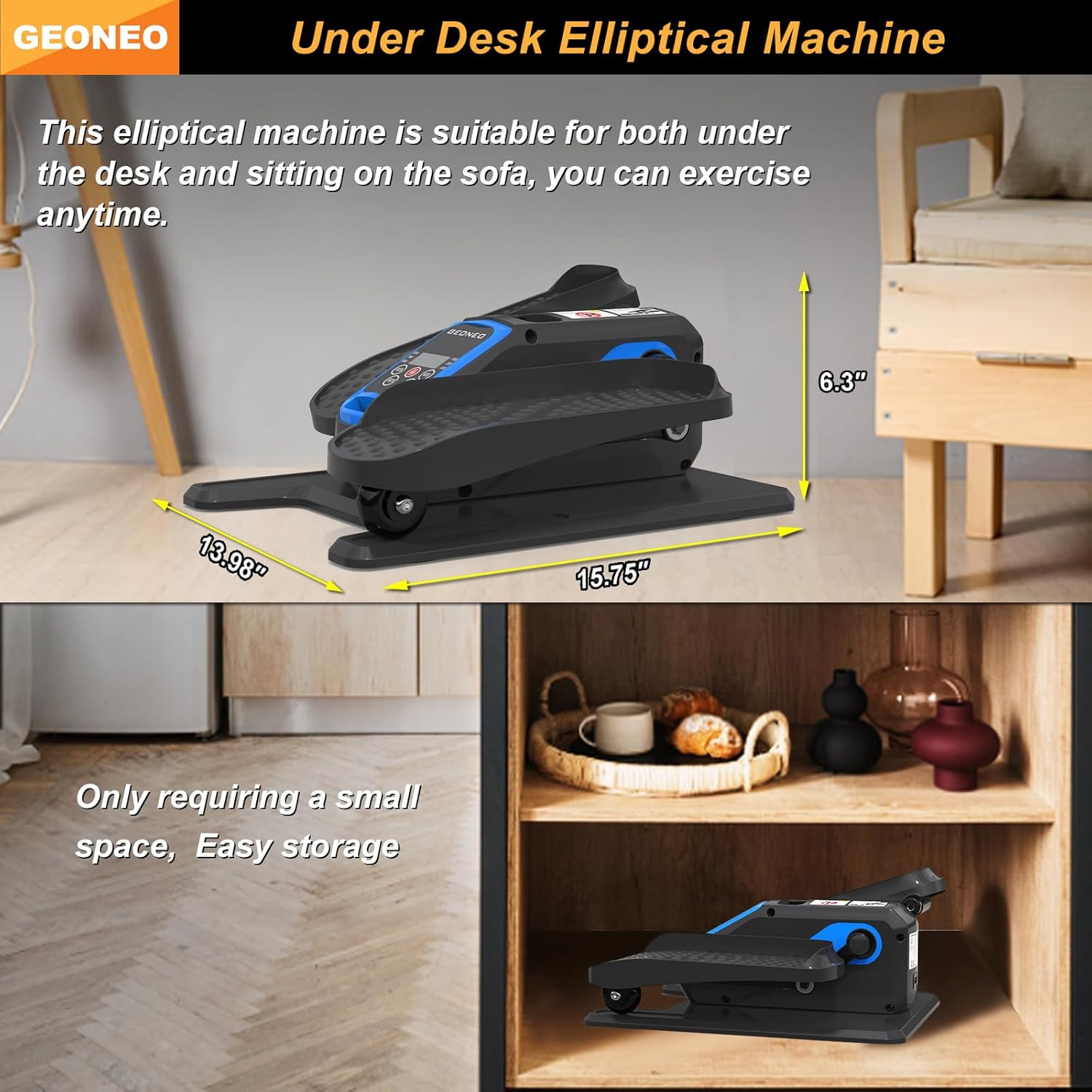
Figure 3: Product dimensions and portability. The image illustrates the compact size of the elliptical (15.75"D x 13.98"W x 6.3"H) and shows it being stored in a small cabinet, emphasizing its space-saving design.
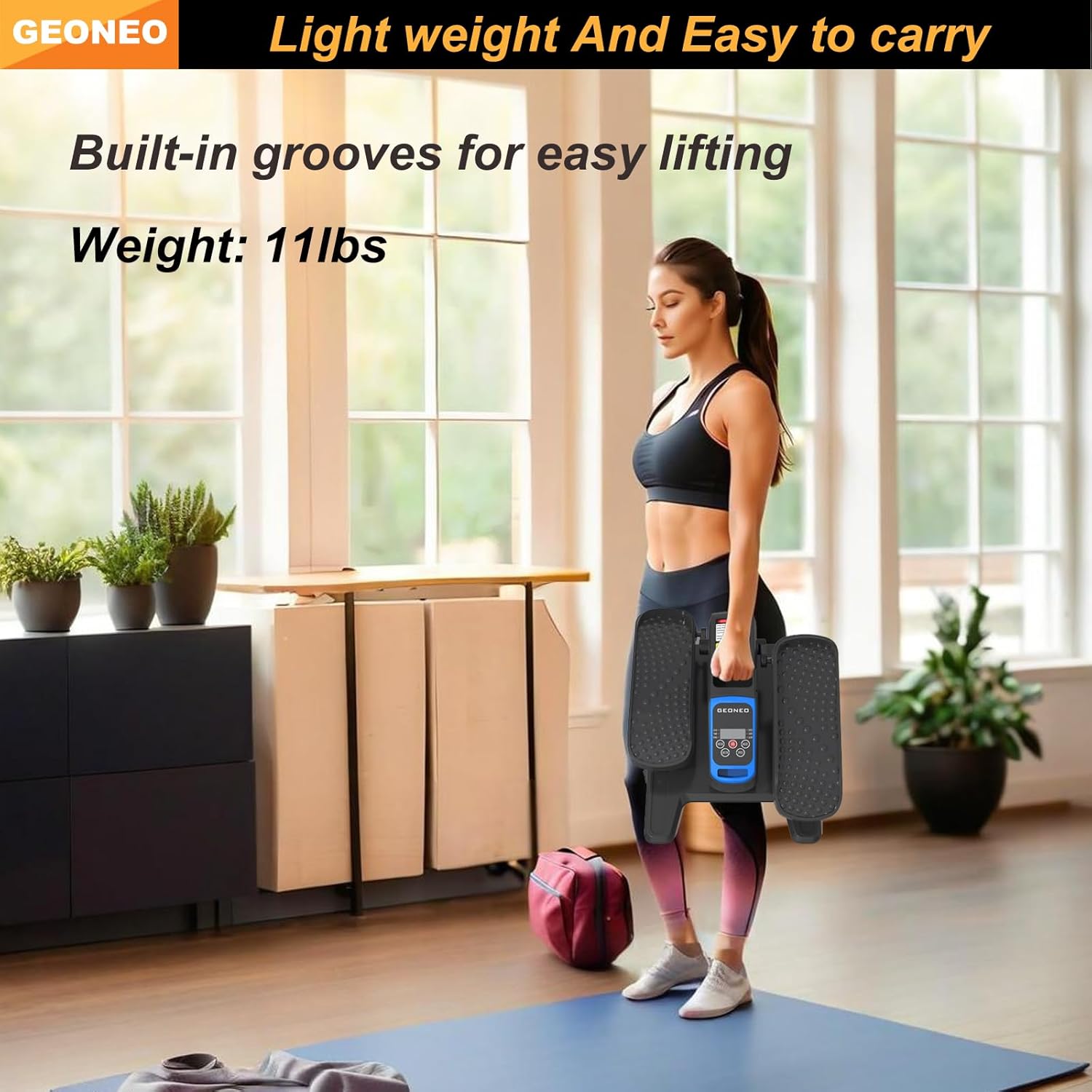
Figure 4: Easy portability. A woman is shown effortlessly carrying the 11lb elliptical machine using its built-in groove, demonstrating its lightweight design.
5. Настройка
- Распакуйце: Carefully remove the elliptical machine and all accessories from the packaging.
- Размяшчэнне: Place the machine on a flat, stable surface. Ensure there is enough clear space around the unit for comfortable use.
- Падключэнне сілкавання: Connect the power adapter to the machine's power input port, then plug the adapter into a standard electrical outlet.
- Пульт дыстанцыйнага кіравання: Устаўце батарэйкі ў пульт дыстанцыйнага кіравання (калі яны не ўстаўлены загадзя).
6. Інструкцыя па эксплуатацыі
The GEONEO S200 offers both manual and automatic operating modes, adjustable via the control panel or remote control.
6.1. Пачатак працы
- Уключэнне: Націсніце УЛАДА button on the remote control or the main unit. The LCD display will illuminate.
- Размяшчэнне ступні: Sit comfortably in a chair and place your feet on the pedals.
- Пачаць практыкаванне: Націсніце ПУСК/СТОП button to begin pedaling.
6.2. Рэжымы працы
The machine features two primary modes: Manual (HR) and Automatic (P1-P3).
- Ручной рэжым (HR): Allows you to manually adjust speed and direction. Press the ПУСК/СТОП key twice to enter HR mode.
- Automatic Mode (P1-P3): Offers three preset programs (P1, P2, P3) with automatic speed and direction adjustments over a 30-minute duration. Press the РЭЖЫМ button to cycle through these programs.

Figure 5: Manual (HR) and Automatic (P1-P3) Modes. This image illustrates the display interface for both manual mode, allowing user control, and automatic modes, which offer pre-programmed exercise routines.
6.3. Рэгуляванне параметраў
- хуткасць: In Manual Mode, use the ХУТКАСЦЬ buttons (up/down arrows) on the remote or main unit to select from 12 adjustable speeds.
- Напрамак: Выкарыстоўвайце КІРУК button to switch between forward and reverse pedaling. This targets different muscle groups.
- функцыя: Націсніце ФУНКЦЫЯ button to cycle through the displayed data on the LCD screen (Time, Distance, Count, Calories).

Figure 6: Remote control functionality. A person is shown using the remote control to operate the elliptical machine, highlighting the convenience for users with limited mobility.

Figure 7: Bidirectional pedaling. The image demonstrates the elliptical's capability for both forward and reverse rotation, allowing for varied muscle engagement.
6.4. ВК-дысплей
The LCD display provides real-time feedback on your workout:
- СКАНІРАВАЦЬ: Automatically cycles through all data metrics.
- ЧАС: Duration of your current exercise session.
- ДАСТАЎКА: Estimated distance covered.
- ЛІК: Агульная колькасць абаротаў педаляў.
- Каларыйнасць: Прыблізная колькасць спаленых калорый.

Figure 8: Key features. This image visually summarizes the elliptical's main features, including 1-12 speed regulation, ultra-quiet operation, bidirectional rotation, function switching, and remote control.
7. Тэхнічнае абслугоўванне
- Уборка: Працярыце машыну мяккай, damp тканінай пасля кожнага выкарыстання. Не выкарыстоўвайце абразіўныя ачышчальнікі або растваральнікі.
- захоўванне: Store the machine in a cool, dry place away from direct sunlight and moisture. Its compact size allows for easy storage under a desk or in a closet.
- агляд: Перыядычна правярайце ўсе шрубы і злучэнні, каб пераканацца ў іх надзейнасці.
- Шнур харчавання: Праверце шнур харчавання на наяўнасць пашкоджанняў. Калі ён пашкоджаны, спыніце выкарыстанне і звярніцеся ў службу падтрымкі кліентаў.
8. Выпраўленне непаладак
| праблема | Магчымая прычына | Рашэнне |
|---|---|---|
| Машына не ўключаецца. | Блок харчавання падключаны няправільна; праблема з разеткай. | Ensure power adapter is securely plugged into both the machine and a working electrical outlet. Try a different outlet. |
| Пульт дыстанцыйнага кіравання не рэагуе. | Low or dead batteries; remote not aimed correctly. | Replace batteries in the remote control. Ensure the remote is aimed directly at the machine's sensor. |
| Pedaling motion is not smooth or makes unusual noise. | Internal mechanism issue; machine not on a level surface. | Ensure the machine is on a flat, stable surface. If the issue persists, discontinue use and contact customer support. |
| LCD display is not showing data correctly. | Temporary electronic glitch; sensor issue. | Turn the machine off and on again. If the problem continues, contact customer support. |
9. Тэхнічныя характарыстыкі
| Асаблівасць | Дэталь |
|---|---|
| мадэль | S200 |
| Марка | GEONEO |
| Памеры прадукту (Д х Ш х У) | 15.75" x 13.98" x 6.3" |
| Вага прадмета | 6.12 кг (прыбл. 13.5 фунта) |
| Матэрыял | Легаваная сталь, пластык |
| Механізм супраціву | Магнітныя |
| Колькасць узроўняў супраціву | 12 |
| Color (Current Variant) | Сіні |
10. Гарантыя і падтрымка
For warranty information, please refer to the documentation included with your purchase or visit the official GEONEO website. For technical support or service inquiries, please contact GEONEO customer service through their official channels.
Ask a question about this manual
Ask about setup, troubleshooting, compatibility, parts, safety, or missing instructions. Manuals+ will review the question and use this page’s manual context to help answer it.