
1. Уводзіны
The AJAZZ AKP03 Macro Keypad Stream Controller is a versatile device designed to enhance productivity and streamline workflows for gamers, streamers, and professionals. Featuring six programmable keys with LCD displays, three physical knobs, and three toggle switches, it offers extensive customization options for various tasks.
This manual provides detailed instructions for setting up, operating, and maintaining your AKP03 device, ensuring optimal performance and user experience.
2. Асаблівасці прадукту
- Six Programmable Macro Keys: Customizable LCD displays for single or continuous actions.
- Three Physical Knobs: For precise control over various functions.
- Three Toggle Switches: Additional control options.
- Аперацыя адным пстрычкай мышы: Instant execution of macro commands, text input, application launches, and media control.
- Intuitive Driver Software: Drag-and-drop functionality for easy key assignment and property configuration.
- Шырокая сумяшчальнасць: Seamless integration with platforms like Streamlabs, Twitch, YouTube, and various software applications on Windows and Mac.
- Removable 40° Stand: Provides an ergonomic viewing angle and stable placement.

Малюнак 2.1: Закончанаview of the AJAZZ AKP03 Macro Keypad, highlighting its programmable buttons, toggle switches, and scroll wheels.
3. Змесціва ўпакоўкі
Праверце, ці ёсць усе прадметы ў вашай упакоўцы:
- AJAZZ AKP03 Macro Keypad Stream Controller
- Кабель USB-C да USB-A
- Removable 40° Stand
- Кіраўніцтва карыстальніка (гэты дакумент)
4. Настройка
4.1 Фізічнае злучэнне
- Attach the removable 40° stand to the bottom of the AKP03 for an ergonomic angle, if desired.
- Connect the provided USB-C cable to the USB-C port on the AKP03.
- Падключыце канец кабеля USB-A да даступнага порта USB на вашым камп'ютары (ПК або Mac).
- Прылада ўключыцца аўтаматычна.

Figure 4.1: Attaching the removable 40° stand to the AKP03.
4.2 Усталёўка праграмнага забеспячэння
To unlock the full customization capabilities of your AKP03, you must install the dedicated driver software.
- Адкрыйце свой web browser and navigate to the official AJAZZ webсайт: www.a-jazz.com.
- Locate the 'Driver Download' section.
- Пошук 'AKP03' or browse for the corresponding driver for your model.
- Download the driver software compatible with your operating system (Windows or macOS).
- Запусціце ўсталёўшчык і выконвайце інструкцыі на экране, каб завяршыць усталяванне.
- Перазагрузіце кампутар, калі будзе прапанавана.
Video 4.1: Demonstrates the software installation process and initial setup for the AJAZZ Macro Keypad.
5. Інструкцыя па эксплуатацыі
5.1 Customizing Keys and Knobs
The AKP03's driver software provides a user-friendly interface for customization:
- Launch the 'Stream Dock AJAZZ' software from your desktop or applications folder.
- The software will display a visual representation of your AKP03.
- To assign an action, drag and drop a desired function (e.g., launch application, media control, macro command) from the software's library onto one of the six programmable keys.
- For knobs, select the knob in the software and assign functions such as volume control, scrolling, or zooming.
- You can configure properties for each assigned action, including specific file шляхі, web URLs, or macro sequences.
- The LCD displays on the keys will update to show the assigned icon or text.
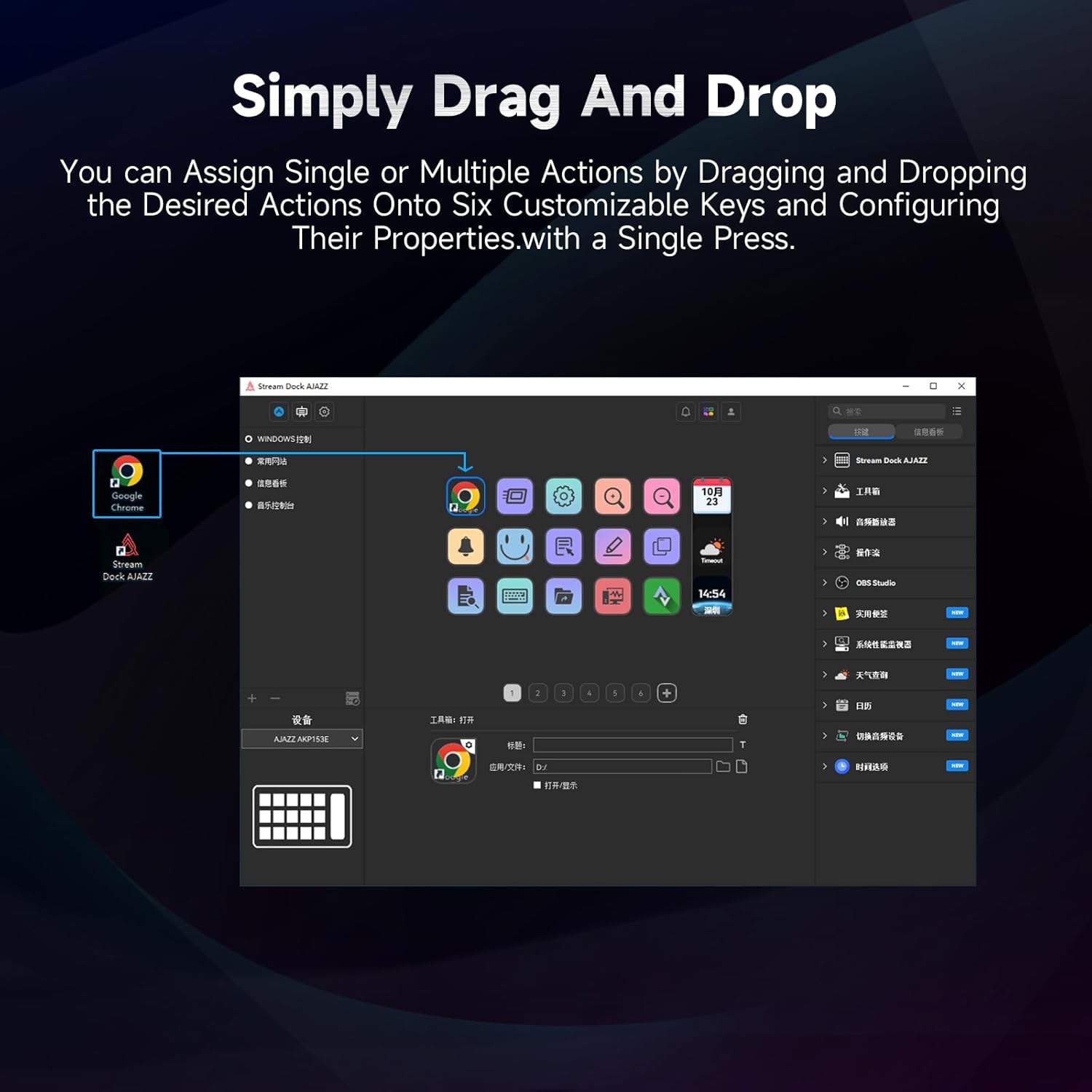
Figure 5.1: Customizing keys using the drag-and-drop interface in the AJAZZ software.
Video 5.1: Demonstration of assigning actions to keys for launching web pages and software with a single click.
5.2 Using Profiles and Pages
The software supports multiple profiles and pages, allowing you to switch between different sets of key assignments for various applications or tasks.
- Стварыце новага профіfiles for specific games, editing software, or streaming setups.
- У межах кожнага праfile, you can create multiple pages of key assignments, accessible by navigating through the device's buttons or software interface.
- The AKP03 automatically switches to the relevant profile when a linked application is in focus.
Video 5.2: Illustrates the multi-functional capabilities and profile switching of the AKP03 for various tasks.
6. Тэхнічнае абслугоўванне
To ensure the longevity and optimal performance of your AJAZZ AKP03, follow these maintenance guidelines:
- Уборка: Use a soft, dry cloth to wipe the surface of the device. Avoid abrasive cleaners or solvents.
- захоўванне: Захоўвайце прыладу ў прахалодным, сухім месцы, удалечыні ад прамых сонечных прамянёў і экстрэмальных тэмператур.
- Сыход за кабелем: Пазбягайце празмернага згінання або скручвання USB-кабеля, каб пазбегнуць пашкоджанняў.
- Абнаўленні праграмнага забеспячэння: Regularly check the AJAZZ website for software and firmware updates to ensure compatibility and access to new features.
7. Выпраўленне непаладак
If you encounter issues with your AKP03, refer to the following common troubleshooting steps:
- Прылада не распазнана:
- Ensure the USB cable is securely connected to both the AKP03 and your computer.
- Паспрабуйце падключыцца да іншага порта USB.
- Перазагрузіце кампутар.
- Verify that the driver software is correctly installed and up to date.
- Клавішы не рэагуюць:
- Check the software to ensure keys are properly assigned and the correct profile з'яўляецца актыўным.
- Ensure the driver software is running in the background.
- Праблемы з праграмным забеспячэннем:
- Reinstall the driver software.
- Check for software updates on the AJAZZ webсайт.
8. Тэхнічныя характарыстыкі
| Асаблівасць | Дэталь |
|---|---|
| Марка | АДЖАЗ |
| Назва мадэлі | AKP03 |
| Сумяшчальныя прылады | ПК, ноўтбук |
| Тып кантролера | Клавіятура |
| Тэхналогія падлучэння | USB-C |
| Колькасць кнопак | 6 Programmable Keys (with LCD displays), 3 Physical Knobs, 3 Toggle Switches |
| Вага прадмета | 0.32 кілаграма |
| Памеры прадмета (Д х Ш х У) | 5 х 3 х 2 цалі |
| Крыніца харчавання | Правадная электрычная |
9. Гарантыя і падтрымка
9.1 Інфармацыя аб гарантыі
The AJAZZ AKP03 Macro Keypad Stream Controller comes with a 1-гадовая абмежаваная гарантыя з даты пакупкі. Гэтая гарантыя распаўсюджваецца на вытворчыя дэфекты і няспраўнасці пры нармальным выкарыстанні. Яна не распаўсюджваецца на пашкоджанні, выкліканыя няправільным выкарыстаннем, аварыямі, несанкцыянаванымі мадыфікацыямі або няправільнай устаноўкай.
Калі ласка, захавайце доказы пакупкі для прэтэнзій па гарантыі.
9.2 Падтрымка кліентаў
For technical assistance, troubleshooting, or warranty inquiries, please contact AJAZZ customer support:
- Webсайт: www.a-jazz.com (Refer to the 'Support' or 'Contact Us' section)
- электронная пошта: [Insert Customer Support Email, if available]
- тэлефон: [Insert Customer Support Phone Number, if available]
Our support team is available to assist you with any questions or concerns regarding your product.