
1. Уводзіны
This manual provides essential information for the safe and efficient use of your IKON 65-inch 4K QLED Smart TV, Model IK-VWQ65. Please read these instructions thoroughly before operating the television and retain them for future reference.
The IKON 65-inch 4K QLED Smart TV delivers an immersive entertainment experience with its stunning 3840 x 2160 UHD resolution and vibrant QLED display technology. It features smart capabilities with Ethernet and Wi-Fi connectivity, allowing seamless access to popular streaming services. Enjoy enhanced audio with integrated Dolby sound support and connect multiple devices via its two HDMI ports and two USB ports. The slim design and included stand ensure stable placement, while the 60Hz refresh rate provides smooth motion for all your content.
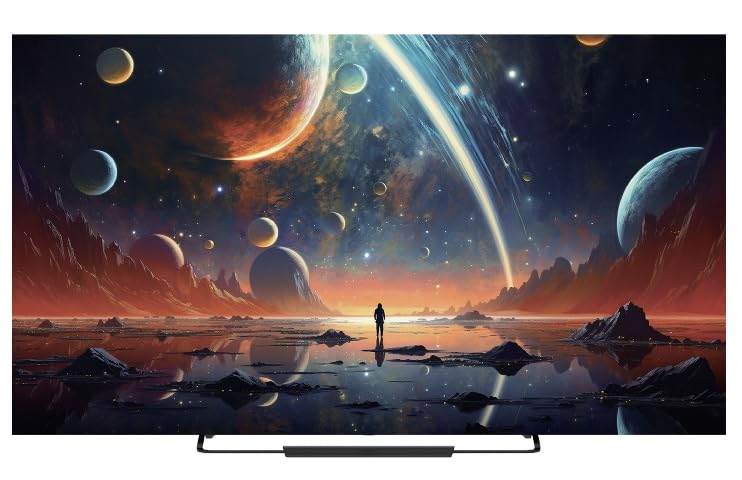
Фронт view of the IKON 65-inch 4K QLED Smart TV, Model IK-VWQ65, showcasinяго вялікі дысплей і элегантны дызайн.
2. Інфармацыя па бяспецы
Заўсёды выконвайце наступныя меры бяспекі, каб пазбегнуць паражэння электрычным токам, пажару або пашкоджання тэлевізара.
- Не падвяргайце тэлевізар уздзеянню дажджу або вільгаці.
- Не адчыняйце тэлевізарasinг; звяртайцеся да кваліфікаванага персаналу па ўсё абслугоўванне.
- Забяспечце належную вентыляцыю вакол тэлевізара. Не блакуйце вентыляцыйныя адтуліны.
- Выкарыстоўвайце толькі шнур сілкавання, які пастаўляецца з тэлевізарам.
- Адключайце тэлевізар ад сеткі падчас навальніцы або калі ён не выкарыстоўваецца працяглы час.
- Трымайце тэлевізар далей ад прамых сонечных прамянёў, крыніц цяпла і моцных магнітных палёў.
- Не стаўце цяжкія прадметы на тэлевізар або шнур харчавання.
- Parental control features are available (Pin-based Content Lock) to manage content access for children.
3. Што ўваходзіць у камплект
Праверце наяўнасць усіх кампанентаў ва ўпакоўцы:
- IKON 65-inch 4K QLED Smart TV (Model IK-VWQ65)
- Remote Control (requires AAA batteries)
- Падстаўка для тэлевізара
- Шнур харчавання
- Кіраўніцтва карыстальніка (гэты дакумент)
4. Настройка
4.1 Распакаванне
Carefully remove the TV and all accessories from the packaging. It is recommended to keep the original packaging for potential future transport or servicing.
4.2 Прымацаванне падстаўкі
Place the TV screen-down on a soft, flat surface. Align the included stand with the mounting holes on the bottom of the TV. Secure the stand using the provided screws. Ensure the stand is firmly attached before placing the TV upright.
4.3 Насценны мантаж
If you choose to wall mount your TV, ensure you use a VESA-compatible wall mount (400 x 400 mm). Follow the instructions provided with your wall mount kit. Professional installation is recommended for wall mounting.
4.4 Падключэнне сілкавання
Connect the power cord to the TV's power input, then plug the other end into a 220V AC power outlet. The TV consumes 150 Watts of power.
4.5 Падключэнне знешніх прылад
Ваш тэлевізар прапануе розныя варыянты падключэння:
- Парты HDMI (2): Connect Blu-ray players, game consoles, streaming boxes, or sound systems.
- USB-парты (x2): Connect USB drives for media playback. (Includes 2x USB 2.0 ports)
- Ethernet порт: Для праваднога падключэння да Інтэрнэту.
- Лічбавы аптычны аўдыявыхад: Для падлучэння да знешніх аўдыёсістэм.
- Analog Audio Outputs (x2): Для падключэння да старых аўдыёсістэм.
5. Кіраванне тэлевізарам
5.1 Уключэнне/выключэнне сілкавання
Націсніце кнопку харчавання на пульце дыстанцыйнага кіравання або на самым тэлевізары, каб уключыць або выключыць тэлевізар.
5.2 Пульт дыстанцыйнага кіравання
The TV comes with an infrared remote control that supports both button and voice control. Insert AAA batteries into the remote control before use.
5.3 Функцыі Smart TV
Running on the Android operating system with 8GB of memory storage, your TV provides access to a wide range of smart features and applications. Connect to the internet via Ethernet or Wi-Fi to enjoy services like Prime Video, Netflix, and YouTube.
5.4 Адлюстраванне экрана
The TV supports screen mirroring technologies such as Chromecast and Miracast, allowing you to cast content from your mobile device to the TV and vice-versa. Bluetooth 5.0 is also available for wireless connections.
5.5 Налады гуку
The integrated Dolby audio system provides immersive sound. You can adjust audio settings through the TV's menu to optimize your listening experience. The TV features 20 Watts of stereo audio output.
6. Тэхнічнае абслугоўванне
6.1 Ачыстка экрана
Акуратна працярыце экран мяккай тканінай без ворса. Для ўстойлівых плям злёгку працярыцеampПрацярыце тканіну вадой або спецыяльным сродкам для чысткі экранаў. Ніколі не распыляйце вадкасць непасрэдна на экран.
6.2 Ачыстка Casing
Працярыце тэлевізарasinмяккай сухой тканінай. Пазбягайце выкарыстання абразіўных ачышчальнікаў або растваральнікаў.
6.3 Вентыляцыя
Ensure that the ventilation openings on the TV are not blocked to prevent overheating. Regularly dust the vents to maintain proper airflow.
7. Выпраўленне непаладак
Калі ў вас узніклі праблемы з тэлевізарам, звярніцеся да наступных распаўсюджаных праблем і іх рашэнняў:
| праблема | Магчымае рашэнне |
|---|---|
| Няма сілы | Праверце, ці надзейна падключаны шнур сілкавання да тэлевізара і разеткі. Пераканайцеся, што разетка спраўная. |
| Няма выявы, але гук ёсць | Verify the correct input source is selected. Check external device connections (HDMI, etc.). |
| Няма гуку, але выява ёсць | Check the volume level and ensure the TV is not muted. Verify audio cable connections to external devices. |
| Пульт дыстанцыйнага кіравання не працуе | Замяніце батарэйкі тыпу AAA. Пераканайцеся, што паміж пультам дыстанцыйнага кіравання і ІЧ-датчыкам тэлевізара няма перашкод. |
| Cannot Connect to Wi-Fi/Internet | Check your router and modem. Ensure the Wi-Fi password is correct. Try restarting the TV and your network equipment. |
8. Тэхнічныя характарыстыкі
| Асаблівасць | Дэталь |
|---|---|
| Нумар мадэлі | IK-VWQ65 |
| Год вытворчасці | 2024 |
| Памер экрана | 65 цаляў |
| Тэхналогія адлюстравання | QLED |
| дазвол | 4K Ultra HD (3840 x 2160) |
| Частата абнаўлення | 60 Гц |
| Суадносіны бакоў | 16:9 |
| Каэфіцыент кантраснасці выявы | 1,000,000:1 |
| Час водгуку | 8 мс |
| Падтрымка HDR | HDR10, HLG |
| Аперацыйная сістэма | Android |
| Ёмістасць памяці | 8 ГБ |
| Выхадная магутнасць гуку | 20 Вт (стэрэа) |
| Surround Sound Format | Dolby Digital |
| Парты HDMI | 2 |
| Парты USB | 2 (USB 2.0) |
| Порт Ethernet | 1 |
| Бесправоднае падключэнне | Wi-Fi, Bluetooth 5.0 |
| Адлюстраванне экрана | Chromecast, Miracast |
| Тып мацавання | Wall Mount (VESA 400 x 400 mm) |
| Электразабеспячэнне | 220 В пераменнага току |
| Энергаспажыванне | 150 ват |
| Вага прадмета | 18.5 кг |
| Шырыня падстаўкі | 45 см |
9. Інфармацыя аб гарантыі
This IKON TV comes with a limited manufacturer warranty. Please refer to the warranty card included in your product packaging for specific terms, conditions, and duration of coverage. Keep your purchase receipt as proof of purchase for warranty claims.
10. Падтрымка кліентаў
For technical assistance, troubleshooting beyond this manual, or warranty inquiries, please contact IKON customer support. Contact details can typically be found on the manufacturer's webсайце або ў гарантыйным талоне.
- Інтэрнэт-падтрымка: Visit the official IKON webсайт з часта задаванымі пытаннямі і рэсурсамі падтрымкі.
- Падтрымка па электроннай пошце: Refer to your warranty documentation for the support email address.
- Падтрымка па тэлефоне: Refer to your warranty documentation for the customer service phone number.