
Уводзіны
This manual provides essential instructions for the installation, operation, and maintenance of your new Generic Laptop CPU Cooling Fan, designed for various HP Pavilion 15-EH series laptops. Proper installation and care will ensure optimal performance and longevity of your device's cooling system.
Важная інфармацыя па бяспецы
Before proceeding with installation, please read the following:
- Wiring Sequence Compatibility: There are many variations in fan wiring sequences, and they are often incompatible between different fan models. It is crucial to verify the fan interface wiring sequence of your new fan against your laptop's original fan and motherboard connector. Incorrect wiring can cause damage to the fan or your laptop.
- Візуальная праверка: Before installation, carefully compare the front and back of the new fan with your original fan. Also, examine the interface wiring sequence diagram to ensure a perfect match. If you are unsure, consult a qualified technician.
- Статычная электрычнасць: Always take precautions against static electricity when handling internal computer components. Use an anti-static wrist strap or frequently touch a grounded metal object.
- Адключэнне сілкавання: Ensure your laptop is completely powered off and disconnected from all power sources (AC adapter and battery) before opening the chassis or attempting any installation.
Прадукт скончаныview
The Generic Laptop CPU Cooling Fan is designed to dissipate heat generated by the Central Processing Unit (CPU) in compatible HP Pavilion 15-EH series laptops. This component is vital for maintaining optimal operating temperatures, preventing overheating, and ensuring stable system performance.
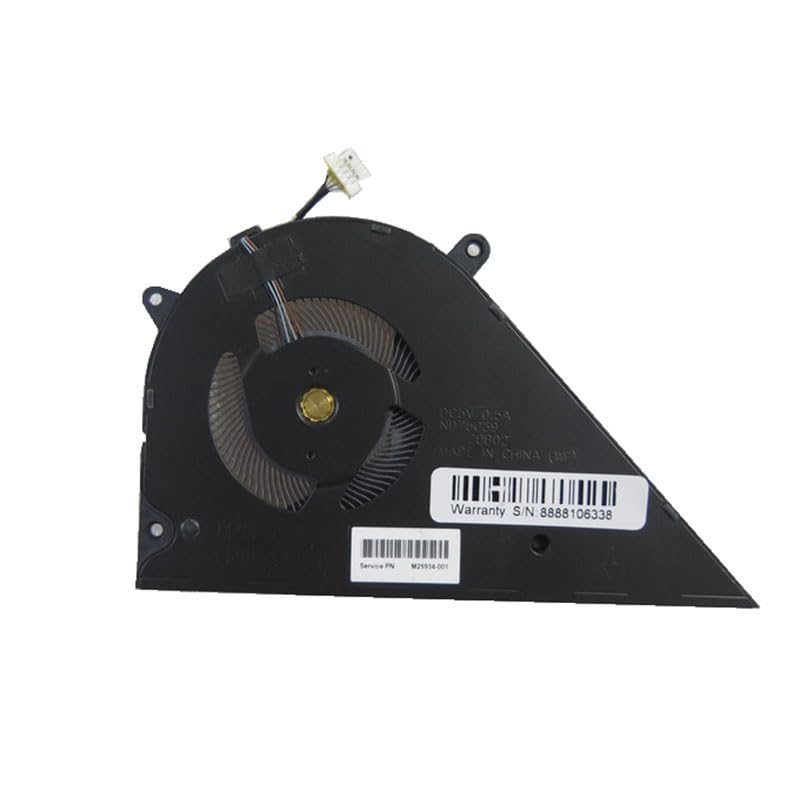
Выява: спераду view of the Generic Laptop CPU Cooling Fan, showing the fan blades and housing.
This fan operates at DC 5V 0.5A, providing efficient airflow to cool the CPU. Its compact design integrates seamlessly into the laptop's internal structure.
Настройка і ўстаноўка
Replacing a laptop CPU cooling fan requires careful handling of internal components. If you are not comfortable performing this procedure, it is recommended to seek assistance from a professional computer technician.
- Падрыхтоўка: Power off your laptop completely and disconnect the AC adapter and battery. Place the laptop on a clean, static-free surface.
- Accessing the Fan: Carefully open the laptop chassis according to your specific HP Pavilion 15-EH model's service manual. This usually involves removing screws from the bottom cover and gently prying it open.
- Removing the Old Fan: Locate the existing CPU fan. Disconnect its power cable from the motherboard. Unscrew any mounting screws securing the fan and gently lift it out.
- Installing the New Fan: Position the new Generic CPU cooling fan in the same location as the old one. Ensure the mounting holes align. Secure the fan with the appropriate screws.
- Падключэнне сілкавання: Carefully connect the fan's power cable to the corresponding header on the motherboard. Double-check the wiring sequence to ensure it matches the original connection.
- Паўторная зборка: Reassemble the laptop chassis, ensuring all screws are tightened appropriately and no cables are pinched.
- Пачатковы тэст: Reconnect the battery and AC adapter. Power on the laptop and observe if the fan spins and if the system boots normally. Monitor CPU temperatures using system monitoring software.
For detailed, model-specific disassembly and reassembly instructions, refer to the official service manual for your HP Pavilion 15-EH laptop model.
Інструкцыя па эксплуатацыі
Once installed, the CPU cooling fan operates automatically, controlled by your laptop's system firmware (BIOS/UEFI) and operating system. It will adjust its speed based on the CPU's temperature to maintain optimal cooling performance.
- Нармальны рэжым працы: The fan will spin quietly during light use and increase speed and audible noise during intensive tasks (e.g., gaming, video editing) when the CPU generates more heat.
- Маніторынг: You can use various software tools to monitor your CPU temperature and fan speed to ensure proper operation.
Тэхнічнае абслугоўванне
Regular maintenance helps prolong the life of your cooling fan and maintain efficient heat dissipation.
- Выдаленне пылу: Periodically clean dust from the fan blades and heatsink fins. Use compressed air or a soft brush. Ensure the laptop is powered off and disconnected from power before cleaning.
- Тэрмапаста: If you are replacing the fan, it is often recommended to reapply fresh thermal paste between the CPU and the heatsink for optimal heat transfer.
- Пазбягайце перашкод: Ensure the laptop's ventilation vents are not blocked by objects or surfaces (e.g., blankets, soft furniture) during operation.
Ліквідацыю непаладак
| праблема | Магчымая прычына | Рашэнне |
|---|---|---|
| Вентылятар не круціцца | Incorrect wiring, loose connection, faulty fan, insufficient power. | Check fan cable connection and wiring sequence. Ensure laptop is receiving power. Test with a known good fan if possible. |
| Гучны шум вентылятара | Dust accumulation, faulty bearings, fan hitting an obstruction. | Clean the fan and heatsink. Ensure no cables are obstructing the fan blades. If noise persists, the fan may need replacement. |
| Перагрэў ноўтбука | Fan not working efficiently, clogged heatsink, poor thermal paste application. | Verify fan operation. Clean heatsink. Reapply thermal paste. Ensure proper ventilation. |
Тэхнічныя характарыстыкі
- Тып прадукту: Laptop CPU Cooling Fan
- Марка: Радавыя
- Сумяшчальныя мадэлі: HP Pavilion 15-EH3001AU, 15-EH3001LA, 15-EH3002AU, 15-EH3003AU, 15-EH3004AU, 15-EH3003LA, 15-EH3005AU, 15-EH3008CA, 15-EH3006AU, 15-EH3009AU, 15-EH3010AU, 15-EH3010NR
- тtage: 5 В пастаяннага току
- Бягучы: 0.5А
- Памеры прадукту: 11.81 х 7.87 х 3.94 цалі
- Вага прадмета: 3.52 унцыі
- ASIN: B0FT26QPP6
- Нумар мадэлі тавару: 15-EH3001LA (representative model)
- Дата першай даступнасці: 1 верасня 2025 г
Гарантыя і падтрымка
This product is typically covered by a return policy allowing for refund or replacement within 30 days of purchase. For specific warranty details, return procedures, or technical support, please refer to the retailer's policy where the product was purchased or contact the seller directly.
Прадавец: JHS Laptop Part