
1. Уводзіны
This manual provides essential information for setting up, operating, and maintaining your Beelink Mini S12 N95 Mini PC. Please read it thoroughly before using the device to ensure optimal performance and safety.

Image: The Beelink Mini S12 N95 Mini PC, a compact and powerful desktop solution.
2. Што ў скрынцы
Праверце наяўнасць усіх прадметаў у камплекце:
- 1 x Beelink Mini S12 N95 Mini PC
- 1 x HDMI кабелі
- 1 x Power Adapter (US Standard)
- 1 х Кіраўніцтва карыстальніка (гэты дакумент)
- 1 х мацаванне VESA з шрубамі
3. Прадукт скончыўсяview
The Beelink Mini S12 N95 is a compact desktop computer designed for office, home video, and general productivity tasks. It features an Intel Alder Lake-N95 processor, 16GB DDR4 RAM, and a 500GB M.2 SSD.
3.1 Асноўныя магчымасці
- Працэсар: Intel Alder Lake-N95 (4 Cores, 4 Threads, up to 3.4GHz, 6MB Cache)
- Памяць: 16GB DDR4 3200MHz SODIMM (single channel, expandable up to 16GB)
- захоўванне: 500GB M.2 2280 SSD (PCIe 3.0, expandable up to 2TB)
- Графіка: Intel UHD Graphics (16EUs, up to 1200MHz)
- Відэа выхад: Dual HDMI 2.0 ports, supporting 4K@60Hz display
- Сетка: 2.5G LAN, Wi-Fi 5 (802.11ac), Bluetooth 4.2
- парты: 4x USB 3.2 Gen2 (10Gbps), 2x HDMI, 1x 2.5G LAN, 1x Earphone Jack, 1x DC Power Input, 1x CLR CMOS button
- Памеры: Прыкладна 4.52 х 4.01 х 1.54 цалі
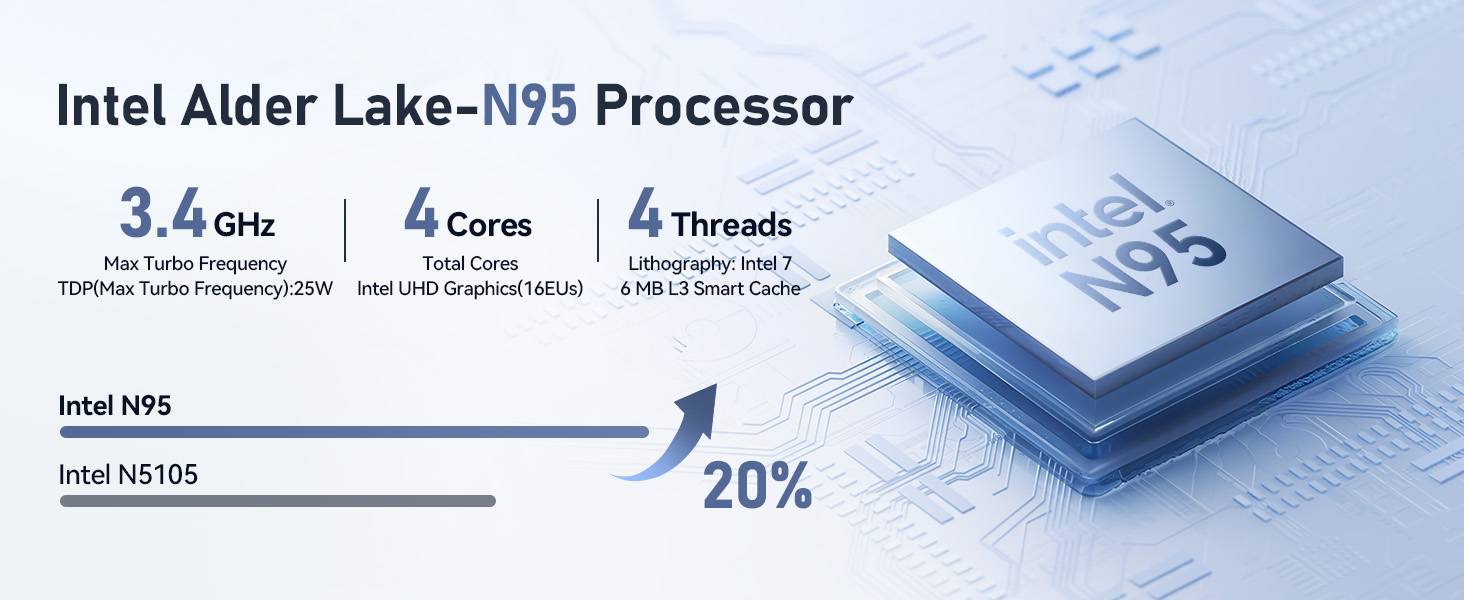
Выява: Зверхуview of the Intel Alder Lake-N95 processor specifications.

Image: High-speed 16GB DDR4 RAM and 500GB M.2 SSD for efficient performance.

Выява: спераду і ззаду view of the Mini PC showing various ports including USB 3.2, HDMI, and LAN.
4. Кіраўніцтва па наладцы
Follow these steps to set up your Beelink Mini S12 N95 Mini PC:
- Падключэнне да дысплея: Use the provided HDMI cable to connect the Mini PC to your monitor or TV. The device supports dual 4K displays.
- Падключэнне перыферыйных прылад: Падключыце клавіятуру, мыш і іншыя прылады USB да даступных партоў USB 3.2.
- Падключэнне да сеткі: For a wired connection, connect an Ethernet cable to the 2.5G LAN port. For wireless, the device supports Wi-Fi 5.
- Уключэнне: Connect the power adapter to the DC input port on the Mini PC, then plug it into a power outlet. Press the power button on the front of the device.
- Пачатковая загрузка: The system will boot up. Follow the on-screen instructions to complete the operating system setup (e.g., Windows 11).

Image: Illustrates connecting two monitors for a dual 4K display setup.
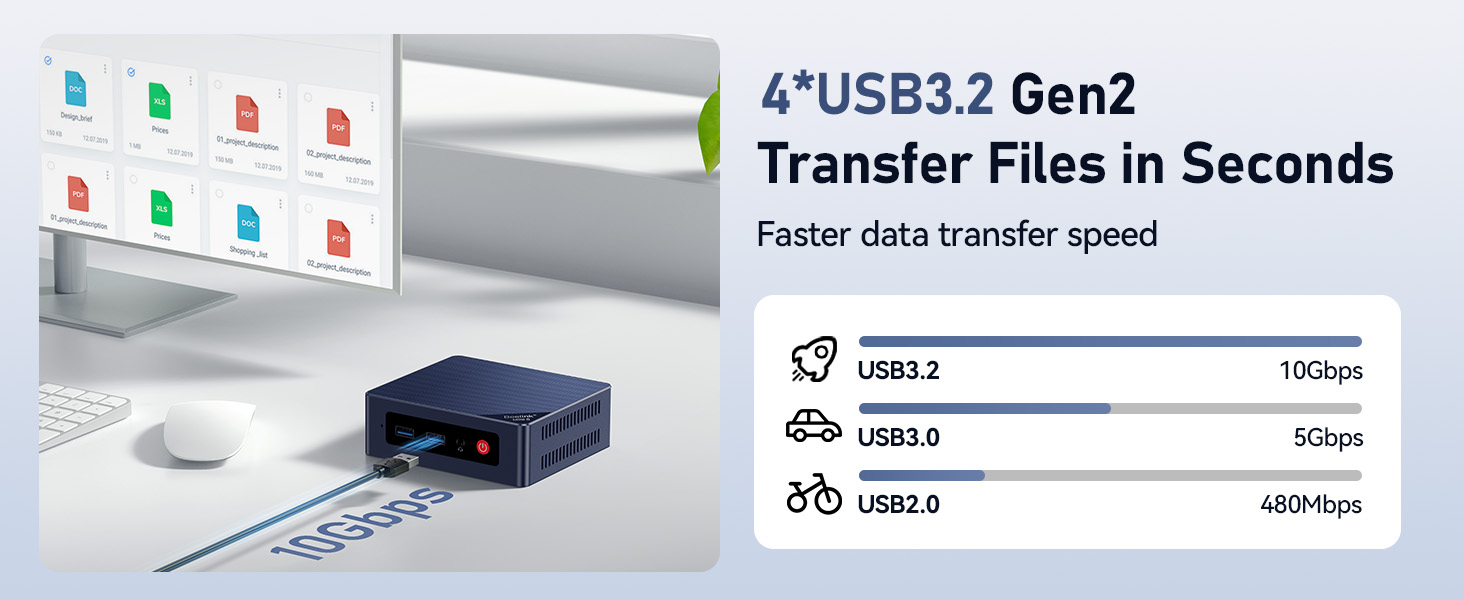
Image: Demonstrates the high-speed data transfer capabilities of the USB 3.2 Gen2 ports.
5. Інструкцыя па эксплуатацыі
5.1 Уключэнне/выключэнне сілкавання
- Каб уключыць: Press the red power button on the front panel.
- Каб выключыць: Use the operating system's shutdown function. Alternatively, press and hold the power button for 5 seconds to force a shutdown (not recommended for regular use).
5.2 Dual Display Setup
Connect two monitors to the HDMI ports. The operating system should automatically detect both displays. You can configure display settings (extend, duplicate, etc.) through your OS display settings.
5.3 Падключэнне да сеткі
- Правадная лакальная сетка: Plug an Ethernet cable into the 2.5G LAN port for a high-speed wired connection.
- Wi-Fi: Access your operating system's network settings to connect to a Wi-Fi 5 (802.11ac) network.
- Bluetooth: Enable Bluetooth in your OS settings to pair with compatible devices like keyboards, mice, or speakers.

Image: Highlighting the 2.5G LAN port for fast wired network connections.
6. Тэхнічнае абслугоўванне
- Уборка: Use a soft, dry cloth to clean the exterior of the Mini PC. Avoid liquid cleaners. Ensure ventilation holes are free from dust.
- Вентыляцыя: Do not block the ventilation openings. Ensure adequate airflow around the device to prevent overheating. The internal cooling fan helps maintain optimal temperatures.
- Абнаўленні праграмнага забеспячэння: Рэгулярна абнаўляйце аперацыйную сістэму і драйверы, каб забяспечыць бяспеку і прадукцыйнасць.
- Пашырэнне сховішча: The Mini PC supports a 2.5-inch SATA HDD/SSD for additional storage (up to 2TB). Refer to the detailed instructions for installation if you wish to expand storage.
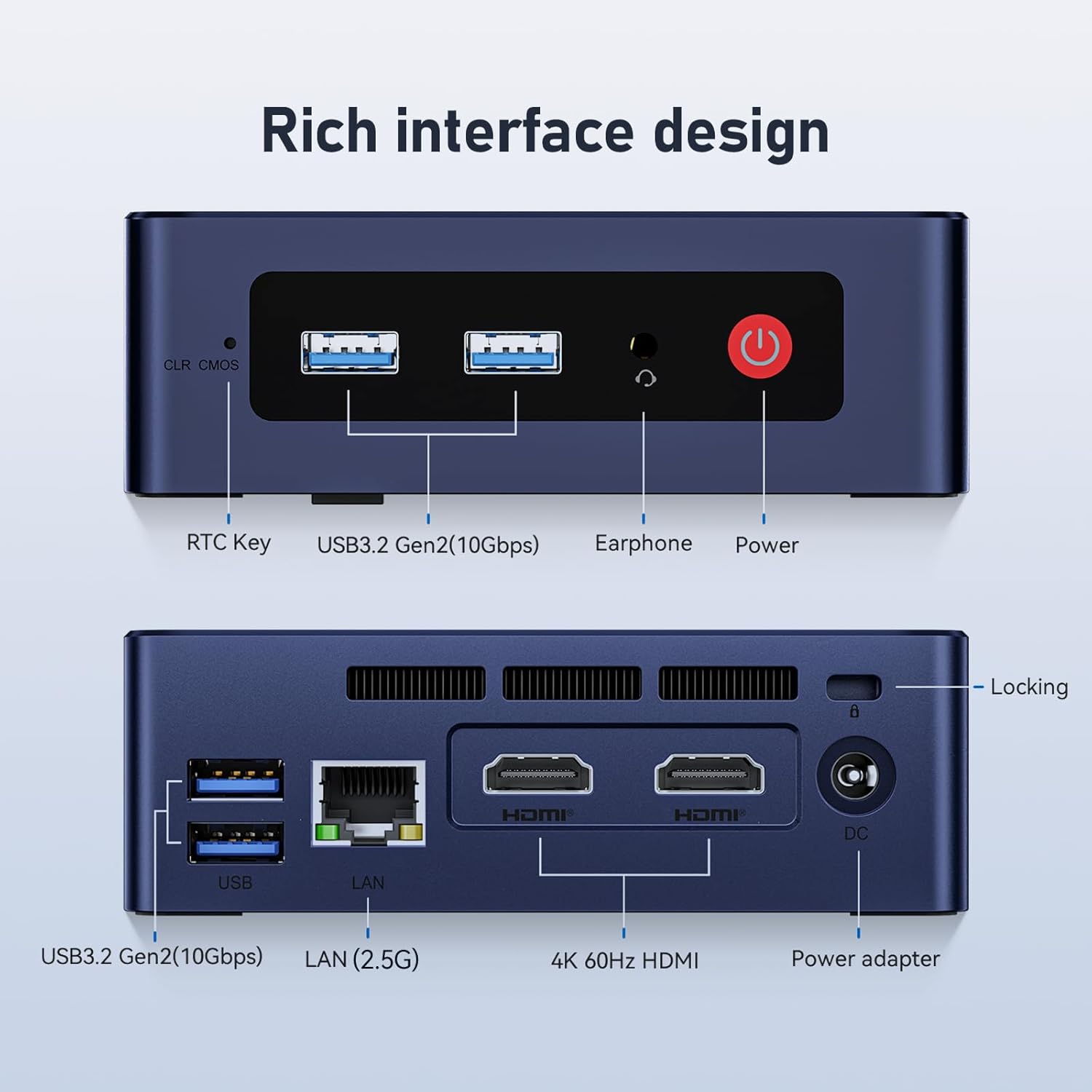
Image: Internal components showing the cooling fan and heat sink, crucial for maintaining CPU temperature.
7. Выпраўленне непаладак
| праблема | Магчымая прычына | Рашэнне |
|---|---|---|
| Няма адлюстравання на маніторы | Няшчыльны кабель HDMI, няправільная крыніца ўваходнага сігналу на маніторы, праблемы з харчаваннем. | Check HDMI connections. Ensure monitor is on and set to correct input. Verify power adapter is connected. |
| Няма ўлады | Power adapter not connected, faulty outlet. | Ensure power adapter is securely connected to both the PC and a working power outlet. |
| Wi-Fi/Bluetooth не працуе | Drivers not installed, disabled in OS, hardware issue. | Check device manager for driver status. Ensure Wi-Fi/Bluetooth is enabled in OS settings. Restart the PC. |
| Павольная або завісаючая сістэма | Too many applications running, low storage, overheating. | Close unnecessary applications. Free up disk space. Ensure proper ventilation. Check for OS updates. |
If you encounter issues not listed here, please refer to the support section.
8. Тэхнічныя характарыстыкі
| Асаблівасць | Дэталь |
|---|---|
| Марка | Білінк |
| Нумар мадэлі | EQ |
| Працэсар | Intel Alder Lake-N95 (4 Cores, 4 Threads, up to 3.4 GHz) |
| Графіка | Інтэграваная відэакарта Intel UHD |
| АЗП | 16GB DDR4 3200MHz SODIMM (1 slot, Max 16GB) |
| Захоўванне | 500GB M.2 SSD (PCIe 3.0), expandable with 2.5-inch SATA HDD/SSD (up to 2TB) |
| Аперацыйная сістэма | OS (as shipped, typically Windows 11) |
| Відэавыхад | 2 x HDMI (4K@60Hz) |
| Парты USB | 4 x USB 3.2 Gen2 (10Gbps) |
| лакальная сетка | 1 x 2.5G Ethernet Port |
| Бесправоднае падключэнне | Wi-Fi 5 (802.11ac), Bluetooth 4.2 |
| Аўдыё | 1 x Earphone Jack |
| Увод магутнасці | Пастаянны ток 12 В/3 А (15 Вт) |
| Памеры | Прыбл. 4.52 х 4.01 х 1.54 цаляў (11.48 х 10.19 х 3.91 см) |
| Вага | 0.7 кілаграма |
| Спосаб астуджэння | Вентылятар |
| Функцыі бяспекі | Windows Defender, Windows Hello, Secure Boot |
9. Гарантыя і падтрымка
Beelink provides comprehensive support for its products.
- Гарантыя: Прадукт пастаўляецца з 12-месячнай гарантыяй.
- Тэхнічная падтрымка: Пажыццёвая тэхнічная падтрымка даступная.
- Абслугоўванне кліентаў: For any product questions or support, please contact customer service. You can typically find contact information on the seller's page or through your purchase platform.

Image: General information about Beelink Mini PCs and support.
10. Відэагід
Watch the official product video for a visual guide on the Beelink S12 Mini PC features.
Відэа: Афіцыйна скончанаview of the Beelink S12 Mini PC, highlighting its Intel N95 processor, 16GB RAM, and 500GB storage.