
1. Уводзіны
Thank you for choosing the PureMate 12L/Day Dehumidifier. This appliance is designed to effectively remove excess moisture from your indoor environment, helping to prevent dampness, condensation, mould, and musty odours. By maintaining optimal humidity levels, it contributes to a healthier and more comfortable living space. Please read this manual thoroughly before operating the dehumidifier to ensure safe and efficient use.
This dehumidifier features a 12-litre per day extraction capacity, an automatic humidity sensor, a digital display, a 24-hour timer, auto shut-off, and options for continuous drainage or manual tank emptying. It is also equipped with castor wheels and a carry handle for easy portability.
2. Інструкцыі па тэхніцы бяспекі
To reduce the risk of fire, electric shock, or injury, always observe the following basic safety precautions:
- Перад выкарыстаннем прыбора ўважліва прачытайце ўсе інструкцыі.
- Ensure the power supply matches the rating label on the dehumidifier.
- Do not operate the dehumidifier with a damaged cord or plug. If the supply cord is damaged, it must be replaced by the manufacturer, its service agent, or similarly qualified persons to avoid a hazard.
- Заўсёды стаўце прыладу на цвёрдую, роўную паверхню.
- Maintain at least 20 cm (8 inches) clearance around the unit for proper air circulation.
- Не ўстаўляйце прадметы ва ўваходныя і выпускныя адтуліны.
- Трымайце прыладу далей ад крыніц цяпла, прамых сонечных прамянёў і лёгкаўзгаральных матэрыялаў.
- Unplug the unit before cleaning, moving, or performing any maintenance.
- Гэты прыбор не прызначаны для выкарыстання асобамі (уключаючы дзяцей) з абмежаванымі фізічнымі, сэнсарнымі або разумовымі здольнасцямі або з адсутнасцю вопыту і ведаў, за выключэннем выпадкаў, калі яны знаходзяцца пад наглядам або праінструктаваныя адносна выкарыстання прыбора асобай, адказнай за іх бяспеку.
- За дзецьмі трэба сачыць, каб яны не гулялі з прыборам.
- Do not use the appliance in areas where water is likely to splash onto it.
3. Прадукт скончыўсяview
The PureMate 12L/Day Dehumidifier is designed for efficient moisture removal and ease of use. Below are the key components and features.

Малюнак 3.1: Фронт view of the PureMate 12L/Day Dehumidifier, showing its compact design and the '12L Per Day' capacity label.
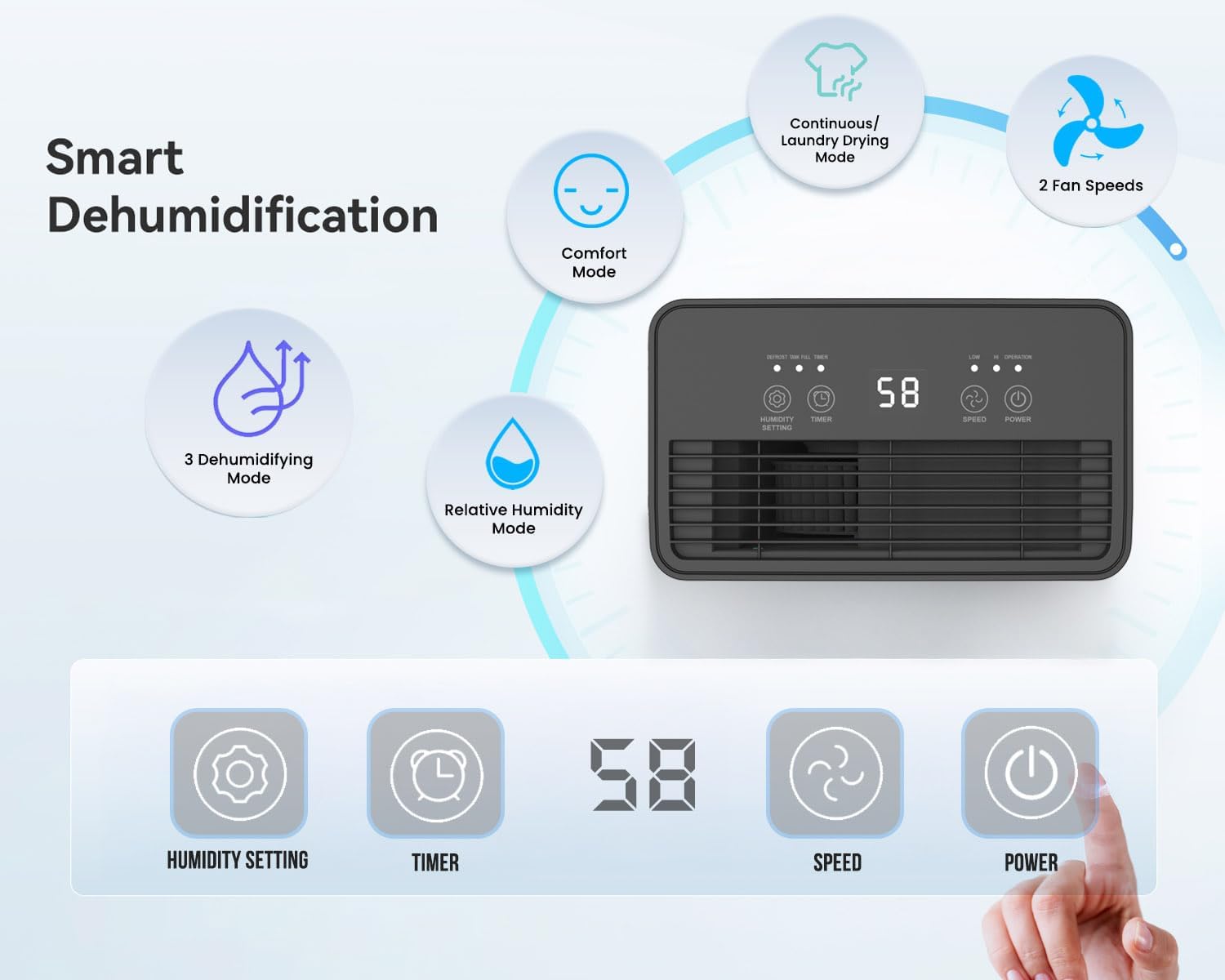
Малюнак 3.2: Illustration of the dehumidifier's smart features and control panel. It highlights Comfort Mode, Continuous/Laundry Drying Mode, 2 Fan Speeds, 3 Dehumidifying Modes, Relative Humidity Mode, and the digital display with buttons for Humidity Setting, Timer, Speed, and Power.
Асноўныя характарыстыкі:
- Эфектыўнае выдаленне вільгаці: Extracts up to 12 litres of moisture per day.
- Customisable Humidity Control: Offers Continuous Mode, Comfort Mode, and adjustable Relative Humidity (30-90% RH).
- Digital Display & Controls: Intuitive LED display and touch panel for easy operation.
- 24-гадзінны таймер: Дазваляе працаваць па раскладзе.
- Аўтаматычнае адключэнне: Activates when the 2-litre water tank is full.
- Варыянты падвойнага дрэнажу: Manual tank emptying or continuous drainage via a hose.
- Мыйны паветраны фільтр: Improves air quality by capturing dust.
- Партатыўны дызайн: Equipped with castor wheels and an integrated handle for easy movement.
- Праца з нізкім узроўнем шуму: Operates quietly at 33-37 dB.
4. Настройка
4.1 Распакаванне
- Асцярожна дастаньце асушальнік паветра з упакоўкі.
- Выдаліце ўсе ўпаковачныя матэрыялы, у тым ліку стужку або ахоўныя плёнкі.
- Retain the packaging for future storage or transport if needed.
4.2 Размяшчэнне
Proper placement is crucial for optimal performance and safety.
- Place the dehumidifier on a firm, level surface to prevent vibration and water spillage.
- Ensure there is at least 20 cm (8 inches) of clear space around the air inlet and outlet to allow for proper airflow. Do not block these openings.
- Пазбягайце размяшчэння прылады побач з прыборамі, якія генеруюць цяпло, або пад прамымі сонечнымі прамянямі.
- For best results, close all doors and windows in the room where the dehumidifier is operating to create an enclosed environment.
4.3 Падключэнне харчавання
- Ensure the power cord is fully extended and not damaged.
- Падключыце шнур сілкавання да заземленай электрычнай разеткі, якая адпавядае аб'ёмуtagе патрабаванням адз.
5. Інструкцыя па эксплуатацыі
The dehumidifier features an intuitive touch control panel and digital display for easy operation.

Малюнак 5.1: Close-up of the dehumidifier's touch control panel and the removable 2-litre water tank, illustrating the high-extraction capacity and drainage options.
5.1 Уключэнне/выключэнне сілкавання
- Націсніце УЛАДА кнопку на панэлі кіравання, каб уключыць або выключыць прыладу.
5.2 Dehumidifying Modes
The dehumidifier offers several operating modes to suit different needs:
- Relative Humidity Mode: Націсніце НАСТРОЙКА Вільготнасці button to set your desired humidity level between 30% and 90% RH (Relative Humidity) in 5% increments. The unit will automatically adjust its operation to maintain this level.
- Камфортны рэжым: This mode automatically sets the target humidity based on the current room temperature for optimal comfort.
- Бесперапынны рэжым: The unit operates continuously without targeting a specific humidity level, ideal for very damp conditions or for drying laundry.
- Рэжым сушкі бялізны: Similar to Continuous Mode, this setting is optimized for drying clothes indoors by continuously removing moisture from the air.

Малюнак 5.2: Visual representation of the Continuous mode and various humidity solutions provided by the dehumidifier, including dry laundry, protection against black mould, and elimination of window condensation.
5.3 хуткасці вентылятара
- Націсніце ХУТКАСЦЬ button to cycle between different fan speeds (e.g., Low, High). Higher fan speed results in faster dehumidification.
5.4 24-гадзінны таймер
- Націсніце ТАЙМЕР button to set the desired operating duration (in hours) for the unit to turn on or off automatically.
- Each press increases the timer setting. Once the desired time is set, the unit will operate for that duration or turn off after that duration, depending on its current state.

Малюнак 5.3: Depicts the 24-hour timer function and the quiet operation of the dehumidifier (33-37 dB), allowing for undisturbed use even during sleep.
5.5 Digital Display and Indicator Lights
- The digital display shows the current room humidity level or the set humidity/timer value.
- Humidity Indicator Light: The unit features an LED light that changes color based on the ambient humidity level:
- ЧЫРВОНЫ: Humidity level is greater than 65%.
- ЗЯЛЁНЫ: Humidity level is between 40% and 55%.
- СІНІ: Humidity level is less than 40%.
- Функцыя аўтаматычнай размарозкі: The unit automatically performs defrosting when frost builds up on the evaporator coils, ensuring efficient operation in cooler temperatures.

Малюнак 5.4: Illustrates the Automatic Dehumidification Mode, where the unit adjusts target humidity based on room temperature, and the Auto Defrost Function. Also shows the Humidity Indicator Light with its color codes (Red, Green, Blue) for different humidity ranges.
6. Варыянты дрэнажу
The PureMate dehumidifier offers two methods for water drainage:
6.1 Manual Water Tank Emptying
- The dehumidifier is equipped with a 2-litre water tank.
- When the tank is full, the unit will automatically shut off, and an indicator light (usually 'Full' or 'Tank Full') will illuminate.
- Асцярожна выміце рэзервуар для вады з прылады.
- Зліце сабраную ваду ў ракавіну або каналізацыю.
- Reinsert the empty water tank firmly into the unit. The dehumidifier will resume operation.
6.2 Бесперапынны дрэнаж
- For maintenance-free operation, you can connect a 12mm hose (not included) for continuous drainage.
- Locate the continuous drainage outlet on the back or side of the unit.
- Attach one end of a 12mm hose to this outlet.
- Ensure the other end of the hose is placed in a drain or a larger container, ensuring a downward slope for gravity drainage.
- Once connected, the water will bypass the internal tank and drain directly.
7. Тэхнічнае абслугоўванне
Рэгулярнае тэхнічнае абслугоўванне забяспечвае аптымальную прадукцыйнасць і даўгавечнасць вашага асушальніка паветра.
7.1 Ачыстка паветранага фільтра
The washable air filter helps to capture dust and improve air quality. Clean it regularly, typically every two weeks, or more often if used in a dusty environment.
- Выключыце асушальнік паветра і адключыце яго ад разеткі.
- Знайдзіце і зніміце паветраны фільтр (звычайна ён знаходзіцца на задняй або бакавой панэлі прылады).
- Gently wash the filter under running tap water. For stubborn dirt, use a soft brush and mild detergent.
- Rinse thoroughly and allow the filter to air dry completely before reinserting it. Do not use a dryer or direct heat.
- Once dry, place the filter back into its position.
7.2 Ачыстка рэзервуара для вады
Clean the water tank periodically to prevent mould and bacteria growth.
- Выключыце і адключыце прыладу.
- Зніміце рэзервуар для вады.
- Wash the tank with warm water and a mild detergent. Rinse thoroughly.
- Dry the tank completely before placing it back into the dehumidifier.
7.3 Знешняя ачыстка
- Працярыце знешнюю частку асушальніка мяккім, damp тканіна.
- Do not use abrasive cleaners, solvents, or harsh chemicals, as these can damage the surface.
8. Выпраўленне непаладак
Калі ў вас узніклі праблемы з асушальнікам паветра, звярніцеся да наступных распаўсюджаных праблем і іх рашэнняў:
| праблема | Магчымая прычына | Рашэнне |
|---|---|---|
| Асушальнік паветра не ўключаецца. | No power supply. Power cord not plugged in. Water tank full or not correctly inserted. | Праверце падключэнне да электрасеткі. Апаражніце і ўстаўце рэзервуар для вады правільна. |
| No water collected or very little water collected. | Room humidity is already low. Temperature is too low (below 5°C). Air filter is clogged. Dehumidifier is in continuous drainage mode. | Increase target humidity setting. Ensure room temperature is adequate. Clean the air filter. Check if continuous drainage hose is properly connected and draining. |
| Агрэгат шумны. | Прылада не стаіць на роўнай паверхні. Паветраны фільтр забіты. | Place unit on a flat, stable surface. Clean the air filter. |
| Паветраны паток слабы. | Air inlet/outlet blocked. Air filter clogged. | Ensure clear space around the unit. Clean the air filter. |
If the problem persists after trying these solutions, please contact PureMate customer support.
9. Тэхнічныя характарыстыкі
Detailed technical specifications for the PureMate 12L/Day Dehumidifier PM411.

Малюнак 9.1: Diagram illustrating the dimensions of the PureMate Dehumidifier: 41.5cm Height, 29cm Width, 17cm Depth.
| Асаблівасць | Спецыфікацыя |
|---|---|
| Марка | PureMate |
| Назва мадэлі | PM411 |
| Ёмістасць абязводжвання | 12 Litres per Day |
| Аб'ём бака | 2 літра |
| Памеры прадукту (Д х Ш х У) | 17 х 29 х 41.5 см |
| Вага прадмета | 8 кг |
| Рэжым працы | Automatic, Continuous |
| Асаблівасці | Countdown Timer, Programmable |
| Верхняя адзнака тэмпературы | 30 градусы па Цэльсіі |
10. Гарантыя і падтрымка
For warranty information, please refer to the warranty card included with your product or visit the official PureMate website. If you require technical support, troubleshooting assistance beyond this manual, or have any questions regarding your PureMate 12L/Day Dehumidifier, please contact PureMate customer service through their official channels.