
1. Уводзіны
This manual provides essential information for the safe and efficient operation of your KA-8205 Portable Speaker. Please read it thoroughly before using the device and keep it for future reference. The KA-8205 is a powerful 200W portable audio system featuring multi-color LED lighting, Bluetooth connectivity, USB input, TF (Micro SD) card slot, and a 3.5mm auxiliary input. It includes a microphone for karaoke or presentations, making it suitable for various events.
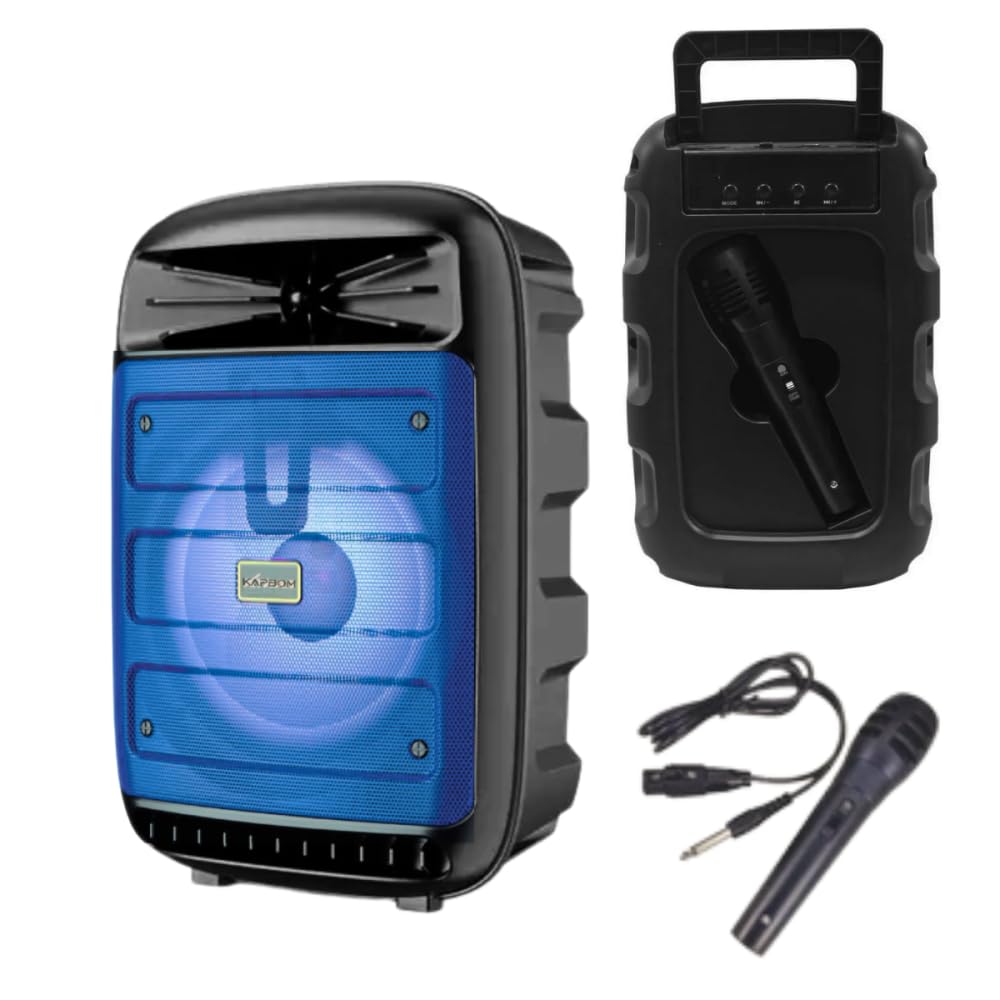
Image 1.1: The KA-8205 Portable Speaker, showcasing its multi-color LED lighting and compact design. The image displays three speakers in blue, red, and green light modes, along with the included microphone and auxiliary cable.
2. Змесціва ўпакоўкі
Пераканайцеся, што ўсе прадметы прысутнічаюць у пасылцы:
- KA-8205 Portable Speaker
- Мікрафон
- Дапаможны кабель (3.5 мм)
- USB Charging Cable (not explicitly listed but implied for a portable device)
- Інструкцыя па эксплуатацыі (гэты дакумент)
3. Настройка
3.1. Зарадка дынаміка
Before initial use, fully charge the speaker. Connect the provided USB charging cable to the speaker's charging port and to a compatible USB power adapter (not included) or a computer's USB port. The LED indicator will typically show charging status and turn off or change color when fully charged.
3.2. Уключэнне / выключэнне харчавання
Locate the power button on the speaker. Press and hold the power button for a few seconds to turn the speaker ON. Repeat the action to turn the speaker OFF.
4. Інструкцыя па эксплуатацыі
4.1. Злучэнне Bluetooth
- Turn on the KA-8205 speaker. It will automatically enter Bluetooth pairing mode, indicated by a flashing LED light.
- Уключыце Bluetooth на мабільнай прыладзе (смартфоне, планшэце і г.д.).
- Пошук available Bluetooth devices and select "KA-8205" from the list.
- Пасля падключэння дынамік выдасць гук пацверджання, а святлодыёдны індыкатар перастане міргаць.
- Цяпер вы можаце прайграваць аўдыё з прылады праз дынамік.

Выява 4.1: Спераду view of the KA-8205 Portable Speaker, illustrating the speaker grille and active blue LED lighting.
4.2. Прайграванне з USB
Устаўце флэш-назапашвальнік USB з аўдыёфайлам у фармаце MP3 files into the USB port. The speaker will automatically detect the drive and begin playing music. Use the control buttons to navigate tracks and adjust volume.
4.3. TF (Micro SD) Card Playback
Устаўце карту TF (Micro SD) з аўдыё ў фармаце MP3 files into the designated card slot. The speaker will automatically switch to TF card mode and start playing. Use the control buttons for playback control.
4.4. Дапаможны (AUX) уваход
Connect one end of the provided 3.5mm auxiliary cable to the AUX input port on the speaker and the other end to the audio output jack of your external device (e.g., MP3 player, computer). The speaker will switch to AUX mode. Control playback and volume from your external device.
4.5. Выкарыстанне мікрафона
Connect the included microphone to the microphone input port on the speaker. Adjust the microphone volume using the dedicated control knob (if available) or the main volume control. The microphone can be used for karaoke or public speaking.

Малюнак 4.2: ззаду view of the KA-8205 Portable Speaker, highlighting the integrated microphone storage slot and the included microphone and auxiliary cable.
4.6. Рэжымы святлодыёднага асвятлення
The speaker features multi-color LED lights that pulse with the music. There may be a dedicated button to cycle through different light modes or to turn the lights off. Refer to the speaker's control panel for specific button functions.
4.7. Рэгуляванне гучнасці і трэкаў
Use the volume knob or buttons on the speaker to adjust the master volume. Dedicated buttons (usually labeled with arrows or skip icons) allow you to skip tracks forward or backward during USB, TF card, or Bluetooth playback.
5. Тэхнічнае абслугоўванне
- Уборка: Выкарыстоўвайце мяккую сухую тканіну для чысткі вонкавага боку дынаміка. Не выкарыстоўвайце абразіўныя ачышчальнікі, воск або растваральнікі.
- захоўванне: Калі дынамік не выкарыстоўваецца працяглы час, захоўвайце яго ў прахалодным, сухім месцы, удалечыні ад прамых сонечных прамянёў і экстрэмальных тэмператур.
- Сыход за батарэяй: Каб падоўжыць тэрмін службы батарэі, пазбягайце частай поўнай разрадкі дынаміка. Рэгулярна зараджайце дынамік, нават калі ён не выкарыстоўваецца, каб падтрымліваць яе ў працоўным стане.
- Ўздзеянне вады: Гэты дынамік не воданепранікальны. Пазбягайце ўздзеяння вады або празмернай вільгаці.
6. Выпраўленне непаладак
| праблема | Магчымая прычына | Рашэнне |
|---|---|---|
| Дынамік не ўключаецца. | Нізкі акумулятар або адсутнасць энергіі. | Charge the speaker fully. Ensure the power button is pressed correctly. |
| Няма гуку з дынаміка. | Volume too low, incorrect input mode, or device not connected. | Increase volume. Check the input mode (Bluetooth, USB, TF, AUX). Reconnect your device. |
| Збой злучэння Bluetooth. | Speaker not in pairing mode, device Bluetooth off, or too far away. | Ensure speaker is in pairing mode. Turn device Bluetooth off/on. Move device closer to speaker (within 10 meters). |
| Не працуе мікрафон. | Microphone not properly connected or volume too low. | Ensure microphone is securely plugged in. Adjust microphone volume. |
7. Тэхнічныя характарыстыкі
| Асаблівасць | Дэталь |
|---|---|
| мадэль | КА-8205 |
| Выхадная магутнасць | 200 Вт |
| Сувязь | Bluetooth, USB, TF Card, Auxiliary (3.5mm) |
| Аўдыё ўваход | Bluetooth, USB, TF Card, Auxiliary (3.5mm) |
| АЧХ | 20 Гц |
| Узровень шуму | 85 дэцыбел |
| Матэрыял | Метал, пластык |
| Памеры (упакоўка) | 33 х 23 х 16 см |
| Вага прадукту | 1.4 кілаграма |
| Уключаныя кампаненты | Speaker, Microphone, Auxiliary Cable |
| Крыніца харчавання | Electrical (implies rechargeable battery, charged via USB) |
8. Інфармацыя аб гарантыі
Гэты прадукт пастаўляецца з гарантыяй вытворцы 30 дзён from the date of purchase. This warranty covers manufacturing defects. It does not cover damage caused by misuse, accidents, unauthorized modifications, or normal wear and tear. Please retain your proof of purchase for warranty claims.
9. Падтрымка кліентаў
If you encounter any issues or have questions not covered in this manual, please contact your retailer or the manufacturer's customer support. For optimal performance and longevity, always follow the instructions provided in this manual.