
1. Прадукт скончыўсяview
The KLIM Cassette Player Boombox is a versatile audio device combining classic cassette playback with modern features like AM/FM radio, Bluetooth connectivity, and USB playback/recording. Its portable design allows for use at home or on the go.
Асноўныя характарыстыкі:
- Касетны прайгравальнік і магнітафон
- AM/FM-радыё цюнэр
- Bluetooth Connectivity for wireless streaming
- USB Port for MP3 playback and recording
- Integrated Microphone for direct recording
- Headphone Jack for private listening
- Dual Power: AC power cord or 4 x C-type batteries (not included)
- Portable design with a carrying handle
Што ў скрынцы:
- KLIM Cassette Player Boombox
- Шнур сілкавання
- Кіраўніцтва карыстальніка

Малюнак 1: Спераду view of the KLIM Cassette Player Boombox, showcasing its controls and cassette compartment.
2. Настройка
Харчаванне прылады:
The KLIM Cassette Player Boombox can be powered in two ways:
- Магутнасць пераменнага току: Connect the included AC power cord to the device's power input and then to a standard wall outlet.
- Магутнасць батарэі: For portable use, insert 4 x C-type batteries (not included) into the battery compartment located on the underside of the device. Ensure correct polarity.

Малюнак 2: ніжні бок view showing the battery compartment for portable power.
3. Інструкцыя па эксплуатацыі
3.1. Cassette Player/Recorder
- Slide the function selector to 'TAPE'.
- Press the 'OPEN' button to open the cassette compartment.
- Insert a cassette tape with the open side facing up.
- Зачыніце адсек для касеты.
- Use the 'PLAY', 'STOP/EJECT', 'FFWD' (Fast Forward), and 'REW' (Rewind) buttons to control playback.
- To record, ensure a blank tape is inserted. Press the 'REC' button to start recording from the built-in microphone, radio, or USB.

Малюнак 3: Верх view of the boombox with a cassette tape inserted into the compartment.
3.2. AM/FM-радыё
- Slide the function selector to 'RADIO'.
- Для аптымальнага прыёму выцягніце тэлескапічную антэну.
- Use the 'BAND' switch to select between AM and FM frequencies.
- Rotate the 'TUNING' knob to find your desired radio station.
3.3. Злучэнне Bluetooth
- Slide the function selector to 'BT' (Bluetooth).
- The device will enter pairing mode, indicated by a flashing light or audible prompt.
- На смартфоне або планшэце ўключыце Bluetooth і знайдзіце даступныя прылады.
- Select 'KLIM Cassette Player' (or similar name) from the list to pair.
- Пасля спалучэння вы можаце перадаваць аўдыё без правадоў са сваёй прылады.
3.4. Прайграванне і запіс з USB
- Slide the function selector to 'USB'.
- Устаўце флэш-назапашвальнік USB з аўдыёфайлам у фармаце MP3 files у порт USB.
- The device will automatically begin playing the audio files. Use the playback controls (play/pause, skip) to navigate.
- To record to USB, ensure a USB drive is inserted. Press the 'REC' button while in radio or cassette mode to record the audio source directly to the USB drive.
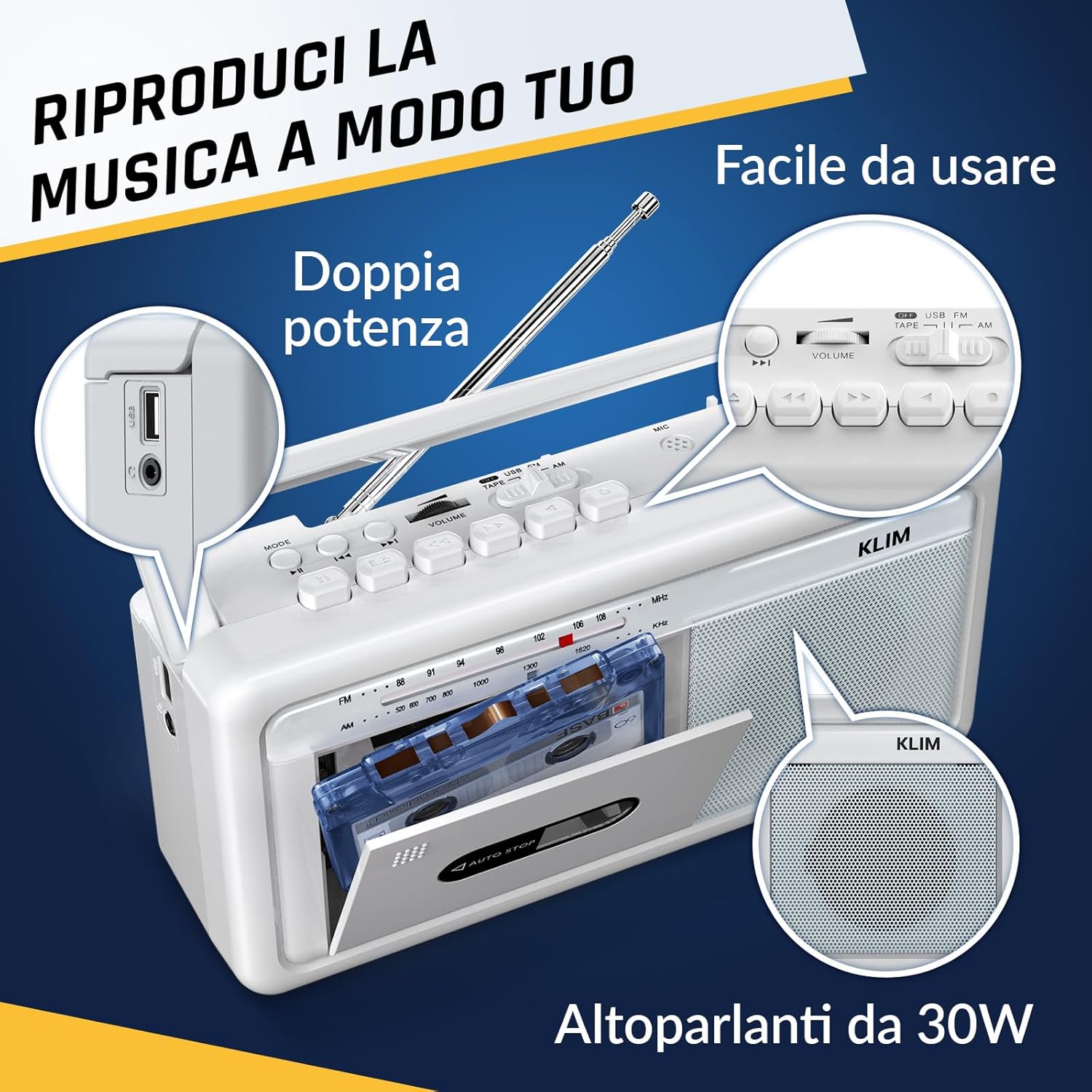
Малюнак 4: бок view highlighting the USB port for media playback and recording.
3.5. Выкарыстанне навушнікаў
Connect standard 3.5mm headphones to the headphone jack for private listening. The internal speakers will automatically mute when headphones are connected.
Video 1: Instructions on how to record a tape to USB using the WTB-795 model. This video demonstrates the USB recording functionality.
Відэа 2: Скончанаview of a retro cassette player with USB, Bluetooth, and AM/FM radio features, similar to the KLIM Cassette Player Boombox.
4. Тэхнічнае абслугоўванне
- Падтрымлівайце чысціню прылады, праціраючы яе мяккай сухой тканінай. Пазбягайце выкарыстання вадкіх ачышчальнікаў або растваральнікаў.
- Рэгулярна чысціце галоўку касеты і прыціскныя ролікі ватным тампонам, злёгку працёртымampпрацякаюць ізапрапілавым спіртам, каб забяспечыць аптымальную якасць гуку і прадухіліць пашкоджанне стужкі.
- Keep the device away from direct sunlight, heat sources, and excessive dust or moisture.
- Калі прылада не выкарыстоўваецца працяглы час, выміце батарэйкі, каб прадухіліць уцечку.
5. Выпраўленне непаладак
| праблема | Магчымае рашэнне |
|---|---|
| Няма ўлады | Check if the AC power cord is securely connected. If using batteries, ensure they are inserted correctly and are not depleted. |
| З дынамікаў няма гуку | Increase the volume. Ensure headphones are not connected. Check the function selector is in the correct mode (TAPE, RADIO, BT, USB). |
| Дрэнны прыём радыё | Extend the telescopic antenna fully. Adjust the antenna direction. Try moving the unit to a different location. |
| Касета не прайграваецца/не запісваецца | Ensure the tape is inserted correctly. Check if the tape is damaged. Clean the cassette head and pinch rollers. |
| Bluetooth не падключаецца | Ensure the unit is in Bluetooth mode. Make sure your device's Bluetooth is enabled and within range. Try unpairing and re-pairing the device. |
| Праблемы з прайграваннем USB | Ensure the USB drive is formatted correctly (FAT32) and contains compatible audio files (MP3, WAV, WMA, AAC, FLAC). Try a different USB drive. |
6. Тэхнічныя характарыстыкі
- Марка: КЛІМ
- мадэль: Касетны прайгравальнік
- Памеры прадукту: 25 х 13.1 х 7.6 см
- Вага прадмета: 1 кг
- Сумяшчальныя прылады: MP3-плэер, смартфон, планшэт
- Рэжым вываду гуку: Стэрэа
- Падтрымліваюцца аўдыяфарматы: Cassette, Analog Radio, MP3, WAV, WMA, AAC, FLAC, Bluetooth
- Крыніца харчавання: Corded Electric (AC) / 4 x C-type Batteries (not included)
- Тэхналогія падключэння: USB, Bluetooth
- колер: Мароз Белы
- Нумар тавару: KLSIN4825
7. Гарантыя і падтрымка
The KLIM Cassette Player Boombox comes with a Гарантыя 5 год. For any questions, technical assistance, or warranty claims, please contact KLIM customer support. Our team is available 24/7 to assist you.
Please refer to the contact information provided in your product packaging or visit the official KLIM webсайт для больш падрабязнай інфармацыі.