
Уводзіны
The Fender Mustang LTX50 is a versatile 50-watt modeling combo amplifier designed for guitarists seeking a wide range of authentic Fender tones and modern features. Equipped with a 12-inch Celestion G12P-80 speaker, it delivers dynamic sound suitable for practice, rehearsal, and performance. This amplifier offers 25 amp models and 25 effects, covering various musical styles from clean to high-gain. Its intuitive color display, onboard tuner, and 100 user preset slots provide easy customization and quick access to your preferred sounds. The Mustang LTX50 also features Bluetooth audio streaming for playing along with tracks and USB-C connectivity for direct recording and monitoring.
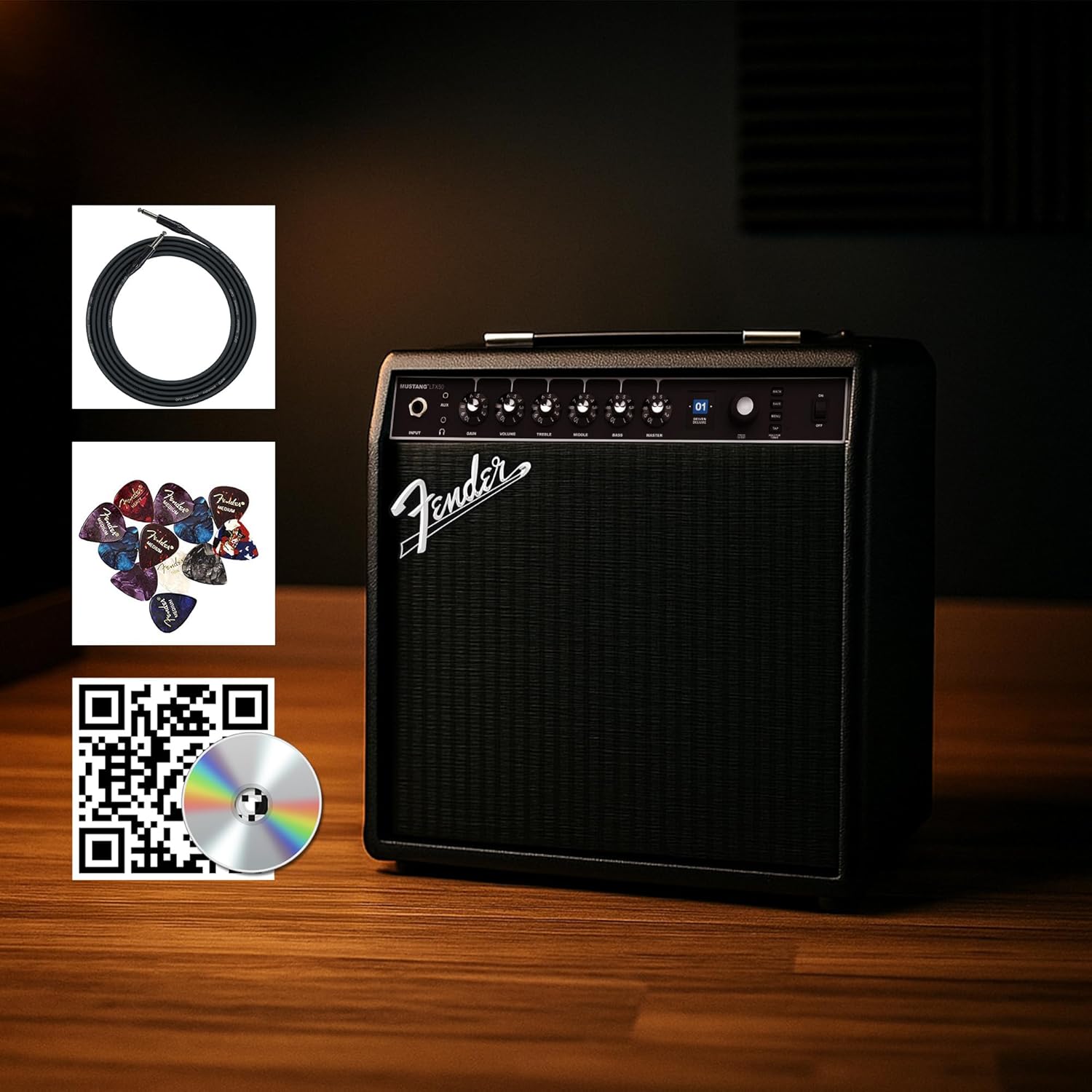
Figure 1: Fender Mustang LTX50 Guitar Combo Ampвыратавальнік з уключанымі аксэсуарамі.
Настройка
1. Распакаванне і першапачатковы агляд
- Акуратна зніміце amplifier and all accessories from the packaging.
- Агледзіце amplifier for any signs of damage that may have occurred during shipping.
- Confirm all included items are present: Mustang LTX50 amplifier, power cord, instrument cable, 12-pack guitar picks, and instructional DVD.
2. Падключэнне сілкавання
- Забяспечце ampВыключальнік харчавання выратавальніка знаходзіцца ў становішчы ВЫКЛ.
- Connect the included power cord to the AC input on the rear panel of the ampзадымнік.
- Падключыце другі канец шнура сілкавання да заземленай электрычнай разеткі.
3. Connecting Your Guitar
- Use the included instrument cable to connect your guitar to the УВОД jack on the front panel of the ampзадымнік.
4. Асноўныя меры кантролюview
Familiarize yourself with the front panel controls before powering on the ampзадымнік.
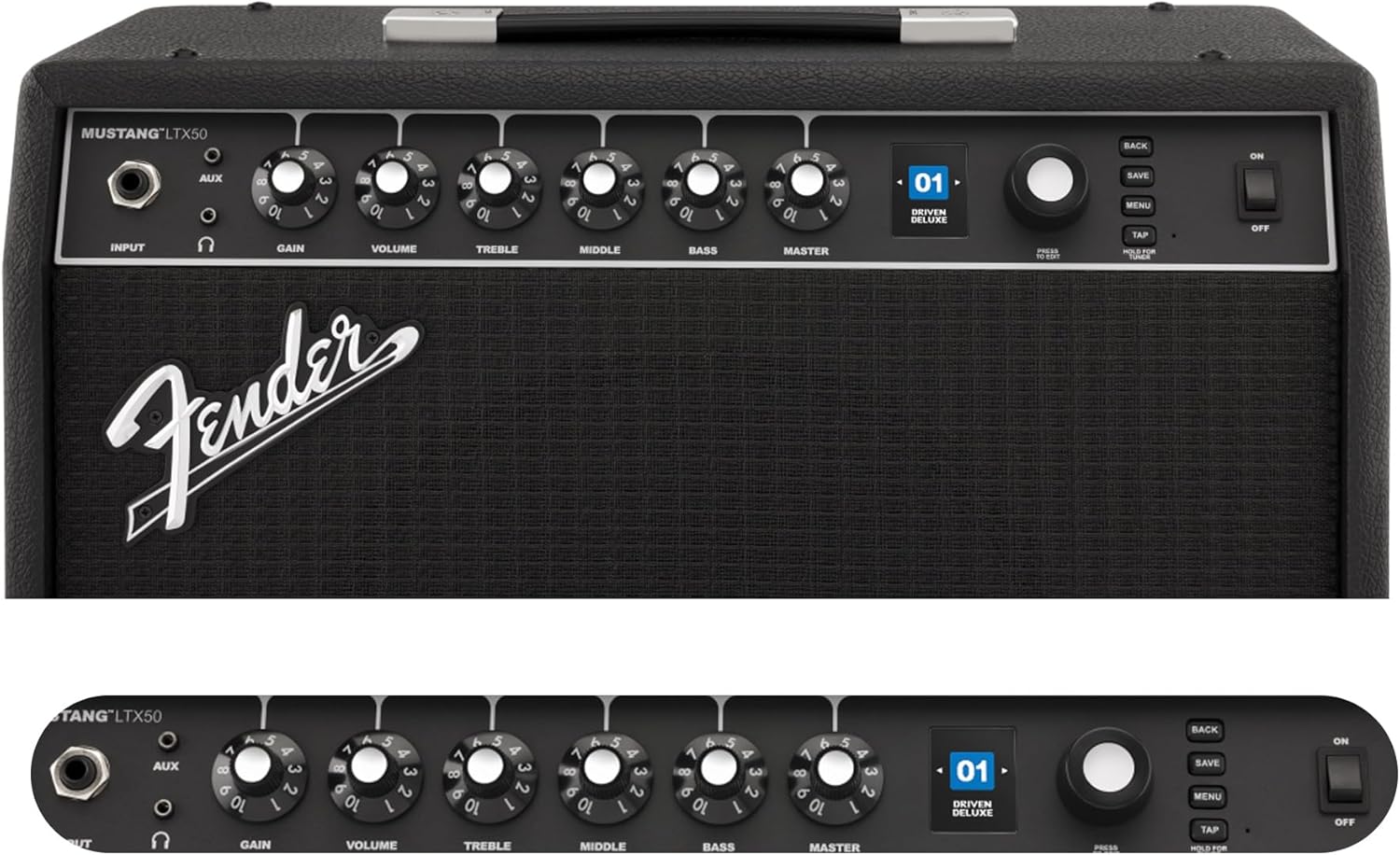
Figure 2: Front Panel Controls of the Mustang LTX50.
Інструкцыя па эксплуатацыі
1. Уключэнне / выключэнне харчавання
- To power on, ensure all volume controls are set to minimum, then flip the УЛАДА пераключыце ў становішча ON.
- To power off, flip the УЛАДА пераключыце ў становішча OFF.
2. Navigating Presets
- Выкарыстоўвайце КАНАДАР knob (large rotary knob) to scroll through the 100 available presets (70 factory, 30 user).
- Націсніце КАНАДАР knob to select a preset.
- The color LCD displays the current preset number and name.
3. Наладка Amp Мадэлі і эфекты
- Націсніце МЕНЮ кнопка для доступу да amplifier's settings.
- Navigate through options like AMP, STOMP, MOD, DELAY, REVERB using the КАНАДАР.
- Select an option and use the КАНАДАР to choose different amp models or effects.
- Adjust parameters for each effect using the smaller control knobs (GAIN, VOLUME, TREBLE, MIDDLE, BASS, MASTER) or by selecting parameters on the display.
- Прэса ЗАХАВАЦЬ to store your customized preset.
4. Using the Built-in Tuner
- Націсніце і ўтрымлівайце ТАП button to activate the chromatic tuner.
- Play a single note on your guitar; the display will show the note and indicate if it is sharp, flat, or in tune.
- Press any button or play for a few seconds to exit tuner mode.
5. Fender Tone 3.0 App Control
- Download the Fender Tone 3.0 app from your device's app store (iOS/Android).
- Уключыце Bluetooth на мабільнай прыладзе.
- На ст amplifier, press the МЕНЮ button, navigate to "Bluetooth," and select "Pair."
- Select "Mustang LTX50" from your device's Bluetooth settings to connect.
- Use the app to wirelessly create, edit, save, and share presets, and to manage your ampналады lifier.
6. Playing Along with Audio (Bluetooth)
- Once paired via Bluetooth, you can stream audio from your mobile device directly to the ampзадымнік.
- Adjust the volume of the streamed audio from your mobile device.
- Alternatively, connect an external audio source to the AUX IN jack on the front panel using a 3.5mm stereo cable.
7. Recording via USB-C
- Connect a USB-C cable from the amplifier's USB-C port to your computer (Mac or PC).
- The amplifier functions as a bidirectional audio interface, allowing direct recording and monitoring.
- Refer to your Digital Audio Workstation (DAW) software's manual for specific setup instructions.
Тэхнічнае абслугоўванне
1. Уборка
- Адключыце ampадключыце прыбор ад электрычнасці перад чысткай.
- Выкарыстоўвайце мяккую, сухую тканіну для працірання вонкавых паверхняў.
- Для ўстойлівага бруду падыдзе злёгкуamp можна выкарыстоўваць тканіну з мяккім мылам, а затым сухую тканіну.
- Avoid using abrasive cleaners, solvents, or waxes, as these can damage the finish.
2. Захоўванне
- Захоўваць ampзахоўвайце ў прахалодным, сухім месцы, удалечыні ад прамых сонечных прамянёў і экстрэмальных тэмператур.
- Avoid storing in areas with high humidity.
- If storing for extended periods, cover the ampахоўны фільтр для абароны яго ад пылу.
3. Safety Warnings (Proposition 65)
Гэты прадукт можа ўтрымліваць хімічныя рэчывы, якія, як вядома ў штаце Каліфорнія, выклікаюць рак, прыроджаныя дэфекты або іншыя парушэнні рэпрадуктыўнай функцыі. Для атрымання дадатковай інфармацыі наведайце www.P65Warnings.ca.gov.
Ліквідацыю непаладак
Без гуку
- Забяспечце amplifier is powered on and the power cord is securely connected.
- Check that your guitar is properly connected to the УВОД дамкрат.
- Пераканайцеся, што МАЙСТР volume and individual preset volume controls are not set to zero.
- Test with a different instrument cable and guitar to rule out faulty equipment.
- If using headphones, ensure they are fully plugged into the headphone jack and that the main speaker is not muted.
Скажоны або непажаданы шум
- Check your guitar's volume and tone controls.
- Паменшыць ВЫРАГ ўстаноўка на ст ampзадымнік.
- Ensure your instrument cable is not damaged or poorly shielded.
- Try a different power outlet to rule out electrical interference.
- If using high-gain amp models, some distortion is inherent. Adjust settings accordingly.
Праблемы з падключэннем Bluetooth
- Ensure Bluetooth is enabled on both your mobile device and the ampзадымнік.
- Пераканайцеся, што amplifier is in pairing mode (refer to "Fender Tone 3.0 App Control" section).
- Перамясціце мабільную прыладу бліжэй да ampзадымнік.
- Паспрабуйце адлучыць прылады і зноў падключыць іх.
- Перазапусціце абодва ampвыратавальнік і ваша мабільная прылада.
Amplifier Not Responding
- Цыкл харчавання amplifier by turning it off, waiting 10 seconds, and turning it back on.
- If the issue persists, a factory reset may be necessary. Consult the Fender support website for instructions on performing a factory reset for the Mustang LTX50.
Тэхнічныя характарыстыкі
| Назва мадэлі | MUSTANG LTX50 |
| Нумар мадэлі | 2311700000 |
| Марка | Крыло |
| Ampтып ліфтара | Лічбавае мадэляванне |
| Выхадная магутнасць | 50 ват |
| Дакладчык | 1 x 12" Celestion G12P-80 |
| Amp Мадэлі | 25 |
| Эфекты | 25 (distortion, overdrive, compression, modulation, reverb, delay, octave, etc.) |
| Прасэты | 70 factory + 100 user slots |
| Дысплей | Color LCD with onboard chromatic tuner |
| Сувязь | Bluetooth audio, USB-C bidirectional audio |
| Выхады | XLR line out, Headphone out |
| Падтрымка прыкладанняў | Fender Tone 3.0 app (iOS/Android) |
| Матэрыял корпуса | Метал |
| Памеры прадмета (Д х Ш х У) | 22.3" Г x 19.9" Ш x 12.3" У |
| Вага прадмета | 26.4 фунта |
| UPC | 840262259088 |

Figure 3: Rear Panel Connections of the Mustang LTX50.
Інфармацыя аб гарантыі
The Fender Mustang LTX50 Guitar Combo Ampвыратавальны апарат пакрыты 2-гадовая абмежаваная гарантыя. This warranty covers defects in materials and workmanship under normal use. For full terms and conditions, please refer to the warranty documentation included with your product or visit the official Fender webсайт.
Падтрымка
For further assistance, technical support, or service inquiries regarding your Fender Mustang LTX50 amplifier, please visit the official Fender support webсайт:
You may also find additional resources, FAQs, and software updates on the Fender webсайт.