
1. Уводзіны
Thank you for choosing the Oberon OR-1682 Smart 3-Axis Stabilizer Selfie Stick. This device is designed to enhance your mobile photography and videography experience by providing stable, smooth footage and intelligent features. Please read this manual carefully before use to ensure proper operation and to maximize the product's potential.
2. Змесціва ўпакоўкі
Праверце, ці ўсе пералічаныя ніжэй прадметы ўваходзяць у вашу ўпакоўку:
- Oberon OR-1682 Gimbal Stabilizer
- Міні штатыў
- Модуль адсочвання штучнага інтэлекту
- Integrated Light Module
- Пульт дыстанцыйнага кіравання
- USB-кабель для зарадкі
- Сумка для пераноскі
- Кіраўніцтва карыстальніка
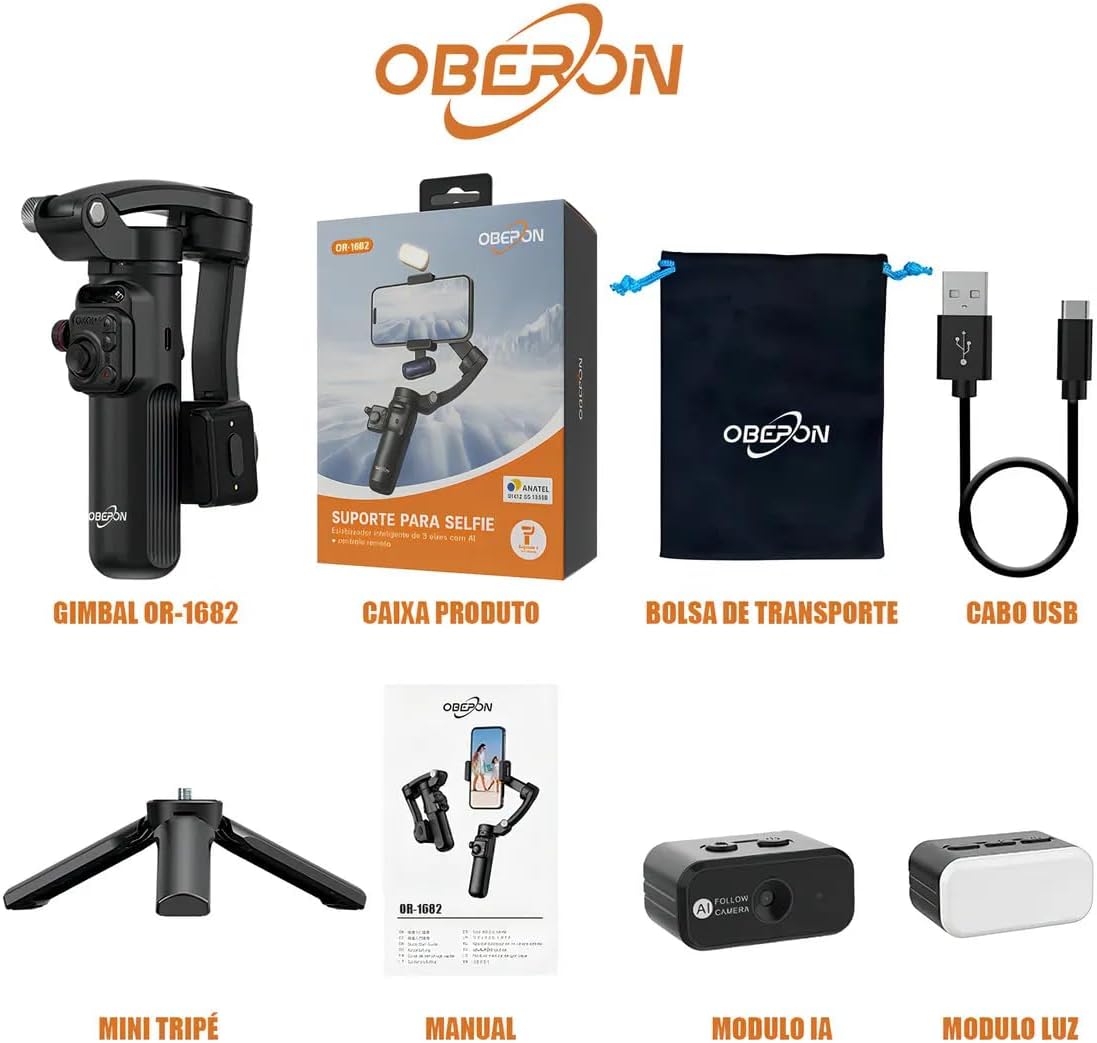
Image: All components of the Oberon OR-1682 package, including the gimbal, mini tripod, AI module, light module, remote control, USB cable, and carrying bag.
3. Прадукт скончыўсяview
Familiarize yourself with the main components of your Oberon OR-1682 stabilizer.

Image: The Oberon OR-1682 stabilizer with a smartphone mounted, alongside its accessories: AI module, light module, remote control, mini tripod, and USB charging cable.
Ключавыя кампаненты:
- Ручка кардана: Main control unit with buttons and joystick.
- Тэлефон Клamp: Надзейна ўтрымлівае ваш смартфон.
- 3-восевая сістэма стабілізацыі: Motors that provide smooth movement.
- AI Tracking Module: Attaches to the phone clamp for automatic subject tracking.
- Light Module: Provides additional illumination, attaches magnetically.
- Mini Tripod: Detachable base for static shots.
- Пульт дыстанцыйнага кіравання: For wireless operation of the gimbal and camera functions.
4. Настройка
4.1 Зарадка прылады
Before first use, fully charge the stabilizer and remote control using the provided USB cable. Connect the cable to the charging port on the gimbal and a standard USB power adapter (not included).
4.2 Падключэнне смартфона
- Падоўжыць тэрмін службы тэлефонаamp.
- Акуратна пакладзеце смартфон у адсекamp, забяспечваючы яго цэнтральнае і збалансаванае становішча.
- Ensure the phone is securely held and does not obstruct the gimbal's movement.
4.3 Уключэнне/выключэнне
- Каб уключыць: Press and hold the power button on the gimbal handle for a few seconds until the indicator light illuminates.
- Каб выключыць: Зноў націсніце і ўтрымлівайце кнопку харчавання, пакуль індыкатар не пагасне.
4.4 Спалучэнне па Bluetooth
After powering on, the gimbal will automatically enter Bluetooth pairing mode. On your smartphone, enable Bluetooth, search for "Oberon OR-1682" (or similar), and connect. This allows the remote control and gimbal to interact with your phone's camera functions.
5. Інструкцыя па эксплуатацыі
5.1 Функцыі дыстанцыйнага кіравання
The multifunctional remote control allows for convenient operation from a distance. It connects magnetically to the gimbal for storage.
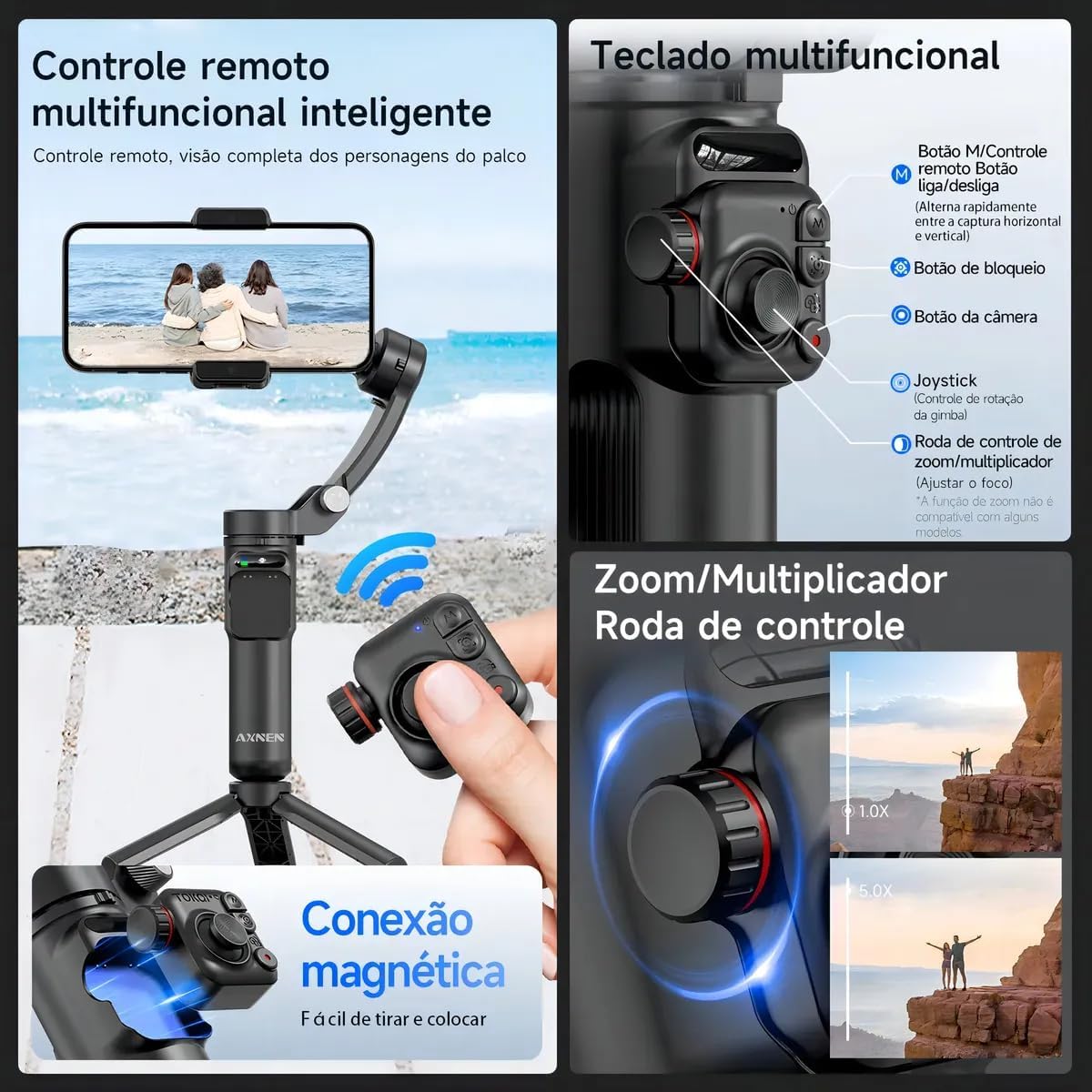
Выява: Падрабязная view of the remote control and the gimbal's multifunctional keypad, highlighting buttons for power, mode switching, camera control, joystick, and zoom/multiplier wheel.
- M Button (Remote): Power on/off the remote.
- M Button (Gimbal): Quickly switch between horizontal and vertical shooting modes.
- Кнопка блакіроўкі: Locks the gimbal's current position.
- Кнопка камеры: Запускае здымку фота ці відэа.
- Джойстык: Controls the rotation of the gimbal.
- Кола кіравання маштабаваннем/множнікам: Adjusts zoom (functionality may vary with some phone models).
5.2 AI Intelligent Tracking
The AI module enables automatic subject tracking, keeping your subject in frame as they move.

Image: Demonstration of the intelligent tracking feature, showing a person running while the gimbal automatically keeps them centered in the frame. Two methods for activation are shown: long-pressing the release button or long-pressing the lock button.
To activate AI Tracking:
- Спосаб першы: Long press the release button on the AI module.
- Спосаб другі: Доўга націсніце кнопку блакавання на падвесе.
5.3 Кіраванне жэстамі
Control certain functions using hand gestures detected by the AI module.

Image: Visual guide for gesture controls, including 'OK' for center tracking, 'Double L' for fixed position tracking, 'Palm' for pause, and 'Double Thumbs up' for switching between horizontal and vertical modes with a pause.
- Жэст «ОК»: Initiates center tracking.
- "Double L" Gesture: Activates fixed position tracking.
- "Palm" Gesture: Pauses tracking.
- "Double Thumbs Up" Gesture: Toggles between horizontal and vertical shooting modes, then pauses.
To deactivate gesture control, press the button on the AI module. The blue light will remain on.
5.4 Гарызантальная і вертыкальная здымка
Easily switch between horizontal (landscape) and vertical (portrait) orientations without manual adjustment.

Image: A woman filming with the stabilizer, demonstrating the ability to switch between horizontal and vertical shooting modes by double-clicking the 'M' key on the gimbal.
Каб пераключыць рэжымы: Double-click the 'M' button on the gimbal handle.
5.5 Light Module
The integrated light module provides adjustable illumination for various lighting conditions. Attach it magnetically to the phone clamp.
5.6 Mini Tripod Use
Attach the mini tripod to the bottom of the gimbal handle for stable static shots, time-lapses, or hands-free operation.
6. Тэхнічнае абслугоўванне
- Трымайце прыладу чыстай і без пылу. Выкарыстоўвайце для чысткі мяккую сухую тканіну.
- Avoid exposing the stabilizer to extreme temperatures, moisture, or direct sunlight.
- Store the device in its carrying bag when not in use to prevent damage.
- Не спрабуйце самастойна разабраць або адрамантаваць прыладу. Звярніцеся ў службу падтрымкі па дапамогу.
7. Выпраўленне непаладак
7.1 Падвес не ўключаецца
- Ensure the battery is sufficiently charged. Connect to a power source and try again.
- Націсніце і ўтрымлівайце кнопку харчавання моцна некалькі секунд.
7.2 Нестабільны Footage
- Пераканайцеся, што ваш смартфон належным чынам збалансаваны ў падлозеamp.
- Check for any obstructions preventing the gimbal motors from moving freely.
- Recalibrate the gimbal if available through the companion app (if applicable).
7.3 Пульт дыстанцыйнага кіравання не рэагуе
- Пераканайцеся, што пульт дыстанцыйнага кіравання зараджаны.
- Пераканайцеся, што на вашым смартфоне ўключаны Bluetooth, і пульт дыстанцыйнага кіравання спалучаны.
- Restart both the gimbal and the remote control.
7.4 AI Tracking Not Working
- Ensure the AI module is correctly attached and powered on.
- Check for sufficient lighting conditions for the AI to detect subjects.
- Ensure no obstructions are blocking the AI module's sensor.
8. Тэхнічныя характарыстыкі
| Асаблівасць | Дэталь |
|---|---|
| Марка | Genérico (Manufacturer: Oberon) |
| Нумар мадэлі | АБО-1682 |
| Колер | Чорны |
| Сумяшчальныя прылады | iPhone, Android Smartphones, Tablets |
| Крыніца харчавання | Акумулятарная батарэя |
| Памеры прадукту | 16 х 8 х 20 см |
| Вага прадукту | 600 г |
| Колькасць адзінак | 8 (referring to components in the kit) |
9. Гарантыя і падтрымка
The Oberon OR-1682 Smart 3-Axis Stabilizer Selfie Stick comes with a Гарантыя 6 месяцаў з даты пакупкі. Гэтая гарантыя распаўсюджваецца на вытворчыя дэфекты пры нармальным выкарыстанні.
For technical support, warranty claims, or any questions regarding your product, please contact your retailer or the manufacturer's customer service.