
1. Уводзіны
Thank you for choosing the Thomson 24-inch HD LED Smart TV, model 24HT2S15. This manual provides essential information to help you set up, operate, and maintain your new television. Please read it thoroughly before use and retain it for future reference.

Выява: спераду view of the Thomson 24-inch HD LED Smart TV, showcasing its frameless design and key features like HD resolution and Dolby Audio.
Асноўныя характарыстыкі:
- TiVo OS with Voice Control: Intuitive interface combining live TV and streaming apps, personalized recommendations, and voice commands.
- Бесправадны дысплей: Mirror your smartphone, tablet, or laptop screen to the TV.
- Dolby Audio: Enhanced sound experience with improved dialogue, detail, and surround effects.
- HDR10: Sharper contrast and realistic colors for an immersive viewвопыту.
- Пульт дыстанцыйнага кіравання з падсветкай: Easy navigation in low light with direct access buttons for popular streaming services.
- Adjustable Side Feet: Flexible positioning options for the TV.
- Патройны цюнэр: Integrated tuners for cable, satellite, and antenna reception.
2. Што ў скрынцы
Пасля распакавання пераканайцеся, што ўсе наступныя рэчы наяўныя:
- Thomson 24-inch HD LED Smart TV (Model 24HT2S15)
- Пульт дыстанцыйнага кіравання
- Адаптар сілкавання
- Кіраўніцтва карыстальніка
- Гарантыйны талон
- Adjustable Side Feet (2x)
If any items are missing or damaged, please contact your retailer or Thomson customer support.
3. Настройка
3.1 Распакоўка і размяшчэнне
Carefully remove the TV from its packaging. It is recommended to have two people for this process. Place the TV on a stable, flat surface or mount it on a wall using a compatible VESA mount (not included).
Забяспечце належную вентыляцыю вакол тэлевізара. Не блакуйце вентыляцыйныя адтуліны.
3.2 Прымацаванне падстаўкі
If you are not wall-mounting the TV, attach the included side feet:
- Place the TV face down on a soft, clean cloth to prevent screen damage.
- Сумясціце кожную падстаўку з адпаведнымі адтулінамі для шруб у ніжняй частцы тэлевізара.
- Secure the stands using the provided screws. The feet are adjustable from 30 cm to 60 cm distance.

Image: The Thomson 24-inch Smart TV showing its dimensions, including a screen diagonal of 60 cm (24 inches), width of 53 cm, and height of 37 cm with the stand. The adjustable stand feet are also illustrated.
3.3 Падключэнне перыферыйных прылад
Connect your external devices to the TV's ports. Refer to the diagram below for port locations.

Выява: Падрабязны view of the rear connection panel of the Thomson 24-inch Smart TV, illustrating various ports including 2x USB 2.0, Antenna input, Satellite input, 3x HDMI 1.4 (one with ARC), Service port, Headphone jack, AV IN, Digital Optical Audio Out, and LAN port.
- Магутнасць: Connect the power adapter to the TV and then to a wall outlet.
- Антэна/Спадарожнік: Connect your antenna or satellite cable to the respective input.
- HDMI: Use HDMI cables to connect devices like Blu-ray players, game consoles, or set-top boxes. HDMI 1.4/ARC supports Audio Return Channel.
- USB: Устаўце USB-назапашвальнікі для прайгравання медыяфайлаў або абнаўлення праграмнага забеспячэння.
- LAN: Падключыце кабель Ethernet для праваднога падключэння да Інтэрнэту.
- AV IN: Для старых прылад, якія выкарыстоўваюць кампазітны відэасігнал і стэрэаўдыё.
- Навушнікі: Падключыце навушнікі для асабістага праслухоўвання.
- Digital Optical Audio Out: Падключыце да знешняй гукавой сістэмы для лічбавага аўдыё.
3.4 Пачатковае ўключэнне і першая налада
- Падключыце тэлевізар да разеткі.
- Націсніце кнопку харчавання на пульце дыстанцыйнага кіравання або на тэлевізары.
- Follow the on-screen instructions to select your language, country, and perform channel scanning for your triple tuner (cable/satellite/antenna).
- Connect to your Wi-Fi network by selecting it from the list and entering the password.
- Complete the TiVo OS setup, including signing in or creating an account.
4. Кіраванне тэлевізарам
4.1 Функцыі дыстанцыйнага кіравання
The backlit remote control provides easy access to all TV functions, even in dim lighting. It includes dedicated buttons for popular streaming services.

Image: The Thomson Smart TV remote control, highlighting its backlit buttons, voice control microphone, and direct access buttons for Netflix, YouTube, Prime Video, Disney+, and Canal+.
- Кнопка харчавання: Уключае/выключае тэлевізар.
- Кнопкі з лічбамі: Выбірайце каналы непасрэдна.
- Навігацыйная панэль (Уверх/Уніз/Улева/Управа/ОК): Навігацыя па меню і выбар опцый.
- Назад/Выхад: Вярнуцца да папярэдняга экрана або выйсці з меню.
- Павялічыць/паменшыць гучнасць: Адрэгулюйце ўзровень гучнасці.
- Канал уверх/уніз: Змяніць тэлеканалы.
- Адключэнне гуку: Выключыць або ўключыць гук.
- Дом: Access the TiVo OS home screen.
- Кнопка галасавога кіравання: Activate voice commands (microphone icon).
- Кнопкі прамога доступу: Launch Netflix, YouTube, Prime Video, Disney+, Canal+ instantly.
4.2 TiVo OS and Smart Features
The TiVo OS provides a unified platform for live TV and streaming content. Explore personalized recommendations and access your favorite apps.

Image: The Thomson Smart TV screen showing various streaming application icons like Netflix, YouTube, Disney+, Prime Video, Plex, DAZN, Canal+, and Pluto TV, indicating integrated smart TV capabilities.
- Доступ да праграмы: Navigate to the home screen to find and launch pre-installed apps or download new ones from the app store.
- Галасавое кіраванне: Press the voice control button on your remote and speak commands to search for content, launch apps, or control TV functions.
- Бесправадны дысплей: Use the Wireless Display feature to mirror content from your compatible smartphone, tablet, or laptop directly to your TV screen.

Image: An illustration demonstrating the voice control feature of the Thomson Smart TV, showing a remote control with a microphone icon and examples of voice commands like "Open Netflix" or "Play movies with Tom Hanks."

Image: The Thomson Smart TV displaying content mirrored from a smartphone, illustrating the Wireless Display and Google Cast features for seamless content sharing.
4.3 Паляпшэнне выявы і гуку
- HDR10: Experience improved contrast, brightness, and color accuracy with HDR10 content. This technology enhances both bright and dark scenes for a more dynamic picture.
- Dolby Audio: Enjoy rich, clear, and powerful sound. Dolby Audio optimizes dialogue, enhances detail, and provides an immersive surround sound experience.

Image: A side-by-side comparison of picture quality, demonstrating the enhanced contrast and color vibrancy of HDR10 on the right compared to standard SDR on the left, with a building and landscape scene.

Image: An illustration depicting sound waves emanating from a TV screen, with the Dolby Audio logo prominently displayed, signifying enhanced audio quality for an immersive viewвопыту.
5. Тэхнічнае абслугоўванне
5.1 Чыстка тэлевізара
- экран: Акуратна працярыце экран мяккай тканінай без ворса. Для выдалення ўстойлівых плям злёгкуampПрацярыце тканіну вадой або спецыяльным сродкам для чысткі экранаў. Ніколі не распыляйце вадкасць непасрэдна на экран.
- Кабінет: Працярыце корпус тэлевізара і падстаўку мяккай сухой тканінай.
- Пульт дыстанцыйнага кіравання: Clean the remote control with a soft, dry cloth.
Увага:
- Заўсёды адключайце тэлевізар ад сеткі перад чысткай.
- Не выкарыстоўвайце абразіўныя ачышчальнікі, воск або растваральнікі.
5.2 Абнаўленне праграмнага забеспячэння
Your Smart TV may receive software updates to improve performance and add new features. It is recommended to enable automatic updates or check for updates periodically through the TV's settings menu to ensure optimal functionality and security.
6. Выпраўленне непаладак
Калі ў вас узніклі праблемы з тэлевізарам, звярніцеся да наступных распаўсюджаных праблем і іх рашэнняў:
| праблема | Магчымая прычына | Рашэнне |
|---|---|---|
| Няма ўлады | Кабель сілкавання адключаны; праблема з разеткай | Пераканайцеся, што кабель харчавання надзейна падключаны. Праверце разетку з дапамогай іншай прылады. |
| Няма выявы, але гук ёсць | Incorrect input source; faulty cable | Check the input source (e.g., HDMI 1, Antenna). Ensure cables are connected correctly. |
| Няма гуку, але выява ёсць | Гучнасць прыглушаная або занадта нізкая; праблема знешняй аўдыёсістэмы | Unmute the TV or increase volume. Check audio settings and external audio connections. |
| Пульт дыстанцыйнага кіравання не працуе | Разраджаныя батарэйкі; перашкода; пульт не спалучаны | Replace batteries. Remove any obstructions. Re-pair the remote if necessary (refer to TV settings). |
| Немагчыма падключыцца да Wi-Fi | Няправільны пароль; праблема з маршрутызатарам; тэлевізар занадта далёка ад маршрутызатара | Verify Wi-Fi password. Restart your router. Move TV closer or use a wired LAN connection. |
| Smart features not responding | Network issue; temporary software glitch | Check internet connection. Restart the TV by unplugging it for a minute and plugging it back in. |
If the problem persists after trying these solutions, please contact Thomson customer support.
7. Тэхнічныя характарыстыкі
Detailed technical specifications for the Thomson 24HT2S15 Smart TV:
| Асаблівасць | Дэталь |
|---|---|
| Марка | Томсан |
| Нумар мадэлі | 24HT2S15 |
| Памер экрана | 24 цаляў (60 см) |
| Тэхналогія адлюстравання | святлодыёд |
| дазвол | 768p (1366 x 768 пікселяў) |
| Частата абнаўлення | 60 Гц |
| Суадносіны бакоў | 16:9 |
| Тэхналогія падлучэння | Ethernet, HDMI, USB, Wi-Fi |
| Асаблівасці | Parental Controls, TiVo OS, Voice Control, HDR10, Dolby Audio |
| Памеры вырабу (з падстаўкай) | 8P x 53l x 37H cm (approx. 8 x 53 x 37 cm) |
| Вага | 3.33 кг |
| Уключаныя кампаненты | Power Adapter, User Manual, Warranty Card, Remote Control |
| Падтрымліваюцца мовы | Французская, англійская, італьянская, іспанская, нямецкая |
| Клас энергаэфектыўнасці | E |
| Інфармацыя пра прадукт EPREL | https://eprel.ec.europa.eu/qr/1969520 |
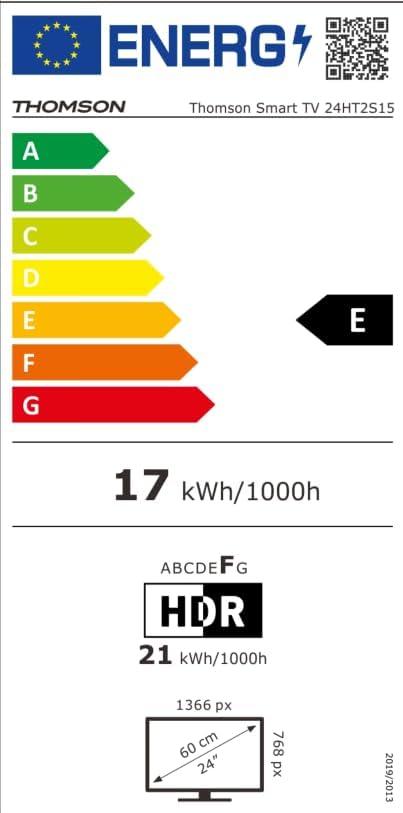
Image: The EU Energy Label for the Thomson Smart TV 24HT2S15, showing an energy efficiency class of E and energy consumption of 17 kWh/1000h for SDR and 21 kWh/1000h for HDR.
8. Гарантыя і падтрымка
8.1 Інфармацыя аб гарантыі
Thomson products are covered by a 3-year warranty. For detailed information regarding warranty claims, returns, or defective products, please refer to the warranty card included in your package or visit the Thomson support webсайт.
For specific information on purchases made via Amazon, consult Amazon's help pages regarding returns and defective products.
8.2 Падтрымка кліентаў
If you require further assistance or have questions not covered in this manual, please contact Thomson customer support:
- вытворца: Патокview GmbH
- электронная пошта: кантакт@стрымview.com
- Webсайт: www.streamview.com
- тэлефон: +4318900066
Please have your model number (24HT2S15) and purchase details ready when contacting support.