
Уводзіны
The Roku Select Series 40-Inch 1080p Full HD Smart TV is designed to provide a seamless and enjoyable streaming experience. This manual provides essential information for setting up, operating, maintaining, and troubleshooting your television. Enjoy bright Full HD picture quality, clear sound, and access to a wide range of entertainment options.
Што ў скрынцы
Перад пачаткам усталёўкі пераканайцеся, што ўсе кампаненты наяўныя.
- Roku Select Series 40-Inch Full HD TV
- Roku Voice Remote with batteries
- TV Stands and screws
- Сілавы кабель
- Кароткае кіраўніцтва (гэта кіраўніцтва)

Image: Contents of the Roku TV box, showing the television, remote control, stand components, and power cable.
Настройка
1. Мацаванне падстаўкі для тэлевізара
- Асцярожна пакладзеце тэлевізар экранам уніз на мяккую, чыстую паверхню, каб пазбегнуць пашкоджанняў.
- Сумесціце падстаўкі для тэлевізара з адтулінамі для шруб у ніжняй частцы тэлевізара.
- Secure each stand with the provided screws using a Phillips head screwdriver.
2. Насценнае мацаванне (неабавязкова)
This TV supports VESA wall mounts with a standard of 200 x 300 mm. Refer to your wall mount's instructions for proper installation. Ensure the wall mount can support the TV's weight of 10.4 pounds (without stand).
3. Падключэнне прылад
Your Roku TV offers multiple connectivity options:
- HDMI: 3 ports available for connecting gaming consoles, Blu-ray players, or other HDMI-enabled devices. HDMI 1 supports ARC.
- USB: 1 USB 2.0 port for media playback or connecting compatible accessories.
- S/PDIF (аптычны): Для лічбавага аўдыёвыхаду на саўндбар або хатні кінатэатр.
- AV (кампазітны): For older devices using red, white, and yellow cables.
- Антэна/кабель: Для падключэння антэны для эфірнага вяшчання або падключэння кабельнага тэлебачання.

Выява: Задняя частка view of the Roku TV displaying the HDMI, USB, optical, and AV input ports.
4. Падключэнне сілкавання
Connect the provided power cable to the TV and then to a power outlet (110 VAC 60 Hz).
5. Пачатковая налада і падключэнне да сеткі
Upon first power-on, follow the on-screen instructions to set up your Roku TV. This includes connecting to your Wi-Fi network (Bluetooth and Wi-Fi connectivity are supported) and linking to a Roku account. Automatic software updates will ensure you have the latest features.
Інструкцыя па эксплуатацыі
1. Навігацыя па галоўным экране Roku
The Roku home screen provides quick access to all your entertainment. You can easily move apps around to customize your viewвопыту.

Image: The Roku TV home screen showing a grid of streaming applications like Netflix, Disney+, and Prime Video, along with navigation menus.
2. Using the Voice Remote
The included Roku Voice Remote allows for easy navigation and control. Use your voice to search across thousands of apps, play entertainment, and control streaming functions. The remote requires 2 AAA batteries.

Image: Close-up of the Roku Voice Remote, highlighting buttons for power, volume, voice search, and dedicated app shortcuts.
3. Streaming and Apps
Access a world of entertainment with pre-installed apps like Netflix, Prime Video, Disney+, Hulu, and Apple TV+. The Streaming Store offers thousands more. Roku also provides over 500 free TV channels, including live in-season shows, movies, weather, and local news.
4. Налады выявы
Аптымізуйце свой viewвопыт працы з рознымі наладамі выявы:
- Разумная выява Roku: Automatically cleans up incoming TV signals, optimizes them, and selects the best picture mode.
- Рэжымы выявы: Choose from presets like Movie, Standard, Vivid, Sports, or Low Power.
- Custom Picture: Adjust backlight, brightness, contrast, sharpness, color, and tint manually.
5. Налады гуку
The Roku TV features Dolby Audio for clear speech and louder sound. Adjust sound modes (Standard, Dialogue, Movie, Music, Night, Auto) or customize settings for volume mode, speech clarity, bass, and treble.
6. Bluetooth Headphone Mode
Connect your favorite wireless headphones via Bluetooth to enjoy audio privately without disturbing others.

Image: A person using Bluetooth headphones while watching the Roku TV, illustrating the private listening feature.
7. Інтэграцыя разумнага дома
Enjoy easy voice control with Roku Voice, Siri, Alexa, or Google Assistant. Effortlessly share videos, photos, and music from your Apple devices to your smart TV with Apple AirPlay.
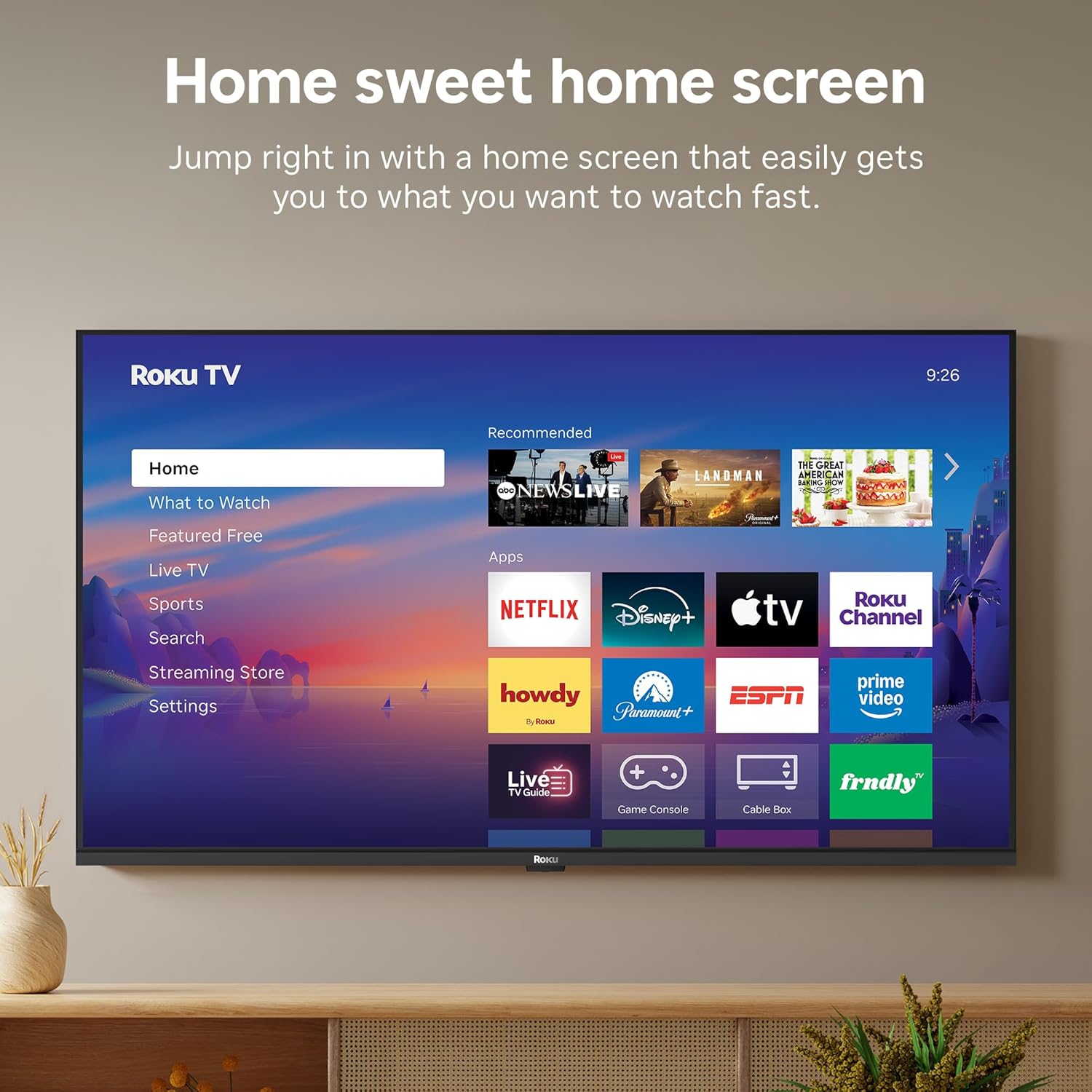
Image: A smart speaker positioned near the Roku TV, illustrating the TV's compatibility with voice assistants like Alexa for smart home control.
8. Таймер сну
The TV includes a sleep timer function, allowing you to set the TV to automatically turn off after a specified duration (e.g., 30 minutes, 1 hour, 1.5 hours, 2 hours, 3 hours).
Тэхнічнае абслугоўванне
To ensure the longevity and optimal performance of your Roku TV, follow these maintenance guidelines:
- Уборка: Use a soft, dry cloth to clean the screen and TV cabinet. Avoid abrasive cleaners or solvents.
- Абнаўленні праграмнага забеспячэння: Your Roku TV receives automatic software updates to provide the newest apps and features. Ensure your TV is connected to the internet for these updates.
- Вентыляцыя: Забяспечце належную вентыляцыю вакол тэлевізара, каб прадухіліць перагрэў. Не блакуйце вентыляцыйныя адтуліны.
Ліквідацыю непаладак
If you encounter issues with your Roku TV, try the following basic troubleshooting steps:
- Няма харчавання: Праверце, ці надзейна падключаны кабель сілкавання да тэлевізара і разеткі. Паспрабуйце іншую разетку.
- Няма выявы/гуку: Verify that the correct input source is selected. Check all cable connections (HDMI, AV, etc.).
- Няма падключэння да Інтэрнэту: Restart your Wi-Fi router and modem. Go to Settings > Network > Check connection on your TV to diagnose network issues.
- Пульт не адказвае: Replace the batteries in the Roku Voice Remote. Ensure there are no obstructions between the remote and the TV.
- Агульныя пытанні: Паспрабуйце перазагрузіць тэлевізар, адключыўшы яго ад разеткі на 30 секунд, а затым зноў падключыўшы.
Тэхнічныя характарыстыкі
| Асаблівасць | Дэталь |
|---|---|
| Марка | Року |
| Назва мадэлі | Roku 40" Select Series FHD |
| Нумар мадэлі | 40R3E5 |
| Памер экрана | 40 цалі |
| Тэхналогія адлюстравання | святлодыёд |
| дазвол | 1080p Full HD |
| Частата абнаўлення | 60 Гц |
| Асаблівасці | Bluetooth Headphone Mode, Dolby Audio, Voice Remote, Roku Smart Picture |
| Тэхналогія падлучэння | Bluetooth, Wi-Fi, інфрачырвоны порт |
| Абсталяванне інтэрфейсу | 3x HDMI, 1x USB, S/PDIF (Optical) |
| Памеры прадукту (Д х Ш х У) | 7.1" Г x 35.1" Ш x 21.9" У |
| Вага прадмета (без падстаўкі) | 10.4 фунта |
| Стандарт мацавання VESA | 200 х 300 мм |
| Аперацыйная сістэма | Roku OS |
| Выходная магутнасць дынаміка | 14 ват |
| Parental Control Technology | V-чып |
| UPC | 829610009476 |
Гарантыя і падтрымка
Roku warrants the hardware against defects in materials and workmanship under normal use for a period of one (1) year from the date of purchase ("Warranty Period"), provided it is used in accordance with the provided documentation. If a defect is determined during the Warranty Period, Roku's sole obligation and your exclusive remedy will be to either repair or replace the unit with a new or rebuilt device, at its option.
For important information about warranty returns and replacements, or additional details regarding product returns, please visit the official Roku support site. You may also return a device within thirty (30) days from the date of purchase from Roku, or within the applicable return period if purchased from an authorized reseller or distributor.
Афіцыйнае відэа пра прадукт
Video: An official product video from Roku, Inc. showcasing the features and user experience of the 2026 Roku TV Select Series.