
Уводзіны
Thank you for choosing the vretti PB821 Portable Thermal Printer. This compact and versatile device is designed for convenient, inkless printing from various devices, including smartphones, tablets, and laptops. Its portability makes it ideal for business, office, home, and travel use. This manual provides essential information on setting up, operating, maintaining, and troubleshooting your printer to ensure optimal performance.
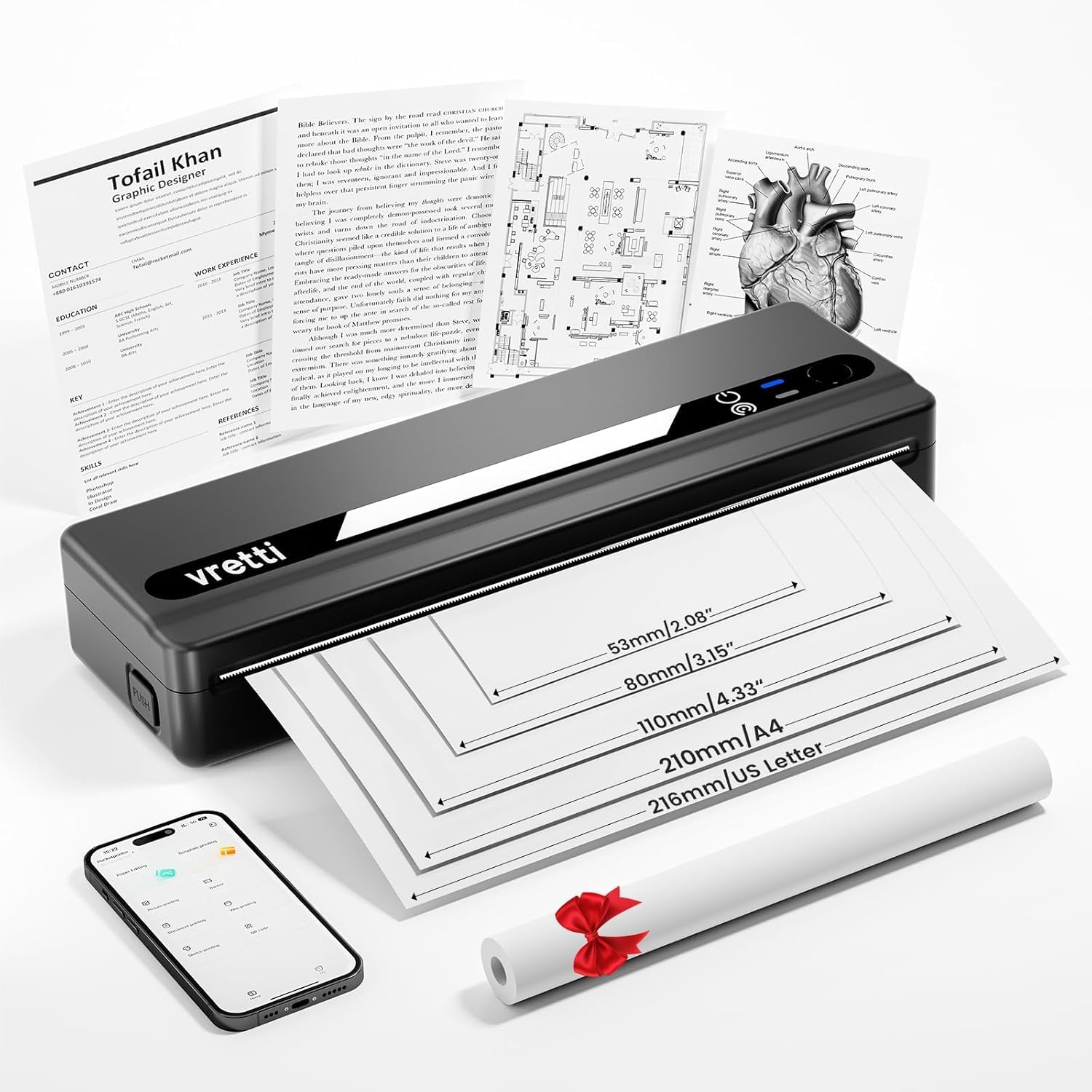
Image: The vretti PB821 Portable Thermal Printer, a sleek black device, ready for use.
Змест пакета
Калі ласка, праверце змесціва пакета пасля распакавання, каб пераканацца ў наяўнасці ўсіх прадметаў:
- vretti PB821 Portable Thermal Printer
- 1 Roll of Thermal Paper
- Зарадны кабель USB-C
- Кіраўніцтва карыстальніка
Прадукт скончаныview
Асноўныя характарыстыкі
- Бесправадны друк па Bluetooth: Connects wirelessly to phones and tablets via the "XLifePro" app.
- Партатыўны і кампактны: Small and lightweight design for easy transport.
- Cost-effective Inkless Printing: Utilizes advanced thermal printing technology, eliminating the need for ink, toner, or ribbons.
- High-quality Printing: Delivers clear prints with a 203 DPI resolution.
- Працяглая батарэя: Built-in 1500mAh rechargeable battery supports printing up to 223 A4 sheets on a full charge.
- Падтрымка паперы розных памераў: Compatible with A5, A4, Letter, and 2-4 inch labels.
Параметры падлучэння

Image: The vretti PB821 printer supports both Bluetooth and USB connections for versatile use with Android, iOS, iPad, Windows, Mac OS, Linux, and Chromebook devices.
The vretti PB821 printer offers flexible connectivity, allowing you to print wirelessly via Bluetooth from mobile devices or directly via USB from computers. This ensures compatibility across various operating systems and devices.
Партатыўны дызайн

Image: A visual comparison highlighting the compact and portable design of the vretti PB821 printer against a larger, traditional printer, emphasizing its convenience.
The PB821 is designed for maximum portability, making it easy to carry in a backpack or bag. Its compact form factor does not compromise on functionality, offering easy setup and smooth, inkless printing.
Настройка
1. Пачатковая зарадка
Before first use, fully charge the printer using the provided USB-C cable. Connect the cable to the printer's USB-C port and a compatible power adapter (not included) or computer USB port. The charging indicator light will show the charging status.

Image: Visual representation of the printer's 1500mAh battery capacity, USB-C charging, and its ability to print up to 223 A4 sheets on a single charge.
2. Загрузка тэрмапаперы
The vretti PB821 supports various thermal paper types. To load paper:
- Адкрыйце вечка адсека для паперы прынтара.
- Insert the thermal paper with the printable side facing up. Ensure the paper is aligned correctly within the guides.
- Надзейна зачыніце папяровую крышку.

Image: The vretti PB821 printer showcasing its compatibility with different thermal paper types, including folding thermal paper and roll paper, along with various paper sizes.
3. Падключэнне праз Bluetooth (мабільныя прылады)
To print wirelessly from your smartphone or tablet:
- Download the "XLifePro" app from the App Store (iOS) or Google Play Store (Android).
- Turn on the vretti PB821 printer. The Bluetooth indicator light will blink.
- Open the XLifePro app, navigate to the device connection settings, and select the PB821 printer from the list of available Bluetooth devices.
- Пасля падключэння індыкатар Bluetooth пачне гарэць пастаянна.

Image: Step-by-step guide on connecting the vretti PB821 printer via Bluetooth, including downloading the XLifePro app and pairing the device.
4. Падключэнне праз USB (камп'ютары)
To print from your Windows, Mac OS, or Linux computer:
- Download the appropriate printer driver from the official vretti webсайт: vrettitech.com/pages/p83-support.
- Install the driver on your computer following the on-screen instructions.
- Connect the vretti PB821 printer to your computer using the provided USB-C cable.
- The computer should recognize the printer, and you can now select it as your printing device.

Image: Instructions for USB connection, detailing driver download from the vretti website and connecting the PB821 printer to a laptop.
Інструкцыя па эксплуатацыі
Printing from Mobile Devices
Пасля падключэння праз Bluetooth:
- Open the document, image, or file you wish to print within the XLifePro app. The app supports various formats including TXT, PDF, Excel, and Word documents.
- Выберыце опцыю друку ў дадатку.
- Confirm print settings such as paper size and quantity.
- Initiate printing.
Printing from Computers
Once connected via USB and drivers are installed:
- Адкрыйце дакумент або file вы хочаце раздрукаваць на вашым кампутары.
- Выберыце опцыю друку ў вашым дадатку (напрыклад, File > Друк).
- Choose "vretti PB821" from the list of available printers.
- Adjust print settings as needed (e.g., paper size, orientation).
- Націсніце «Друк».
Supported Paper Types and Sizes
The PB821 printer is compatible with various thermal paper types and sizes, including:
- A4 (210 мм)
- Letter (8.5" x 11" / 216mm)
- A5 (148 мм)
- B5 (175mm)
- 2-inch (53mm) labels
- 3-inch (80mm) labels
- 4-inch (110mm) labels

Image: The vretti PB821 printer demonstrating its support for multiple paper sizes, including standard document sizes and various label sizes.
Using the XLifePro App
The XLifePro app provides additional functionalities beyond basic printing, including:
- Access to multiple templates for creative printing.
- Options for document printing, picture printing, and more.
- Customization features for various printing needs.

Image: Screenshots of the XLifePro app interface, illustrating its diverse range of templates and printing options.
Тэхнічнае абслугоўванне
Ачыстка друкаркі
To maintain print quality and prolong the printer's lifespan:
- Ensure the printer is turned off and disconnected from power before cleaning.
- Выкарыстоўвайце мяккую безворсовую тканіну, злёгку dampened with water or isopropyl alcohol to gently wipe the print head and paper path.
- Не выкарыстоўвайце абразіўныя ачышчальнікі або растваральнікі.
- Allow the printer to dry completely before turning it on.
Сыход за батарэяй
Каб аптымізаваць тэрмін службы батарэі:
- Пазбягайце частай поўнай разрадкі акумулятара.
- Захоўвайце прынтар у прахалодным, сухім месцы, калі ён не выкарыстоўваецца працяглы час.
- Charge the printer regularly, even if not in frequent use, to prevent deep discharge.
Ліквідацыю непаладак
| выпуск | Магчымая прычына | Рашэнне |
|---|---|---|
| Прынтар не ўключаецца | Нізкі зарад батарэі; кнопка харчавання націснута няправільна | Charge the printer; Press and hold the power button for a few seconds |
| Немагчыма падключыцца праз Bluetooth | Bluetooth выключаны на прыладзе; прынтар не ў рэжыме спалучэння; праблема з праграмай | Ensure Bluetooth is enabled; Restart printer; Reinstall XLifePro app |
| Дрэнная якасць друку | Low battery; Dirty print head; Incorrect paper type | Charge printer; Clean print head; Use recommended thermal paper |
| Замяцце паперы | Няправільная загрузка паперы; пашкоджаная папера | Turn off printer, carefully remove jammed paper, reload correctly; Use undamaged paper |
| Прынтар не распазнаецца камп'ютарам | Missing/incorrect drivers; Faulty USB cable/port | Install/reinstall drivers from vretti website; Try a different USB cable/port |
Тэхнічныя характарыстыкі
| Асаблівасць | Дэталь |
|---|---|
| мадэль | PB821 |
| Марка | вярці |
| Тэхналогія друку | Цеплавы |
| Тэхналогія падлучэння | Bluetooth, USB |
| Максімальны дазвол друку | 203 DPI (чорна-белы) |
| Друкаваныя СМІ | Тэрмапапера (звычайная) |
| Падтрымліваемыя памеры аркушаў | 2'', 3'', 4'', A4, 8.5''x 11'' US Letter |
| Максімальная ёмістасць аркуша ўводу | 30 лістоў |
| Ёмістасць батарэі | 1500 мАг (літый-іённы) |
| Памеры прадукту | 25.7 х 7 х 4.7 см |
| Вага прадмета | 900 г |
| Двухбаковы друк | няма |
| Колер чарнілаў | Чорны |
Гарантыя і падтрымка
The vretti PB821 Portable Thermal Printer comes with a standard manufacturer's warranty. For specific warranty details, technical support, or service inquiries, please refer to the warranty card included in your package or visit the official vretti webсайт. Захоўвайце чэк аб куплі як пацвярджэнне пакупкі для гарантыйных прэтэнзій.
Відэа прадукту
Video: An official product video demonstrating the features and usage of the vretti PB821 Portable Thermal Printer, including its compact design, wireless connectivity, and printing capabilities.