
1. Прадукт скончыўсяview
The INSMART Wireless Smart Meat Thermometer is designed to provide accurate temperature monitoring for various cooking methods. It features a wireless probe and a base unit that connects to a mobile application via Bluetooth, allowing for remote monitoring of your food's internal temperature.

Image 1.1: The INSMART Wireless Smart Meat Thermometer, showing the probe, charging base, and mobile application interface.
2. Змесціва ўпакоўкі
Праверце наяўнасць усіх прадметаў у камплекце:
- INSMART Wireless Smart Meat Thermometer Probe
- Charging Base (Booster)
- Кіраўніцтва па эксплуатацыі
- USB Charging Cable (not explicitly listed but implied for charging)
3. Кіраўніцтва па наладцы
3.1 Першапачатковая зарадка
Before first use, ensure the probe is fully charged. Place the probe into the charging base. Connect the charging base to a power source using the provided USB cable. The indicator light on the base will show charging status.
3.2 Усталёўка прыкладання
Download the companion mobile application, "PROBE PLUS," from your device's app store. The app is essential for monitoring and controlling the thermometer.
3.3 Спалучэнне прылад
- Пераканайцеся, што Bluetooth уключаны на вашым мабільным прыладзе.
- Open the "PROBE PLUS" application.
- Remove the probe from the charging base to activate it.
- The app will automatically search for and connect to the thermometer. Follow any on-screen prompts to complete the pairing process.
3.4 Placement of the Charging Base (Booster)
The charging base acts as a signal booster for the probe. For optimal wireless range, place the booster at least 1 foot away from cooking utensils and heat sources to prevent potential damage. The base features a built-in magnet for convenient attachment to metal surfaces like a grill or smoker.

Image 3.1: The magnetic back of the INSMART charging base, allowing it to be securely attached to metal surfaces near your cooking appliance.

Image 3.2: Diagram showing the wireless range capabilities, with the probe connecting to the booster, and the booster connecting to the mobile device for extended monitoring.
4. Інструкцыя па эксплуатацыі
4.1 Устаўка зонда
Insert the metal probe into the thickest part of the meat, avoiding bones. Ensure the notch on the probe is fully covered by the meat while the tip of the probe is inside the meat. This ensures accurate internal temperature readings.
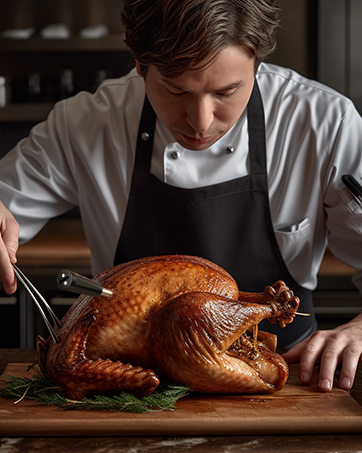
Image 4.1: Proper insertion of the thermometer probe into a turkey for accurate temperature measurement.
4.2 Monitoring Temperature with the App
Once the probe is inserted and connected, the "PROBE PLUS" app will display the current internal temperature. The app provides:
- Адлюстраванне тэмпературы ў рэжыме рэальнага часу: Shows the current internal temperature of your food.
- Графік тэмпературы: Visualizes the temperature trend over time.
- Зададзеныя тэмпературы: Offers a variety of pre-programmed temperature settings for different types of meat and doneness levels.
- Карыстальніцкія абвесткі: Allows you to set custom temperature alerts and notifications.
- Estimated Cooking Time: Provides an estimate of the remaining cooking time based on current temperature trends.

Image 4.2: Various screens of the PROBE PLUS mobile application, demonstrating its multifunctional features for monitoring cooking progress.
4.3 Temperature Reading Speed and Accuracy
The thermometer begins measuring temperature within 1 second of insertion. The reading stabilizes within 8 seconds, with an accuracy variation of 0-0.5°C (0-1.8°F).

Image 4.3: The thermometer probe inserted into sliced meat, illustrating its quick temperature reading capability.
4.4 Versatile Cooking Applications
The INSMART thermometer is suitable for a wide range of cooking scenarios, both indoors and outdoors:
- Прыгатаванне ежы на адкрытым паветры: Grills, Smokers, Rotisseries, BBQs.
- Прыгатаванне ежы ў памяшканні: Ovens, Frying Pans, Air Fryers.

Image 4.4: Visual representation of outdoor cooking applications for the thermometer.

Image 4.5: Visual representation of indoor cooking applications for the thermometer.
5. Тэхнічнае абслугоўванне і догляд
5.1 Інструкцыі па ачыстцы
The probe is IPX7 waterproof, making it easy to clean. After each use, wipe the probe clean. If necessary, hand wash the probe with mild soap and water. Ensure the probe is completely dry before storing.
5.2 Захоўванне
Store the thermometer probe and charging base in a dry place when not in use. The probe can be stored within its charging base.
5.3 Важныя папярэджанні аб бяспецы
- Do Not Expose to Open Flames: The probe is designed for insertion into food within cooking appliances, not direct contact with open flames.
- Do Not Use in Microwaves: The thermometer is not safe for microwave use.
- Do Not Wash Immediately After Use: Allow the probe to cool down before cleaning to prevent thermal shock and potential damage.

Image 5.1: Visual warnings against exposing the thermometer to open flames, using it in a microwave, or washing it immediately after use.
6. Выпраўленне непаладак
6.1 Праблемы з падключэннем
- Probe Disconnects: If the connection occasionally drops at a distance, the device is designed to automatically reconnect within 2 seconds. Ensure the charging base (booster) is positioned optimally and within range of both the probe and your mobile device.
- Праграма не падключаецца: Verify that Bluetooth is active on your phone and the probe is removed from its base (which activates it). Restart the app or your phone if necessary.
6.2 Недакладныя паказанні
- Ensure the probe is inserted correctly into the thickest part of the meat, with the notch fully covered.
- Avoid inserting the probe near bones, as this can affect accuracy.
- Allow sufficient time (approximately 8 seconds) for the temperature reading to stabilize.
6.3 Праблемы з тэрмінам службы батарэі
- Ensure the probe is fully charged before each use. A full charge provides up to 16 hours of operation.
- Check the charging cable and power source for proper function if the probe is not charging.
7. Тэхнічныя характарыстыкі
| Асаблівасць | Дэталь |
|---|---|
| Нумар мадэлі | edca7f5a-f4ca-41bc-a92e-35cc2fd839f7 |
| Марка | ІНСМАРТ |
| Тэхналогія падлучэння | Bluetooth |
| Далёкасць бесправадной сувязі | Up to 330 FT (unobstructed), Up to 100 FT (with obstacles) |
| Дыяпазон тэмператур | Ад 32°F да 212°F (ад 0°C да 100°C) |
| Дакладнасць | 0-0.5°C (0-1.8°F) |
| Час водгуку | 1 second to start, 8 seconds to stabilize |
| Рэйтынг воданепранікальнасці | IPX7 |
| Знешні матэрыял | FDA 304 Stainless Steel (Probe) |
| Тэрмін службы батарэі | Да 16 гадзін (цалкам зараджаны) |
| Тып дысплея | Digital (via mobile app) |
| Асаблівасць | Fast Reading System, Magnetic Base |
| Уключаныя кампаненты | Кіраўніцтва па эксплуатацыі |
8. Інфармацыя аб гарантыі
Warranty details for the INSMART Wireless Smart Meat Thermometer are typically provided with the product packaging or can be found on the official INSMART website. Please refer to these resources for specific terms and conditions regarding your product's warranty.
9. Падтрымка кліентаў
For further assistance, technical support, or inquiries regarding your INSMART Wireless Smart Meat Thermometer, please contact INSMART customer service. Contact information is usually available in the product packaging or on the official INSMART webсайт.