
1. Уводзіны
Thank you for choosing the Nillkin Pocket Foldable Wireless Keyboard. This manual provides essential information for setting up, operating, and maintaining your new keyboard. Please read it thoroughly before use to ensure proper functionality and to maximize your user experience.
2. Змесціва ўпакоўкі
Праверце, ці ёсць усе прадметы ў вашай упакоўцы:
- Nillkin Pocket Foldable Wireless Keyboard
- Зарадны кабель USB-C
- Кіраўніцтва карыстальніка (гэты дакумент)
- Сумка для пераноскі
3. Прадукт скончыўсяview
The Nillkin Pocket Foldable Wireless Keyboard is designed for portability and versatility, featuring a full-size (small) layout, integrated touchpad, and numerical pad. It connects wirelessly via Bluetooth to multiple devices.

Image: The Nillkin Pocket Foldable Wireless Keyboard in its fully unfolded state, displaying the complete QWERTY layout alongside the integrated numerical pad and touchpad.
The keyboard features a durable organic silicone cover and magnetic folding mechanism, making it compact for travel. Its design includes dedicated function keys for media control and shortcuts, enhancing productivity across various operating systems.

Image: The keyboard in its compact, folded state, demonstrating its portability as it is easily stored in a bag.
4. Настройка
4.1 Зарадка клавіятуры
Before first use, fully charge the keyboard using the provided USB-C cable. Connect the cable to the keyboard's USB-C port and a compatible power source (e.g., computer USB port, USB wall adapter). The charging indicator light will show charging status (refer to Section 5.5 for details).
4.2 Спалучэнне па Bluetooth
The keyboard supports connection to up to three devices simultaneously.
- Пераканайцеся, што Bluetooth на вашай прыладзе ўключаны.
- На клавіятуры націсніце Fn + Q (для BT1), Fn + W (для BT2), або Fn + E (for BT3) to select a Bluetooth channel.
- Прэса Fn + C каб увайсці ў рэжым спалучэння. Індыкатар Bluetooth будзе міргаць.
- On your device, search for "Cube Pocket Keyboard" in the Bluetooth settings and select it to connect.
- Once connected, the Bluetooth indicator light will turn off.
- To connect additional devices, repeat steps 2-5 for BT2 and BT3.
Video: A tutorial demonstrating Bluetooth connection and switching between multiple devices on the Nillkin Pocket Foldable Wireless Keyboard.
5. Інструкцыя па эксплуатацыі
5.1 Пераключэнне паміж падлучанымі прыладамі
After pairing with multiple devices, you can switch between them by pressing Fn + Q (for Device 1), Fn + W (for Device 2), or Fn + E (for Device 3).

Image: Visual guide on seamlessly switching between up to three paired devices using the designated function key combinations.
5.2 Touchpad and Numerical Pad Functionality
The numerical pad area also functions as a touchpad. To switch between touchpad mode and numerical keypad mode, press Fn + Command.
- In numerical keypad mode, press a multi-function key alone to input numbers.
- Прэса Shift + multi-function key for punctuation.
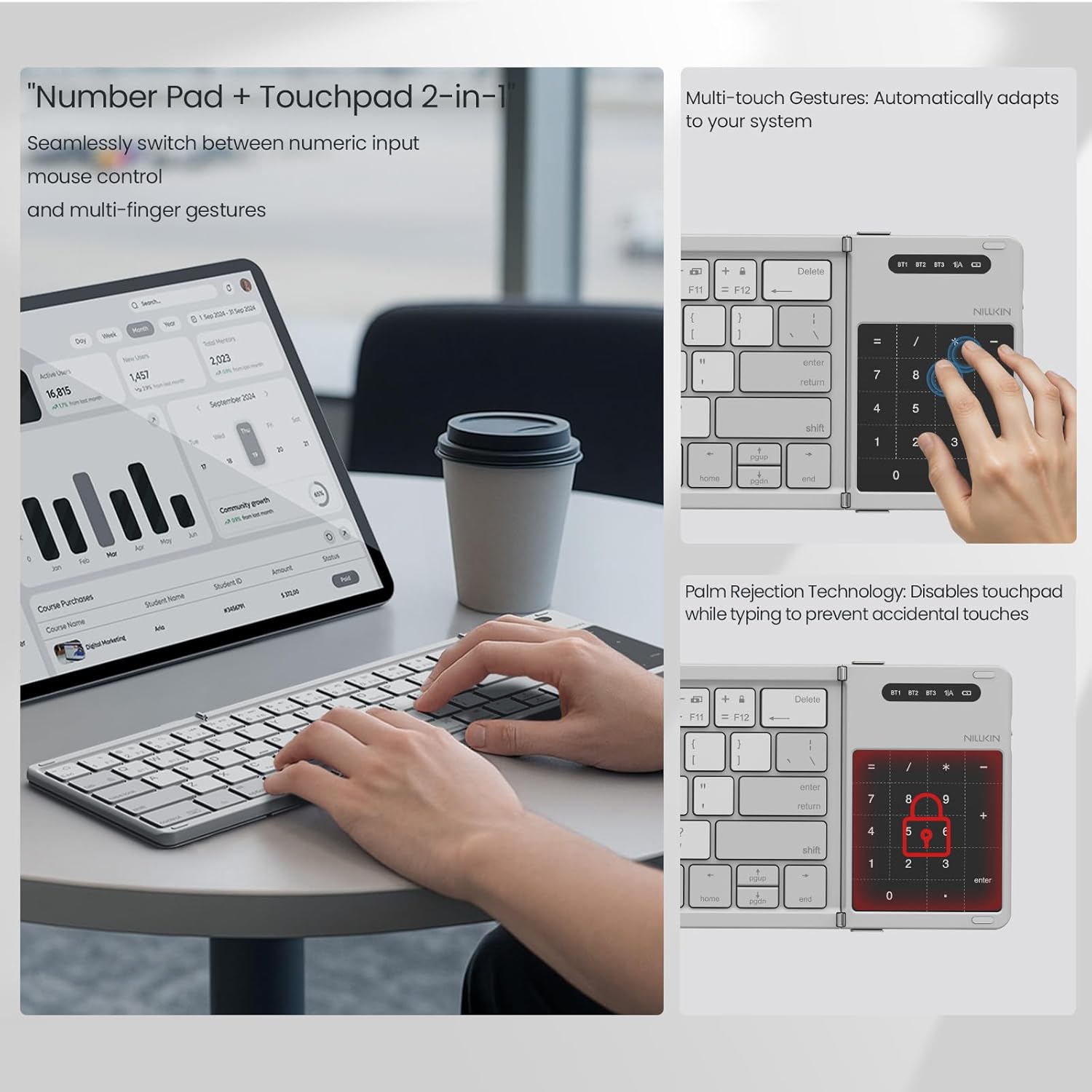
Image: The numerical pad area, highlighting its dual functionality as a touchpad with support for multi-touch gestures.

Image: A visual representation of how the touchpad and numerical keypad functions are combined into one area.
5.3 Fn Keyboard Shortcuts (Multimedia and F-keys)
The keyboard's function keys have dual purposes:
- Першы націск Fn + Tab: Keys output multimedia controls (e.g., volume, play/pause).
- Другі націск Fn + Tab: Keys output standard ESC/F1-F12 functions.
- Трэці націск Fn + Tab: Keys return to number mode.
5.4 Пераключэнне мовы
To switch input languages:
- For iOS/Mac devices: Press Ctrl + Прабел.
- Для прылад Android: Націсніце Ctrl + Прабел or Shift + прабел.
- Для прылад Windows: Націсніце Alt + Shift.
5.5 Праверка ўзроўню зарада батарэі
Каб праверыць бягучы ўзровень зарада батарэі, націсніце Fn + Command. The indicator light will flash:
- Green light flashes 3 times: 70-100% battery.
- Blue light flashes 3 times: 30-70% battery.
- Red light flashes 3 times: 0-30% battery.
During charging, the red light stays on. When fully charged, the light turns off.
6. Тэхнічнае абслугоўванне
To ensure the longevity of your Nillkin keyboard:
- Уборка: Выкарыстоўвайце мяккую сухую тканіну для працірання паверхні клавіятуры. Для ўстойлівага бруду злёгкуampПрацярыце тканіну вадой або мяккім ачышчальным растворам. Пазбягайце празмернай вільготнасці.
- захоўванне: When not in use, fold the keyboard and store it in the provided carrying bag to protect it from dust and scratches.
- Пазбягайце крайнасцей: Не падвяргайце клавіятуру ўздзеянню экстрэмальных тэмператур, прамых сонечных прамянёў або высокай вільготнасці.
- Разлівы вадкасці: The keyboard is made from organic silicone that resists spills, but it is not waterproof. In case of a spill, immediately power off the keyboard and allow it to dry completely before reuse.
7. Выпраўленне непаладак
| праблема | Магчымая прычына | Рашэнне |
|---|---|---|
| Клавіятура не ўключаецца. | Нізкі акумулятар. | Charge the keyboard using the USB-C cable. |
| Немагчыма падключыцца праз Bluetooth. | Bluetooth not enabled on device; keyboard not in pairing mode; device too far. | Ensure device Bluetooth is on. Press Fn + C to enter pairing mode. Move keyboard closer to the device. |
| Клавішы не рэагуюць або націскаюцца няправільна. | Incorrect operating system mode; low battery; connection issue. | Ensure the correct operating system mode is selected (if applicable). Recharge the keyboard. Re-pair the keyboard. |
| Touchpad/Numerical pad not working as expected. | Выбраны няправільны рэжым. | Прэса Fn + Command to toggle between touchpad and numerical pad modes. |
8. Тэхнічныя характарыстыкі
- Марка: Nillkin
- мадэль: Pocket Foldable Wireless Keyboard
- Тэхналогія падключэння: Бесправадная сувязь (Bluetooth)
- Сумяшчальныя прылады: iPad, most tablets (e.g., Samsung, Pixel), Laptops, PCs, Fold Mobile Phones
- Апісанне клавіятуры: Multi-functional, Foldable, Portable, Numeric Keypad, Trackpad, Hotkeys and Media Keys, Lightweight, Rechargeable, Silent and Quiet
- матэрыял: PC Basic + Organic Silicone Cover + Magnets
- Складаны памер: Прыкладна 18 х 10.8 х 1.6 см (7.09 х 4.25 х 0.63 цалі)
- Павялічаны памер: Прыкладна 34 х 10.8 х 0.95 см (13.39 х 4.25 х 0.37 цалі)
- Вага прадмета: Прыблізна 0.52 фунта (0.24 кг)
- акумулятар: 1 нестандартная батарэя (у камплекце)

Image: Detailed dimensions of the keyboard in both folded and unfolded states, presented with other devices for size comparison.
9. Гарантыя і падтрымка
Nillkin products are manufactured to high-quality standards. For warranty information, technical support, or service inquiries, please refer to the warranty card included in your package or visit the official Nillkin webсайт. Захоўвайце чэк аб куплі як пацверджанне пакупкі.