
Уводзіны
This manual provides essential information for the safe and efficient use of your Motorola Edge 70 smartphone. Please read it carefully before using your device. Keep this manual for future reference.
The Motorola Edge 70 is a high-performance smartphone featuring a 6.67-inch Super HD 120Hz AMOLED display, a triple 50MP camera system with flicker sensor, a 50MP selfie camera, a 4800mAh Silicon-Carbon battery with 68W TurboPower charging, and runs on Android 16 with Moto AI enhancements. It boasts a slim 5.99mm design, military-grade durability, and IP68/IP69 water and dust resistance.
Што ў скрынцы
Праверце, ці ёсць усе прадметы ў ўпакоўцы вашага прадукту:
- Смартфон Motorola Edge 70
- Кабель USB (тып C)
- Чахол для тэлефона
- Інструмент выцягвання SIM-карты
Note: A power adapter is not always included and may need to be purchased separately. For optimal charging, use a 68W TurboPower charger.
Настройка
1. Устаўка SIM-карты
- Знайдзіце латок для SIM-карты на бакавой частцы прылады.
- Устаўце інструмент для выцягвання SIM-карты ў невялікую адтуліну побач з латком і моцна націсніце, пакуль латок не выскочыць.
- Place your Nano-SIM card(s) into the tray with the gold contacts facing down. Ensure they are correctly seated. The Motorola Edge 70 supports Dual SIM.
- Асцярожна ўстаўце латок назад у слот, пакуль ён не будзе ўпоравень з прыладай.
2. Пачатковае ўключэнне і канфігурацыя
- Націсніце і ўтрымлівайце кнопку харчавання (размешчаную збоку), пакуль не з'явіцца лагатып Motorola.
- Выконвайце падказкі на экране, каб выбраць мову, падключыцца да сеткі Wi-Fi і ўвайсці ў свой уліковы запіс Google.
- You will be guided through setting up security features such as fingerprint recognition and a screen lock (PIN, pattern, or password).
- Transfer data from your old device if prompted, or set up as a new device.
Інструкцыя па эксплуатацыі
Дысплей і навігацыя
The Motorola Edge 70 features a vibrant 6.67-inch AMOLED Extreme display with a 120Hz refresh rate, offering smooth visuals and incredible contrast. The display has a resolution of 2712 x 1220 pixels and a peak brightness of 4500 nits for excellent visibility even in bright sunlight.

Ясна view of the Motorola Edge 70, highlighting its expansive 6.67-inch pOLED display with vivid colors and sharp details, ideal for an immersive visual experience.
Navigate your device using intuitive touchscreen gestures. Swipe up from the bottom to access the app drawer, swipe down from the top for notifications and quick settings, and use gestures or navigation buttons for home, back, and recent apps.
Асаблівасці камеры
Capture stunning photos and videos with the Motorola Edge 70's advanced camera system. It includes a triple 50MP rear camera setup with a flicker sensor and a 50MP front-facing camera.
- Асноўная камера: 50MP sensor with Optical Image Stabilization (OIS) for clear shots, even in low light.
- Ultra-wide & Macro Vision: A versatile lens for capturing expansive landscapes or detailed close-ups.
- Пярэдняя камера: 50MP for high-resolution selfies and 4K video recording.

The image focuses on the Motorola Edge 70's advanced camera setup, featuring three 50MP lenses, Optical Image Stabilization (OIS) for the main sensor, 4K video recording for the front camera, and versatile ultra-wide and macro vision options.
The camera software includes Moto AI for enhanced photo optimization, improving details, contrast, and sharpness. It also supports HDR video recording for richer colors and dynamic range.
Акумулятар і зарадка
The device is equipped with a 4800mAh Silicon-Carbon battery, designed for extended usage. It supports 68W TurboPower fast charging, allowing for quick recharges. Additionally, 15W wireless charging is supported.

This visual representation details the Motorola Edge 70's battery capabilities, including an estimated 50 hours of usage, the 4800mAh Silicon-Carbon battery, and support for 68W TurboPower wired charging and 15W wireless charging.
To charge, connect the provided USB-C cable to the phone's charging port and to a compatible power adapter. For wireless charging, place the device on a compatible wireless charging pad.
Прадукцыйнасць і захоўванне
Powered by the Snapdragon 7 Gen 4 processor, the Motorola Edge 70 delivers fast and efficient performance for all your tasks. It comes with 12GB of RAM and 512GB of internal storage, providing ampмесца для праграм, фота і відэа.

Гэта выява дае большview of the Motorola Edge 70's powerful internal hardware, including the Snapdragon 7 Gen 4 processor for efficient performance, and details on its 12GB RAM (expandable to 24GB) and 512GB of internal storage.
Функцыі штучнага інтэлекту Moto
Moto AI integrates intelligent features to simplify daily tasks and enhance user experience. This includes smart photo organization, notification management, and generative AI capabilities for creative tasks.

This image illustrates the intuitive Moto AI features on the Motorola Edge 70, showcasing how it simplifies daily tasks such as organizing photos, managing notifications, and utilizing generative AI for creative purposes.
Тэхнічнае абслугоўванне
- Уборка: Для чысткі экрана і корпуса прылады выкарыстоўвайце мяккую тканіну без ворса. Пазбягайце абразіўных матэрыялаў або агрэсіўных хімічных рэчываў.
- Абнаўленні праграмнага забеспячэння: Рэгулярна правярайце наяўнасць абнаўленняў праграмнага забеспячэння і ўсталёўвайце іх, каб забяспечыць аптымальную прадукцыйнасць, бяспеку і доступ да новых функцый. Перайдзіце па спасылцы Налады> Сістэма> Абнаўленні сістэмы.
- Сыход за батарэяй: Каб падоўжыць тэрмін службы батарэі, пазбягайце экстрэмальных тэмператур і не пакідайце прыладу цалкам зараджанай або разраджанай на працяглы час.
- Воданепранікальнасць: The device is IP68/IP69 rated for water and dust resistance. This means it can withstand immersion in up to 1.5 meters of fresh water for up to 30 minutes. However, it is not waterproof. Avoid exposing it to saltwater, chlorinated water, or other liquids. If the device gets wet, dry it thoroughly before charging or using ports.

The image highlights the Motorola Edge 70's slim profile, its military-grade certification for robustness, and its IP68/IP69 rating for water and dust resistance, demonstrating its durable construction.
Ліквідацыю непаладак
- Прылада не адказвае: If your device is frozen or unresponsive, press and hold the Power button for about 10-15 seconds to force a restart.
- Хуткая разрадка батарэі: Праверце выкарыстанне фонавых праграм, паменшыце яркасць экрана, адключыце непатрэбныя функцыі, такія як GPS або Bluetooth, калі яны не выкарыстоўваюцца, і пераканайцеся, што праграмнае забеспячэнне абноўлена.
- Праблемы з падключэннем да сеткі: Try restarting your device. Check if Airplane Mode is off. Verify your SIM card is correctly inserted. Contact your service provider if issues persist.
- Збой праграмы: Ачысціце кэш і дадзеныя праграмы (Налады > Праграмы > [Назва праграмы] > Сховішча і кэш). Калі праблема не знікне, выдаліце і пераўсталюйце праграму.
- Скід да заводскіх налад: As a last resort for persistent software issues, you can perform a factory reset. This will erase all data on your device, so ensure you back up important information first. Go to Налады > Сістэма > Параметры скіду > Сцерці ўсе даныя (скід да заводскіх налад).
Тэхнічныя характарыстыкі
Detailed technical specifications for the Motorola Edge 70:
| Асаблівасць | Спецыфікацыя |
|---|---|
| Марка | Motorola |
| Назва мадэлі | Край 70 |
| Аперацыйная сістэма | Android 16 |
| Памер аператыўнай памяці | 12 ГБ |
| Хуткасць працэсара | 2.5 ГГц |
| Ёмістасць захоўвання | 512 ГБ |
| Памер экрана | 6.67 цалі |
| дазвол | 2712 х 1220 пікселяў |
| Частата абнаўлення | 120 Гц |
| Тып дысплея | OLED |
| Шчыльнасць пікселяў | 393 PPI |
| Раздзяленне задняй камеры | 50 MP (Triple Camera) |
| Раздзяленне франтальнай камеры | 50 МП |
| Дазвол відэазахопу | 1080p |
| Ёмістасць батарэі | 4800 мАг |
| Зарадка | 68W TurboPower, 15W Wireless |
| Слоты для SIM-карт | Dual SIM (Nano) |
| Тэхналогія падлучэння | 5G, CDMA, GSM, LTE |
| біяметрычная ідэнтыфікацыя | Распазнаванне адбіткаў пальцаў |
| Узровень воданепранікальнасці | IP68/IP69 |
| Памеры | 15.9 х 7.4 х 0.6 см |
| Вага | 159 грам |
| Год мадэлі | 2025 |
| UPC | 840493608020 |
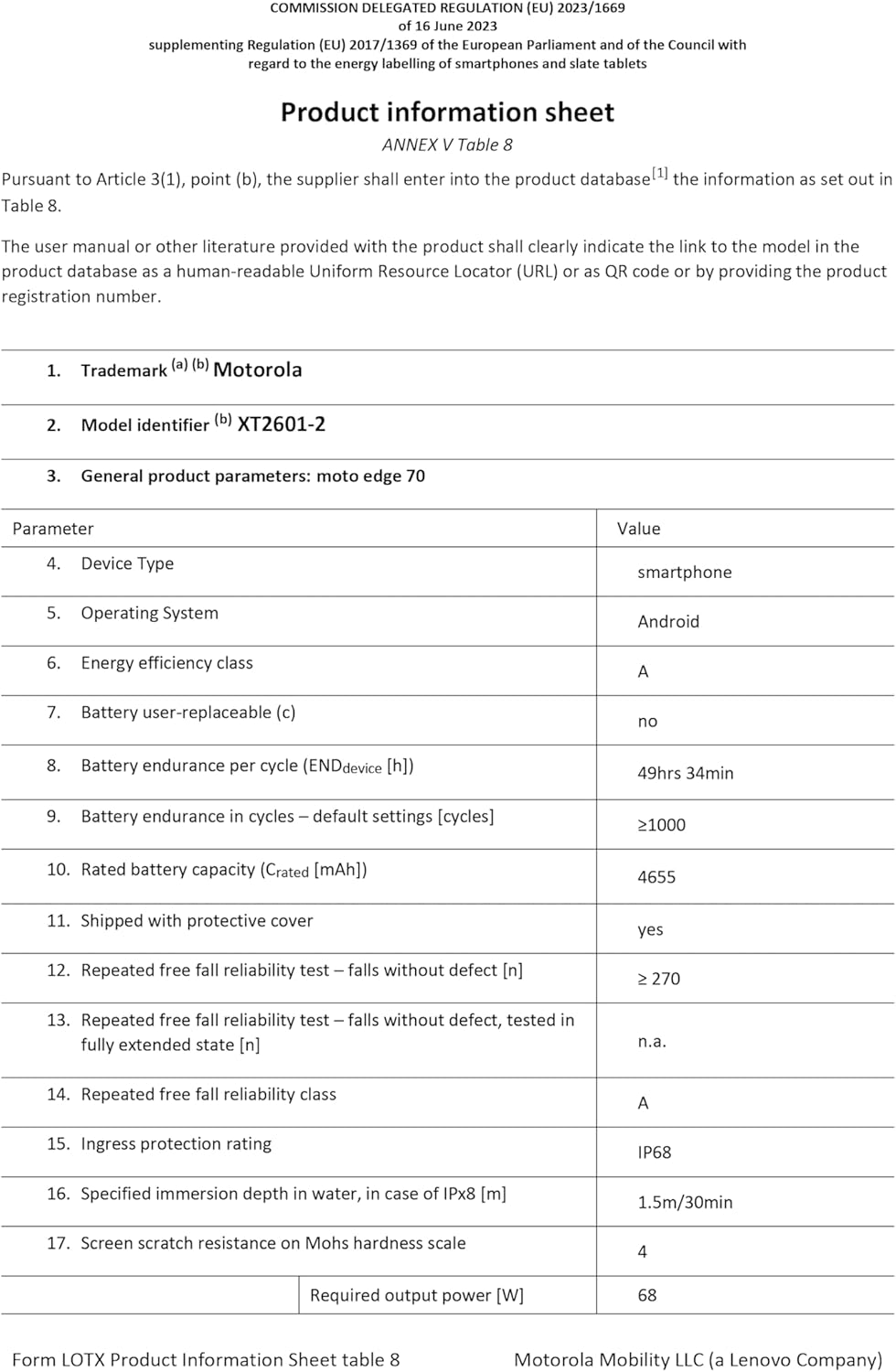
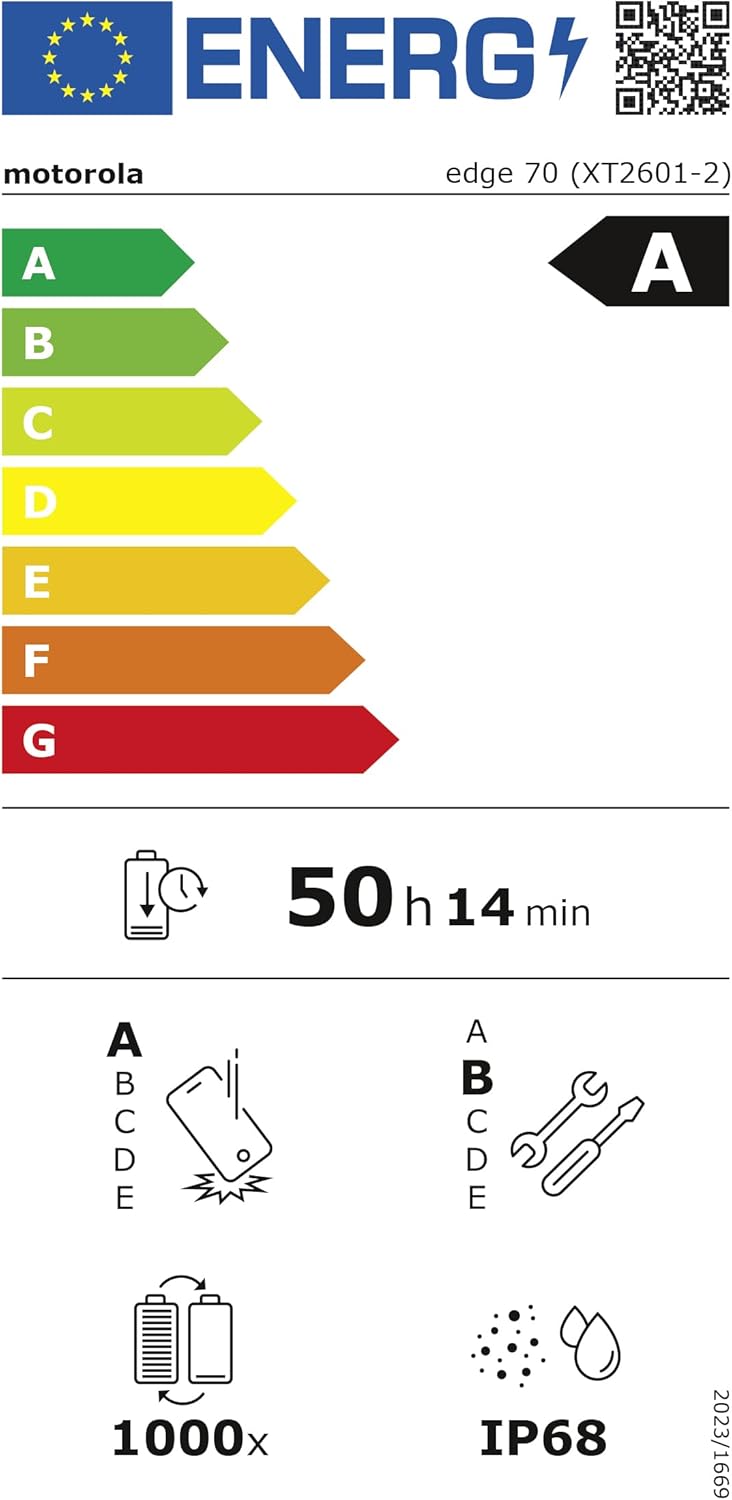
The EU Energy Label for the Motorola Edge 70, indicating its 'A' energy efficiency rating and an estimated battery endurance of 50 hours. More details can be found on the База дадзеных EPREL.
Гарантыя і падтрымка
Your Motorola Edge 70 comes with a 2-гадовая гарантыя вытворцы з дня пакупкі. Гэтая гарантыя распаўсюджваецца на дэфекты матэрыялаў і вырабу пры звычайным выкарыстанні.
For warranty claims, technical support, or further assistance, please visit the official Motorola support webсайт або звярніцеся ў службу падтрымкі кліентаў. Захоўвайце пацвярджэнне пакупкі для пацверджання гарантыі.
Афіцыйная падтрымка Motorola: www.motorola.com/support